Desert Online General Trading LLC
Dubai, United Arab Emirates
Desert Online General Trading LLC
Dubai, United Arab Emirates


🚀 Elevate Your Home Network Experience!
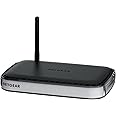
The NETGEAR RangeMax Wireless Router (WNR1000-100NAS) offers reliable wireless connectivity for small to medium-sized homes, featuring advanced security protocols, user-friendly setup, and smart parental controls to ensure a safe online environment.



C**R
To Replace An Old Wired Router....
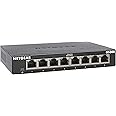
I got this router to replace an older Netgear wired 4 port router that had given me long and faithful service. (It didn't break down, I just needed a wireless one.) This looked like just what I needed. (I have a small home network consisting of two NAS back up drives, two HP printers, two Dell Inspiron computers, a AMD computer, and the Astro Tab A10 tablet. The tablet caused me to seriously think about getting a wireless router for my network as before all these items were connected thru a wired network. When I got it in I noted that the new router was a bit longer than my old router had been but it fit into the spot where the old was mounted with just a little adjusting to the mounting bracket I use. Once installed on the bracket, all that remained was to get anything plugged up and crank it up. I have the three computers plugged into the first three router slots with the last slot being fed by a 8 port switch where the two NAS drives, two HP printers, and a Blu-Ray player are plugged in. So after getting anything plugged up, I turned out the router and let it do it's thing. In a couple of minutes the router had set things up and I was in business. (I have the NAS drives and the two HP printers assigned ip addresses right after the router with the items after that assigned by the router. This seems to work best for my set up.) All items came up just fine and were seen by the router OK. (Even the Blu-ray player came up OK.) I then run the router's set up screen and changed the default log in for the router and the wireless setup and then set up the tablet for the router and all came up OK. The only problems I had were in the set up for the wireless printer. It worked really well on the wired setup but when I turned on the wireless setup on it, it tried to select the same address as the wired setup used and caused a really bad conflict on the network. I tried resetting the printer to use a different ip address for the wireless than the wired, but the printer wouldn't stay set and tried to reset itself. I finally turned off the wireless on the printer and left it set to the wired address which solved that problem. After this and checking a few other settings and turning off a couple of items, I checked to see how it was working. These few final checks went OK. So far, I haven't run into any real problems with this router and the wireless to the tablet works really well. I walked to the back of my 60 foot trailer and had a good solid signal all the way back to the very back wall. It seems to be just what I needed for my situation. The only other thing I noticed which really didn't effect performance at all were the way the lights blink at a sort of slower rate on this new router. My old Netgear lights would blink like crazy but these seem to be a bit slower. This was just what the doctor ordered for me. Not bad...
A**A
Simple, effective WiFi router
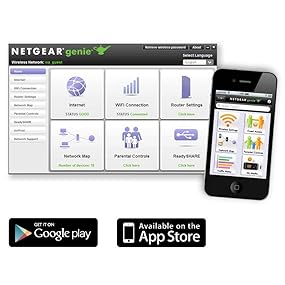
I wanted a simple, effective WiFi router for a low price, and this one turned out to be perfect. As far as performance is concerned, I am running two computers, a smartphone, and an iPad on the WiFi network in a medium-sized apartment with no problems.According to Speedtest.net, on WiFi I get the same the same upload/download speeds as I had been getting previously (when I was using an Ethernet cable plugged directly into the modem).Setting up the router was easy and hassle-free.Just one warning. I don't think the setup instructions include an injunction to change the router's admin password as soon as possible. This is something you should do right away, or else anyone can get into your router settings and muck around with it. You can do it in two quick steps:(1) Open a web browser and type 192.168.1.1 in the address bar and hit Go. This will take you to the router settings page. The page will prompt you for a username and password, which will be the default ones if you haven't yet changed them--on mine the default username was "admin" and the default password was "password". (In any case, the default username/pw should be listed in the router's documentation.)(2) You should be in the "NETGEAR genie" page. Click on the "ADVANCED" tab, then click on the "Administration" tab below it to expand the menu. Click on "Set Password." Now you can change the password to something more secure.
M**Y
This router was super easy to set up and change the network name ...
Hopefully this one lasts a while and doesn;t make a mockery of my review. Fingers crossed.This router was super easy to set up and change the network name and password to that of our previous router so we didn't have to change settings on a bunch of devices. Really nothing to complain about and it works and gets good range, though our house is pretty small. I can pick it up fine though in the back yard or out in front of the house.Now, let me share some background. We have TWC for our home internet, and unfortunately, we are under contract to use their router. We discovered when connected to their router's network, none of our Android devices will receive push notifications and most of our apps hang, freeze, or won't work at all. We had a tech from TWC come out and after about 3 hours, verify it was the router causing the problem. The solution we found without breaking our contract, was to hook a second router up to the TWC one, and set up a network through there. When our Android devices were connected to the secondary router (we've use this one, and another Netgear earlier) we get our push notifications and all the apps work fine.With that in mind, when I first set this router up, we did not get push notifications. I went through all the settings, and found there is one (can't remember offhand the name of it) that gave the option of 75MBps or 150MBps. Our connection is good up to 100MBps, so I changed the setting to 150MBps and the push notifications came through and apps acted normally.I hope that if anyone else is having this issue this will help them in choosing a router as I spent weeks researching the issue and found no solutions. We had to sort it our ourselves, and it was frustrating beyond belief. No idea why the TWC routers hate our Android devices but we tried two different brands and had the same issue, and this little Netgear helped fix it.
Trustpilot
2 weeks ago
3 weeks ago