Desert Online General Trading LLC
Dubai, United Arab Emirates
Desert Online General Trading LLC
Dubai, United Arab Emirates


⚡ Power up your testing game with precision and programmable prowess!
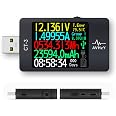
This USB Power Meter is a professional-grade USB 3.1 digital multimeter designed for precise voltage (0-26V) and current (0-6A) measurement. Featuring a sharp 128x160 TFT display and 4.5-digit accuracy with minimal error, it supports a wide range of fast-charging protocols including PD, QC, VOOC, and more. Its integrated Lua interpreter and robust PC software enable advanced scripting, real-time data logging, and comprehensive device diagnostics, making it an indispensable tool for engineers and tech-savvy professionals.


E**C
A powerful combination of most of the current usb meters/triggers
The media could not be loaded. This USB meter is very powerful. Build quality looks good. The large TFT screen helps to read easily. It has some common features like monitoring voltage, current, energy, power, capacity, and time with high accuracy. It also has wide operating range of 3.7-25V, 0-5A but a low quiescent current of 1mA@5V. Moreover, it has built-in clock and temperature sensor while most of the other usb meters don’t. Like some other usb meters, it supports dual-way detection thus don’t have to plug the input cable into the IN port, but the OUT port works as well. Furthermore, it has 5 different views of the home screen including everything on one page, D+ D- voltages & current direction & possible + current charging protocols, time and energy consumption, simple look with large fonts, and black screen. And It will automatically enter power saving screen when idle.The electronic load is fairly easy to use. Turn the knob clockwise/counterclockwise to increase/decrease the current. The fan will automatically turn on when the temperature is higher than 40℃ to keep it cool. Good for performing stress test on a power adapter or measuring the capacity of a power bank.Next is the advanced part I’d like to comment in detail.[Operations]All operations are carried out with the scroller.>Short press - switches/enters/confirms>Long press - enters the main menu>Double press - enters the charting mode/exits to the home screen>Short turn forward/backward - enters a mode/scrolls through menu options/triggers an action/increases or decreases a value>Long turn (turn and hold) forward/backward - enters a mode/scrolls through menu options/triggers an action/increases or decreases a value[Groups]Short turn forward to clean the current group.Can switch between 5 groups for different tests.[Charting]Double press to enter, short press to switch between V-A and Vd+/Vd-.Draws a V-A or Vd+/Vd- chart with real-time data at a selected sample rate[FastCharge Trigger]UNPLUG any device before doing this as it may DAMAGE your device!Short turn backward to enter. Short turn forward/backward again after the red warning message flashes three times. Short turn backward once more to release if triggered.Triggers different voltages that a power supply can deliver.>QC2.0 - triggers 5/9/12/20V if supported.>QC3.0 - triggers 5-20V, increases/decreases 200mV per time, if supported>Auto Detect - automatically detects the charging technologies the power supply supported and shows them in green. Helps to pick a power supply with high compatibility.>Apple 2.4A - makes a regular charger to charge like an apple 2.4A charger. Lets a regular charger charges an apple device faster.>Apple MFI Test - checks if a lightning cable is MFi certified. Helps to pick a good lightning cable. (Needs a QC3.0 charger)>Power Delivery - checks the PDOs the PD charger offered and triggers the voltages (Needs to turn on the PD trigger switch first)>HUAWEI FCP - triggers HUAWEI FCP voltages 5/9V.>Samsung AFC - triggers Samsung AFC voltages 5/9V.[Cable Resistance Test]Long turn backward to enter. Needs to use with the electronic load together to adjust the output current to 500mA or greater.Tests the ESR of a usb cable. Usually a better cable has a lower ESR.In addition, a lot of settings can be found in the main menu. It’s awesome that a firmware update will bring more new features. It’s really a combination of all my current usb meters/triggers with even more features. Powerful and useful. I wish bluetooth connection and PC/Smartphone apps would be found in a later version of this product.(I did everything pretty quick in the video to save your time.)------------- UPDATE 12/27/2017 -------------CT-2 Part[Independently/Externally Powered]Powered via the Micro USB port. Can measure DC 0.1-26V with this. Useful to check Ni-MH rechargeable batteries.[Offline Curve Recording]Short turn forward to enter.Records the voltage and current points. Will generate a curve diagram when finished recording. A charge curve helps determine if a charger is good. Also, the curve records can be accessed in the PC app.[PC App]Shows the curve diagram directly. Can save/export the curve diagram to a file and open the diagram recorded on the meter or computer.Tracks the communication between a charger (source) and a device (sink) with PD Listen. Will let you know how a PD charger charges a device. Needs the PD Tester switch to be turned on.Boot logo and theme can be easily customized here.Can perform firmware update here as well.I also updated the video.I am looking forward to the next version!
A**D
This is the USB power tester you've been looking for!
This is an initial review; I'll post some pictures and other things later on. However, let me state out the gate that if you can afford just one tester, this should be it! Oh, and the firmware is upgradable with the seller releasing updates on a regular basis!Sure, it's more expensive than those cheap $10-$20 ones, but you get a LOT in this package:USB-A male to femaleUSB-C female to female(these are mostly independent; you can test A-male in to C-out)Advanced charge protocol testing with bypass switch; this supports (nearly?) all protocols including VOOC / Dash (but alpha or beta not sure). This becomes really useful when trying to figure out if some wall-wart with barely legible markings is just a dumb PS or more, and what modes, not to mention testing.Testing cables INCLUDING READING THE E-MARK CHIPS OF USB-PD CABLES! This has already proven useful to me as I was troubleshooting a Prymax 300Wh power station: turns out it doesn't like e-marked cables but works ok with an unmarked one! (Also telling me that particular USB-C cable WAS unmarked and therefore technically non-USB-IF compliant.)This particular kit comes with an external variable constant-current load which is oh-so-very useful finding out what wall warts will REALLY support. Using this I have also discovered that the HP Pro 3500 computer at work just connects the USB port to the power supply with no protection or intelligence whatsoever! I pulled over 3A from that USB-A port! The much newer Dell Inspiron next to it, OTOH, has full protection and cuts off just over 2.4A with an alert to Win10 even. However, your typical USB-powered device (including power banks) won't pull that 3A because they're under the safety assumption they're connected to something much smaller.This also has an internal load that can be used to test cable resistance along with the external one. The instructions aren't clear on these procedures (there are 4 with one not supported due to an (as of yet?) un-obtainium part. Once I figure it out this should be very useful classifying cables. Note that this is ONLY for power and (very unfortunately) doesn't test for data on a cable with more than 4 wires.This, then, is the only real gripe: without plugging it into some other device there's no way to know if the cable with pass data or is just one of those cheap "charge-only" cables. I've been trying to find testers that will do this similar to network cable continuity testers; I may have found one but it's kinda pricey and I already have a real network tester that tests supported data speeds: however no such thing exists for USB unless you're willing to shell out at least a thousand dollars!I promise more to come with pictures!
龙**猫
Super cool, just be careful
This is really cool. It can show all the data with the downloadable software. It can also run scripts. Just be careful about the scripts that you run. I fried some tech that was plugged in when I ran a script.
M**L
Provides a lot of information on the display
This device is very handy to use to detect the voltage and current used by a device, such as a cellphone. USB 3.1 is USB C and the cahrge cable pluds into the display, and then the end plugs into the phone. One can see the current draw into the phone or device, providing a good display of charging conditions on the device.This can help in troubleshooting, determining if the battery is charging or drawing any current.
Trustpilot
1 month ago
2 days ago
2 months ago
1 month ago