Desertcart purchases this item on your behalf and handles shipping, customs, and support to Japan.
🚪 Unlock the future of convenience — your garage, smarter and safer than ever!
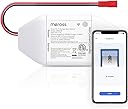
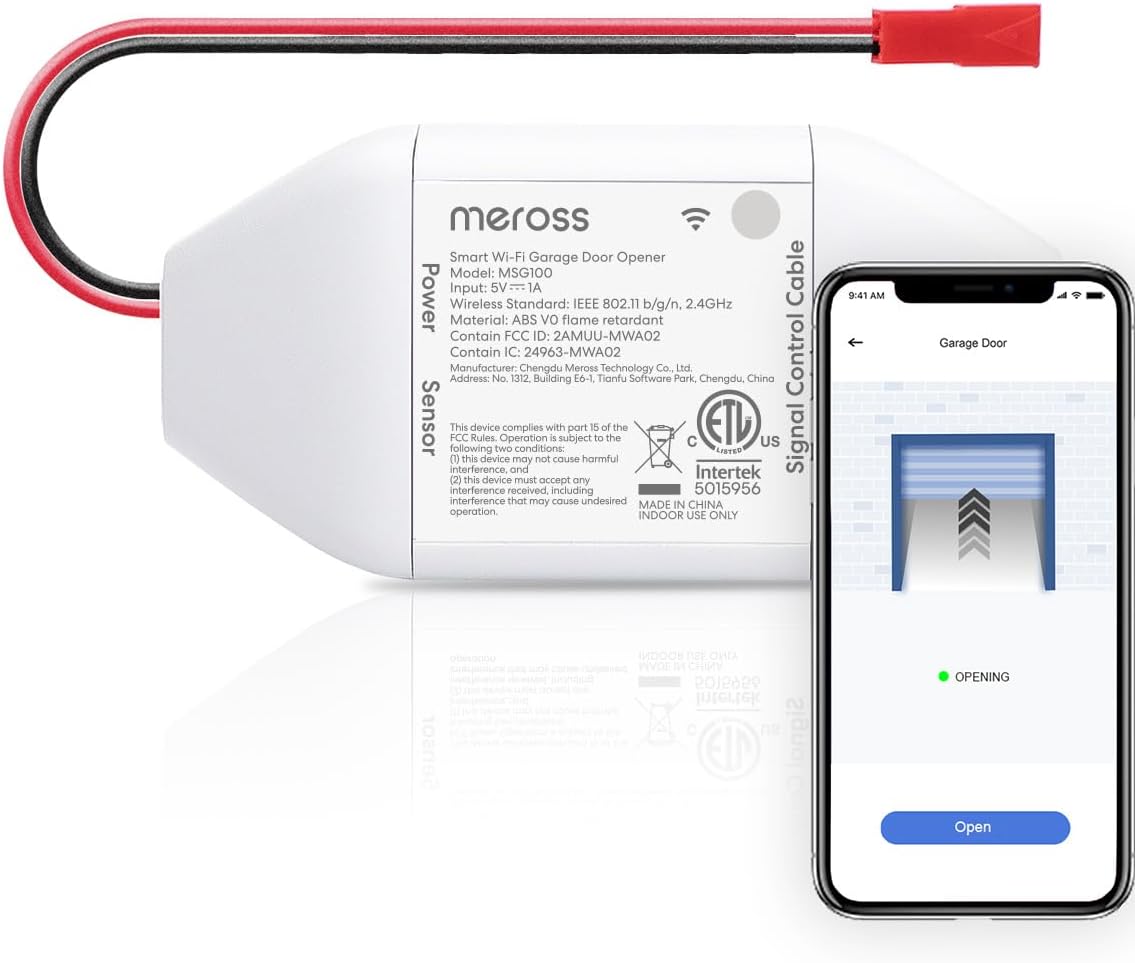
The meross Smart WiFi Garage Door Opener (MSG100) is a compact, easy-to-install device that upgrades your existing garage door opener to smart control. Compatible with over 200 brands and 1600 models, it supports voice commands via Alexa, Google Assistant, and SmartThings without any subscription fees. Featuring a high-sensitivity wired sensor and stable 2.4GHz Wi-Fi connection, it offers real-time notifications, auto-close scheduling, and remote access through the Meross app, making your garage smarter, safer, and effortlessly connected.


| ASIN | B07L5DPK8P |
| Additional Features | No subscription fees or advertising, APP and voice control |
| Battery Type | No battery required |
| Best Sellers Rank | #3,577 in Tools & Home Improvement ( See Top 100 in Tools & Home Improvement ) #17 in Garage Door Keypads & Remotes |
| Brand | meross |
| Built-In Media | Smart Wi-Fi Garage Door Opener |
| Color | White |
| Compatible Devices | Garage Door |
| Connectivity Technology | Wi-Fi |
| Controller Type | Voice Control |
| Customer Reviews | 4.4 out of 5 stars 5,855 Reviews |
| Item Dimensions L x W x H | 3.7"L x 1.8"W x 0.9"H |
| Item Type Name | smart garage door opener |
| Item Weight | 230 g |
| Manufacturer | meross |
| Max Number of Supported Devices | 1 |
| Maximum Number of Supported Devices | 1 |
| Maximum Range | 200 meters |
| Mfr Part Number | MSG100 |
| Model Name | MSG100 |
| Model Number | MSG100 |
| Number of Items | 1 |
| UPC | 606015786696 |
| Unit Count | 1 Count |
| Warranty Description | 2 year |
T**Y
My garage is now smart
All-in-all, this little device works well and consistently, giving me remote access to opening/closing my Genie garage door. I purchased this MSG100 just a bit over a week ago. I was initially surprised to find some pieces missing (little screws, adhesive pads, test wire), so I reached out to Meross to see if there was anything they could do. They were able to send me a new package, this one with the missing pieces. Now that I had everything, I was ready to set it up. It really wasn't that difficult. I was initially worried that I didn't know enough about garage doors to do this, but it really wasn't that difficult. I watched a YouTube video where someone mounted this that gave a good easy-to-understand visual. They give you a little piece of wire that you can use to connect between two contacts on your garage door in order to test if the device is compatible with your opener. In my case, the terminals I needed to test had a number 1 and 2 next to them (see attached picture). If you would like to test before you decide to order, you can just use your own wire, or take a pair of pliers and bridge the connection. If your garage door opens/closes when you touch it to both of the terminals, then the Meross device will work. Walking through the app will go over all of the directions. After testing, they recommend to go ahead and plug up the device to power inside your home to get it started with wifi setup. If you can plug it up in the garage, that will also let you test if your wifi will reach. Once I had the app setup, I moved on to installing it. I used the provided adhesive pads to stick the device on top of the opener itself, and just bundled the cables together so they're all up there (see photo). The power cable is a USB plug that connects to a regular power adapter, and there should be an outlet just above your garage door opener. The control cable has two leads that now need to connect to those same two terminals that were tested before. The final cable on the device has a red connector that attaches to the long cable included for the door sensor. This was probably to longest part since I had to run the cable across the rail to the door itself. There should already be some wire running across this rail to one of the control levers that stops the door when it's closed. I just followed that and put the new wire under the plastic clips holding the existing wire. In my case, I opted to attach the sensor using the included adhesive pads to the top of the plastic piece that slides along the underside of the rail (the emergency release lever part). This is what the guy did in the Youtube video. It was a shorter run and easier than attaching the sensor on the door, while also serving the same purpose. If you do the same, just keep in mind this plastic piece also hits the levers on the rail to stop it once it's closed, so just put it like in the picture attached so it doesn't conflict. Once all was done, I just opened the app and tapping the garage door icon was opening and closing my garage door! It initially was giving an error saying that the garage door failed to open or close, even though it opened/closed just fine. This is because of the "Opening time" setting that you will need to adjust. This setting tells the app to wait a longer/shorter time before checking to see if it completed successfully. Since my door takes a while to open, I had to change the 15sec default to 20 seconds. Now I don't get the message, and successfully get notifications when the door opens and closes. These notifications work even if you use your manual remote or button in your car to open, which is cool. And on top of that, it also integrates with Alexa. Just download the Meross Alexa Skill and link it, then you can open and close it with your voice. At the end of the day, it works quite will so far and I am very happy with it. I was apprehensive at first due to my lack of knowledge, but it really was pretty simple. And Meross came through and did the right thing to get me the missing parts so I didn't have to return it. Just give them some time to respond. Final note: If I did have one small gripe so far, it would be that once you have it integrated with Alexa, the Alexa app does not have an open/close button that you can tap. So if you do not want voice control, you can't use the Alexa app to control it, so you'll just have to use the Meross app. I'm not sure if it's an issue with the Alexa app or the Meross skill. The Alexa app does not treat the garage door opener like a smart plug with a simple on/off button. I can't dock them for that, but if Meross and/or Amazon are listening: you guys should get together and find a way to have a simple open/close button in the Alexa app just like you do in the Meross app. That way you can use the Alexa app as the hub even if you don't want to use voice.
L**L
Wish I Bought These Sooner
All to often, my wife calls me after she leaves the house to check if she closed he garage door. It's always closed, but I still have to check, so I looked into turning my opener into a smart opener so she could check by herself. After eliminating any device that requires a subscription, the Meross Smart Garage Door Opener emerged as the potential best choice for me and since the price was right, I bought three, one for each door. For some reason, I thought they would be a little larger but they are nice and compact. They arrived quickly and were packaged very well, with three boxes inside the larger (but still small) box, each containing a piece of the puzzle, opener unit, door sensor and cable, and installation accessories (not many). If you're at all handy, installation is pretty easy and straightforward. First plug in the unit (USB powered, adapter and cable provided) and the Meross app and it will connect to your wifi and walk you through the installation process. First one took about an hour, the other two, about 20 minutes each. A few installation tips (I have Marantec openers, yes I had never heard of them before either, but they came with the house and Meross said they are compatible, which they are): * I added a pigtail to the wires that connect to my opener just to give me a little more wiggle room and make it a bit easier. * Have a lot of zip ties around. They provide one, I guess to tie down the unit but I had to zip tie everything near the opener because there were a lot of wires (I also use the opener outlets to power security cameras) and the sensor wire is VERY long (had to coil up more than ten feet). I used 5 inch and 8 inch ties. Didn't need anything larger. * Comes with double stick tape for the sensors, but I also screwed them in, just because (screws are provided). * No special tools needed and if you don't pigtail the connection wires, I'm not sure any tools are needed (other than a ladder, and maybe something to snip the tails off the zip ties). I like the app as well. Somewhat basic but easy to use. Can set up notifications when the door opens/closes, is open for more than a specified period of time (mine is set for 30 minutes), or is open after a certain time (I'm set for 9:00 PM). It will also close the door after a certain length of time (I have this turned off), or after a set time (10:00 PM for me). You can set it to beep when it's closing the door (turned off). Says it works with Alexa , Google Assistant, and optionally, Apple HomeKit but I don't use any of these as I figure there are enough things listening to me already, so I can't comment on those. Also, I've only had it for a short time so can't comment on any longer term issues that may arise, but I'll update this review if necessary. I'm very impressed and if/when I do decide to automate more, I'll look into additional Meross options. To me, it does all I need it to do.
S**N
As Advertised
Works quite well. Simple to set up. App is easy to control and seamlessly integrates to Alexa.
S**E
Doesn't stay connected, most of the time - Great customer support
Update: Support reached out and they took care of the issue. Good to have great support like that! Not happy! Although the devise seems well made, easy to install, it just doesn't function properly on my network. I tried to save a few bucks and buy this instead of a new Smart Garage Door Opener, but I now see that was a mistake, for me! I have constant problems with this device, sometimes it works, most of the time it don't. It just won't stay connected to my network. I know my way around my network and I assign every device, both wired and wifi, a static IP and tested different scenarios more times then it's worth. I also have the Meross Smart WIFI Thermostat and both are mounted by the garage door facing the back of my house and have very strong wifi signal, evident as the thermostat works fine with the app and voice control via Alexa Echo8(she's mounted in the back of the garage on the wall), but the the opener just doesn't work properly. Maybe I had a bad one that barely functioned?! I bought the correct version for my Craftsman garage door opener and followed the simple installation process. Like I said, sometimes it works, most of the time it don't.
K**Y
A must have device thats simple to install
This is a must have if you want something to control your garage with your phone that's plug and play. I looked at name brand openers and they required additional wiring or something....This unit on the otherhand is simple to install taking about 30 minutes max and it just works! I have the app on my phone and its connected via Alexa so when I'm riding home on my bike, I can open the garage door well before I get there and just pull in. It is also set to close automatically in the event you forget to close your garage door when leaving. I have two of these and the first one has been going now for 6 years. A must have item for controlling garage doors from anywhere.
H**L
It works! Alexa integration is a bit kludgy.
Update 12/27/2019 The Meross app on my Android phone gets confused. If you open the garage door using the regular door button or wireless remote, the open/close display on the Meross goes out of sync and shows the door open when it is closed and vice versa. To get the Meross app status back in sync, you have to operate the door using the non-WiFi device (button or wireless remote). Even though it's out of sync, the Meross app still works, but displays an error (door open/close failed) and the icon on the app does not display the correct door status. Alexa also performs properly when the Meross app is out of sync, but you have to repeat the Alexa voice command. Alexa incorrectly says the door opened on the first command. The door will open when the voice command is repeated. Once the Meross app is back in sync, everything functions normally. Not sure why this is happening. It's not a deal killer, but it is frustrating. I still recommend the product, but I'm hoping future app updates will resolve the issue. ++++++++++++++++++++++++++++++++++ I'm not quite sure why I bought this item. I guess I'm on a smart home quest and I scored an excellent deal on Amazon. With the on-line coupon at checkout, the unit cost $30 (list price is ~$50). Before receiving the device, I viewed all the installation videos. They were very helpful, but Meross has updated the WiFi controller box so that you don't have to open it up to attach the power, sensor, and signal control wires. It's all done for you. The strangest thing is that the unit is now powered by USB (don't worry, it comes with an AC adapter plug). The first thing you should do before venturing into the garage is to get the unit connected to your network using the Meross app and then linking it to the Alexa voice assistant, if that's what you use (more about Alexa below). Installation was difficult, but that is not the fault of Meross. My detached garage is not heated so I was shivering in 30° temperatures. The most challenging part of the install was attaching the signal control cable to the Liftmaster motor. There were already a couple of wires attached to terminals, so fitting the control cable was a major chore that was made worse by my shivering cold hand trying to get the screw driver in the screw slot (hey, Meross, put on wire spade connectors!). Note that as long as the existing wire connections are maintained, all the other devices that control the door opener (wireless remote, door buttons, etc.) are fully functional. Once that onerous task was completed, the rest of the installation was reasonably fast. Positioning the door sensors was a little tricky, but the sensors seem to be quite forgiving in sensitivity (placement of the sensors will be different depending on your garage door). The only thing remaining to be done is dressing the wires a bit more neatly when the weather warms up. A few words about integration with Alexa. The garage door opener is categorized as a "Lock" in the Alexa device settings. Makes no sense, but there it is. The voice commands are: "unlock garage" (or whatever you named the device in the Meross app) to open the door. Alexa will then query you for a four digit security code that you will have previously entered in the Alexa app (I've not discovered a way to bypass this). To close the garage door, the command is "lock garage". No security code is required to close the door. This is the main gripe I have. The Alexa integration is awkward and unintuitive. I like simplicity and having brief, logical voice commands. Unfortunately, Alexa and/or Meross have some work to do. Perhaps future updates will address this kludgy interface. It would be really nice if Meross products were supported directly by Alexa to bypass the Meross app. Despite the installation and integration issues, I highly recommend this product. It works as advertised (so far, anyway; I've only been using it for a few days). Meross seems to have its act together (I have six of their smart plugs that have worked wonderfully over the past year). Their product pricing, at least through Amazon, is highly competitive and the quality seems excellent. I'm hoping this garage door opener holds up. I will update this review to reflect future developments.
K**K
Very Unreliable (and Risky)
I bought one of these in Nov 2025 to retrofit my older Genie garage door opener to allow me to open and close the door remotely, and on the rare occasion I forgot, to close it for me automatically at night. I did all the testing and everything checked out. I followed the instructions to install it, and things looked good. I could now go for a walk without taking keys, and open the garage with my phone when I got home. But I did notice the status (open, closed) was sometimes wrong, saying the opposite of what was actually the case. Then I found the garage door inexplicably open a couple of times when I thought it had been closed, and then while standing in the kitchen I heard it opening by itself. I did some research and found I wasn’t alone in having this issue, but we were going to be out of town for a while so I just unplugged it and went back to dumb – but safe – garage door opener. I came back around to looking at this recently, and after some additional research, thought the possibilities were a too-weak Wi-Fi signal in the garage, or interference with the door sensor. I bought a network access point for the garage and gave it a unique name, so there was no confusing which network the device weas connected to. Then, even though I had mounted the sensor per instructions the last time, I removed the door-mounted side, and put another layer of rubber underneath it, to insulate it from the metal door further. I plugged the unit back in, and went to the app. There was the old setup, and when I tapped on it, the door opened, but from that point on, nothing worked right. I could not find a way to edit the device settings, or to remove it, so I eventually uninstalled the app and started over. After signing in, and putting the opener in pairing mode, the app found the opener and walked me through the setup, including connecting to the new Wi-Fi node in the garage. After finishing the set-up, I tapped on the opener and the garage door opened. I thought maybe I was now in business. But the status continued to say “Closed”, and now tapping on the device did nothing except after a wait to render the helpful message “Request timed out”. Again, no way to access any setting or information about the device, and no way to get it to open or close. It continued to say “Closed”, while it was clearly “Open”. That’s enough for me. Not trying anything else, except maybe another brand. An opener that can’t reliable tell if it’s open or closed is a huge risk, and a device that can’t tell me when I’m away what is going on, or let me do something about it, won’t work.
T**M
Works as should
Needed control of garage when not home etc and this worked perfect. Easy to install and works with Alexa.
A**R
تجربة ممتازة
الجهاز ممتاز ، بدون خدمات سيري إذا يهمك سيري يوجد اصدار آخر من نفس الشركة
F**A
Muy buen producto
Funciona muy bien sin ningun problema desde la app, muy facil instalación con la puerta e incluye los sensores para saber si está abierta. Contra: Solo funciona con Alexa en Estados Unidos y Canada hasta el momento.
D**0
Worthy
Great, simple to install and connect
C**N
Cumplió expectativas
Trabaja bien, fácil de instalar y usar. Buena calidad a la vista.
S**V
Excellent
Awesome. Working very well. The installation was easy.
Trustpilot
2 days ago
1 month ago