🎬 Capture the Future of Storytelling!
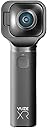
The Vuze VUZE-XR-BLK XR Dual VR Camera offers cutting-edge video recording capabilities with 5.7K resolution at 30 fps, versatile shooting modes, and high-quality photo capture, all controlled through a user-friendly mobile app.


| ASIN | B07J68LR1X |
| Are Batteries Included? | Yes |
| Box Contents | Hand strap, Soft pouch, USB cable |
| Brand | VUZE |
| Brand Name | VUZE |
| Camcorder Type | Action Camera |
| Colour | Black |
| Compatible Devices | Personal Computer, Laptop, Smartphone, Tablet, Desktop |
| Customer Reviews | 3.7 out of 5 stars 248 Reviews |
| Effective Still Resolution | 18 MP |
| Effective Video Resolution | 5700 |
| Exposure Control Type | Automatic |
| File Format | MP4 |
| Flash Memory Speed Class | Class 10 |
| Flash Memory Type | Micro SD |
| Flash Memory Video Speed Class | V60 |
| Flash memory type | Micro SD |
| Focus Type | Manual Focus |
| Form Factor | Compact |
| Global Trade Identification Number | 00634041992767 |
| Has Image Stabilization | Yes |
| Image Aspect Ratio | 16:9 |
| Image Capture Speed | 60 fps |
| Image Stabilization Type | Digital |
| Item Type Name | VR Camera |
| Item Weight | 212 Grams |
| Lens Type | Wide Angle |
| Manufacturer | HumanEyes |
| Maximum Aperture | 2.4 Millimetres |
| Maximum aperture | 2.4 Millimetres |
| Minimum Aperture | 2.4 Millimetres |
| Model Name | Vuze XR |
| Model Number | VUZE-XR-BLK |
| Network Connectivity Technology | USB |
| Number of Batteries | 1 Lithium Polymer batteries required. (included) |
| Number of Speakers | 1 |
| Optical Sensor Size | 1/4-inch |
| Photo sensor technology | CMOS |
| Product Features | 5.7K video, 18MP photo, Dual VR camera 2D 360 / 3D 180 video and photo, In-app Stabilization, Underwater case for water sports |
| Sensor Type | CMOS |
| Shooting Modes | 360°, VR 180° |
| Style Name | Single |
| Supported Audio Format | AAC, possibly SBC and aptX |
| Supported Image Format | DNG, JPG |
| UPC | 634041992767 |
| Video Capture Format | MP4 |
| Video Capture Resolution | 4K, 5.7 |
| Video capture format | MP4 |
| Video capture resolution | 4K , 5.7 |
| Viewing Angle | 180 Degrees |
| Water Resistance Level | Not Water Resistant |
| White Balance Settings | Daylight |
| Wireless Compability | Bluetooth |
W**X
Excellent consumer VR180 camera and a decent 360 camera too.
As (at the time of writing 27.06.20) Insta360's Evo has apparently been discontinued, and the 3D mount for their newer One R has yet to launch, the Vuze XR is left as the only option (that I am aware of) for 5.7k VR180 video at a consumer friendly price. The good news is it's a great camera. What I would stress though is that buyers need to have realistic expectations. VR photography is incredibly resource intensive, and compared to conventional 2D stills and video, it may well seem like quality has gone backwards. The Vuze XR is the VR equivalent of a compact camera, it is equipped with 2 Sony IMX-378 Exmor sensors of a type fitted to good quality mobile phone cameras and 2 extreme wide angle circular fisheye lens, all for the price of a budget DSLR or CSC. A significantly better VR camera will come with a 4 figure price tag. The camera feels well made, and the design is both stylish, and somewhat practical. It is possible to hold the camera in such a way as to ensure your fingers don't appear on-screen when shooting VR180, though it is a little awkward and i would definitely recommend using the supplied wrist strap. In 360 mode the handle allows you to hold the camera away from yourself for selfies or above your head where you will be less visible. You can use the Vuze XR app to preview the scene, control the camera, and adjust settings (which has to be done with the app), this works fine for me on both Android and IOS devices. Most of the time though I just use the very simple on camera controls. Once you've taken your photos and or video the next stop is the app, or Vuze VR Studio on the desktop, to render them into formats you can view and share. There is an issue here in that the IOS app has more features than the Android app, which in turn has more features than the desktop software. This is a shame as rendering on PC is a much quicker process. At the end you get the results, unlike some other reviewers I'm impressed, and on my Oculus Go both video and photos look good. While it's not like "being there" the experience still amazes me in way non-immersive content doesn't. Do be aware that the audio is what you would expect from tiny onboard microphones, and as with any kind of filming or photography, you do need to think about what you are doing. A few points that I hope will be helpful:- If possible, don't update the firmware with the app, just download the latest version from the Vuze XR website and put it in the root folder of your Micro SD card. Do make sure you use a V30 Micro SD card. Vuze VR Studio on a Windows PC requires a graphics card with at least 3gb of RAM. I was able to use it with an older GTX 670 with 2gb, but the software did crash frequently. Selfie sticks are pretty much essential for 360 shooting, ironically they actually work to take yourself out of shot too. Do get one designed for 360, mine actually comes from Insta360, but works just fine with the XR. Remember that a conventional tripod will be very obvious in your shot, a selfie stick or monopod, with a tripod stand at the bottom will be far less obtrusive, lighting stands with a 1/4 inch thread at the top work well too. The lenses are easily damaged, this isn't a fault as such, pretty much all 2 lens 360 cameras have this issue. If you don't need VR180 and just want a 360 camera, then while the Vuze XR is still a good option, and can do things like stabilisation, tracking, hyperlapse etc. pretty well, GoPro and Insta360 cameras do seem to have the edge. (Based solely on watching other peoples videos)
H**N
Lens release failed
The electrically locked lenses would not release into the 3D position. Returned to Amazon and got a refund so I purchased an insta360 EVO which has machanical a release from Amazon and have had no problems. I see Kodak are releasing a 3D 180 / 360 camera and it has a mechanical release too. I purchased 2 insta360 EVO cameras. One failed after a month and took 8 weeks for Insta to return it to me and it still wasn't working and they won't respond to me emails any more. If you by a camera like this for 3D 180, maybe you should superglue it in the mode. Thin cables don't like being bent though 180%
P**T
Very impressed, excellent quality images
Bought alongside the waterproof carry case with the intention of taking it to the bottom of the sea as soon as possible! SD card also required but everything else you need comes in the box. Took for a test ride mounted on the back of my bike as soon as it arrived and very impressed with the performance and video quality. The mobile app allowed me to control the camera settings and stop/start recordings without stopping to unmount it from the back of the bike. Video recordings offer 360 degree 4k 60fps or 5.7k 30fps, something for everyone whether your preference is buttery smooth framerates of ultra high resolution. A press of a button switches to 180 degree VR mode, recordings are immersive, albeit vomit inducing for someone not well versed in VR suddenly dropped into a virtual offroad bike ride. The stitching is barely noticeable in 360 mode, only if you are really paying attention for it, and the image stabilization works extremely well - field tested on a bumpy mountain bike course. The app has fairly extensive offerings in terms of editing and exporting the media but the desktop studio is where you will want to do the majority of the fine tuning.
D**N
Returned the item
When using the Vuze in 360 mode the video had stitching issues (you could see the join between the two lens). Vuze provide some options for customising the stitching in their app, but it was not possible to easily correct. I went with the Instra360 One X instead which didn't have the same visible stitching issues and had a faster end-to-end workload.
M**.
Good for basic 360 or 1803D use but overpriced for the quality
Firstly the good. It's sturdy and feels weighty in hand. It's easy to use it has a reasonable dynamic range Now the bad. The lenses scratch REALLY easily. The picture resolution is useless for anything other than social media novelty 360s The 180 3D mode is only any good under perfect lighting conditions. Trust me if you try to watch a video show in poor lighting on a VR headset the noise is REALLY noticable and makes it almost unwatchable. The grip is too large so your hand is always in shot, they do try to sell a "magic selfie stick" with the product which supposedly fixes this issue but honestly at £400 for a novelty camera this should be included as part of the package. This product will be useful for people going on holiday who don't plan to use the images for anything other than social media posts where people wont see the pictures up close. Could MAYBE be used by people wanting to record basic 3D videos in a perfectly lit studio environment.
L**C
It's just not a good experience - MUST HAVE 64Gb Card Minimum
This camera was sadly returned within four days; it just has too many issues. We bought this after getting the Oculus Quest 2 and wanted to create some VR videos, and it's a no go, and this has been returned. Setup Issues First off the setup requires you to connect to the camera and manually enter some IP address details. This isn't going to be possible for a 'normal' phone user. To request the user create a manual IP setup while not giving them that information is simply no good. Software Problems When you do get the camera and the software connected, the software is terrible. You can flick around and work it out for yourself, but the software is slow, crashes disconnects from the camera, and the editing is awful. There are apps out there for VR editing which I ended up using, but that brings me on to the most significant issues Recording Problems When you finally get recording, this is the next set of problems. The camera does not stop recording. You hit the stop button it ignores requests, you have to hard power off the camera, this corrupts your recording. Anything more than a few seconds of recording, the experience is very hit and miss. File Transfer Huge issue: The SD card formats itself in such a way neither Windows nor Mac can read it. This means you have to transfer all videos over the terribly slow wifi connection. A 1 minute VR video takes 9 minutes to transfer, this process is just too slow to be of use. Conclusion I bought the wrong product. It's time to look for a more established brand like Insta360 or GoPro. This camera has fantastic potential and the form factor, and its flip-out camera should be amazing. It's just a bad experience from start to return. Note: Almost forgot , as soon as the camera connects it needed a firmware update. But unless you have at least a 64Gb card in the camera you can't even do this. This camera will not work with anything less than a Class10 64G Card. There are no cards included. You can't even get the camera started without this.
R**H
Brilliant - although a few tips I will share will help novices like me.
My first Amazon review, but wanted to share a few tips to save other perhaps much research time. This camera was bought with the sole purpose of watching back 3d 180 photos and videos via and Oculus Rift. The results once steps below were taken were absolutely mind blowing, I have been waiting for a product such as this for 3 years and to finally have it and have it work as well as it does is mind blowing. To do the above you will need, this assumes shooting in 180 3d. 1) Download Vuze software, all images and videos will need to be "Rendered" by the software and saved. You can edit some aspects of the videos, lighten etc. BUT no opportunity to crop or merge clips. So very basic. 2) But once you have your rendered files time to create folders on your PC in my pictures and videos under the name '360 Photos' and '360 Videos' drop the files into these folders. You will need to re-name the end of your videos files to _180.mp4 (or _360 etc). 3) You will need to download and but "Virtual Desktop" from steam store or Oculus store - I would recommend Oculus store. 4) When you open up this application top right will be the 360 tabs to view in VR and your images are there. Don't use folders within the main 360 folders as that can cause problems. 5) You will need to change the video or photo view setting - for photos to Dome 180, this in the pictures, in the tab bar just above the tiled photos displayed - this gives you the 3d - for vide its bottom left under tiled videos and you will need the side by side square icon to view 3d videos as 180 vs them duplicated in a messy 360 view. 5) The rendered photos can be edited as long as you broadly edit side by side photos the same using a third party photo app. 6) Videos once rendered can be edited, cropped (in length, not picture size really), and merged together etc. the trick then is exporting them in an .mp4 fie as .mov files won't work (but try just changing the file name manually to .mp4 as this worked - bit then no sound). Conversion tools to .mp4 compress so much that this isn't great given VR scale playback. You will also need to manually select image size 5760 x 2880 - all other setting sound etc will be typical - this 5760 x 2880 post vuze render process. 7) The other purchase was a "Fantaseal Action Camera Grip Mount, Handheld Stabilizer Selfie Stick w/Smartphone Clamp Mount Compatible for Gopro Sony Action Camera and More, Action Cam Handle Grip Micro Movie Shooting System" cheap but brilliant - This as I found when you held the camera my knuckles always appeared in the bottom of the shot - this grip kept your hand safely back out of shot and was more comfortable. Plus you could also then use the phone app as well. 8) Don't take photos with the camera pointing down, keep vertical or it will make you feel unwell looking back at them. It catches floor to ceiling so no need to tilt anyway. 9) Keep in pouch as very easy to scratch a lens. 10) Oculus video will play but not in 3d - 360 fine but really not as good as the virtual desktop app which is strange in my opinion. Other than that I can't rate it high enough......the future and it is here today.....any family photo not taken in 3d vr will look silly 5 years from now! Like photos in an album do today, and a wasted opportunity. Hope this helps.
A**R
Software still a work in progress
The camera offers good definition at 5.7K. However the Vuze Android App at the moment is very limited, I hope that future releases will improve over time. The Vuze VR Studio on my PC is also limited at the moment in functionality. Present software capability is my only complaint. Vuze fix this soon!!!
J**D
Imprescindible para los amantes de la VR
Fácil manejo, muy ligera. Quizá la batería dura poco, pero es algo que sucede con todas las cámaras. Una forma estupenda de guardar tus recuerdos en 2D 360º y 180º VR.
お**う
VRカメラとして一般人が購入できる唯一の標準画質機
OculusGoを購入以来VRコンテンツの視聴にハマり、自分でもコンテンツを作りたいと思うようになった。 MavicAirを飛ばして、海の上から撮影した全天球画像を見るのは最高だったが2D画像なので、3Dにも興味がわいた。 3D撮影ができる機器としては、VuzeやVuzePlusがあるが10万円を超える価格だし、YouTubeでサンプルをみると画質が荒かったので二の足を踏んだ。 いわずもがなInsta360Proは高い。QooCamも画質が荒い。 VuzeXRは昨年末くらいに存在を知って興味が沸いたが、期待の5.7KがPC編集が必要とわかって面倒さを感じたのと、 個人で海外から購入するのにハードルを感じて購入に至らなかった。 今回、日本のAmazonから購入できるというので、製品としての品質は疑わしかったが思い切って購入した。 結果は、大正解。VRカメラとして個人的には最高の選択肢だった。 ・画質は良い。YouTubeなどで見れる最高峰には届かないが、簡単に上位レベルの映像が取れる。 画質が荒いと感じるようなことはない。180度3Dでは5.7Kが標準品質ラインだったとわかった。 ・PCでのエンコーディングは簡単。読み込んでレンダリングボタンを押すだけ。全然面倒ではない。 自宅のファイルサーバから、OculusGoのSkyBoxプレイヤーでそのままネットワーク再生できる。(5.7K問題なし) もともと、スマホ視聴は念頭になく、ファイルサーバからネットワーク再生する運用だったのでなにも面倒なことはなかった。 ・ともかく簡単に使える。スマホと連携するまでもない。ボタンを押せば撮れるし、マイクロSDカードで動画を取り出せる。 ・機材としての手触りがいい。高級感がある。 ・小さい。ポケットに入れて持っていける。 このジャンルの進歩の速度からすれば、今年の中盤~年末にははるかに良い製品が発売されるとは思うが、 シャッターチャンスは待ってくれないので、VRカメラとして一般人が購入できる唯一の標準画質機だと思う。 ※VuzeXRと同画質を望めば簡単に10万円を超えるし、同じような価格帯だと4Kになるので絶対に画質に荒さを感じる。
C**2
Camera au top!
J’ai découvert cette caméra sur Instagram et après quelques recherches sur internet, j’ai décidé de me faire plaisir et je ne suis pas déçue ! La livraison était rapide (2 jours) et la mise en route facile. Il suffit simplement de télécharger l’appli gratuite Vuze sur l’Apple App store et de suivre les étapes. (Je l’utilise avec mon IPhone 7 mais la camera est également compatible avec d’autres smartphones). Les photos et vidéos s’enregistrent directement dans l’appli et vous pouvez ensuite les partager sur vos réseaux sociaux. La qualité de l’image est top ! (Résolution 5.7k) et en plus de prendre des photos et vidéos en 360° vous pouvez également le faire en 3D ! Une petite sacoche /housse est jointe à la caméra, son petit format la rend super pratique. J’ai hâte de l’emmener avec moi en voyage et en festival ! J’ai également vu sur Facebook (groupe Vuzers) qu’il existe une perche à selfie qui disparait de l’image quand on prend la photo ! Concernant la batterie, j’avais lu des commentaires comme quoi elle ne tenait pas longtemps. Je l’ai donc mise à charger une bonne heure avant la première utilisation et (croise les doigts) je n’ai pas eu de problème. En amont je suis super contente de mon achat et je recommande vivement *****
T**T
Best Mobile Phone Accessory Hands Down
360 cameras can produce some really creative and beautiful shots, the problem for me is that the resolution hasn't been high enough nor easy enough to use until now. I saw the XR online back in September and got really excited by the fact that 5.7K looks great but it also does 3D video, which turns out works great with my Oculus Go. Two cameras in one is a great concept and I can fit it in my pocket. First day I got it I took the dog for a walk and shot some 360 photos and videos then tried out the VR180, really happy about the results. The fact that I only need my mobile phone is amazing to me. I do have a VR laptop for gaming, but it isn't needed to do edits and sharing. The shots you take with the XR can't be done from a mobile phone camera,. This is why I called it the ultimate mobile phone accessory since it gives me 2 more shooting modes, 4 all together with the mobile camera and selfie camera. I watched some tutorial videos from Ben Claremont and Creatorup for some creative tips, which I highly recommend. Only downside is the selfie stick I have (a $5 cheapo one) isn't strong enough when fully extended so I ordered a new stronger one. I would like to see an adjustable shutter and self timer for photo mode, it seems a bit long to me but it has helped to get things in position when using a selfie stick, just depends on your shooting mode if it bothers you or not. Great buy, definitely worth it and would recommend to anyone interested in creative video and photo creation! Hope this helped.
P**R
wordt erg warm
opgenomen video moet je eerst kopiëren naar de telefoon daarna converteren en dan bewaren in de camerarol, zeer omslachtig omdat de software op een apple niet werkt. De bestanden van de SD kaart kun je ook niet gebruiken want je moet dit eerst converteren maar het programma stopt gelijk na opstarten
Trustpilot
1 month ago
2 days ago