Desertcart purchases this item on your behalf and handles shipping, customs, and support to Japan.
๐ฅ๏ธ Elevate your workspace, elevate your game.
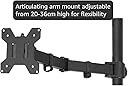
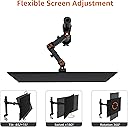
The Amazon Basics Single Monitor Stand is a sturdy, height-adjustable arm mount crafted from durable steel, designed to support monitors between 33 and 61 cm (up to 10 kg). It offers 360-degree rotation and a wide tilt range (-15ยฐ to +85ยฐ), enabling versatile ergonomic positioning. With integrated cable management and easy installation via a detachable VESA plate, it transforms any desk into a sleek, organized productivity hub favored by professionals.


| ASIN | B07DHK5DHN |
| Best Sellers Rank | 1,628 in Computers & Accessories ( See Top 100 in Computers & Accessories ) 10 in Computer Monitor Arms |
| Brand | Amazon Basics |
| Brand Name | Amazon Basics |
| Colour | Black |
| Compatible Devices | Monitor |
| Compatible devices | Monitor |
| Country of Origin | China |
| Customer Reviews | 4.3 out of 5 stars 26,853 Reviews |
| Enclosure Material | Metal |
| Global Trade Identification Number | 00855427008715 |
| Item Weight | 5.59 Pounds |
| Manufacturer | Amazon |
| Manufacturer Part Number | DLB111-US290 |
| Material | Metal |
| Maximum Tilt Angle | 85 Degrees |
| Maximum-Supported Screen Size | 60.96 Centimetres |
| Minimum-Supported Screen Size | 33 Centimetres |
| Model Number | DLB111-US290 |
| Mounting Type | Table Mount |
| Mounting type | Table Mount |
| Movement Type | Articulating |
| Movement type | Articulating |
| UPC | 855427008715 |
| Unit Count | 1.0 count |
M**S
Very high quality, especially for the price!
I recently got the Amazon Basics Single Monitor Stand, and itโs been a game-changer. The build quality is excellent โ solid steel that feels very sturdy and stable. The height adjustment is smooth and precise, making it easy to position my monitor exactly where I want it. It also frees up a lot of desk space, which makes my workspace feel much cleaner and more organized. Installation was straightforward, with clear instructions and all the necessary hardware included. Overall, a simple, durable, and highly functional monitor arm that I would recommend to anyone looking to improve their setup.
F**M
Great arm, sturdy and premium
Great single monitor arm, sturdy, premium and definitely not going anywhere, I feel secure in knowing my monitor is safe on this thing. Easy to assemble. My favourite feature is that you can route cables through a hole in the back of the pole and feed them out through the top of it so your cables are completely hidden.
M**I
Solid, sturdy dual monitor stand that does exactly what it promises
Iโve been using the Amazon Basics Dual Monitor Stand for a few weeks now with two 24-inch monitors, and overall Iโm very happy with it. Build quality is excellent โ the steel construction feels solid and confidence-inspiring, especially for the price. Once everything is tightened properly, the arms hold the monitors firmly with no sagging or wobble. Height adjustment and tilt work smoothly, and the 360-degree rotation makes it easy to switch between landscape and portrait if needed. Installation was straightforward, but it does take a bit of time. Iโd recommend assembling it on the desk before mounting the monitors, and having a second person helps when lifting the screens into place. The VESA mounts lined up perfectly with my monitors. The cable management clips are simple but effective โ not fancy, but they do help keep things tidy and reduce desk clutter. A couple of minor downsides: โข The adjustment joints are quite stiff at first (which is good for stability, but expect to use some force) โข No built-in gas spring, so height adjustments arenโt as quick as more expensive arms โข Instructions are basic, but usable That said, considering the price, this stand offers excellent value. If you want a reliable, sturdy dual monitor arm without paying premium-brand prices, this is a great choice. Would definitely recommend for home office or workstation setups.
M**D
Decent basic monitor arm
I share a desk with my other half... it's my desk really, but she has a computer tucked underneath that she can use from time to time. I purchased this monitor arm to try and maximise the desk space available by being able to get rid of the monitor stand and also to be able to push the monitor out of the way when not in use, but also be able to pull the monitor out and have it at a suitable viewing angle when actually in use. This monitor arm does this perfectly. The desk I have is pretty sturdy so it has a good surface to clamp to. I'm not sure I'd want to clamp this to something like the IKEA Linnmon desks are they're pretty hollow and not very rigid... but that's more a fault of the desk than the arm. Just something worth mentioning to make sure you're not attaching this to something too weak to hold it. The product itself is very well made. I expected a much weaker, more flimsy product for this price and especially considering it has "Basics" in the brand name... but it's absolutely solid, decently thick steel. There's no way it'll bend or flex easily. Really easy to put together, took only about 10 minutes or so to completely set it up on the desk. Adjustability is great, the arm is a little bit stiff so it may take a bit of time to make it easier to move about, but it's generally pretty good. I'm not entirely sure of the specs of the monitor, but it's a fairly beefy ASUS 27" unit... Absolutely no issues holding this monitor, no adjustments needed to make it support the weight. I was in the market for two monitor stands and decided this one would cut it for that monitor, but for my own Samsung 34" ultrawide, I wasn't convinced it'd be sturdy enough so bought a different arm for that. Admittedly I haven't tested it, but having now physically seen and felt the product, I'd be almost happy to say this would likely have held that ultrawide monitor as well. The cable management is quite good for such a simple thing as well. The pole is basically hollow with a hole at the bottom rear. There is then a plastic cap that keeps the top of the pole neat and tidy once you've run your cables... It's very basic but does such a great job... and the rear exit is a very welcome feature as I've seen others that come from the front and you end up with the cables shoved right in view. The rear helps keep them hidden and tidy, you'd barely even know the cables were there! For such a basic monitor arm, I highly, highly recommend this product.
M**D
Great product - Much stronger than others! !IMPORTANT FOR IKEA USERS!
BACKGROUND -------------------------------------- This is my second monitor stand - my first one was a single one from a different manufacturer, as I recently purchased a 24" screen to mount in portrait mode. The previous one was very sketchy with such a huge monitor on it, despite the monitor being within load limits.... PROS -------------------------------------- - MUCH easier tilt adjustment than previously - can hold my Samsung CF791 without falling (the CF791 is notorious for having an AWFUL VESA mount that makes keeping it still an extreme challenge) - Cable routing through the stand (when I get around to it...) - Nowhere near the amount of lean previously noticed with other screens - Easy angle/height adjustment even when locked in place without much undoing required CONS -------------------------------------- - Still leans....see pictures. Not much of a con though, as short of a piece of structural steel, a 34" ultrawide will always make these stands lean - Dual base clamp wheels, which are tricky to get level, especially on IKEA desks where it's easy to overtighten and destroy the desk SUMMARY -------------------------------------- This stand is night-and-day compared to what I had before, and I'm very impressed at it's value. The stand itself is huge in diameter, and has a really neat cable route that can fit kettle-leads and HDMI cables with ease. It leans, and bends, but this is to be expected, and it's very slight. It doesn't appear to be getting worse. It can also fit an ultrawide as long as you only use a 24" for the second screen - this current setup has maxed out the arm width, so a 27 would not fit. Nor would the 24 in landscape mode. Assembly was simple! FOR IKEA DESK USERS: This stand will have the same issues as any other with certain desks - if like me you've got a honeycomb desk, it'll crush it with the added weight of two monitors. I have fixed the slight lean in its entirety by cutting two pieces of solid wood, and sandwiching the desk between them where the monitor stand clamps. The stand is FAR stronger like this, as the load is spread out!
C**M
Very impressed
Very impressed with this Amazon Basics single arm monitor stand, especially for the price. It took around 5 minutes to assemble and mounting the monitor was straightforward. The arm feels sturdy and holds the screen securely without any sagging or tipping. I like how you can rotate the screen and adjust the height very easily. The built-in cable management is also a great feature, with cables running neatly through the middle of the stand and the included clips helping keep everything tidy. Excellent value for money and a great budget-friendly option if you're looking for a reliable monitor arm.
H**H
Picture isn't entirely accurate, the monitor will protrude quite far forward despite good height.
This monitor is fine and all height-wise, but extends way too far outward that it defeats the purpose of helping you save desk space.
U**N
Single monitor arm
I purchased this for my monitor because my stand was getting in the way. The arm is very easy to install (only requires you to twist and tighten). It has great adjustability depending on how you want to display your screen. It can turn and tilt a large amount. The arm itself seems to be very durable and holds the monitor up without issue. It frees up space on the desk since you don't have to deal with a monitor stand getting in your way. My only issue is how annoying it can be to adjust the height of the arm. You have to take the monitor off before you can adjust and there are no markings which means you have to guess. I had to set mine quite high up which caused the pole to lean slightly but it still stayed in place. Pros: - Easy to turn/tilt and has wide range - Simple installation - Durable and strong - Frees up a lot of space Cons: - No markings for adjusting height - The pole leans slightly from the pressure (can be avoided if height is lowered and if placed closer to center)
J**A
Excellent Quality for the Price
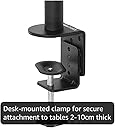
I was genuinely surprised by how well-built this monitor arm is, especially for the price. It feels sturdy and holds my monitor securely without any issues. One thing I really liked is that it offers two mounting options. You can either use the included desk clamp, or if you prefer a cleaner, more permanent setup, you can drill a hole in your desk and mount it through the desktop. Having both options makes it much more versatile and means it should work with almost any desk setup. Overall, itโs excellent value for money and Iโd definitely recommend it if youโre looking for an affordable, solid monitor arm.
P**E
ใใฃใใใใฆใ
ๆใฃใฆใใใใใ้ ไธใงใใใใชใซใใฃใใใใฆใใๅฟ ่ฆใ ใใใฎใใใใใฌใใทใชใงใใ ไฝฟใๅๆใใใใใใๆใใงใใ
W**W
Easy to use
Works as intended. Was easy to setup
N**R
Strong, Solid, Thoughtful Design. Exceptional Value for the Money. Best by a Mile.
Exceptional value for the money. Rock solid support, great range of motion. The monitor mountโs vertical support pole is a sturdy 1.9โ in diameter (others are mostly only 1.37โ in diameter) and designed to allow monitor and power cables to be threaded discreetly down through the pole; exiting out the back just above the surface level of your desk. The extra-wide diameter permits the threading of full-size power plugs, HDMI, and DisplayPort cables through the support pole. A two-part plastic plug can be placed into the top of the pole after running your cables for a nice and tidy look. Unfortunately, the vertical pole only seems to be available in a 16โ height; and if your are unlucky enough to have a stupidly designed monitor like my 28โ 4K Samsung U28E590D, with the VESA attachment point at the extreme top edge of the monitor, this will likely be too short to earn you any extra room on the surface of your desk. In fact, it hangs the monitor several inches lower than the monitorโs own included stand. * I tried mounting my monitor upside down, as flipping the display orientation in Windows and MacOS is simple as can be, but my Samsung Monitor just wouldnโt submit. I donโt know if it is a polarization issue or a LCD under stress issue; but the flipped monitor winds up entirely washed out (dark, reflective, and deeply purple tinted) on the button half when viewed directly as one normally would. Mounted upside down, one can only see the full screen clearly by leaning the monitor 45ยฐ or more backward, which obviously is not practical at all. Other monitors might better handle being mounted upside down, and one should attempt this if they have a monitor with a similarly off-center VESA point. Iโm disappointed in mine, as mounted upside down I only needed 12-13โ of the 16โ pole to have 6-7โ of clearance under my monitor.
M**I
Just go for it
Very study and stable mount, only cheap and best stand in amazon. I look to sit and work for hours now.
Trustpilot
2 weeks ago
5 days ago