Buy anything from 5,000+ international stores. One checkout price. No surprise fees. Join 2M+ shoppers on Desertcart.
Desertcart purchases this item on your behalf and handles shipping, customs, and support to Japan.
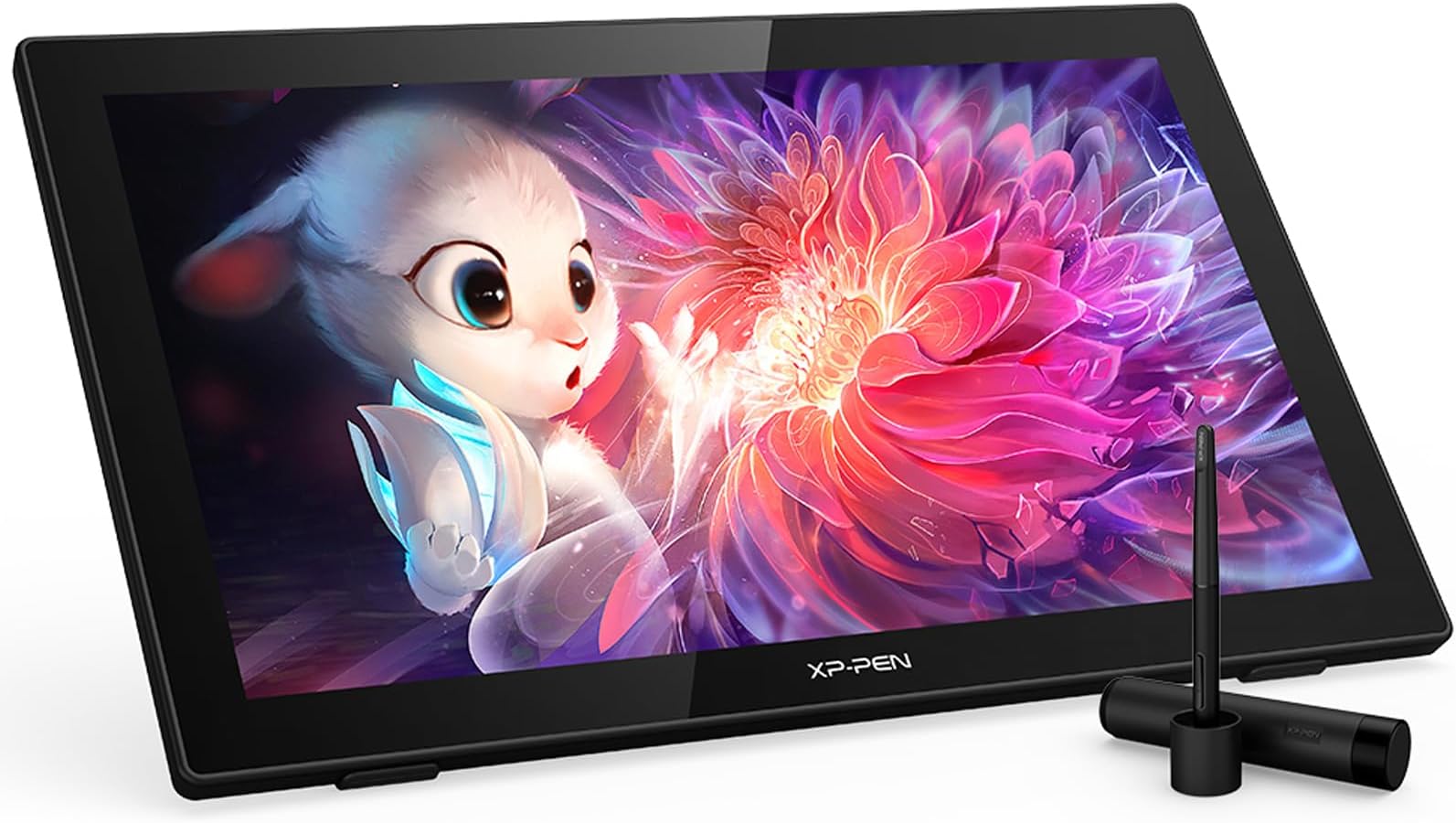
🎨 Elevate your digital canvas with precision and color that commands attention!
The XPPen Artist 22 2nd is a 21.5-inch pen display tablet featuring a vibrant 122% sRGB IPS screen, 8192-level battery-free stylus with tilt support, and an adjustable ergonomic stand. Designed for professionals and creatives, it offers seamless compatibility across Windows, Mac, Linux, and Chrome OS, delivering precise color accuracy and ultra-responsive drawing performance for digital art, design, and e-learning.


| ASIN | B07J51LD25 |
| Active Surface Area | 140.64 square inches |
| Additional Features | draiwng/e-learning/working |
| Best Sellers Rank | #171 in Computer Graphics Tablets |
| Brand | XP-Pen |
| Built-In Media | Stand |
| Color | Black |
| Compatible Devices | Windows 7 (or later), Mac OS X 10.10 (or later) |
| Connectivity Technology | USB |
| Customer Reviews | 4.5 out of 5 stars 804 Reviews |
| Display Type | LCD |
| Item Dimensions L x W | 13.07"L x 21.18"W |
| Item Weight | 5 Kilograms |
| Manufacturer | XP-PEN |
| Mfr Part Number | Artist 22 Pro |
| Model Name | CD220F |
| Model Number | Artist 22pro |
| Native Resolution | 1920x1080 |
| Operating System | Windows 7 (or later), Mac OS X 10.10 (or later) |
| Pressure Sensitivity | 8192 Levels |
| Screen Size | 21.5 |
| Special Feature | draiwng/e-learning/working |
| Specific Uses For Product | Online Teaching/E-Learning/Remote working/Digital drawing/Web-conference |
| Target Audience | Teacher |
| UPC | 654913040242 |
R**E
shmebulock
The XP Pen Artist Pro 22 Gen 2 has been an interesting purchase. I've watched every review I could find before buying and it's just as good if not better than I expected. The drawing quality is smooth, the set up was easy. The execution of the product is incredible. I can see myself having this for a long time. It's definitely worth the price tag. The screen is big enough to use as a second monitor (I have it connected to a monitor arm) and it doesn't feel like it's ever in the way, it sits in the background when I don't need it and it's perfect for whatever I'm doing. I mostly just video edit and draw/animate I use it as a second monitor to look up things when I'm editing on my main monitor. It's a life saver as a second monitor, ideal for a drawing set up. A perfect addition to my work flow. The only thing that's a personal issue for me is the fact I can't switch from the display tablet to my monitor when I'm drawing so it makes it harder to get into a flow state when drawing. But it's probably up to me and my settings. I'll figure it out. No real issues from the display tablet itself. Not that I know of. Recommended for any artist.
A**R
An excellent tool for a very affordable price
Now, I will say this caveat: I have only been using this for a single day so far. However, it has already expanded my ability to complete art more competently and quickly. Using a setup guide on youtube, I was able to quickly get it set up to my computer. Note, if you do not have a USB-C connection, you will have to use both a USB and a HDMI port on your computer to be able to use this tablet. As I have three screens, I also had to get a display port to HDMI adaptor to be able to get all three screens to work right. For the screen itself, it is easily the best screen in my setup. Colors are vibrant, and the tablet is bright. As an art surface, the screen is a little glassy, which does make me miss the paper tactile feel of my old Wacom Pen and Ink. However, it is pretty easy to move past. I look forward to making lots of art on this! Pros: Large, beautiful screen. If you haven't spoiled yourself with 2.5 or 4K resolution, then you won't really notice the resolution that much if at all. it provides ample room to work on a piece as well as be able to manipulate menus and tools. A complete package: This comes with everything you need to start using it, minus desktop or laptop. All cables, a pen, microfiber cleaning cloth, and even an artist glove. Its an excellent value for the money Responsive Tablet: I haven't noticed parallax in my use of it, nor noticeable delay in lines. Cons: The Setup: While initial setup was very easy, this is a tablet that may require a lot of tuning to get it to the point that you like it in regards to the shortcuts on the pen and setting it up with the art program. Its not bad, but it did create a learning curve that I am still struggling with The pen: once again, not bad, but after using a Wacom stylus for years, it feels a little sloppy. The buttons on it aren't very tactile, and the default programmed shortcuts were not really the ones I want. Not hard to fix, but a slight annoyance.
R**Y
A Large Pen Display for a Reasonable Price
I bought this display a few months back to replace my old Bamboo. Going from a tiny tablet to a huge pen display like this is quite the upgrade, and I've enjoyed it quite a bit. The build quality is pretty decent. The stand that comes attached does seem to have a little give when I press down on the display, however I haven't personally had this cause any problems when drawing. A more noticeable problem is that the Menu button on the bottom of the display occasionally fails to register, though I don't find myself having to use the button much anyways. The materials seem fairly high quality, nothing feels especially cheap or fragile. I was a bit concerned that the input/output ports facing downwards would be a problem, and while it is slightly inconvenient to plug/unplug cords, there's enough space between the ports and the desk that I'm not concerned about wires getting damaged from being bent too far. I also consider it a plus that the device has separate ports rather than using a proprietary, converged cable as some pen displays have as those tend to be prone to failure and are far less convenient to replace. The display is quite large. On one hand, this is nice because it allows for a large drawing surface which means you can more easily make use of your entire arm for drawing rather than over-relying on your wrist. On the other, you'll need to ensure you have ample desk space available. The adjustable stand on the back takes up a lot of space, and it will jut out farther as you adjust the screen to a more shallow angle. The stand is easy to adjust and has a good range, allowing the screen to be nearly perpendicular or parallel to the desk. The display has a standard mount so I suppose other stands or a monitor arm could also be used. The screen is of good quality. The surface is glossy, which results in some reflections and glare. Additionally, drawing on it occasionally causes some squeaky noises. The glossy screen does provide a smooth surface for drawing though, and a matte screen protector can be applied, though matte screens come with their own cons anyways. The LCD panel is defect-free and looks great. It has near-perfect viewing angles as advertised. The colors are fairly good, better than my laptop's panel and my other monitor anyways. It accepts HDMI, VGA, and DVI input so there's a great amount of compatibility. For the purpose of drawing, it functions just fine. It lacks fancy features, namely tilt detection, but for basic functionality I haven't had any problems. I'm able to produce nice smooth lines, even when making rapid strokes such as when hatching. There is a bit of parallax and lag as is to be expected, but it's not ever so bad that it's caused me any problems. Compared to drawing on a traditional/screenless tablet, drawing on a pen display feels a lot more intuitive. The pen has a nice shape and has a nice rubbery material around the grip, and the buttons are well placed. I haven't had the battery die yet even as I've barely charged it. The display also comes with a drawing glove which is cool. It isn't exceptionally high quality but it has held up so far and I like the feel of the material. One thing I was a bit worried about when buying this was the support for Linux based operating systems. Tablet support is a bit spotty for Linux, however XP-Pen has released Linux drivers. Initially they didn't work, but after contacting support they were able to get the drivers updated and now they work just fine. The support team was polite and helpful. I'm very happy that XP-Pen is willing to support Linux. So overall I'd say that this is a very solid option if you're interested in getting a full-size pen display. It executes pretty well on what it sets out to do and at a very good price. It's especially nice if you're not a professional and can't really justify paying for something like a Cintiq.
M**A
Perfect for me
Yes, the screen is very smooth, like glass, not paper, and I love it. It seems like it's getting harder to find this as time goes on, but honestly I very much prefer it, as I'm a digital artist before any other kind, and the feel of the pen nib grinding and sanding down and wearing away (on "like paper" screens or tablets) just bothers me and makes me not want to draw big or fast lines. I think paper feel can be nice if it's a smaller screen, as it helps to give more resistance and control, but I realized with this that there's another way of accomplishing that. Because this screen is so large, and the accuracy is good, you have a lot more space to draw over the same resolution and more "accuracy per pixel", if that makes sense. In other words, despite a more smooth, nice, glossy surface, you still get your control by essentially having everything more "zoomed in" by default, without zooming in. This means when you do zoom in, you can go even further than a smaller screen could, while still seeing the surrounding area or having more precision, and when you don't zoom in, it's similar to how it would be on smaller tablet zoomed in. It's hard to explain, but you can be more loose and free with your lines, and every tiny movement isn't as big of a deal, it's much more forgiving, so it's accomplishing essentially the same thing as resistance from texture would. (Could be nice if you had jittery/shaky hands too.) If you wanted the utmost control, I suppose you could find something with both size and texture, but honestly drawing large lines quickly, dragging fast over a large rough area is going to wear the nib down really fast, plus feel to me like nails on chalkboard slightly, so if you're anything like me you'd always be inclined to slow it down or draw in a smaller area, more carefully, less free. I like to draw large, sweeping, smooth, all in one stroke, flowing lines, rather than a million hairy ones, and I feel this is the perfect balance for that. You can be precise because it's over a large area, but also just swoosh the pen around without feeling like it's grinding against the screen. My only issue so far is there is a tiny bit of parallax, but it's not nearly as much of an issue as I imagined when shopping around. I'd love one with less of that, but now that I've tried this, I would not sacrifice any of the other features for it. Some said the pixels were too big, but I don't notice it, I like crisp pixels anyway but I don't even see it regardless, maybe it's my vision. If anything, it just means more input accuracy mapped over fewer (larger) pixels like I said, which for drawing (rather than viewing) seems pretty ideal to me (1920x1080 resolution is plenty for this screen size imo, again especially for drawing). Try to imagine the opposite, a tiny screen where you try to draw, but no matter how careful you are, the pen is covering many pixels at once and the slightest movement (even by the texture of it!) would span many more pixels. In other news, yes you can 100% see your reflection in it when it's off, so do beware if glare is a concern - that being said, other screens seem to just blur the reflection, not stop it, so dealing with your lighting situation properly is your best bet anyway if possible. All in all, I love it, and words cannot describe how much better I feel with it than screenless graphics tablets. Some say it's not that big of a deal, but I have to wholeheartedly disagree. Trying to explain would just be even more confusing and long than this review has already gotten, though, so I'll leave it at that. Love this thing.
T**G
A Multifunctional Gem for Art, Gaming, and Entertainment
I recently got the XP-Pen Artist 24 Pro, and although it was a bit pricier on Amazon compared to XP-Pen’s official site, it’s proven to be a fantastic investment. The extra cost was a small trade-off for the convenience and quick delivery. This tablet has seamlessly integrated into my daily routine. I use it not only for digital art but also as a high-quality monitor for gaming, streaming, and even watching movies. The 2K resolution and excellent color accuracy make everything look stunning, whether I’m working on a new piece of art or diving into a game. The customizable shortcut keys are a huge time-saver, and the large screen provides ample space for multitasking. Switching between tasks is smooth, making it a versatile addition to my setup. In short, the XP-Pen Artist 24 Pro has become my go-to device for a variety of activities, and it consistently delivers excellent performance.
S**.
Not good without iGPU/USB-C as connection
I like this tablet and I decided to keep it, but there are a few things everyone should know: 1. Per my emails with support, windows scaling is not supported and there are no plans to. That means you are stuck at 100% which is tiny tiny tiny. Most apps have UI scaling though, but windows is a no-go. EDIT: through testing it does scale over USB-C vs USB-A/HDMI splitter cable. Not sure why support wouldn't tell me that. 2. The cables are short and they don't sell longer ones. My extensions won't supply power properly or let the pen work without hiccupping. 3. The power button only turns the screen off. It remains connected to windows. Your cursor or windows can still move to tablet. The only way to disconnect it from windows is to unplug it from USB. 4. If touch won't work make sure you enter PC Tablet Settings in Control Panel to enable the screen. 5. It doesn't draw dots well. It doesn't detect pressure sensitivity (under those circumstances) and they come out tiny or large and few in between. You have to set a brush to a size and adjust as needed. EDIT: again over USB-C it drew dots fine. Not sure why the performance is so much poorer through the other cable. 6. It doesn't always draw when you expect it to. I decided to keep it because: 1. I like the semi-matte surface. I don't like the sound of the scratchy pen tablets with matte surfaces. I came from an HP Spectre and Surface Pro 4 which both have glossy screens and it's definitely more matte than that. It's right between which is really comfortable for me. 2. The pen is very good and the drawing experience is great. 3. It's cost effective. EDIT: If using over USB-C connection the experience is much better. This requires that you have an integrated iGPU/APU on your desktop processor and a USB-C port on your motherboard or laptop. Without that you are stuck with poor options. I'm upping my rating to 4 stars, but I think the manufacturer and their support can be much more communicative about these requirements and limitations. UPDATE: I decided to return it after all. Not being able to draw dots just doesn't work for my art style and things became very deliberate. If it did that one thing well, I'd keep it for sure but for now it's a deal breaker.
C**H
First time graphics monitor user and loving it!
So, I ordered this graphics monitor after bumping in to tablet after tablet. I saw some with side buttons, knobs, and all sorts of additional functions, but size was important to me. So after seeing some of the reviews, I decided to take the leap. And I do not regret it whatsoever. The package came with an hdmi, set of VGA cables, glove, pen, BONUS pen (which I found fantastic, and will write about why later in this review), spare nibs, and the monitor itself with AC power supply and usb for the PC. For those who might be first timers as well, keep in mind the set ups on your PC to connect this too. If you lack the inputs on your graphics card, you might be in for a mild challenge to start. I also recommend trying to connect this with another monitor at the same time, or have a phone nearby that can pull up nice tutorials as you feel out the applications you may be less aware of whilst using this (my example was illustrator, which I was mildly intimidated by whilst using a mouse and keyboard). There are no inputs for sound, and as a new buyer I do not know if this is standard form. Easy fixes nonetheless. The pen that comes with it also has a small usb to charge it with a thin cylinder at the end. This may have been a mild inconvenience at one point, if it weren't for the fact they gave me a bonus pen. So I can switch between them with relative ease and comfort, which I really appreciate! The pens come with two buttons on the side, which you can modify the functions with them, which is great! And with the glove that comes with it, it removes worries of smothering your fancy new monitor with your hands. The cleaning cloth that also comes with it helps, especially with dust. And the lack of glare found on the face of the monitor, despite my setup right next to a window, is a blessing as well. The function of it is great. The quality is great. This is overall a pretty great system. Minor issues like lack of ability to drag the google chrome window around hardly ever register to me, since I have a mouse and keyboard right nearby to aid, so overall I am happy on my purchase! Will update if anything turns awry, but it looks like a nice 5 stars is well deserved here.
D**M
This is the worst tablet for 3d artist
This is the worst tablet I have had in over 20 years of dealing with different brands and tablets. If you are a 3D artist, don't buy this tablet. If you use all 3 mouse buttons in your programs, forget about it. There is only one button on the pen, which means that you have to turn the pen every time or use a mouse. This new button on the pen is the ugliest. It's so flat that it is almost impossible to find it without seeing it. Every time you want to start drawing, you have to look at the pen, trying to find the button. Also, you can't replace that pen, because there are no other options. XP-pen doesn't even support its previous pen models. 4k is really great, but not all programs work great with this monitor. Some of the interfaces will be really tiny. Also, some 3D programs such as Blender and 3D Max will glitch unless you turn off the finger touch feature and it happens completely by accident. If you're a 3D artist, as a result of these problems that I mentioned above, you'll be using a mouse instead of a pen, and most of the time you'll be disabling finger touch. I cannot return this monitor because it was a gift and I really like this brand more than Wacom for its flexibility. I can't enjoy this monitor until they give me a pen option like their previous models or just a new pen with all 3 mouse button functionality.
H**R
Touch Screen for PC
Product is good. 2K resolution is a bit low. Looking forward to a 4k with larger screen! Not just for art work but also for those suffering from mouse repetitive stress injury.
E**A
Produto super recomendo!!
Gostei muito do produto e super recomendo!!
A**J
Nice product
The display tab is easy to use
@**N
Quality and Value hands down worth it
So, I was reading through reviews before and after purchasing this item. which then became a project. It has been four days now since then, which has given me ample time to gather information, test, experiment, and form my own opinion. Having gone through numerous reviews, there were a few things that stood out to me After a couple of days with the default settings, as well as system sleeps and shutdowns, I can provide my review based on my experience with the product . It feels great to address this! I've tried and tested this multiple times, and each time I had to tweak something to achieve the perfect setting. Now, when I turn off or restart my computer, or when it goes to sleep mode, all my settings, including those for my artist XP and tablet, remain the same. Initially, I had to quit the XP pen app application (ONLY) and restart it, the app only, to get everything connected and functioning properly, but eventually, I didn't have to do that anymore. It may seem tedious to try, test, and tweak, but since its not impossible, its worth it. I can officially confirm that many hours have passed, and I haven't encountered any issues with my settings during sleep or when the device wakes up. The color is pretty great, although I must admit that the film across the screen is not to my liking. If they release a version without the film, I would happily choose it again as an upgrade However, that's not to say I won't try Wacom or other drawing devices and be completely swayed over. Overall, would I repurchase? Yes, especially if the film was removed. However, the film itself is not a 100% dealbreaker for me. As I continue to learn and adapt, coming from an iPad background, I appreciate the gloss. Nevertheless, I did appreciate what one YouTuber mentioned—the XP gives that paper-like feel that we often overlook as digital artists which i have to agree. i'm actually pretty obsessed. its strong and sturdy. i love the pen holder on side too. it also never makes noise . the pen is relatively smooth for me and i barely adjusted it. i recommend. UPDATE: - I wanted to add that the color was great from the beginning as id mentioned BUT I played with the color profiles just a little I switched the profile to RGB 1980 but then reverted it right back to the Artist PROR and now that color looks as good as my studio I am not even playing or exaggerating im like so shocked at how great it looks unfortunately the photos do not do justice! definitely happy with this purchase. Please note the pictures taken are in their natural form, no edits were made to them
D**F
Una gran herramienta de trabajo
Es una gran elección, la pantalla es muy grande, y por el precio una excelente compra
Trustpilot
1 week ago
1 month ago