Desertcart purchases this item on your behalf and handles shipping, customs, and support to Japan.
๐ฅ๏ธ Touch the Future: Seamless, Stable, and Stunning
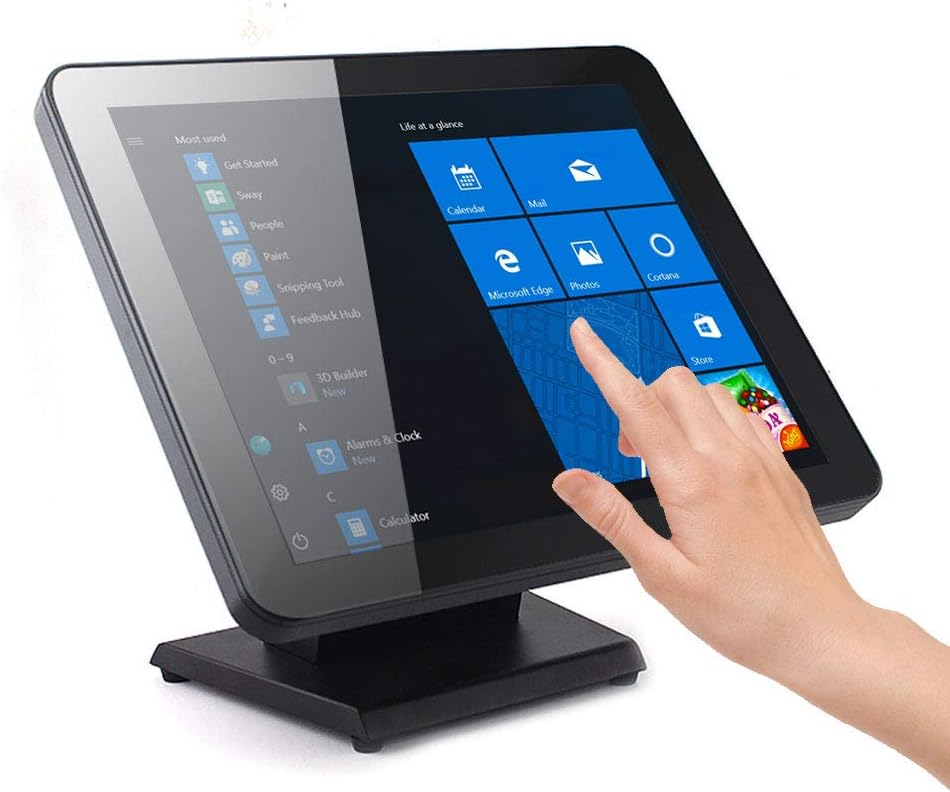
The Angel POS 17-Inch Capacitive LED Backlit Multi-Touch Monitor combines a sleek, true flat seamless design with robust water and dust resistance, making it ideal for demanding commercial environments. Featuring a 10-point capacitive touchscreen, it delivers precise multi-touch responsiveness without the hassle of driver installation. Its heavy-duty metal stand ensures stability in busy settings, while the bright 300 cd/mยฒ LED display with wide 170ยฐ viewing angles guarantees clear visuals. Compatible with multiple Windows versions and equipped with HDMI, VGA, and USB connectivity, this monitor is a reliable, plug-and-play solution for modern point-of-sale and interactive applications.


| ASIN | B07GTYJMSM |
| Additional Features | Touchscreen |
| Aspect Ratio | 4:3 |
| Best Sellers Rank | #77,048 in Electronics ( See Top 100 in Electronics ) #1,750 in Computer Monitors |
| Brand | ANGEL POS |
| Brightness | 300 cd/mยฒ |
| Color | Black |
| Compatible Devices | [Likely compatible with devices supporting USB, HDMI, or VGA connections] |
| Connectivity Technology | HDMI, VGA, usb |
| Contrast Ratio | 350:1 |
| Customer Reviews | 4.0 out of 5 stars 205 Reviews |
| Display Resolution Maximum | 1280 x 1024 |
| Display Technology | LED |
| Display Type | LED |
| Hardware Connectivity | HDMI, USB, VGA |
| Image Contrast Ratio | 350:1 |
| Included Components | Touch Screen LED Display, PowerAdapter,Power Cord,VGASignalCable,HDMICable,USBCable |
| Item Dimensions D x W x H | 1.97"D x 15.55"W x 12.6"H |
| Item Weight | 5.88 kg |
| Manufacturer | ANGEL USA |
| Model Name | Angel POS 17" Cap LED |
| Model Number | 1 |
| Mounting Type | Wall Mount |
| Native Resolution | 1280x1024 |
| Number of Component Outputs | 2 |
| Power Consumption | 30 watts |
| Refresh Rate | 75 hertz |
| Resolution | SXGA |
| Response Time | 9 milliseconds |
| Screen Finish | Glossy |
| Screen Size | 17 inches |
| Screen Surface Description | Glossy |
| Shape | rectangular prism |
| Specific Uses For Product | Office |
| Total Number of HDMI Ports | 1 |
| Total USB 2.0 Ports | 1 |
| Total Usb Ports | 1 |
| UPC | 616983343722 |
| Viewing Angle | 170 degrees |
| Voltage | 110 |
| Warranty Type | 1 Year Manufacturer Warranty |
D**.
Works perfectly
I've been a loyal ELO guy for over 20 yrs. I've deployed countless ELO monitors. But recently ran into what seems like a batch of defective ELO units, so I had to desperately scramble for an alternative. I found these and ordered two hastily. While waiting for them to arrive I read the reviews and saw so many negative experiences. So I got worried. Well, they arrived today and I am happy to say they are perfectly fine. Picture quality is not grainy at all, in fact it's more than good enough for a point-of-sale system. The touchscreen response and accuracy is perfect. And that's right out of the box, no special drivers, no calibrating, etc. They are not as "heavy" as a typical ELO monitor, but they are heavy enough to stay in place while being used. These are going into a busy restaurant environment so they will need to take a beating - I will keep an eye on them and update this review after a few months... But my initial impression is very very good.
A**A
Pretty good
It worked for about 3 months then wonโt work. Stability is good,designed is good. I will buy another one to test it again.
K**H
Multi-touch an issue with Windows 10 and standalone kiosk
The monitor works fine; multi-touch was the issue. On a standalone kiosk, multi-touch is the kiss of death, because an errant finger can make the display zoom out to the point where it is unusable by the average person who doesn't know about multi-touch. There is no way to disable multi-touch in Windows 10 because this device uses built-in drivers and Micro-shaft forgot to include the capability to manage multi-touch that has been there in Windows 7 and Windows 8. Anyway, after an extensive search and hair pulling, I found the solution: a Group Policy edit that disables multi-touch. This means that only Windows 10 Pro or Enterprise can be fixed. For anybody else out there facing this problem, the way to disable multi-touch in Windows 10 is to run gpedit, and find the setting ADMINISTRATIVE TEMPLATES--> WINDOWS COMPONENTS--> INTERNET EXPLORER--> "TURN OFF PAGE-ZOOMING FUNCTIONALITY" and set that to Enabled. Yeah, it says Internet Explorer, but it works for the regular desktop, too.
R**.
This is NOT WORKING!!!!!!
The device worked fine at first the screen is really grainy but I can deal with that. However, in the middle of transactions, the screen just blinks off and will not come back on, not turning the power off and on, not unplugging from the modem which it has to have, It says that it doesn't need a driver but that is False. I bought it a little over 30 days ago and I'm out on the money there aren't returns evidently. Soooo aggravated!!!!
C**S
Great POS monitor
This is a great monitor for a touch screen POS system. It's heavy so it does not shake. The edge to edge glass makes it look very modern and sleek. It's also easy to clean. Highly recommend if this is something you are looking for.
T**E
great product
Bought one to start with and have since bought 2 more. work great in my retail shops and was much cheaper than Eleo touch screens.
K**.
Not a good quality
Screen picture quality is not good.
R**O
The monitor was perfect for the program I was working on.
The monitor was easy to install and the quality is execellent.
H**S
Good Products
Used for Pos system easy to use
J**Y
No touch screen ability! Company won't respond
Bought two touch screens from this company on amazon, the touch screen functionality doesn't work on either of them. Have left numerous emails and voicemails with company and have gotten no response. If don't get a response soon will have to return both items.
A**N
Great Product
Got this for our salon system & its great! Great size for the money and is very sturdy
J**N
Mounting issues
I have three of these screens, and they seem to be working great, as far as the touchscreen and viewing functionality. However, using the hardware provided, neither of my screens can assemble to the stand or a VESA mount. All three screens have the same issue, faulty nutserts embedded in the monitor housing. I cannot even thread the provided screws in the required depth to securely mount the screen to the stand, I have to use numerous washers (NOT provided). They all stop at about 1/8" threading depth. One of the nutsert have broken away from the housing and now just spins (so I could not remove the bolt and tighten it, so I had to pry it out). It requires an M4X0.7 tap. After I have fixed this there are perfect. I just order 2 more.
G**Z
Work with Xplane 11 G1000 suite on Cessna 172 s
Touch screen works well two monitors for the PFD and MDF Cessna GN 1000 the monitor looks like Giant iPad for a better experience on flight simulator
Trustpilot
2 weeks ago
2 weeks ago