Desertcart purchases this item on your behalf and handles shipping, customs, and support to Japan.
🎨 Elevate Your Artistry with Precision & Style — Don’t Just Create, Dominate!
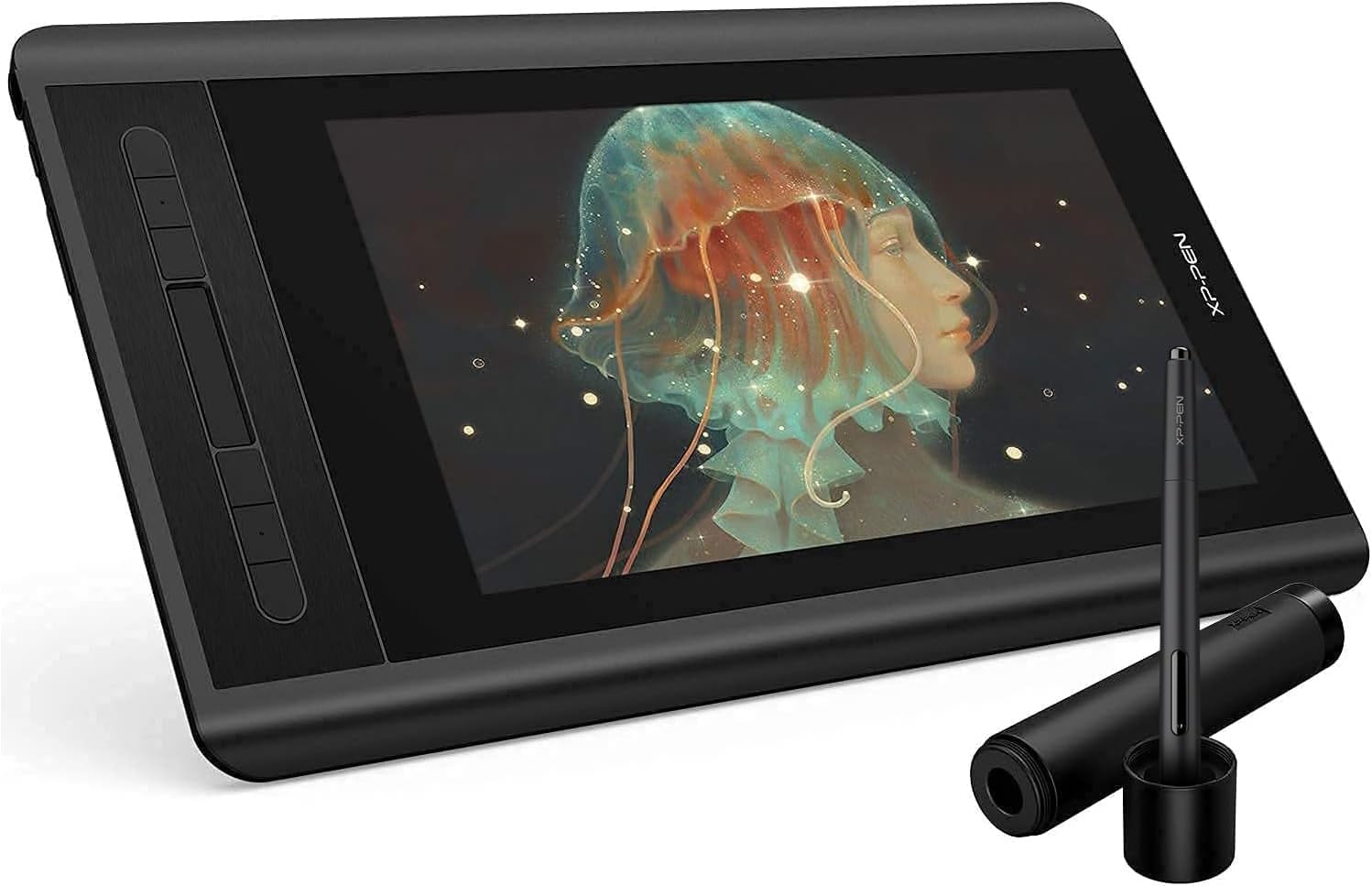
The XP-PEN Artist 12 Pro is a professional-grade 11.6-inch fully-laminated IPS drawing monitor featuring 1920x1080 resolution, 8192 levels of pen pressure sensitivity, and 60° tilt support. Designed for Windows and Mac compatibility, it offers 8 customizable shortcut keys and a red dial for enhanced workflow efficiency. Its anti-glare, scratch-resistant screen and included accessories make it a versatile, portable tool ideal for artists, designers, and educators seeking precision and convenience.


| ASIN | B07GNK18VJ |
| Active Surface Area | B07GNK18VJ |
| Best Sellers Rank | #14,843 in Computers & Accessories ( See Top 100 in Computers & Accessories ) #69 in Graphic Tablets |
| Box Contents | 1 Pen Display, 1 P06 Passive Pen, 1 Pen Holder, 8 x Replacement Pen Nibs, 1 HDMI to Mac adapter cable, 1x USB Cable, 1 Cleaning cloth, 1 Black Drawing Glove, 1 Quick Guide |
| Brand | XPPen |
| Brand Name | XPPen |
| Colour | Black |
| Connectivity Technology | USB |
| Country of Origin | China |
| Customer Reviews | 4.4 out of 5 stars 11,632 Reviews |
| Display Type | LCD |
| External Testing Certification | nao |
| Importer Contact Information | M/s DNS Overseas: 1003, Raheja Chambers, 213 Nariman Point, Mumbai 400029 |
| Item Dimensions L x W | 35.5L x 23.4W Centimeters |
| Item Type Name | Graphic Tablet |
| Item Weight Unit of Measure | 907 Grams |
| Manufacturer | Hanvon Ugee Technology Co. Ltd., XP-Pen |
| Manufacturer Contact Information | Hanvon Ugee Technology Co. Ltd. |
| Manufacturer Part Number | Artist 12_SML |
| Model Name | Artist |
| Model Number | Artist 12_SML |
| Native Resolution | 1920x1080 |
| Network Connectivity Technology | USB |
| Operating System | Mac OS, Windows |
| Packer Contact Information | M/s DNS Overseas: 1003, Raheja Chambers, 213 Nariman Point, Mumbai 400029 |
| Pressure Sensitivity | 8192 Levels |
| Product Features | 60° Tilt Support, 8192 Levels of Pressure Sensitivity, Shortcut Key |
| Screen Size Unit of Measure | 11.6 Inches |
| Special Feature | 60° Tilt Support, 8192 Levels of Pressure Sensitivity, Shortcut Key |
| Specific Uses For Product | Animation, VFX, Game design, Illustration, Graphic design, Interior Design, Teaching, Note-taking, Business meetings |
| Target Audience | Student, Teacher |
| UPC | 758232357309 |
| Unit Count | 1 Count |
| Warranty Description | 1 year manufacturer |
P**)
Great tool to up your art game.
Great tool for artists...I know ipad and procreate is amazing too but this gives me much more freedom to work with bigger files and cmyk file since I can use the power of my PC and software like photoshop. It has good response. Sometimes it gets disconnected but it happens on prolonged use... It has a matte screengaurd which is good since it avoids the screen glares. The colors are very nice and saturated. The pen is very responsive and very comfortable to use for long hours. The tablet comes with a stand which is very helpful. With dust prone atmosphere of India the screen needs extra care and cleaning to prevent scratches. I would like to know if the matte screen gaurd gets scratched can it be changed?. All in all it is a great budget friendly tool for artists.
P**J
Superb Build Quality
I am reviewing it after using it for 2 years. Currently I am using as an external display. its screen quality is great and its build quality is superb because it survived an accidental fall. no screen damage at all.
S**.
Great product
This is the only affordable and efficient drawing tablet I've found. As I could not invest in Wacom cintiq I found out about the XP pen & I loved it. It did give me trouble connecting it as it is a little complex and the manual they provide does not help so I suggest visit their website & download zip file for the manual of the required product as that gave me the right details. The stylus/pen is amazing, feels like drawing on paper & the drawing glove was a life saver for me as my palms are sweaty. But the pen don't work properly on Adobe illustrator, I will contact the customer service for it. The customer care has always answered my calls and helped. If you don't have a habit you may face some neckache so I suggest u also purchase the stand or use a laptop table with flap. Over all I find this product is helpful and it saves my time a lot making illustrations!
S**L
Bang for Buck
You what you pay for. No non-sense device and it does what its made for. Good screen, good stylus and good performance overall.
A**N
Really Awesome
After one month of usage i am very much satisfied of this products. The pressure sensitivity is superb. We can use it as a monitor tablet also as a normal graphic tablet( off the screen and use). Also if its connected to laptop. It will take the power from laptop, so we can work remotely without direct power support also. The non chargeable stylus pen is very handy and Weightless. I am using it for Zbrush sculpting its works well. I love the product very much.
H**H
I am in love with this
Great product in very reasonable price
D**E
🤘🏼
Very good product if u are a beginner.
A**A
Disappointing product and even worse Customer Support .
I purchased this product in June ‘20. It worked fine for a half a month then it began showing display errors. Even though it is properly connected the tablet always show’s not display signal’ . I searched online and turns out many buyers posted the same problem on Reddit and other such online forums . The 3-in-1 cable has a manufacturing defect in most tablets , I contacted the customer rep, and they are the worst ever . I took me a month to successfully register my complaint and took them more than 3-4 months to get back to me on a replacement . They don’t even keep you updated I have to always call them to inquire when it should be their job to do so . It’s almost 5 months of my warrantee period wasted and I haven’t had the replacement cable yet . They have successfully managed to evade and nullify half of the warranty period . I myself am planning to return the product . So don’t buy this product at all . Not recommended, trust me I am a professional artist and this is not something you would want to have . Really not worth your money. Again , the worst customer service ever. It’s like communicating with zombies
G**A
Mesa artista 12 detalhes finos e precisos
A mesa é muito boa, era como imaginei tem uma ótima qualidade, tem bastante detalhes em cada trabalho.
B**A
Great display tablet
I have not had this for very long but I'm so far pleased with it. This is not my first graphic tablet but it is my first display one. The XP-Pen Artist 12 is a display graphic tablet which must be plugged into a laptop or monitor for it to work, it is not functional as a standalone product just to be clear. Inside the box includes wires to plug in, several wall mounts for different regions, a drawing glove, a screen cleaning cloth, some manuals, the pen (which also has an eraser on the other end of it as well as extra nibs in the holder) and of course, the tablet. There is no stand included. Display: The display matches the monitor almost perfectly. There may be a small difference color-wise but it is almost undetectable. The working space is slightly smaller than 12 inches (and forgive me if I'm off as I am not the best when it comes to measuring) so it may feel a little small at times. The contrast and color scales are customizable in the settings so you may adjust it to better replicate your computer monitor. But do be aware that turning up the brightness (buttons on the side near the input plug) on the tablet itself may also affect the contrast and cause things to look weird. If you have overhead lights on while using it, you may notice some glare issues that can obstruct your vision. As the display is not laminated, there is a small observable gap between where you place your pen and where your cursor appears on the screen. This parallax issue is easily overcomable in my personal experience and doesn't actually affect the way you draw but it may bug you if you are prone to being displeased by that. Pressure and Drawing Experience: The pressure sensitivity is rather decent (I'm no expert though) and though the display looks smooth, there is a grippy, textured feel to drawing on it. The pen detection distance is rather short, however, so the pen tip must be pretty close to the screen at all times if you want to hover over something without clicking or drawing. I am satisfied with the drawing experience though. Because there is no stand included, you may find yourself in awkward positions or practicing poor ergonomics so I do recommend purchasing one. Shortcut keys: The tablet includes short cut buttons to the side and a scroll wheel all of which are mappable in the settings. The scroll bar is not very sensitive but its still useful. The pen also has a shortcut button on one of its sides but is incredibly inconvenient to use as it rests flat and is therefore undetectable by feel. You'll have to stop what you're doing to look at it if you're determined to use it and there have been times where I gripped a little too hard after habitually rotating it and accidentally pressed it while drawing. Software: You must first uninstall any drivers from other brands you had installed and then search for the XP-Pen drivers on their official website. I have not had any driver issues but there may be select software incompatibilities that you should be aware of. I used Paint Tool Sai on my previous Wacom tablet before getting this one only to find that XP-Pen has some strange issues with the program. The pressure sensitivity completely stopped working and the pen eraser is rendered obsolete. The pressure sensitivity can be fixed by installing and using a special version/pack of Paint Tool Sai but I am not aware of any eraser end fix. Durability: I researched about this Tablet before buying and this aspect was completely inconclusive. I used to have a Wacom graphic tablet and I wanted a display (that wasn't Wacom prices) but I was concerned that I would spend a good 200 dollars for a month or two of use. Obviously the XP-Pen Artist 12 isn't a tank and should therefore be treated with utmost care. There is an included warranty but I hope to never need to use it. I will most likely update this aspect after further use down the line. Price: This one speaks for itself. The price tag is so good for a display tablet, its near irresistible. Overall, the XP-Pen artist 12 is a great display tablet, especially for the price and I can wholeheartedly recommend it.
M**O
Prima tablet
Ik heb deze tablet gekocht voor mijn vrouw. Ze wilde eigenlijk een "blinde" van Wacom maar tijdens onze zoektocht liepen we tegen deze aan die voor een vergelijkbare prijs een scherm biedt. Ik teken zelf niet, maar kon me voorstellen dat dit veel en veel fijner werkt. Dus we hebben de gok genomen, na wat reviews te hebben bekeken, en deze tablet gekocht. Ik ben niet bekend met de concurenten, ook niet met Wacom, dit is onze eerste tablet voor tekenen maar hij is erg prettig en mijn vrouw is er dolgelukkig mee. Ik raad hem dus ook zonder meer aan voor mensen die een keer willen proberen of digitaal tekenen iets is voor ze. Het werkoppervlak is groot genoeg en het scherm is erg scherp en mooi van kleur (al ben ik geen kenner en zal er natuurlijk voldoende op aan te merken zijn als je gaat kalibreren en zo, maar ok, in deze klasse (zowel van tablet als artiest :+ ) doet dat er niet zo veel toe. De pen zelf ligt lekke rin de hand en zelfs ik kon er prima mee schrijven, het is echt net of je op papier werkt.
L**O
Para trabajar con soltura y calidad incluso en los viajes
Como usuaria anterior de otras soluciones de tabletas gráficas basadas en monitores (trabajar sobre el dibujo), puedo decir que esta solución de XP-Pen es una opción muy buena para cuando tengas de dibujar en viajes, acabar trabajos en casa o demostraciones en la casa del cliente. Qué recibiremos con el pedido? Dentro de una cuidada caja muy trabajada nos espera la tableta en todo su tamaño, detrás tendremos el cargador con los adaptadores para 3 diferentes enchufes, manuales, garantía y tarjeta de fidelización, puntero dentro de un estuche redondo con varias puntas de repuesto y todos los cables necesarios, a saber: Un complejo cable que, en el extremo de la tableta es conexión USB C y en el otro extremo una conexión triple (HDMI, USB para el táctil y USB para alimentación (para el cargador incluido)). Además un extensor de cable USB para poder tener funcionando la tableta a mayor distancia del enchufe y por último, un adaptador de HDMI a MicroDP (Mac). Os dejo una fotografía (4ª) con el montaje completo ordenado con un par de bridas de velcro. Preguntado al fabricante, no existe la posibilidad de una conexión directa USB C a USB C. La tableta, al ser un monitor de 12" FullHD LED IPS, necesita al menos 5V y 2.5 Amp que no es capaz de alimentarse directamente del portatil. Una vez todo conectado, Windows 10 detectará y dejará funcionar la tableta sin añadir driver alguno, si bien el fabricante insiste en utilizar los últimos drivers descargados de su web, estos nos facilitan la configuración de los botones adicionales (parte izquierda de la tableta) con las funciones que nosotros queramos. Funcionamiento Para Windows 10, la tableta es, y así se comporta, un monitor externo adicional, que podremos configurar a nuestro gusto. Por defecto se configurará con su resolución de 1920x1080 (FullHD) y será el monitor nº 2. Podremos configurarlo a la resolución y posición que nosotros queramos, windows se adaptará a nuestro gusto. El lápiz interactua como un ratón con su botón derecho incluido. También es compatible totalmente con Windows Ink. En las pruebas realizadas con el simple SketchBook Pro (disponible en la Windows Store) hemos sido capaces de probar que el programa reconoce los niveles de presión y escribe más grueso o más fino dependiendo de la fuerza con la que actuemos contra la pantalla. El puntero no necesita alimentación alguna. Con su tamaño de 12" nos cabrá perfectamente en el mismo maletín del portatil, el puntero viaja dentro de su estuche redondo con las puntas adicionales. Tal vez la conexión directa por USB habría simplificado enormemente la complejidad del cableado y el cargador, espero que tomen nota para futuras versiones.
A**R
Beginners Beware!
This drawing monitor is insanely good for the price. I’ll have to admit that I’ve only used it for a week or so at the time of me writing this. Yet the one thing I wanted to point out was something I found to be quite inconvenient and possibly challenging/ impossible for beginners as they set up their new drawing monitor. I started out by deleting my previous tablet driver and downloaded the one that my computer needed on the XP-PEN website. It was a walk in the park, super simple. The thing was when I rest my computer and connected the cables it wasn’t working. I turned on the monitor and it gave me an error message, then enabled battery saver mode. Long story short I had to fidget around with my cables for about 30 minutes and reset my computer a dozen times to actually get it going. Once inside my program I found that even though the cursor was popping up on screen once it went over the canvas it was going haywire. I went into the driver and calibrated it a bunch, then reset it again. Then I ended up having to change my virtual monitor set up so that the XP-PEN monitor would mirror my main one. After all that I came a across a slight problem, in multiple programs that I had tested I was seeing that the lines were coming out pixel-y. It actually wasn’t a problem with the monitor that time but just the custom DPI settings I had on all my programs, so keep that in mind if you come around a similar issue. Anyways, it took me about 15 resets before it was working functionally, then another one when the stylus went haywire again. Right after reset 16 I started to question my purchase but once I got into the rhythm of things with the touch bar, shortcut keys and the really great screen quality, my doubts just went away. The inclusion of the pen case and smudge guard plus cloth were nice but also incredibly practical. The drawing monitor didn’t give me any problems from then on, the only thing would maybe be that I have to disconnect and reconnect the HDMI to USB adapter cable every time I turn on my computer, this isn’t new to me though, I’ve had similar issues with that adapter when using other monitors, but hey maybe another reset would be necessary! All in all I would consider it easy to use but not easy to set up. There were a few aforementioned issues I encountered which weren’t from the monitor itself but instead as a result of the monitor such as the DPI and HDMI adapter, which is important to differentiate between as it helps better find the solution. If this were my first encounter with drawing virtually then I would love using it but maybe find it impossible to set up. If you’re planning on buying this product specifically for someone who doesn’t know anything about computers, drawing programs, or tablets in the slightest then it’s better to either A. Have it set up for them by someone who either knows about it or has the extreme patience and time to learn about it, or B. Buy a simpler type of drawing TABLET as it would most likely be 10 times easier to set up than a drawing monitor. Though they are XP-PEN’s competition, Wacom, and the Wacom Intuos tablets are really awesome for beginners, I had one starting out and at that time they even included drawing and animation programs ( all be it not very good ones). A Wacom tablet would be a better choice if choice A isn’t possible. Yet I understand the interest with this particular monitor with its size and price point. I highly recommend it regardless of my initial problems.
Trustpilot
1 month ago
2 days ago