
DOWNLOAD THE APP


Customer Services
Copyright © 2025 Desertcart Holdings Limited
DOWNLOAD THE APP

🎯 Own the game, anywhere, anytime with Nimbus — your ultimate Apple gaming sidekick!
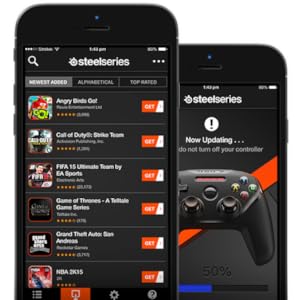
The SteelSeries Nimbus is a premium MFi-certified Bluetooth 4.1 mobile gaming controller designed for iPhone, iPad, and Apple TV. Featuring an ergonomic console-style layout, pressure-sensitive buttons, and a robust 40+ hour battery life rechargeable via Lightning cable, it delivers seamless, precise gameplay. Perfectly optimized for Fortnite Mobile and hundreds of other MFi-compatible games, Nimbus offers professional-grade control and effortless multi-device connectivity for the discerning Apple gamer.





| ASIN | B01AZC3III |
| Additional Features | Ergonomic |
| Best Sellers Rank | #54,300 in Video Games ( See Top 100 in Video Games ) #1,344 in Mac Games & Accessories |
| Brand | SteelSeries |
| Brand Name | SteelSeries |
| Button Quantity | 12 |
| Color | Black |
| Compatible Devices | iPhone 6S, 6S Plus, 6, 6 5, 5C, 5S, iPad Mini 4, 3, 2, (4TH Generation), Air iPod Touch (6TH Apple TV Generation) Compatible Devices iPhone 6S, 6S Plus, 6, 6 5, 5C, 5S, iPad Mini 4, 3, 2, (4TH Generation), Air iPod Touch (6TH Apple TV Generation) See more |
| Connectivity Technology | Bluetooth |
| Controller Type | Gamepad |
| Customer Reviews | 4.3 out of 5 stars 4,050 Reviews |
| External Testing Certification | 04086-17-10511 |
| Global Trade Identification Number | 05707119025676 |
| Hardware Platform | Tablet |
| Included Components | Nimbus Controller^User Manual |
| Item Dimensions | 4.33 x 2.49 x 5.9 inches |
| Item Type Name | SteelSeries Nimbus Bluetooth Mobile Gaming Controller - iPhone, iPad, Apple TV - 40+ Hour Battery Life - MFi Certified - Supports Fortnite Mobile |
| Item Weight | 0.53 Pounds |
| Manufacturer | SteelSeries APS |
| Model Name | STEE |
| Package Quantity | 1 |
| Power Source | Battery Powered |
| UPC | 813810019915 |
| Warranty Description | 1 year |
M**R
Better Than a PS4 Controller (IMHO)
With the release of iOS 13 and the push for compatibility with iOS and PS4 or XB1 controllers, I thought I'd return to my review for the Nimbus and give my impressions after using the PS4 controller with my iPad. I actually PREFER using the Nimbus. Yes, the R3/L3 buttons don't work on the Nimbus, but so far that hasn't been an issue. The positives here are a VERY premium feel, more or less rock solid performance, and great battery life. On top of that, using a PS4 controller requires you to drag another micro-USB cable along with you (the Nimbus charges over lightning). With Apple pushing controllers, and more and more indie PC games making their way to iOS, now is definitely the time for a dedicated gaming controller. And sure, this thing is expensive (I was lucky enough to get an Amazon Warehouse deal). If you already have a PS4 or XB1 controller lying around, then use what you've got handy. Otherwise, you can't go wrong with the Nimbus! ------ Not sure why Apple has never made a bigger deal out of MFI. I started playing Stardew Vallew on iOS, and grew increasingly frustrated with the clumsy touch controls, which led me to researching bluetooth controllers that worked with iOS. The Nimbus has the same feel and quality as a Playstation or XBOX controller, with all of the buttons, triggers, and analog sticks that you will ever need for iOS/OSX gaming (aside from the L3/R3 inputs found in PS/XB). The controller works perfectly with any game designed to accept MFI inputs, which is really the only problem with this controller -- the games/apps have to be PROGRAMMED to work with MFI. There are several websites that will tell you which games DO work, but you have to go into this knowing that a vast majority of iOS titles will NOT function with this, or any, controller. Like other Apple products (ex AirPods), the Nimbus can seamlessly switch between all of your iOS or OSX devices and works perfectly well for Mac gaming. Definitely recommend!
A**N
Better than xbox or playstation.
Ok so this product is pretty mind blowing. For starters the build quality is even better than any xbox or playstation controller (especially the joysticks sensitivity range and overall functionality. Could be partly do to the superior nature of ios/ipad os but I would guess most of the credit goes to this amazing company. Next I should mention that of any controller I ever used this one is far superior when it comes to ergonomic design. The dimensions are perfect, the layout is perfect and overall it just feels like an extension of your digits. I get addicted to just holding this controller let alone it's superior responsiveness and sensitivity range while actually using it. Ok so final gush here but no less impressive is it's battery and bluetooth connectivity. It connects seamlessly upon the press of the start button in just over a second and has a standby mode which rivals the iphone. This means that on one charge the battery can last WEEKS on end with hours upon hours of intense gameplay and within less than a minute of no interaction it goes into standby mode which uses virtually no battery power whatsoever so you never have to worry about forgetting to switch if off EVER and when needed you just hit the big round 'start' button and you are good to go.... for sometimes over a month before it needs a charge. Oh btw it charges with a lightening cable which is not included.
S**S
A perfect controller when it's supported
This controller feels great. Despite some reviews I read, the Dpad is very nice and not too squishy. The buttons are firm and feel well built and the joysticks have great resistance. The triggers feel solid and feel very similar to those on my ps4 controller. The battery indicator and ability to charge via lighting cable are great features. Pairing was simple and quick on iPhone, iPad, Mac, and my Apple TV. I use the controller with an emulator on my Mac and several iOS games. My favorite so far is Real Racing 3. Totally makes it feel like a console experience. My only complaint is that more games don't support the device. I think more will in the future. At least I hope. And yes, it does work with Minecraft and Terraria as well.
A**Y
Love it!
I have a hard time writing reviews but this controller has been amazing! It is the perfect size so it is not big and bulky but it also isn't super small and hard to press buttons. When I first picked it up I could tell it was sturdy and well made. All of the buttons look and feel like an Xbox controller and it links seamlessly and is smooth and fast in connection. The only complaint I have is not with the controller but the game developers. Some of the button layouts make no sense for some of the games, and some games you have to both touch the screen of your phone and use the controller. It doesn't make much sense. The controller itself however works perfectly and makes games that with good layouts so much more fun. I highly recommend it as it has turned my iPhone 6 into a traveling game console. Good Games for the controller (That I have played) Minecraft Grand Theft Auto San Andreas Gangstar 4 Storm Raiders Asphault 8 Games that didn't work as well: Call of Duty Strike Team (It is fun but you still have to touch the screen at some points) Trial Xtreme were not as functional All in all it was a worth it purchase as it is not specific to iPhone or iPad but works with all. I bought a Moga controller in the past that I could only use with my iPhone 5, so this was a must fro me. Enjoy!
D**R
Nimbus vs Stratus Duo
Since Amazon combines both the nimbus and Stratus Duo reviews, I have to put both those reviews here. Nimbus Review: Because I saw that someone had posted on YouTube that this controller does not work with OpenEmu, I thought that I would clarify that at the time of this review (Feb 19, 2017), it does work. It connects just fine to the Mac via bluetooth, and there is no button that does not get detected and function just fine (including the joysticks). Don't be fooled though, outside of OpenEmu, there was no game on my Mac that worked with it. Obviously it works great with iOS though and I definitely preferred it for that over other MFI controllers that I found. Edit: I wanted to add that I have further tested this controller and it also works with the "Dolphin" Emulator (which runs GameCube games), except that it doesn't sense the start button. In case you're wondering, this doesn't work at all with the "Boxer" emulator (that's a DOS emulator for Mac). Also, although this controller doesn't work with most regular Mac Games (including Steam games), you can make it work with many games by using a program called Joystick Mapper or something similar. If you go that route, you can remap the inputs to read as keyboard inputs inside of your games, which still doesn't work in every game (plus the D-Pad and Start Button aren't picked up at all by that program), but it certainly extends the usefulness and capabilities of this controller. Stratus Duo Review Summary The Stratus Duo feels just like the Nimbus Controller for iOS, except for small improvements to the triggers and D-Pad. The Wi-Fi connection dongle has an amazing range and was fairly reliable on windows. The Bluetooth is essentially useless for anything but an android phone. Battery life seems great as long as you use the dongle and not Bluetooth. The Details Look and Feel This controller looks and feels almost identical to the Nimbus controller. I was a big fan of the Nimbus, so having one that works natively on PC is awesome. The things that are different are the triggers, D-Pad, and front LED’s. The triggers have a shorter range, and are slightly more ergonomic/curved. I would say that they’re better than the Nimbus in that regard. The front LED’s are a step down in the sense that they’re white instead of red. This makes them a lot more distracting in dark environments compared to the Nimbus’ red lights. They also seem brighter. So they constitute a strange design change in my opinion. The D-Pad is bigger than the Nimbus, the surface is different. It feels better to me than the Nimbus but is definitely more stiff than the PS4 controller. Wi-Fi Dongle When you plug in the dongle to a PC, it’s basically is plug and play, and the range is incredible. I was planning on using the Bluetooth setting to connect to my Steam link a couple rooms away, but the connection is so good using the included dongle, that I was able to play on my Steam link while still connected directly to my PC. That means that the connection has a greater range than even my Xbox One Controller when I connect it to my PC through Microsoft’s proprietary USB dongle. It’s also substantially better than the Bluetooth range on my PS4 controller, which cuts out before even reaching my living room (where the steam link is). As far as negatives go… This does not work at all with an Xbox One. I tried it, and it doesn’t even detect that something is plugged in. It also has a strange issue on PC, where if you turn the controller off, it will often connect as the second player controller when you turn it on again, which means that you can’t play any one player games because of being considered a second player. You have to restart your PC to fix that issue. Windows is fairly buggy with controllers sometimes, and this could very well be their issue and not the this controller’s issue. However, I haven’t had that problem with my Xbox One controller or my PS4 controller. Bluetooth By far the biggest failing with this controller is its extremely bad Bluetooth. I guess when they say that it works with Android and VR, they really just mean those two and nothing else. It connected with the Steam link, but had a bug where the left joystick moves the mouse slightly, while also moving the joystick at the same time. No other controller has that issue on my Steam Link. iOS 13 brought xinput and direct input controller support with it and I can confirm that both the Xbox One and PS4 controllers connect and work just fine. This controller… not so much. iOS can’t even see this controller in the Bluetooth connection menu. I tested that on multiple iOS devices. So don’t plan on using this with iOS. My MacBook was able to see it and connect to it, but then I couldn’t use it in any way, not even in OpenEmu, which is something that even the Nimbus can be used with. The lights also indicated that the connection was unstable or something, since they went back and forth from showing the looking-for-a-connection pattern to the now-connecting pattern. So don’t count on using the Bluetooth for anything but Android. Durability The controller’s durability has yet to be evaluated, so I might update this review with that in the future. I will say that the Nimbus had a design flaw that caused the triggers to become sticky within a fairly short time. iFixit has a page about how to fix that issue, and they also explain what causes it. This controller feels very similar to the nimbus as far as the triggers go, so I wouldn’t be surprised if it has the same flaw.
M**E
Great controller
What can I say? It was a great and loyal controller for many years until I eventually sold it. It’s great if you have an Apple TV and nowadays, you know you can use your PlayStation or Xbox controller instead of this, but nevertheless, if you don’t have either of those this is a good great controller For Apple TV and Apple TV games. You can even use it to control your Apple TV for anything even watching videos, so definitely worth it and I would recommend it.
A**O
Steel series nimbus r1 and r2 fumbling problem.
quite a fantastic controller it looks good it's durable everything you see is ok things like limited button setups are not the controllers fault ok let's see why I've turned this 5 star controller into a 3 star review and looking at the competition. I play modern combat 5. The schematic I use in order to use the knife as 'A' button requires me to shoot with r1. And throw a grenade with r2. The way the controller fits allows your finger to barely hit the corner of r1 and lately I've been misfiring grenades because I keep accidentally hitting r2. Some people would know what I'm talking about. Some may take it has an advantage. To me it feels a bit too compact and the design in the back could be done better with the angles and I think a stiffer r2 would make it more realistically luxurious and believable. I am nitpicking to some degree but there are at least two other controllers out there besides the steel series xl which has poor to average reviews. I like what I see with the steel series xl and might just try it despite 3 stars on Amazon. I will probably put this in a droor and try the madkatz or the other one I forget the name of that also allows a phone to port.
D**E
Perfect for Minecraft.
I originally bought a Madcatz C.T.R.L.i remote (boy, that's annoying to type), and it was great. But it would freeze frequently, requiring a restart of my iPhone. So I bought the SteelSeries Nimbus to compare, hoping to regain confidence in iOS remotes in general. And I was hugely relieved to find that the Nimbus did just that. It pairs fast. It's reliable. The controls are smooth. And it looks great (if you're into that). I use it for Minecraft Pocket Edition v0.16.2 on my iPhone 7+ 256gb with iOS 10.1 (10.1.1 is available now, but I'm lazy). It works perfectly. I can go to the Nether and never worry that I'm going to have some weird controller glitch and end up in lava, or trapped helplessly by a magma cube. I mean, this remote is ridiculous. I was AFK at my skeleton xp farm with my phone on the 2nd floor walking all over my house with my Nimbus in hand whacking away at the skeletons, gaining enchantment levels, and with my phone at full volume I could hear the skeletons still dying anywhere in the house that I walked. It just works. Which is the reason I got an iPhone and not an android. This remote is, based on my experience with iOS remotes so far, the iPhone of remotes. And with this remote, I feel my search is done. One issue: it has no mount. But that has proven to be less of an issue for me than I thought it would be. I really don't miss it. And the remote feels better to use without the weight distribution being all wonky with a big, fat phone stuck on the top. So that's a nonissue for me. That weight distribution made the C.T.R.L.i uncomfortable to use for long periods anyway (when it was working). If that remote had been more consistent, I would have accepted it and probably have stayed happy with it. But I'm glad to be free of that little issue.
Trustpilot
3 weeks ago
2 weeks ago