Desertcart purchases this item on your behalf and handles shipping, customs, and support to Japan.
🚀 Upgrade your rig with PCIe 4.0 speed and chill vibes!
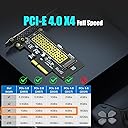
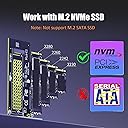
The GLOTRENDS PA09-HS adapter converts a PCIe X4/X8/X16 slot into an M.2 Key M slot, enabling installation of PCIe 4.0 NVMe SSDs up to 4TB. It includes a high-efficiency heatsink that reduces SSD temperatures by 5-20°C, ensuring sustained peak performance. Fully compatible with modern OSes and supports booting from the NVMe drive on compatible motherboards, this adapter delivers reliable, high-speed storage expansion for professional-grade desktop PCs.


| ASIN | B07FN3YZ8P |
| Best Sellers Rank | 5,089 in Computers & Accessories ( See Top 100 in Computers & Accessories ) 1 in Serial Adapters |
| Box Contents | M.2 Heatsink |
| Brand | GLOTRENDS |
| Brand Name | GLOTRENDS |
| Cache Memory Installed Size | 6 GB |
| Color | Black |
| Compatible Devices | ['Desktop PC'] |
| Connectivity technology | Firewire, PCI-Express X4 |
| Country of Origin | China |
| Customer Package Type | Standard Packaging |
| Customer Reviews | 4.6 out of 5 stars 5,387 Reviews |
| Data Transfer Rate | 64 Gigabits Per Second |
| Digital Storage Capacity | 4000 GB |
| Digital storage capacity | 4000 GB |
| Enclosure Material | Aluminium |
| Form Factor | M.2 Key M |
| Hard Disk Description | Solid State Drive |
| Hard Disk Form Factor | 22 Millimetres |
| Hard Disk Interface | NVMe |
| Hard disk form factor | 22 Millimetres |
| Hard disk interface | NVMe |
| Hard-Drive Size | 64 GB |
| Hardware Connectivity | PCI Express x4 |
| Hardware Platform | Linux, Mac, PC |
| Installation Type | Internal Hard Drive |
| Item Dimensions L x W x Thickness | 7L x 7W x 0.3Th centimetres |
| Item Weight | 0.08 Kilograms |
| Manufacturer | glotrends |
| Manufacturer Part Number | PA09_HS |
| Model Name | PA09-HS |
| Model Number | PA09-HS |
| Network Connectivity Technology | Firewire, PCI-Express X4 |
| Number of Items | 1 |
| Product Features | PCI-Express 4.0 X4 Full Speed Support |
| Product Warranty | 30 Day Warranty Against Manufacturer Defects |
| Special feature | PCI-Express 4.0 X4 Full Speed Support |
| Specific Uses For Product | Personal |
| Unit Count | 1.0 count |
S**L
Easy to add NVMe drive to PC
For 13 quid, you cant go wrong. Worked first time and dead easy to install. I have a few NVMe drives knocking about and I thought Id test one of these adapters on one of the bigger ones. Very pleased and will probably get another one. Longevity yet to be determined but theres not a lot to go wrong with it.
J**W
Added a 2nd M.2 SSD to my Gigabyte motherboard
As a result of some upgrades to my laptop I had a spare M.2 SSD floating about. Although the Gigabyte motherboard in my desktop has 2 M.2 slots one can only be used with 11th Gen Intel CPUs and mine is a 10th Gen. This cheap card means that I can now have a second M.2 running. It took about 5 minutes to fit (fit SSD to board, open desktop, fit card, close desktop). The drive was recognised immediately, no drivers needed and just worked. It's not as fast as the motherboard M.2 drive but I think this is expected given the speed of the PCIex slot I fitted it to, but it blows the 3.5" mechanical drive that this second M.2 SSD is replacing into the far distance So: cheap way to add a 2nd M.2 SSD, easy to fit, good performance. Very happy
P**Y
Easy installation, works just fine
Instructions are simple and installing a SSD is rather easy. No issues with it!
P**R
Works great at x4 PCIe 2.0 speed. Doesn't boot.
First impression, it's smaller than it looks. I was worried it would block my GPU fan. I needn't have worried. I bought this along with an inexpensive NVMe card to use in an 12 old AMD Phenom II system. The motherboard had a spare x8 slot, which was ideal for this x4 card, and the speed is incredible. Copying some 2GB files to the drive was so fast I actually checked to see if they really had been copied. Disappointingly it wont act as a boot device despite the motherboard documentation (and BIOS settings) having options for bootable add-in cards. I mainly bought it as a location to install and run software so that's not a problem, but it would have been nice. As for PCI-e 2.0 speed at x4 lanes, it runs at 2000MB/s. For the price, I'm very happy.
C**G
Worked Perfect
Works a treat, just as fast as the built in m.2 slot on a fairly new pc with PCIe 4 slots and a nice speed gain in an old ASUS z77 board which must be about 12 years old but getting near theoretical max speeds for a PCIe 3 slot, had to try different slots to see which one is giving the best speed, the bios doesn't support it at all, but managed to get it booting into Windows 10 with Clover, not too bad to set up.
R**R
Works great with SN570 in Dell T3600
Works great, no issues. I have this installed on one of my PCIe ports (Gen 3, x4) of my old Dell T3600 workstation. Fitted a 1 TB WD SN570 NVMe drive and it works at full speed. I get a peak of over 3 GB/s. Only qualm is that the securing screw was already installed and was far, far too tight. Almost stripped it trying to loosen it ready for my drive. Had to use pliers and undo it that way. For anyone wondering, I use this with the NVMe as my boot drive. I installed Clover bootloader onto a small M2 card inside a cheap USB adapter. Plugged that into my internal USB port on the motherboard. Changed boot to UEFI in BIOS. Booted via Clover and installed Windows via recovery USB and restarted. System now boots from the NVMe device, and I didn't lose an external USB port. Total boot time is about 40 seconds, 35 of which are getting through POST. So a5 second windows boot all thanks to this card, a good drive, Clover, and a bit of tinkering
D**N
Works well !
Was unsure about this product as the price is cheap compared to other adapters that do the same job, but after reading the reviews I decided to give it a go. I am really happy with it ! I am getting full speed with my gen 4 NVMe drive. The only thing I don't like is the metal clips that are to help keep the heatsink on. I have not used these as even on their instructions you have to be careful that you don't short out the circuits on the drive ! These, in my opinion, are a disaster waiting to happen. I just used the rubber bands they supplied. I will use a plastic cable tie if these fail. Heatsink is working ok but drive still got to 60 degrees under load, but that was ok as my other drive which is on the motherboard socket and with a preinstalled heatsink gets hotter. I recommend this as a great way to add NVMe drives to your system.
D**N
Perfect for an old HP Z440 System!
This adapter allows me to boot from an NVME drive with an old HP Z440 workstation and is very easy to install. The drive being used is a 1TB MSI Spatium NVME and it works flawlessly and at the advertised speed too! Be careful with the metal heatsink clips as they can potentially cause a short on the underside of some NVME drives. The metal clips I received are a bit rough around the edges and can scratch/scrape the underside of the drive when sliding them on. It's a decent adapter that does the job and even the slim heatsink works well as long as your case has some airflow... It's just a shame the metal clips for the heatsink are a bit rubbish and can damage your SSD if you're not careful.
D**L
Competent card
Works.
J**N
Good option for those who need an extra NVMe drive for their PC
Easy installation, worked straight away with a 2TB Samsung 970 EVO Plus.
J**N
Arrived quickly. Works as intended.
I used it for my new SSD (The KIOXIA 内蔵 SSD 1TB NVMe M.2 Type 2280 PCIe Gen 4.0×4) since my Aurora R11 only had one slot for a NVME M.2 to go into, which was for my OS SSD. I ended up putting my OS SSD into this adapter and using the built-in slot for my new SSD. (To take advantage of the PCIE 4.0 speed) It works great and I have never had a problem with it. It comes with a little LED light in it, so you can check if it is powered/slotted correctly. The heatshield+gel works good too. It arrived the day after I ordered it as well, which was great, since I needed it quickly.
M**N
Just Perfect
I ordered it because I didn't have a second NVME slot on motherboard. Only use it for games and vfx, so far works flawlessly without any issues.
I**A
Compatibilidad y Rendimiento
🔹 Diseño y Funcionalidad: Este adaptador M.2 PCIe SSD representa un avance significativo en el campo de las soluciones de almacenamiento y expansión para computadoras. Su capacidad para trabajar con PCIe 4.0/3.0 M.2 SSD y no limitarse a los SSD M.2 NGFF SATA es un punto fuerte. Esto lo hace ideal para aquellos que buscan aprovechar la velocidad máxima de PCIe 4.0 X4 (64Gbps), aunque es crucial tener en cuenta que tanto la CPU como la ranura PCIe de la placa base y el SSD M.2 PCIe deben ser compatibles con PCIe 4.0 para lograr este rendimiento. 🔹 Compatibilidad y Rendimiento: La compatibilidad con el arranque del sistema operativo desde el SSD PCIe es un aspecto destacable. Sin embargo, es importante tener en cuenta las limitaciones, como la necesidad de reinstalar el sistema operativo y configurar el BIOS/UEFI para arrancar desde la SSD M.2 PCIe. Además, la incompatibilidad con Windows 7 para el arranque del sistema operativo podría ser un inconveniente para algunos usuarios. 🔹 Usabilidad: Como disco de almacenamiento, este adaptador es ampliamente compatible con sistemas operativos modernos como Windows 11/10/8, Linux y Mac OS. La necesidad de inicialización y formateo de los nuevos SSD M.2 PCIe antes de ser reconocidos por el PC es un paso adicional, pero es manejable para la mayoría de los usuarios técnicos. 🔹 Accesorios Incluidos: Los accesorios proporcionados, como el disipador de aluminio M.2, los soportes de perfil regular y bajo, y los kits de instalación, añaden un valor considerable al producto. El disipador de aluminio es particularmente útil, prometiendo una reducción de temperatura de entre 5°C y 20°C, lo cual es crucial para mantener un rendimiento óptimo y la longevidad del SSD. Conclusiones Este adaptador M.2 PCIe SSD es una solución robusta y versátil para usuarios que buscan expandir las capacidades de almacenamiento y rendimiento de sus sistemas. A pesar de algunas limitaciones, como la incompatibilidad con ciertas configuraciones antiguas y sistemas operativos, sus ventajas en términos de velocidad y compatibilidad con las tecnologías más recientes lo convierten en una opción recomendable para usuarios técnicamente inclinados y entusiastas del rendimiento. El conjunto de accesorios incluidos y la facilidad de instalación son puntos adicionales a favor, haciendo de este adaptador una excelente elección para mejorar la eficiencia y capacidad de almacenamiento en configuraciones modernas de PC.
Trustpilot
3 weeks ago
2 months ago