Desertcart purchases this item on your behalf and handles shipping, customs, and support to Japan.
๐ Transform your laptop into a powerhouse command centerโdock, display, dominate!
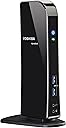
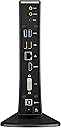
The Toshiba Dynadock PA3927U1PRP is a versatile USB 3.0 docking station designed for Windows laptops, offering a single-cable connection to multiple peripherals. It supports dual external displays up to 2048 x 1152 resolution, delivers 5.1 channel surround sound via HDMI or audio ports, and provides six USB ports including two front 'Sleep & Charge' USB 3.0 ports. Ideal for professionals seeking a clutter-free, high-performance desktop setup with universal compatibility.
| ASIN | B006ZGWJU2 |
| Best Sellers Rank | #71,398 in Computers & Accessories ( See Top 100 in Computers & Accessories ) #2,276 in Laptop Docking Stations |
| Brand | TOSHIBA |
| Color | Pa3927u1prp |
| Compatible Devices | toshiba laptops |
| Customer Reviews | 4.2 out of 5 stars 493 Reviews |
| Global Trade Identification Number | 00883974669882 |
| Hardware Interface | 3.5mm Audio, HDMI |
| Item Weight | 1.18 Pounds |
| Manufacturer | Toshiba |
| Mfr Part Number | PA3927U1PRP |
| Model Number | PA3927U1PRP |
| Number of Ports | 17 |
| Total Number of HDMI Ports | 1 |
| Total USB Ports | 2 |
| Total Usb Ports | 2 |
| UPC | 803982740267 132017821399 163120312092 151903091524 012302520391 883974669882 887597148434 088021462472 956263371527 763615849869 |
| Warranty Description | 1 year |
P**Y
Makes my Surface Pro a desktop replacement.
I recently bought a used Surface Pro on Ebay. And while its screen is amazing for tablet and ultraportable use, it isnt the best form factor for desk use at home. I found the Toshiba Dynadock after a little searching and it has exactly what I need: additional USB 3.0 ports, multiple video outputs, and 5.1 surround sound support. At was hesitant at first given some of the reviews, but these worries were quickly relieved. I downloaded the Dynadock drivers for Windows 8 from the Toshiba website, which I found difficult to navigate. But after installing the two necessary drivers, I connected my dynadock and it was recognized without problems. My dynadock currently has a 3TB Seagate drive, a Microsoft arc keyboard, a Microsoft arc mouse, a Dell S2340M 23" DVI monitor, and a Logitech 5.1 surround system. Everything was plug and play; the drivers all installed automatically. I'm mostly using this setup for business and productivity, as well as entertainment. I had everything setup and running in 30 minutes at most. I can't say it'll work this well for everybody but I could not be happier.
G**R
Works perfectly on USB 3.0 - great dock!
Flawless upgrade to my prior USB dock!! Have had a Kensington sd400v dock for several years. I run two screens off the computer (laptop, flat panel) and a third portrait screen off the dock. The Kensington always had issues with video (speed, video errors) but otherwise worked fine. I upgraded to the Toshiba Dynadock hoping the 3.0 speeds would result in error-free video. Was a little apprehensive about the negative reviews here, so I'll comment directly on some of the issues that others have experienced. 1. No problems with installation - ran the CD, the drivers updated themselves twice when the dock was plugged in, and it works with no issues. Toshiba uses a version of the same DisplayLink software that I used with the Kensington, however I note none of the errors I had with the sd400v. For example, the Win 7 drivers for the sd400v were notoriously difficult to get to install correctly. 2. No problems restarting the computer with the USB 3.0 connection. This problem is usually due to the USB 3.0 drivers and chips between the computer and the attached device. For example, I have had problems with a particular USB 3.0 hard drive causing the computer not to boot up. But no problems with this dock. I have a Clevo computer rebranded from Mythlogic with a Radeon graphics card, Win7 64bit (BTW a great company if you want a high-end laptop, much better price/performance than any of the "regular" brands) 3. The video has worked perfectly. No problems with video, response time equal to my other screens. No issues when I move windows back and forth to the screen (which used to cause problems before) 4. All of my USB devices on the dock work with no issues. I do not use either the audio or ethernet ports on the dock, so I can't comment on performance there. All in all, very pleased with this dock!!
R**.
A nice port expander
I bought the Dynadock (a port expander) to go on my wife's Sony Flip 13 to support a USB hard drive (with confidential information that stays home), a USB keyboard/mouse, and an exernal VGA monitor when working at home.. The Sony has 2 USB 3.0 ports and a single HDMI port. Using the Dynadock means she only has to unplug/plug two connections (Sony power and the USB to the Dynadock) when she travels and returns. Fortunately for me, she decided she didn't like the standup form factor, so I stole it and hooked it up to my little Samsung np300u1a-a01us, which actually has 3 USB 2.0 ports (one with optional sleep power), a VGA output, and an audio jack. Nevertheless, with the Dynadock, I can keep my USB hard drive(s) and USB CD/DVD drive connected to the dock, and I only have to undo two connections to take my PC elsewhere. The vertical, narrow form factor actually works well on my table. Installation was almost straightforward. I installed the software from the included CD, along with an update, and was off and running. I clicked on the notification icon for the displaylink, and saw the "check for updates" item, which I then clicked. The menu went away for about 10 seconds (with no evidence of activity) and then a notification bubble popped up with the message "Cannot Update Displaylink Sofware, Unable to connect to Microsoft Windows Update Server". I Googled "displaylink" and got the pointer to their download page, from which I was able to retrieve and install the latest update. (The notification menu item for update still doesn't work, and the "displaylink manager" item just gives you the current version number.) The audio and video setup items do work. As far as performance goes, I'm quite pleased, given that I'm driving the whole mess via a USB 2.0 port and my PC has an I3 processor. Keyboard/mouse and video response are indistinguishable from direct attachment of the monitor. I tried playing a DVD onto the monitor and separate speakers (all on the Dynadock), and the motion and sound were smooth and synchronized. I leave the Dynadock powered up, and I worried that this would leave the USB hard drives powered on as well (if you plug one into the Dynadock while the PC is not connected, it powers up and seems to stay up.) However, the Dynadock appears to shut down the drives if the PC is shut down while connected. I haven't tried this with either of the sleep/power USB ports on the front. Overall, I'm quite pleased with the device. I'd think it would be essential for some of the windows tablets that only come with a single USB port.
S**A
Ooooh I love this!
UPDATE: 25 December 2017 More than 4 year of continuous usage and still going strong! I still use this dock and I thought I'd come back and say how durable this thing is! I absolutely love it. I've added Plugable USB 3.0 Sharing Switch to it so I can share the same dock between two computers by pushing a button. ------- This is a fantastic work of art. Works as advertised. Computer: I use it on Windows 8 (download the latest drivers) on my Lenovo x220 Tablet/Notebook. I connected the DynaDock u3.0 on a USB 2.0 port and it works fine. I think it will be more awesome if my computer had USB 3.0 USB ports: I use all 6 USB ports: -Rear: HP printer, Webcam, Fitbit One dongle, wireless keyboard/mouse receiver (I have also tried external HDD) -Front: cellphone charging, spare for memory stick/lamp etc (very convenient) Displays: I use two monitors in extended mode both VGA, one connected via DVI connector (provided in box), other monitor connected to HDMI port via a Sandberg HDMI-VGA adapter, and it works flawlessly. I have not faced any of the issues mentioned in other reviews, I believe Toshiba has made enhancements to the drivers. For those having issues when the computer goes to standby, just prevent the computer from going on standby when docked by using a power plan. (You can enable the option to turn off displays, but not put the computer on standby). Please read the packaging and the description before you buy - this docking station does not charge your notebook and should not be expected to! Also make sure you use a genuine charger for your notebook, otherwise the display might experience flickering when connected to the Dynadock.
B**E
Nice, But a Caution for Business Users
The Good Overall, I am pretty happy with the Dynadock U3.0. I use it for business. I downloaded the latest drivers and the install went fairly smoothly, although I did have to reboot to get everything working. It does a great job allowing me to use both a Dell 2048x1152 monitor and a Dell 1900x1200 monitor in addition to my laptop's monitor for business software development (ASP.NET MVC). I can pretty much do everything, including watch videos, with no perceptible difference. Text is crisp and clean, and with a USB 3.0 port, performance is fine. Network, USB Ports, and video all seem to work as I had hoped they would. Audio is good, except for one glaring issue (see below). I had no expectation that this device would support games, so I am basically happy. The Bad Since I use this on my business computer, I attend internet-based audio conferences and chats (Microsoft Lync, etc). A problem with the Dynadock U3.0 is that it does not automatically mute it's rear external speaker ports when a headset is plugged into the front headset ports on the dock. This causes audio problems in a voice chat/conference. When I plug the headset into the front ports, I have to manually unplug the external speakers from the back of the Dynadock. Long-term, I am worried about wear and tear on the rear speaker port. A customer reported this problem in the Toshiba forums back in Feb. 2012, but got no public response. He indicated that older Dynadocks had a software option that allowed you to mute external speakers, but the current software only takes you to the Windows Control Panel Audio Settings dialog where no such option is available. When I called Toshiba support, the representative said that there is a software solution, but that he is not allowed to help me troubleshoot a "software issue" over the phone and he referred me to the support forums (where no answer was posted on this issue since Feb 2012). Catch-22, anyone? Honestly, I'd be happier if they would have just said "Oh yeah. That is the way it works, sorry." Nonetheless, I posted a repeat problem statement to the forums and hope to get an answer. [...Link to forum post deleted by Amazon...] Conclusion The Dynadock is a great solution for business users who want 2 external, hi-res monitors to work in addition their a laptop monitor. However, it's imperfect support for audio conferencing users is a real negative. It's not for gamers, and yet it has a real drawback for business users. If you do not do audio chat/conferencing, I recommend the Dynadock. However, if you do use audio chat/conferencing software, you might want to look for alternatives.
M**K
Best option on the market
After researching many option, I decided on this product because it has more features than any other product on the market. I love that there are four USB 3 ports and two USB 2 ports. DVI and HDMI work well. I read the reviews before purchasing and disagree that the item does come with needed drivers for windows 7 and prior. I had to download the Windows 8 driver/package but I received this product 5 days after the release of Windows 8. I didn't expect them to include Windows 8 yet but was impressed they already had the drivers. I had to install twice to get it to work but once installed, everything worked. I have two additional monitors connected to my laptop and it recognized both of them as an independent screen. I simply plug my Lenovo Ultrabook Yoga in and I have internet, monitors, additional keyboard and mouse. I do not see the delay as on review stated. It is not a dock as stated. You still need to connect the power to your Laptop but it is a great option to give you more options and connectivity with ease.
E**.
Did not work for me, and my laptop is still trying to recover
I ordered this product to use with my HP Envy 17 laptop (running Windows 7) that I'd purchased over the summer. The goal was to phase out my 4-5 year old tower and make the laptop my sole computer. Naturally there are times when it's more comfortable to work at a desk, with a larger monitor and a standalone mouse and keyboard, so I was looking forward to using this docking station as a means of easily connecting my laptop to those peripherals as needed. Initially everything worked fine - I set up the Dynadock using the included CD, and downloaded the updated drivers from Toshiba's website. Thanks to the reviews here and elsewhere I knew to adjust the power settings of my laptop so that it wouldn't sleep or hibernate when I closed the lid, and I was excited to have the new flexibility of using my laptop as a desktop. However, after a day or two I had a need to reboot my computer and that was when the trouble started. After rebooting and logging in I saw nothing but a black screen with a mouse pointer. I could move the mouse, but that was it. Hitting the Window key to try to bring up the system menu did nothing, and I had no choice but to do a hard shutdown of the laptop by powering it off. This began several days of trying various combinations of System Restores, driver re-installations, browsing forums on Toshiba's website and others, etc. On occasion I would get back to a workable system, but then something would go wrong ( piece of software wouldn't start, my web browser wouldn't function fully) that would force me to restart, and when I restarted I would get the same black screen with the mouse pointer. Interestingly -- and fortunately -- I was still able to log in to a second account that was on my laptop, so at least I had some limited access. But I was never able to get everything running smoothly again, and so this is going back to Amazon while I continue to try to get my laptop back to the state it was in before I purchased this product. I had planned on using my holiday time off for much more productive activities than this. Before buying this product I spent a lot of time looking at the reviews for this item and its competitors, and I can see from the reviews that it's worked very well for a lot of people. I don't know exactly what went wrong with my installation or where the incompatibility is exactly, but I wanted to share my experience in hopes of sparing others the frustration that I've experienced over the past week. YMMV certainly applies here - you may well have the positive experience that many other reviewers have had, but be prepared to recover in case something goes wrong.
T**.
Reduces the desk clutter
This is a great dock and works really well. Printer, ethernet, speakers, various USB connections for external drives work really well. I leave the wireless mouse connector right in the laptop so its there when I move it around. I had trouble with the external monitor however. It connects but there seems to be a lag in the screen response. I use this with a Toshiba Laptop. Another nice thing about it is that it stands up and doesn't take up a lot of room on the desk. USB 3.0 is really important if you have USB 3.0 on your laptop. The speed is incredibly fast. Another bonus is that you can charge all your USB devices such as iPODS, ereaders and phones in the front port of the dock, even if your computer is off. Amazon had the best price on this one.
S**C
Worth Having
We have a busy office with multiple monitors and our staff work on site and in the office. It is a quick disconnect and go.
Trustpilot
3 weeks ago
2 weeks ago