🎧 Elevate your audio game—because your sound deserves the spotlight!
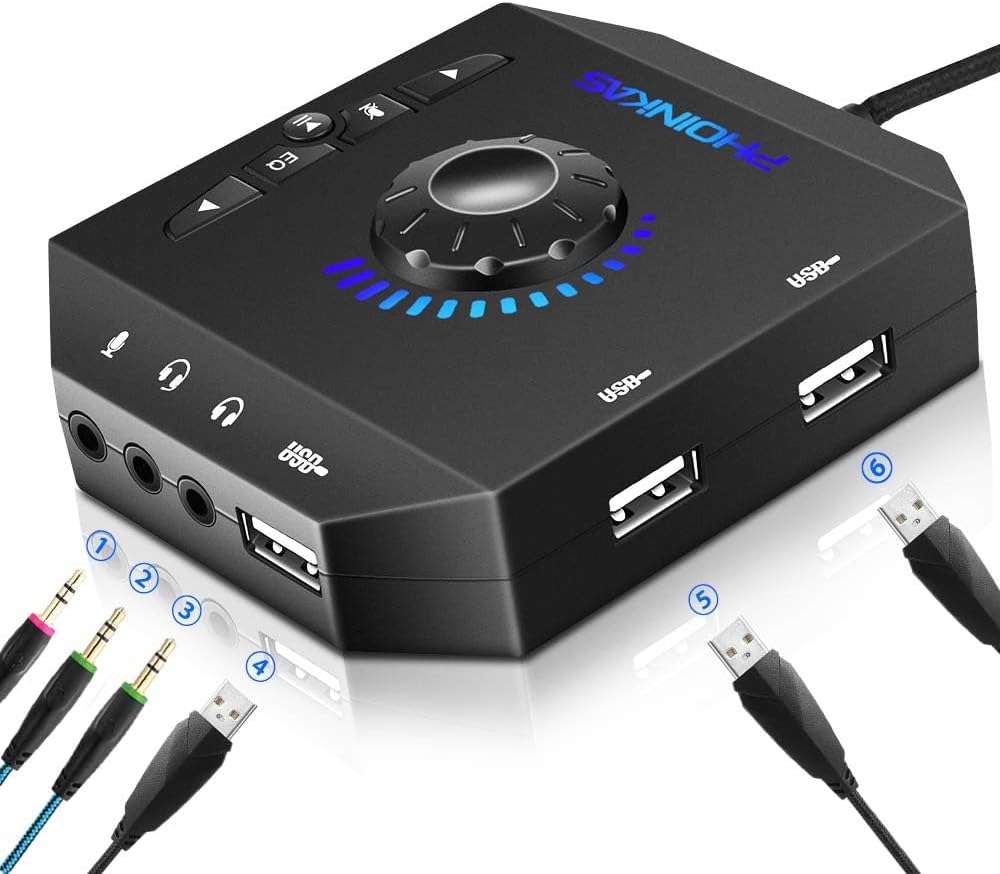
The PHOINIKAS T10 External Sound Card is a compact, plug-and-play USB audio adapter designed for PCs, Macs, and Linux systems. Featuring 6 ports (3 USB and 3.5mm jacks), it supports multiple devices simultaneously, offers 4 EQ sound modes including surround sound, and includes manual volume and mic controls. Perfect for gamers, professionals, and audiophiles seeking clear, interference-free HD stereo sound with flexible connectivity.


| ASIN | B07FP8PG9N |
| Audio Output Mode | Stereo |
| Best Sellers Rank | #54 in External Sound Cards |
| Brand | PHOINIKAS |
| Compatible Devices | Desktop, Headphone, Laptop, Speaker |
| Customer Reviews | 4.1 out of 5 stars 3,521 Reviews |
| Hardware Connectivity | USB |
| Hardware Interface | USB |
| Hardware Platform | PC |
| Item Dimensions L x W x H | 3.15"L x 2.95"W x 1.06"H |
| Manufacturer | PHOINIKAS |
| Maximum Sample Rate | 48 KHz |
| Model Number | T10 |
| Platform | Windows |
| Surround Sound Channel Configuration | 2.0 |
| UPC | 693594449869 795787263044 |
| Warranty Description | 1 |
J**.
Powerful, Versatile, and Surprisingly Clear — A Game-Changer for My Audio Needs
I purchased the PHOINIKAS T10 External Sound Card back in June 2025, and after months of regular use on my laptop (October 2025 now), I can say it has earned its five stars. I have some nerve deafness, so hearing things clearly has always been a challenge. Even with the volume cranked up to 100%, Windows 11 just doesn’t get loud enough, and my laptop lacks any sort of manual volume control. This little sound card completely changed that. It provides a noticeable boost in volume and allows me to fine-tune my audio in ways the built-in system simply can’t. The onboard EQ functions are a big plus — four sound modes, including a surround sound option that really enhances clarity and spatial awareness, especially during games and movies. It also helps cut down on electromagnetic interference, which means I get a stable, clean HD sound without static or hum. For its price point, the build quality is solid and the functionality is surprisingly rich. I love that it supports both USB and 3.5mm connections, and I can even plug in a thumb drive directly — that’s not something I expected from a compact external sound card. The 3.5mm ports are thoughtfully designed: one for speakers or headphones, one for microphones, and a combination port for headsets with built-in mics. This flexibility makes it perfect for switching between gaming, work calls, and music without constantly fiddling with adapters. Overall, this is an outstanding little device that punches well above its weight. If your laptop’s audio is weak or limited like mine was, this is a simple, plug-and-play upgrade that makes a big difference. Highly recommended.
J**C
Works great!
Bought a refurbished Windows 11 PC for a friend. Unfortunately the onboard sound card wasn't working. Instead of sending it back to the refurbisher, they offered to give me a refund to be able to purchase an external sound card and did this thing deliver. The 3pc speaker setup he has sounds really good now. Let the music play!
C**D
Works pretty well
This does just what I needed it to do. The onboard sound of my desktop failed, and this replaces it pretty effectively. If you need something like this, this product is a very cost-effective solution. But there are a few things to be aware of. The volume knob is very pretty, with its ring of lighting following when you turn. But it doesn't drive system volume. That is, turning it doesn't tell the operating system to increase or decrease volume. Rather, there's some volume changing within the device itself. So you may find yourself confused if you also use other means of controlling the volume (like, I have a volume knob on my keyboard). It takes up another USB port, but because it's got three more of its own to offer, that's probably not a problem. I simply unplugged my keyboard from the PC, plugged this device into where it had been, and plugged the keyboard into THAT. But be aware that the USB dialect it speaks isn't the highest-speed. You won't want to plug your external hard drive into it, for example, because it'll be slower. The physical design of the device is odd. They seem to have thought more about symmetry than actual usage. The device's own USB cable comes off what the designers of the device think of as the bottom, with the speaker (or headphone) connector at the "top", and two of the USBs at the "left". The buttons are near the "right" edge of the top. With this layout it's natural to want to orient this on your desk so the USB cable is actually on the left (not on the bottom, because that would be coming out toward you, just where you don't want it!), and the buttons are facing you. The result of rotating it like this is that the next and previous track buttons seem reversed: hitting the one that's now on the left (they thought of it as "bottom") goes to Next, hitting the one on the right goes to Previous: intuitively backwards. But I can get used to that. Also, the Pause button is probably the one I'll use the most, yet they've made it the smallest button of all, again apparently for visual symmetry. There's an onboard Tone button. Don't use it, it's crap. You get three settings: regular, filter out most treble, or filter out most bass. Those latter two sound awful, making the control useless. But that's fine, the computer has its own equalizer anyway, there was no need for this device to have such a control anyway. Just avoid clicking that button.
R**A
QUALITY & BEST VALUE
✧Review:⭐⭐⭐⭐⭐ SUPER price: It is firm-sturdy with 100% satisfaction. It is very cool and nice, and it is a high-quality product. It is excellent. PERFECT DELIVERY also, THANK YOU.
X**S
This doesn't enhance anything. it won't even raise the volume
Nope. This is only a DAC in the sense that you require an audio solution. DO NOT BUY THIS WITH THE IDEA THAT IT ENHANCES ANYTHING. It is only useful in the event that you have ZERO audio, and need a desperate solution for it. In that sense, it is more than worth the cost. A good product in it's own right, but misleading in it's advertising, (eye-roll)
S**X
Its just Plug in, Restart and Play! It saved my computer from the recycler!
I have an HP Envy x360 laptop computer. It was working fine until AVG Updater installed an audio update. After the update the sound card no longer worked. AVG couldn't restore it, HP couldn't either and the computer was indicating that the sound card was no longer recognized and wasn't working. The drivers were reinstalled repeatedly. The sound card is part of the mother board so the computer which worked fine but no audio was headed for the trash. I tried to find a sound card replacement on Amazon. there were none. I stumbled on this device and bought it. Plugged it into a USB port and it immediately worked! I use 3.5mm earbuds and the sound is perfect! A speaker would probably need to be attached the same way and would sound light years better than the computer speakers anyway. I can't recommend this enough! Thank you, Thank you, Thank you!
S**G
PHOINIKAS vs Schiit Audio Fulla
I've been using a Schiit Audio Fulla mini DAC with volume control with my laptop driving a pair of 1 by One 2-way powered speakers via headphone out. The Schiit died after 3 years so I replaced it with this. Yeah, I know the Schiit is $100+ more than the PHOINIKAS. This review is only for people like me who thought I could get by with a cheaper desktop DAC solution. The PHOINIKAS was easy to use, Windows 10 recognized it immediately and I was playing music in 15 seconds. Amazing features given the price. The sound is a huge step down from the Schiit Fulla: - It has roughly 10dB lower volume gain than the Schiit - It's not a clear and clean audiophile sound like the Schiit. - The bass is present but not well defined. It drops off below about 50 Hz and sounds like it's boosted in teh 100 Hz range. - The midrange is a bit recessed and not clear. This makes the upper bass sound overly resonant and boomy. - The treble is muffled. There is no "sparkle". Hi hats are lost in the mix. - The dynamic range sounds flat and not engaging. - The sound with the PHOINIKAS is much more coarse than the Schiit with significant digital "hash." - Essentially, the sound difference between the PHOINIKAS ($13) and the Schiit ($120) reminds me of the difference between the stock stereo system in my Subaru vs when I upgraded the speakers to some proper audiophile ones. Overall the PHOINIKAS is a great product for the money but the sound quality is no more than what you'd expect for the price.
N**Z
A BIG win for an HP Laptop running Ubuntu/Linux
I have an HP Envy 360 2-in-1 running Ubuntu/Linux. I'm still learning Linux but the audio input & outputs are constantly changing (sometimes I see them, sometimes I don't) as I haven't configured them to be permanently labeled yet (as I'm sure that'll take hours for me to figure out). All that to say is that this T10 external sound card is making my audio needs so much easier and gives me the extra needed ports. Thank you.
Trustpilot
2 weeks ago
1 week ago