


Desertcart purchases this item on your behalf and handles shipping, customs, and support to Japan.
🎨 Print Your Passion, Craft Your Legacy
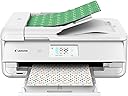
The Canon TS9521C is a premium all-in-one wireless inkjet printer designed for creative professionals and craft enthusiasts. It delivers ultra-high 4800x1200 dpi resolution with 5 individual inks protected by ChromaLife100 technology, ensuring vibrant, fade-resistant prints. Featuring 12x12 inch borderless printing, versatile media support including cardstock, and seamless wireless connectivity via WiFi, Bluetooth, and AirPrint, it’s perfect for scrapbooking, photo projects, and everyday printing. Additional features like an Auto Document Feeder, built-in memory card slot, and voice control compatibility make it a versatile powerhouse for both creative and office tasks.


| ASIN | B07G6BH2C7 |
| Additional Printer Functions | Copy, Scan |
| B&W Pages per Minute | 15 |
| Best Sellers Rank | #121,858 in Office Products ( See Top 100 in Office Products ) #51 in Desktop Photo Printers |
| Brand | Canon |
| Built-In Media | 5 Sheets of 4”x6” Glossy II (PP-301), 5 Sheets of 5”x5” Glossy II (PP-301), 5 Sheets of 5”x7” Semi-Gloss (SG-201), 5 Sheets of 8.5”x11” (Letter) Matte (MP-101), Multi-Purpose Tray, PIXMA TS9521C Crafter’s All-In-One Printer, Paper, Power Cord, Set of Standard Ink Tanks, Setup CD |
| Color | White |
| Color Depth | 16 |
| Color Pages per Minute | 10 |
| Compatible Cartridge | Canon ink cartridges |
| Compatible Devices | Laptops, PC, Smartphones |
| Connectivity Technology | Bluetooth, Ethernet, USB, Wireless |
| Control Method | Voice |
| Controller Type | Amazon Alexa, Vera |
| Customer Reviews | 4.2 out of 5 stars 1,446 Reviews |
| Duplex | Yes |
| Global Trade Identification Number | 00013803305838 |
| Hardware Interface | PictBridge |
| Ink Color | Cyan, Magenta, Yellow, Black |
| Item Dimensions D x W x H | 14.5"D x 18.5"W x 7.6"H |
| Item Type Name | PIXMA TS9521C Wireless Crafting All-in-One |
| Item Weight | 21.3 pounds |
| Manufacturer | Canon USA Inc. |
| Maximum Copy Resolution Black and White | <4800 dpi |
| Maximum Copy Resolution Color | 4800 x 1200 dots per inch |
| Maximum Media Size | 11 x 17 inch |
| Maximum Print Resolution Black and White | 4800 x 1200 dpi |
| Maximum Sheet Capacity | 100 |
| Maximum print Resolution Color | 4800 x 1200 dots_per_inch |
| Model Name | TS9521C |
| Model Number | 2988C022 |
| Model Series | TS |
| Number of Trays | 2 |
| Other Special Features of the Product | Auto Document Feeder, Borderless Printing, Memory Card Slot, Scanning |
| Paper Size | 8.5 x 11 |
| Print media | Card stock |
| Printer Connectivity Type | Bluetooth, Ethernet, USB, Wireless |
| Printer Output Type | Color |
| Printer Type | Inkjet |
| Printing Technology | Inkjet |
| Processor Count | 1 |
| Resolution | 4800 x 1200 dots_per_inch |
| Scanner Type | Flatbed |
| Special Feature | Auto Document Feeder, Borderless Printing, Memory Card Slot, Scanning |
| Specific Uses For Product | crafting, scrapbooking |
| Total Usb Ports | 1 |
| UPC | 013803305838 |
| Unit Count | 1 Count |
| Warranty Description | 1-Year Limited Warranty with InstantExchange Program. |
| Warranty Type | Limited warranty |
P**L
Impressive.
I owned an epson artisan 800 printer that lasted me 16 yrs. yes 16. I bought a cis ink system for it and in 16 yrs I filled it twice with ink. the photo quality was hands down amazing. it finally died and I really did not like the way the new epson printers looked and felt. So I switched up and took a chance. I bought this canon and I wanted to make sure I bought a decent one so it was the TS9521C . So far playing with it I am very impressed. double sided printing. cd printing. basically everything my epson did plus alot more, It connects directly to your google drive one drive, ect all the cloud based storage and your stuff is just there. for the print quality? SUPERB. I am talking full hd photo prints. better than you will get from film development at your local cvs. the scanner is amazing, it has more than good resolutions for scanning anything you need. It doesn't say it features a fax but it does fax using windows fax manager. I mean this thing has crazy features. It comes with all kinds of preloaded templates ect. the wifi was a lil confusing at first, the printer was telling me to setup network at the pc and the pc was telling me to set it up at the printer. by default the wifi was disabled and I had to find it and turn it on. the software wasn't really good at finding the printer and I had to manually set it up to connect but once you see how it is youll understand it pretty easy. it comes with carts. but we all know they are half full so they can get you to buy some within a few prints. so far I printed 5 things and the carts are about 1/4 empty. I suggest you purchase a set of refillable cartridges and 100ml bottles of ink. and you should have ink for at least a yr without depending on canon to provide it. the printer wants to auto detect the ink when it gets low and automatically order it for you. no thank you. there is way to many features to type here. I was scared because my epson was a one of a kind printer that was way way ahead of its time. but I see canon wasn't playing around when they designed this bad boy. don't buy an hp as we all know hp is getting sued for bricking there printers when the ink runs out. plus you have to login to a service to print anything. not cool. the epson printers are real nice don't get me wrong. but they dont give the features this thing had unless you purchase the 699.99 expressions 15000 or something like that. which is a real nice printer. but. for 299.99 you can not beat this printer. the quality is just amazing. I can't get enough of it. I am going to print everything under the sun just to look at the quality and see just how lng the ink really does last per ink cart. listen, you can not go wrong buying this printer. bottom line. you will be very impressed just as I am when you see the things it does and has. I give it a 10/10 for everything about it. quality, print quality, features, ease of use ect. Buy It. you will not be disappointed. I promise.
L**A
Great printer for invitations/card stock
I have searched for years to find the best printer for thick card stock and I think I finally found it. So far I am extremely impressed as I have been able to print on 5x7 130 lb card stock without any issues. It prints very clean, no streaks and exactly "centered" on the page (previous printers would print too high or low or too far to the right or left which caused lots of wasted paper, ink and having to "shave" part of the page to make the image centered). I found the installation to be very easy- within 20 minutes or so of unboxing the printer I already had my first print out. It doesn't seem to be using up ink any faster than my HP inkjet. I purchased remanufactured ink cartridges that we recommended by another reviewer but I have yet to try them. I will update this review after I've used the printer for a few projects and have a better idea of how quickly it runs through ink, if the manufactured cartridges work and if its still printing nicely on various sized card stock. ***update after a few months of use- the printer accepted the re-manufactured cartridges without any issues which is amazing. I have run into a little trouble with the rear feed. If I’m printing on thick card stock I have to manually feed every sheet which is extremely time consuming. It will print beautifully but when I have 100+ pages to print it takes so much more time than it would if I could put in a stack and walk away then come back to replace it. I still love the printer but I have to make the time to call canon and see if this is a common problem and see what I can do to fix it.
E**F
Need a crafty color printer/scanner for Linux? Look no further.
Got this out of the box, loaded up the ink, went through the setup. I disabled the "report back to Canon" function, so Web Services (whatever that is) won't work. Selected a wifi network using the touchscreen, went over to a Linux laptop, and printed a sheet of counters for Lone Sherman onto 100gsm paper using the rear tray. Easy-peasy, no drivers, no special software, nothing. Print quality was good. Didn't blow me away, but I wasn't doing a photo or anything really impressive, so time will tell there. Did not test the scanning feature, might update the review when I do. Have some heavier 297gsm paper and some transparencies I want to try as well. One thing to note: the rear feed tray sticks up like a turkey's tail. This isn't all that problematic, but since I have this on a shelf in a wall unit, it means I will have to remove the shelf above it in order to use the rear feed conveniently. The photos show this, but I didn't fully appreciate that we're talking an extra 12" or so of height needed at the rear side of the printer. UPDATE: Assigned a fixed IP to the printer on the wireless router. Added a bjnp:// entry for that IP to /etc/sane.d/pixma.conf (though it turned out that was unnecessary - a second Linux computer without that change also worked) and fired up simple-scan. Scanned like a champ. Generated an SVG file programmatically with size and viewport set to 8.5in x 11.5in, printed it to PDF using Inkscape. Used the system document viewer (eVince) to preview and print the SVG file onto a US letter transparency loaded face-down (important!) into the standard paper tray. Again, worked like a champ, no fuss no muss. Very impressed, this thing just works. Ignore all of Canon's cloud/web-services stuff and you've got yourself a great networked printer-scanner that can handle cardboard and non-paper media.
B**A
Great for kids crafts!
We already have a Brother printer that's a workhorse for home office needs but I bought this printer specifically to print coloring and activity pages for my kids' birthday parties on heavier weight paper that the Brother can't handle - haven't used it for anything other than that yet. Set up was frustrating, I couldn't figure out how to do it wirelessly (and I'm not bad at all at doing wireless setup on other printing devices or electronic devices in general) and when someone's review stated they also had the same issue but then was able to set up using the printer cord, I was able to do it that way as well, but had to purchase a compatible cord because the printer didn't come with one. As for the printing itself, I was very happy with it! I wanted thicker paper that kids could use watercolor paints on and not have the paper warp. I wasn't able to use actual watercolor paper because I couldn't find anything under 75lb weight that was letter sized but chose 65lb cardstock and hoped for the best. The ink held up to the watercolor paint pretty well, with minimal fading/bleeding from the liquid, which was my main concern. The printer is a little slow, but as long as you're not in a hurry it's not a big deal. I'm extremely satisfied with this purchase and am excited to use more features.
J**K
HORRIBLE NIGHTMARE TO INSTALL
I have had nothing but Canon printers over the years and have been very happy with them. This printer though shows how bad Canon has become. The printer out of the box just seemed cheaply built. Cheap thin plastic. When I tried to install the ink cartridges I had the feeling that the lids really didn’t open enough but also go the feeling that if I had pulled to hard I trying to open it the lid would have ripped off. Then when I tried to plug in the electrical cord I found that the plug in was recessed and it really takes a small hand with long thin fingers or a pair of needle nose pliers. Why did they design it that way. It should not have been difficult. I tried to install the printer by downloading the install software. I have no cd player anymore. I wanted a wireless install and it should have been easy. Well…..I live in a retirement facility and it refused to connect to my router and instead insisted on connecting to the community WiFi! Thought I would try to contact Canon support for help. No…..first you have to go through the whole registration routine….this was Friday afternoon. Even after registering it there was no phone number to call for install help. Just the horrible automatic assistant. I then unplugged one of my other printers and used the printer cable to install the printer. The printer does not ship with a printer cable so if you don’t have one then you are just out of luck. Got it running wired and it’s slow to print and the paper drawer only has about a 50 page capacity. Unplugged the printer again and tried to connect it again for wireless. No such luck. After a couple hours of this still could not get it running wireless. Gave up. Saturday morning I went to return it and found a button to contact support. Lo and behold it had an 800 number! Called it and they weren’t open. This was at about 9 am pacific time. Guess they figure no one is going to have trouble on a weekend! So consider Canon support has no phone support. After all this had finally had enough and returned it to Amazon. Installing a printer on windows 10 should not take 3 hours of trying just to find out Canon doesn’t want to provide telephone support. I will not purchase a Canon printer again. Look elsewhere.
A**R
I love this printer!
This is my dream printer and so far it does not disappoint. Pros: -12"x12" printing -copy and scan functions -individual ink tanks (ink is still pretty expensive but at least I can change individual inks as needed.) -wireless printing (With the canon app I easily can print photos from my phone or ipad. Very cool) -photo printing is very good -set up was easy, canon software was easy to install and I just followed directions on the screen Cons -ink cost, due to photo printing I'm afraid to use 3rd party cheaper inks in this machine. -size, not a deal breaker and is totally expected, but it is a "bigger" printer because of the 12" print width functionality so plan your space accordingly -the front panel needing to be flipped up to print. It's just annoying and so far I just leave it up and open so it is what it is. -sublimation. In terms of being a "crafter's" printer, I feel like sublimation ink options is the only ball left dropped. If there is a good option for this I haven't seen it being talked about.
W**Y
A reliable, versatile ink jet printer at a good price. 12 x 12 printing is a bonus!
This printer was very easy to setup on my network and control from all my computers. It creates fine looking text printing and bright, smooth color graphics. The 12 x 12 inch borderless printing makes great scrapbook pages or posters. Importantly, it accepts generic ink without a fuss. The double-sided printing takes a while, but works flawlessly. I am very happy with this printer. I encouraged a family member to buy the same, and he is equally happy.
T**N
They great pictures. And easy to use
Our second one
K**Z
Decepcionada
Ahórrense comprarla, no reconoce el papel en la parte de atrás (para poder imprimir en cartulina), solo una vez lo permitió. Ha sido falla tras falla y pérdida de tiempo. Para el precio que pagué y para poder imprimir solo en hojas bond y del feed normal me hubiera comprado otra por un 1/4 del pecio.
Trustpilot
2 weeks ago
4 days ago