✂️ Cut beyond limits—where your creativity meets precision!
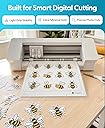
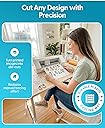
The Silhouette Cameo PixScan Cutting Mat is a precision A4-sized cutting mat designed for seamless integration with Silhouette Studio’s PixScan technology. It allows users to photograph printed or hand-painted designs on the mat and cut them with exact accuracy, expanding creative possibilities. Lightweight and highly rated, it’s a must-have tool for professional and hobbyist crafters alike.

| ASIN | B00CICZ7ZQ |
| Amazon 売れ筋ランキング | ホーム&キッチン - 741,283位 ( ホーム&キッチンの売れ筋ランキングを見る ) まな板 (ホーム&キッチン) - 2,369位 |
| GTIN (Global Trade Identification Number) | 00814792010266 |
| UPC | 814792010266 |
| おすすめ度 | 5つ星のうち4.6 2,651 レビュー |
| カラー | 白 |
| ケース形 | 正方形 |
| サイズ | 長さ30.5 x 幅0.1 cm |
| パック数 | 1 |
| ブランド | Silhouette |
| ブランド名 | Silhouette |
| メーカー名 | Silhouette |
| メーカー型番 | CUT-MAT-PIX12-3T |
| モデル名 | CUT-MAT-PIX12-3T |
| 付属コンポーネント | 台紙 |
| 品目の寸法(長さ x 幅x 厚さ) | 30.5長さ x 0.1幅 x 40.6厚み cm |
| 商品の入り数 | 1 |
| 商品の取り扱い説明書 | 手洗いのみ |
| 商品の寸法 | 30.5長さ x 0.1幅 x 40.6厚み cm |
| 商品の推奨用途 | Schnitt- und Bastelarbeiten |
| 商品の重量 | 0.05 キログラム |
| 形状 | 正方形 |
| 材質 | 紙 |
| 特殊機能 | ピックスキャン |
| 素材 | 紙 |
| 色 | 白 |
| 製品の推奨用途 | Schnitt- und Bastelarbeiten |
ま**ん
まだまだです。
このピクスキャンはスマホ・デジカメ・スキャナーでこのシートごと撮ると原寸でカットラインが簡単に作成できるものですが、ソフトウェアのバグが多いようで思ったようにカットできないときがあります。(カットラインがずれるなど) たぶんソフトウェアの改良がよくなれば結構使える商品だと思います。 今後に期待したいです。 今のところ海外では売られていますが、日本では代理店も販売をしておりません。 ここのお店のみでしか取り扱っておりません。 このショップさんも海外での発送となるので、3週間以上かかります。 興味ある方は届くまで時間はかかりますますが、検討してみてはどうでしょうか!
G**L
壊れやすいです
先端パーツが沢山ありますのでほとんどの物に対応できます。残念なのは🔫型からストレートに切り替えるスイッチが直ぐに壊れて押して回転させるのですが戻りません。中のバネが折れたようです。レビューを書いている最中に起きてしまい残念ながら⭐️3にオマケしました。
M**A
んー。
これ使ってもちゃんとカットされないのは何故?何回やっても、色々試しても、カットラインがズレてしまう。
E**A
My first appliqué!
I had some leftover Star Wars fabric after making cushions and was eyeing this Millennium Falcon on it thinking it would make a great appliqué, but I had never done that and was a little nervous about it, so I followed this process: 1) attach the fabric to the PixScan mat 2) Take a clear, well lit picture of the PixScan mat (MAKE SURE THE WHOLE MAT IS VISIBLE IN THE PICTURE, ALL THE WAY UP TO THE EDGES) 3) Import for PixScan in the Silhouette app 4) Trace the pattern and make it a cut path 5) Feed the PixScan mat with the fabric still attached, and cut away! 6) Save the cut path as an SVG file 7) Import the SVG file as vector into the embroidery software (I use Embrilliance on the Mac, awesome product) 8) Make two shapes using the imported path, one being a single stitch and the other a wide appliqué stitch (do not resize!) 9) Hoop the fabric and load the design into the embroidery machine 10) Stitch the first path 11) Use sticky spray on the cut out fabric and attach to the hooped fabric using the stitched path as a guide 12) Start embroidering the second path Done! That was so easy and the result looks fantastic. A lot of fun to use, and virtually impossible to do without the PixScan -- you'd have to do it all by hand. If you own an embroidery machine, make sure to give this a try! The Silhouette was already great for its "Print & Scan" capability but the PixScan mat gives it all the functionality of the Brother Scan & Cut without the cumbersome and limiting web app. Must have for Silhouette owners.
S**A
I want purchase this item. how to get the ...
I want purchase this item .how to get the working on the used to method. details catalogue in with box. Thank-you
S**Y
Very Useful Mat
Some people have had difficulty getting this to work, but I have had no problems at all. It means I can use all my scraps of card as well as being able to cut out specific items on a sheet, just by taking a photo on my mobile and importing it into the software. It isn't an item that is necessary to get the most out of the Cameo cutter but it makes things a lot easier to do in my opinion.
M**K
Recomendadisimo!!!
Si ceramente estaba dudando en comprarlo, por comentarios que vi en internet, sin embargo resultó ser todo un éxito!! Es la mejor herramienta para los que utilizamos cortadora de silhouette ya que te permite aprovechar el 100% de las hojas sin preocuparte de los márgenes de “cortar y luego imprimir”. Lo recomiendo muchísimo
M**O
Ok
Ok
Trustpilot
1 month ago
5 days ago