Desertcart purchases this item on your behalf and handles shipping, customs, and support to Japan.
๐ Elevate your workspace: One monitor, two computers, zero compromises!
The TESmart USB 3.0 HDMI KVM Switch lets professionals and gamers effortlessly control two computers with a single 4K@60Hz monitor, keyboard, and mouse. Featuring ultra-fast USB 3.0 data sharing, multiple switching methods including remote and hotkeys, integrated audio I/O, and broad OS compatibility, it streamlines multi-device management with zero latency and plug-and-play ease. Designed for high efficiency and seamless workflow, itโs the ultimate tool for multitasking millennials who demand speed, clarity, and convenience.


| ASIN | B0C6XSNPK1 |
| Actuator Type | Push Button |
| Best Sellers Rank | #87,344 in Computers & Accessories ( See Top 100 in Computers & Accessories ) #191 in KVM Switches |
| Brand | TESmart |
| Brand Name | TESmart |
| Circuit Type | 2-way |
| Colour | Black |
| Compatible Devices | Computers (Windows, Linux, Mac), Laptops, Keyboards (wired, wireless, mechanical, gaming), Mice (wired, wireless, gaming) |
| Connectivity Protocol | Infrared, USB |
| Connector Type | Plug In |
| Contact Material | Aluminium |
| Contact Type | Normally Open |
| Control Method | Remote |
| Control Type | user controlled |
| Controller Type | Push Button |
| Country of Origin | USA |
| Current Rating | 2 Amps |
| Customer Reviews | 3.9 out of 5 stars 51 Reviews |
| Item Dimensions | 19.5 x 7.8 x 2.8 Centimeters |
| Item Weight | 263 g |
| Manufacturer | TESmart |
| Material Type | Metal |
| Model Number | HKS201-P23 |
| Mounting Type | Panel Mount |
| Number of Items | 1 |
| Number of Positions | 2 |
| Operating Voltage | 12 Volts (DC) |
| Operation Mode | ON-OFF |
| Part Number | TES-HKS0201A3U-USBK |
| Smart Home Compatibility | Not Smart Home Compatible |
| Specification Met | Hdmi 2.0, Hdcp 2.2, and Multiple Operating System Standards |
| Switch Type | Push Button |
| Terminal | Solder |
| Unit Count | 1.0 Count |
| Wattage | 36 Watts |
M**T
Excellent Product
Product is well built and solid. Easy to install, and performs as expected. Would definitely purchase from this vendor again.
A**.
Great KVM switch! No video lag
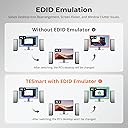
Great product. Easily switches between two computers with no video lag and USB devices connected via the KVM switch share automatically between the two computers. The EDID adaptive tech really works! Wish I would have found this switch years ago.
T**.
Does not work as advertised
Really disappointing. The product does not work with a Mac mini. I went through all the troubleshooting staff spent about four or five hours on the desk, made two trips to the store to get the right cables and never could get it to work. I feel revengeful at this point. It seems like all the connectors were outdated. They use USB type B when was the last time you saw one of those?
M**H
A KVM that works perfectly!
Bought two cheap KVM's and was disappointed twice. Not so with this one. Worked right out of the box with good response to my mouse and keyboard. Video was fine with the two previous but I couldn't get mouse or keyboard to function with them. I was unsure about this one due to the fact that the dongle plugins are on the rear of the unit but it is functioning perfectly with no choppiness or funny characters from the keyboard. Pleased with this product. If you're getting a KVM forget about those $25-$30 models. Spend a few more bucks and get one that works right away.
J**R
not good for gaming keyboards, bluetooth may be an issue - do youre research!
This switch did NOT work well for me - please read if you have a gaming keyboard (or otherwise non-standard keyboard) and count on Bluetooth dongles for your setup. A gaming keyboard (one that comes with its own macros and RGB lights etc) does not work well with this switch. This is a known issue with these keyboards and KMV switches in general. This means the dedicated keyboard port does not recognize the keyboard, which means I had to use a different port and then the keyboard shortcut to switch computers did not work. In addition, the USB3 ports interfere with Bluetooth (this was not a problem with USB2, the previous generation) according to their tech support. This causes jerky movements with the mouse. Depending on your setup and how many devices you have (and how far away the mouse is from the dungle) this might not be a problem for you. This is a good brand and I had a previous model that worked well. Their support was responsive and answered my quesions, so I've giving them 3 stars... but I'm returning mine. A USB switch is less than half the price and doesn't have this problem - and you can get an HDMI switch as well for your screen. Do your research!
Trustpilot
2 weeks ago
3 weeks ago