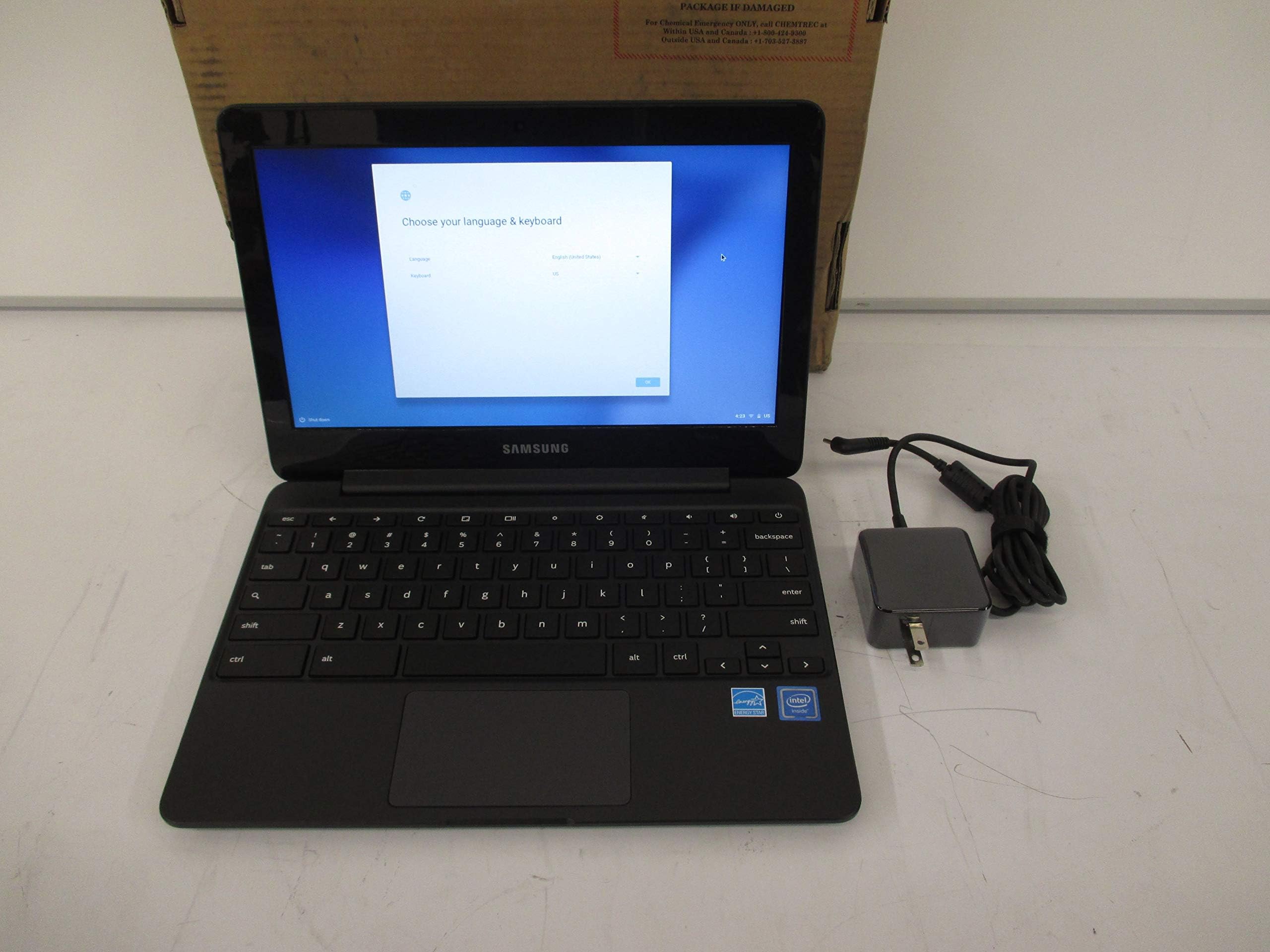
🚀 Power through your day with Samsung Chromebook 3 — where productivity meets peace of mind!
The Samsung Chromebook 3 (11.6") combines an efficient Intel Celeron N3060 processor with 4GB RAM and 64GB eMMC storage, delivering smooth multitasking and fast boot times on Chrome OS. Its standout 11-hour battery life and spill-resistant keyboard make it perfect for on-the-go professionals and busy millennials. The anti-glare HD display ensures comfortable viewing in bright environments, while built-in security features keep your data safe without extra hassle. Lightweight and durable, this Chromebook is a smart, affordable choice for work, study, and entertainment.
| ASIN | B07D4Z8FY7 |
| Average Battery Life (in hours) | 11 Hours |
| Batteries | 1 Lithium Polymer batteries required. (included) |
| Best Sellers Rank | #148,796 in Computers & Accessories ( See Top 100 in Computers & Accessories ) #26,303 in Traditional Laptop Computers |
| Brand | Samsung |
| Card Description | Integrated |
| Chipset Brand | Samsung |
| Color | Black |
| Computer Memory Type | GDDR3 |
| Customer Reviews | 4.4 4.4 out of 5 stars (1,470) |
| Date First Available | May 14, 2018 |
| Flash Memory Size | 16 |
| Graphics Card Ram Size | 4 GB |
| Graphics Coprocessor | Intel HD Graphics 400 |
| Hard Drive | 64 GB SSD |
| Hard Drive Interface | ATA-5 |
| Hard Drive Rotational Speed | 1 |
| Hardware Platform | PC |
| Item Dimensions LxWxH | 11.37 x 0.7 x 8.04 inches |
| Item Weight | 2.54 pounds |
| Item model number | XE500C13-K06US |
| Max Screen Resolution | 1366x768 Pixels |
| Memory Speed | 2400 MHz |
| Number of Processors | 2 |
| Number of USB 2.0 Ports | 1 |
| Number of USB 3.0 Ports | 1 |
| Operating System | Chrome OS |
| Power Source | Battery Powered |
| Processor | 1.6 GHz celeron_n |
| Processor Brand | Intel |
| Product Dimensions | 11.37 x 0.7 x 8.04 inches |
| RAM | 4 GB DDR3 |
| Rear Webcam Resolution | 68 Pixels |
| Screen Resolution | 1366 x 768 pixels |
| Series | Samsung Chromebook |
| Standing screen display size | 11.6 Inches |
| Voltage | 120240 Volts |
| Wireless Type | Bluetooth |
T**A
AWESOME PRODUCT!!! AWESOME PRICE!!!
I bought this for my daughter as she needed the chrome book for school. This was the one recommended by an I.T. Guy. We received it within days. I was extremely surprised at how light it was. My daughter had it up and running in no time. The battery life is awesome!!! The keyboard was awkward for me only because I am used to a full-size lap top keyboard. The only issue I had was it took me quite some time to set it up and connect it to our printer. I was concerned I I would now have to buy a printer new printer that would be compatible. That being said, I am sure a majority of that was operator error and our printer is 5 years old. However after some time and having to use my phone to follow the directions it finally connected. The little bit I have used this, I am very, very impressed!!! I am even contemplating switching to this when my iPad crashes.
T**N
The most affordable 64gb Chromebook on the market.
I’ve been using this Chromebook for about a week prior to writing this review. So far, I’m impressed with the amount of value Samsung brought to this device. The N3060 processor is perfectly suitable for my daily tasks. This Chromebook is able to stream 1080p/60fps videos, load ad/image-heavy websites relatively fast, multitask without slowdown, and run Android apps/games well. For example, 3d games such as Max Payne, GTA San Andreas, and Star Wars KOTR from the Google Play Store are perfectly playable at their default settings (If you’re wondering about the controller, the DualShock 3 is compatible with this model). As for the general build quality, I have no complaints. The spill-resistant keyboard is comfortable to type on, the mousepad is responsive, and the design of this laptop both looks and feels more premium than the price suggests. The only downside I have for this laptop is the screen. Compared with my old Chromebook, the Acer Chromebook 11 (2016), it’s no contest. The IPS screen on the Acer Chromebook has much better viewing angles and the colors are more saturated. That being said, I wouldn’t say that the screen on the CB3 is bad. The colors are decent when you find an optimal viewing angle and the anti-reflective screen is well suited for brightly-lit environments. You can tilt the screen about 30 degrees outside of the optimal viewing angle before the colors get washed out. Also, I've had no issues running this Chromebook through my 1080p monitor. In the future, the Samsung Chromebook 3 will have Linux support with Crostini. Currently, you can switch this Chromebook to the Canary channel to test this feature out. Unfortunately, I was unable to get Linux to work because of mounting issues. Hopefully Google will get this feature ironed out in the future, since having 64gb of storage is optimal for installing a plethora of Linux apps. To conclude this review, I’d recommend this Chromebook to anyone that wants to install both Linux apps (either with crouton or crostini) and Android Apps on their Chromebook. Having 50gb of usable internal storage makes this Chromebook an excellent device to use both online and offline. Pros 1. Decent processor with 4gb of RAM 2. Anti-glare screen 3. Comfortable keyboard and responsive trackpad 4. Less than $300 5. 8-10 hours of battery life 6. Google Play is supported and Crostini (Linux apps inside Chrome OS) is coming in the near future. Cons 1. Colors get washed out when the screen is tilted out of optimal range. 2. Quiet speakers *Update - 1.5 months later* The Samsung Chromebook 3 officially supports Crostini Linux in the beta channel. Even though I initially had a few issues getting the terminal to install on this Chromebook, Linux apps work quite well. For example, the Libre Office suite (a Linux substitute for Microsoft Office) works very well and I haven't experienced any crashes with it. The same thing can be said for Filezilla, Gimp photo editor, and GnuCash. However, if you're using Linux apps that rely on sound and video/graphics (Spotify desktop, VLC Media Player, watching videos through Firefox, games with Steam), the performance is quite laggy and all of these apps have audio problems (scratchy audio or none at all). Therefore, it still has a long ways to go when it comes to replacing a dedicated Linux distro. If you're interested with a smoother Linux experience with this Chromebook, I'd recommend installing Gallium OS and dual boot it with chrx. I was able to get Counter Strike GO playable through steam (at very-low graphics) and the rest of the apps I've had problems with in Crostini worked in Gallium.
M**N
It Definitely Has Its Issues
I love Samsung products. I had a Samsung Microwave. I have a Samsung 10.1" Tablet, & I have a 32" Samsung Flat Panel Tv. I rarely if ever have had any issues with any of their products, until now. The picture screen on this Samsung Chromebook at 11.6" is barely larger than my Samsung 10.1" Tablet. If you are used to having and using a standard sized laptop, you will be in for a shock with this, at how small it is. Mine came with a Quick Start Guide & Warranty Booklet, but the Owners Manual, which you can download the PDF here on the product page, or thru Samsung.com, it's literally 73 pages long! I called Tech Support, was told they could mail it to me, then was told they couldn't. No Owners Manual should be 73 Pages long for ONE language! Over the course of 3 days I have called Samsung Tech Support 4 times. They seem knowledgeable, but all have very strong accents, if you live in the U.S.A., which makes things more difficult when dealing with a new product, to explain your issue. My biggest issue is when it comes to printing. Forget about Click & Print! I have a Brother All In One Printer, less than a year old. I had to call both Brother Tech Support, as well as Samsung Tech Support, so that I could print. I have an entire page of handwritten notes just to print! I doubt I can scan, etc. It uses both the I CLOUD Beta Printing, as well as my Brother All In One to print. Unlike both my Android Tablet & Android Phone, where all I had to do was get the Brother Plug In App through The Google Play Store, and could either download or print, etc. With this Samsung Chromebook you have to basically download and save the document, but then there are about 6-8 "this opens another window" instructions BEFORE it actually prints whatever it is you want to print. Way too much for what is supposed to be a fairly simple Chromebook, so you might want to think twice about buying this if printing is important to you. I've always had a printer with a computer. I doubt I will be using this Chromebook for printing! I also noticed that when using Chrome for your Search that pages don't always load correctly. I had that issue with Amazon.com. I didn't want Windows 10, and I already have a tablet, so it was suggested to me by Best Buy that maybe a Chromebook would be an option. I am not sure that it will work for my needs, but if you are mainly buying it to check email, things like that, this will probably work fine for you. Yes it does have Google Play Store loaded on it. There is also a Chrome Web Store. It is nice that it updates automatically when you turn it on, that there are no Windows Updates since the Operating System is Chrome, which I always thought Chrome was just a search engine, like Firefox or Internet Explorer. No need for Mal ware or Norton either. I think the picture on this is fair, not great. I have a sound bar attached to it for better sound. Now I am just trying to figure out if the pluses of having this Samsung Chromebook outweigh the negatives. I haven't made up my mind yet! I purchased mine Used, Like New in Original Packaging through Amazon Warehouse on Amazon. Normally I buy everything new when it comes to electronics, after having a bad experience with one refurbished item. They shipped very fast, it was packaged well, the item does look new, and after contacting Samsung with the Model # & Serial #, I found that I still had 10 months left on the One Year Warranty. FINAL UPDATE- I am returning this to Amazon, only my second purchase to return since 2001. That's how long i have been an Amazon Customer, and A Vine Voice since 2009. In the few days that I've had it, it has been a constant source of frustration, not what I anticipated at all when I purchased it. Have had printer issues where something should print but doesn't. I can't even get Amazon's web page to load correctly through Google Search. I thought that this Samsung Chromebook might be a good alternative for me, instead of purchasing another laptop. I really didn't want Windows 10, but I need something that can do what I need it to do, which this can't, at least not for me. Funny thing is, I was just trying to do basic things on it- checking email, going to a web page, printing. After speaking to Samsung Technical Support once again today, I was told that Chromebooks are mainly for students, a lower cost alternative to a computer. It was suggested to me to buy one of their larger Chromebooks. No thanks! I am done with Chromebooks! Back to looking at laptops! I wish that this had worked out for me. I am sad that it doesn't. Hopefully it will work for some of you. I always get the bad apple in the bunch!
M**.
Chromebook pretty good
I have owned several computers over the years and never even thought of using a Chromebook. This thing is amazing for what it is. Does everything I need and more. I use it everyday. Battery and weight are awesome. The screen could be a little more clear but it is what is. Love and find it logs on quick. If I need more power I have my windows and mac laptops. Nice machine for the price can take it everywhere without worries.
R**N
Perfect.
This baby was under 100.00. I had no idea what a notebook was or wasn't. I quickly learned it's not operating on Windows and once you've come to terms with that reality it's easy going. The only whacky thing is that I know my password, this sucker doesn't know I know it until after the exact routine EVERY SINGLE TIME: I have to power off, and then enter my password exactly 6 times. It doesn't recognize it the first 5 but on the 6th it decides to play nicely. Arrrgh. We have some tick or other so I its all good.
Trustpilot
1 month ago
1 month ago