Buy anything from 5,000+ international stores. One checkout price. No surprise fees. Join 2M+ shoppers on Desertcart.
Desertcart purchases this item on your behalf and handles shipping, customs, and support to Japan.
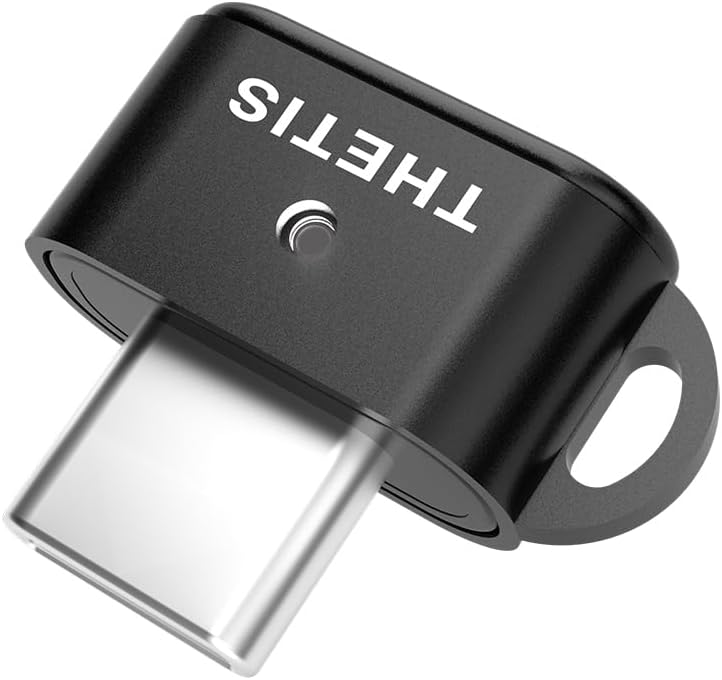
🔐 Elevate your digital fortress with Thetis Nano-C — security that fits in your pocket!
The Thetis Nano-C is a FIDO2-certified USB-C security key designed for professionals demanding robust, portable multi-factor authentication. Supporting up to 200 FIDO2 passkeys and 50 TOTP slots, it enables passwordless logins and cross-platform compatibility across Windows, macOS, Android, iOS, and Linux. Its ultra-compact form factor ensures you never compromise on security, whether at your desk or on the go.


| ASIN | B0F3JX7F76 |
| Additional Features | Compact, Encrypted, Lightweight, USB C |
| Best Sellers Rank | #484 in USB Flash Drives |
| Brand | Thetis |
| Color | Black |
| Compatible Devices | Windows, MacOS, IOS, Android or Linux |
| Compatible Phone Models | Windows, Mac OS X, IOS, Android, Linux (Debian Based or Red Hat Based) and Chrome OS |
| Connectivity Technology | USB |
| Customer Reviews | 4.0 4.0 out of 5 stars (149) |
| Flash Memory Type | USB |
| Hardware Interface | USB Type C |
| Item Dimensions D x W x H | 0.3"D x 0.6"W x 0.3"H |
| Item Weight | 0.04 Ounces |
| Manufacturer | Thetis |
| Model Name | Thetis Nano C FIDO2 Security Key |
| Model Number | MB000504 |
| Read Speed | 480 Bytes Per Second |
| UPC | 850065774039 |
| Unit Count | 1.0 Count |
| Warranty Description | Standard Express Warranty |
| Write Speed | 0.4 MB/s |
Z**G
exactly what it says it is
exactly as ordered
W**E
Easy to Setup and Just Works Even With a USB-C to USB-A Adaptor
Very easy to setup in Windows and add as a login in key for many accounts already.
T**L
Excellent value!
Small form factor security key. Verified by me to work with Google accounts, Login dot Gov and Bitwarden. Excellent value for the money as compared to others that charge twice as much. Two things that I didn't like. The first is that you have to use the Thetis key manager application on Windows, Mac or a Linux computer to set the PIN on the key. Thetis does have an Android app however, that app doesn't have the ability to set a PIN on the key. This could be a limitation of the Android OS but I don't know for sure. The second issue I have is that the key should have come with a cap to protect the USB C connector. The key does work with a USB C to USB A adapter. Bottom line is that this is a good value but keep in mind that you will need a desktop or laptop to add a PIN to the key before you can start using it. If you laptop only has USB A connections then you will need an adapter. You might also want to get a lanyard for your new key.
C**O
Does not work as advertised
Does not work with Microsoft products on a Home computer Windows 10 or google.
1**6
Good fido key. Great value
Tiny, yet hold 2x more passkeys than yubikey at half the price (though 100 slots is still more than enough). Seems durable. It's so tiny so be careful not to misplace it though :)
A**R
Really great for a travel option
FIDO2 security keys are an absolute must these days. This is a high security, high quality USB-C key that will provide peace of mind with multifactor authentication for years to come. I have a much older Yubico Yubikey device that is still relevant, and is now serving as a backup. It is easy to setup and use and is an overall good value. The small size of this key is really convenient for travel.
F**N
Requires some dedication to setting it up
Had not use yet, didn’t have any time for setting it up yet
J**E
Small and ultra-portable USB C security key
I'm pretty happy with this Nano-C security key from Thetis. I have been working to incorporate better security with my password manager and select websites and these Thetis keys work well for that. Hardware keys are, in my opinion, more secure than 2FA based on texted numbers and a lot less annoying. This Nano-C key uses a USB C plug, although it works fine with my USB C to A adapter, and it has a touch sensor on the end for when you're prompted to press a button during authentication. It's very compact, has an internal LED showing it's connected, and has a small loop on the rear corner for attaching a small keychain-type lanyard. There are some aspects of these security keys that are pretty tough to figure out. Much of that may be due to all the different ways that they interface with various operating systems and programs. When I setup the windows Thetis Manager software I found I needed to setup a PIN for the FIDO key area. Great. It's not until you enter and try to create a PIN that's rejected that you are then told the PIN must be 6 numbers or more. When I secured my password manager (bit warden) with the key I was surprised that there's no feedback in the manager software about storing a key, but the Nano-C does work with that password manager software. I already have a larger, Pro-A FIDO2 key and wanted to add the Nano-C as a 2nd hardware key, just in case one gets lost or damaged. The Nano-C is much smaller and more portable. The Nano-C also has a native USB C connection that works with my cell phone (although the Pro-A has NFC capabilities).
I**Z
Cumple con lo esperado
Está perfecto y cumple con su función perfectamente, para activarlo necesitas tener un ordenador con Windows o Mac para instalar los drivers. Faltaría que tuviese NFC para mayor versatilidad
P**E
Opérationnel.
RAS. Ça marche parfaitement.
U**I
Sometimes it allows you to enter without passcode
This security key might have some feature that suits some applications but not others, sometimes it allows you to access that account without passcode.
R**R
Cheaper than a Yubikey
I bought a couple of yubikeys and this one as a cheaper spare for a key chain because of its compact size. Ideally you need at least two security keys incase one breaks or you lose one. You could also use a security key and keep another method back into your account as a backup. How do you use one? Download and install the Thetis application onto your PC. Open the app as an Administrator on windows by right clicking. You will then be able to set your FIDO2 pin key which you will use to authenticate and log into your accounts. The Pin acts as additional security if your key ends up in the wrong hands and there's only so many times the pin can be entered wrong (might be 8 like yubikey?). You can then add your key (s) to your accounts like Email and others that support them. Different websites will vary on how these are set up. They are used as passkeys or the next step in 2FA instead of a text code but sometimes both. The advantage here is only you own the security key. Other methods such as text codes there's always a risk of phishing from hackers or somebody sim jacking your mobile number. Security keys offer stronger protections for your accounts and they're relatively straightforward to use. There's plenty of instruction on places like Youtube if you're unsure.
E**�
Günstig und sehr klein - funktioniert einwandfrei
Funktioniert einwandfrei, schön klein. Nutze es mit mit dem Microsoft-Account meines Arbeitgebers. Es ist zwar nicht einfacher oder schneller als die Nutzung der Microsoft Authentificator App am Handy, aber es funktioniert eben auch ohne Handy. Der FIDO2-Key ist eine Alternative zur App. Ein Tipp zur Nutzung: Wenn die weiße LED blinkt beim Einloggen, muss man den FIDO2-Key mit dem Finger berühren. Einmal vor der Eingabe der PIN und einmal danach. Alternative: Es gibt ab 58€ auch FIDO2-Keys mit Fingerabdruck-Sensor (der von Kensington ist sehr schön). Das ist noch bequemer, denn da muss man nicht einmal mehr die PIN eingeben. Allerdings kann der Admin diese Funktion komplett sperren, dann nützt der Fingerabdrucksensor nichts und man muss dennoch jedes Mal die PIN eingeben. Das sollte man also vor einer Kaufentscheidung mit seiner IT-Abteilung klären.
Trustpilot
2 weeks ago
2 months ago