


๐ Elevate your workspace with ultra-wide clarity and silky smooth visuals!
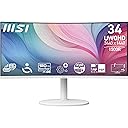
The MSI Modern MD342CQPW is a 34-inch ultra-wide VA monitor featuring a 3440x1440 UWQHD resolution, 120Hz refresh rate, and 1ms response time. Its 1500R curved screen and EyesErgo technology ensure immersive, comfortable viewing. Equipped with Adaptive-Sync, USB-C 98W power delivery, KVM switch, and height adjustability, itโs designed for professionals seeking productivity and eye-friendly performance.


| ASIN | B0DG6ZR4WG |
| Adaptive Sync | FreeSync |
| Aspect Ratio | 21:9 |
| Brand | MSI |
| Brand Name | MSI |
| Colour | White |
| Contrast Ratio | 3000:1 |
| Customer Reviews | 4.3 out of 5 stars 81 Reviews |
| Display Technology | VA |
| Display Type | LCD |
| Hardware Connectivity | DisplayPort, HDMI |
| Has Color Screen | Yes |
| Image Contrast Ratio | 3000:1 |
| Item Dimensions D x W x H | 25.1D x 80.8W x 42.4H Centimeters |
| Item Weight | 8.08 kg |
| Manufacturer | MSI |
| Maximum Display Resolution | 3440 x 1440 |
| Model Name | Modern MD342CQPW |
| Model Number | Modern MD342CQPW |
| Mounting Type | Desk Mount |
| Native Resolution | 3440 x 1440 |
| Network Connectivity Technology | HDMI, DisplayPort |
| Picture Quality Enhancement Technology | EyesErgo |
| Product Features | 120Hz Refresh Rate, Curved, Adaptive Sync, Height Adjustable, KVM, Speaker, 1ms Response Time |
| Refresh Rate | 120 Hz |
| Resolution | 3440 x 1440 (UWQHD) |
| Response Time | 1 Milliseconds |
| Screen Finish Type | Matte |
| Screen Size | 34 Inches |
| Screen Surface Description | Matte |
| Shape | Curved |
| Total HDMI Port | 1 |
| Total USB Ports | 1 |
| UPC | 824142341896 |
| Unit Count | 1 Count |
S**.
Nice monitor at good price.
I looked and looked for a curved 4k monitor that did not cost a king's ransom. Sceptre used to have one, and I love my Sceptre z32 flat 4k. After a ton of looking around, I settled on this MSI. I wanted a curved and wide display for a work PC (Bleah Windows). The Samsung on it had terrible color. It was a Pain to switch inputs on as well. I had used MSI years back, and liked them, so I went with this one. Price was OK, etc. The color is good. The screen is crisp (way better than the Samsung 32 it replaced), the controls are easy to reach and use to change inputs (I use HDMI for Lenovo T14 and USB-C for Macs and iPad). I don't game, but I see when the Mac or iPad is connected via USB-C, it is running at 120 hz. Looks good. Other than not being curved 4k (which, again, I knew it wasn't), I like this monitor well. I do wish manufacturers would not use so much styrofoam when packing things, though. It came undamaged for sure, but filled by outside can!
J**Y
Great size display!
Use for work, display is fantastic for my daily use!
D**Z
Almost perfect for the price.
For the price I'd almost give this a 5. Overall I'm very happy with the monitor. The dynamic refresh rate setting does cause a lot of flickering so I haven't been using it. At first I had to manually adjust the refresh rate to 60 Hz manually stop the flickering when I used one of the desktop apps I work with. And then change it back to 120 Hz manually for games. But then I noticed when I turned on HDR I get no flickering usually. There is however a slight weird brightness balancing on the left side of the monitor but only for a bit after first logging into Windows and then it fixes itself. Hoping that doesn't become an issue in the future. That is the only reason I'm knocking off one star. So overall, once I found the right settings for this monitor which is not using dynamic refresh rates, permanently set to 120Hz because I seem to like wasting energy, and HDR just looks better so might as well leave it on which also fixes the flickering issue in Unity game engine. Of course I did buy the protection plan Amazon offers due to reviews but so far I'm hoping I don't need to use it.
K**E
Perfect monitor in every way
I love this monitor, full stop. I have had 0 issues with it since getting it around Dec 2025. Pros: - Refresh rate great for gaming - Picture quality meets expectations - LOVE that it's white to go with my setup - Perfect size; 34" curved is large enough for all of my multitasking needs - It is a little heavy, but I've had this on a monitor arm since unboxing it, and the arm supports it with no problem Cons: - I'm not entirely sure that this is a con, but sometimes getting the monitor to auto-switch between my two devices could be a pain. Sometimes it would want to connect to my gaming PC over and over while I'm trying to use my work laptop/setup. However, I turned the auto-switch function off and just manually switch it. Not a big deal imo. Plus, it gives me the feeling of truly being "done" for the day since I WFH.
C**E
USB-C does not work
If you have a MacBook the USB-C functionality is useless. Also the sound control canโt be controlled via laptop. Other than that solid monitor but you can get something with the above functionalities for only a bit more.
Trustpilot
1 month ago
1 day ago