Desertcart purchases this item on your behalf and handles shipping, customs, and support to Japan.
🚀 Upgrade your desktop’s network game — don’t get left buffering!
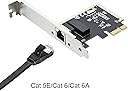
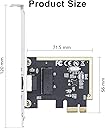
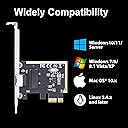
The 10Gtek 1Gb/s Network Card features a Realtek RTL8111 controller with a single RJ45 port supporting 10/100/1000 Mbps auto-negotiation. Designed for desktop PCs, it connects via PCIe x1 and supports Wake-on-LAN, jumbo frames up to 9K bytes, and is compatible with a wide range of Windows, Mac, and Linux operating systems. Ideal for professionals seeking reliable, high-speed wired networking with easy installation.
| ASIN | B0DG8DG9LD |
| Best Sellers Rank | #25 in Internal Computer Networking Cards |
| Brand | 10Gtek |
| Color | X1 |
| Compatible Devices | Desktop |
| Customer Reviews | 4.4 out of 5 stars 794 Reviews |
| Data Link Protocol | Ethernet |
| Data Transfer Rate | 1 gigabits_per_second |
| Hardware Interface | Ethernet |
| Item Weight | 0.1 kg |
| Manufacturer | 10Gtek |
| Mfr Part Number | RTL8111-GE-1T-X1-US |
| Number of Items | 1 |
R**T
Simple replacement for failed motherboard NIC
Recognized immediately by Windows 11, worked flawlessly from the start.
B**.
is same as Intel 82576 Gigabit Network Connection adapter
Very good product and working fine with pfsense and good performance with suricata IPS inline mode. pciconf -lcv #Output of pciconf command on freebsd. igb2@pci0:3:0:0: class=0x020000 card=0xa03c8086 chip=0x10c98086 rev=0x01 hdr=0x00 vendor = 'Intel Corporation' device = '82576 Gigabit Network Connection' class = network subclass = ethernet cap 01[40] = powerspec 3 supports D0 D3 current D0 cap 05[50] = MSI supports 1 message, 64 bit, vector masks cap 11[70] = MSI-X supports 10 messages, enabled Table in map 0x1c[0x0], PBA in map 0x1c[0x2000] cap 10[a0] = PCI-Express 2 endpoint max data 128(512) FLR link x1(x4) speed 2.5(2.5) ASPM disabled(L0s/L1) ecap 0001[100] = AER 1 0 fatal 0 non-fatal 1 corrected ecap 0003[140] = Serial 1 6cb311ffff1b17c0 ecap 000e[150] = ARI 1 ecap 0010[160] = SR-IOV 1 IOV disabled, Memory Space disabled, ARI disabled 0 VFs configured out of 8 supported First VF RID Offset 0x0180, VF RID Stride 0x0002 VF Device ID 0x10ca Page Sizes: 4096 (enabled), 8192, 65536, 262144, 1048576, 4194304 igb3@pci0:3:0:1: class=0x020000 card=0xa03c8086 chip=0x10c98086 rev=0x01 hdr=0x00 vendor = 'Intel Corporation' device = '82576 Gigabit Network Connection' class = network subclass = ethernet cap 01[40] = powerspec 3 supports D0 D3 current D0 cap 05[50] = MSI supports 1 message, 64 bit, vector masks cap 11[70] = MSI-X supports 10 messages, enabled Table in map 0x1c[0x0], PBA in map 0x1c[0x2000] cap 10[a0] = PCI-Express 2 endpoint max data 128(512) FLR link x1(x4) speed 2.5(2.5) ASPM disabled(L0s/L1) ecap 0001[100] = AER 1 0 fatal 0 non-fatal 1 corrected ecap 0003[140] = Serial 1 6cb311ffff1b17c0 ecap 000e[150] = ARI 1 ecap 0010[160] = SR-IOV 1 IOV disabled, Memory Space disabled, ARI disabled 0 VFs configured out of 8 supported First VF RID Offset 0x0180, VF RID Stride 0x0002 VF Device ID 0x10ca Page Sizes: 4096 (enabled), 8192, 65536, 262144, 1048576, 4194304
T**M
A great choice for Linux or BSD
When building a Linux system the last thing you want to deal with is weird drivers. So I always look for Intel or Broadcom chipsets in ethernet cards. Intel chipsets in particular are pretty much guaranteed to work. Most of the servers I build have Intel I350 ethernet cards for a reason. They're fast, reliable, and use the rock-solid "igb" driver that you can be absolutely certain will be included in the stock kernel from any Linux distribution The I350 controller chip has been in production since 2011 and Intel plans to manufacture it through 2031. It's fast, reliable, inexpensive, and uses only 2.8W of power. Those features, combined with the high availability of the chip has made it ubiquitous on server motherboards. As a result it's extremely well supported by any operating system you might want to use. Thie PCI interface on the card identifies itself as being built by Beijing Sinead Technology Co. The ethernet MAC address has the correct prefix (98:b7:85) for Shenzhen 10Gtek Transceivers, which matches the name of the seller on Amazon. That's always a good sign; they're using properly assigned MAC addresses rather than just cloning some other card. The card appears to be identical to the I350 cards sold by Intel. The only difference is the price, which is less than half what Intel charges. I'll probably buy more of these in the future. Great pricing and like the other 10Gtek products I've purchased in the past it's a solid product.
A**E
10Gtek Gigabit PCIe NIC (Intel I210 Chip) Review: Flawless Performance & Bonding for OMV
If you are building or expanding a home server or NAS setup, finding network hardware that is both budget-friendly and rock-solid is always the goal. The **10Gtek Single-Port Gigabit PCIe Adapter (Intel I210 Chip)** delivers on all fronts, offering genuine enterprise-grade reliability at a fraction of the cost of official Intel-branded cards. Packaging & Hardware Revision * **Safe Delivery:** The card arrives exactly as pictured and described, safely packaged in anti-static protection to keep the sensitive electronics secure during transit. * **The Heatsink Upgrade:** I was one of the lucky ones who received the newer revision featuring a **dedicated heatsink** directly over the Intel I210 controller. While Gigabit cards generally don't run as hot as 10GbE gear, having passive thermal cooling adds extra peace of mind for 24/7 server environments. --- Key Specifications * **Controller:** Intel I210-AT * **Interface:** PCIe 2.1 x1 (compatible with x1, x4, x8, and x16 slots) * **Speed:** 10/100/1000 Mbps (Single RJ45 Port) * **Brackets Included:** Standard profile + Low-profile bracket * **Feature Support:** PXE, Wake-on-LAN (WOL), 9.5K Jumbo Frames, Linux Network Bonding --- Installation & OS Compatibility (OpenMediaVault / Linux) The highlight of using an Intel I210-based card is native kernel support across virtually all modern Linux distros. Under **OpenMediaVault (OMV)**, the card is **truly plug and play**. There is zero need to compile kernel drivers, run scripts, or mess with the command line. You simply seat the card in your PCIe slot, power on the system, and OMV picks up the new interface immediately. Performance & Multi-Port Network Bonding (Mode 6) I added this card as an extra Ethernet port alongside my motherboard's onboard NIC to connect two physical cables directly to my router. * **No Managed Router/Switch Required:** By setting OMV to **Bonding Mode 6 (`balance-alb` / Adaptive Load Balancing)**, the server handles load balancing internally via ARP negotiation. This means you don't need a high-end router with LACP/LAG support to get the extra bandwidth! * **Increased Aggregate Throughput:** Connecting two cables doubles the total system capacity, allowing simultaneous heavy uploads and downloads across multiple clients without bottlenecking a single link. * **Superior to Realtek:** The Intel I210 excels at handling hardware-offloaded network traffic and ARP negotiation, keeping CPU overhead minimal and performance stable during multi-client transfers. * **Zero Dropped Packets:** Rock-solid stability with no driver crashes, latency spikes, or dropped connections under heavy continuous load. Verdict For anyone running OpenMediaVault or a custom Linux server looking to add an extra port for link aggregation without buying expensive LACP-compatible switches, this **10Gtek I210 NIC** is a no-brainer. Getting the updated heatsink version was a great bonus, and the true plug-and-play simplicity makes it completely hassle-free.
S**N
Not pleased at all with the cards, but good customer service.
First, let me say that I'm an IT professional with over 30 years of experience. I know what I'm doing when it comes to building computers and firewall systems! I bought these cards after reading that other buyers had used them with pfSense without issues in the reviews. Unfortunately, none of mine would work out of the box with pfSense, OPNsense, IP Fire, or any other BSD or Linux based firewall I've tried (I tried 7 in all). I've tried all 3 cards I bought in 3 different computers, so I know it isn't the motherboard that's at fault. I have a hard time believing that all 3 cards I bought are defective, but it sure looks that way. If these cards don't work in a Windows box, I'm sending them back! I was going to try loading the drivers included in the box, but the driver CDs don't work, either. I've tried all 3 of those in 3 different drives on 3 different computers. Complete waste of my hard-earned money! Edit: After leaving my review above, I was contacted by the seller. They were apologetic that the NICs didn't meet my needs and offered a full refund, which I gladly accepted, without trying them in Windows. We made arrangements for me to ship them back, and I was refunded my money once the cards arrived. I did have to pay to ship the cards back, but I'm out a LOT less than I was before (less than the cost of one card). I will not hesitate to buy other products from this seller again. I must give them kudos for doing their best to rectify the situation! I appreciate the integrity this shows on their part.
C**N
TrueNAS setup
Not a technical review but my experience from being a sudo-tech. I have a TrueNAS only to host content for Plex. If Plex wasn’t a thing I would never have built two machines over the last seven years. The first one was dated two years ago easily so I had to upgrade. I bought a older MB but still lights out better than before- a ASRock B550 Pro4. What I didn’t know was that MB has a RealTek ethernet chip. I pulled everything in and all was well. I went to move data and my network started to drop. After seeing that I saw an error on the TrueNAS about the network. After researching the problem was the RealTek 2.5. I then bought an Intel 2.5 and found that those don’t have proper driver so that was returned. Then I found reviews about this 1G card and bought it. Immediately plugged in and worked with no extra effort from me. Moved big data files with no errors. I was relieved. How long will this last? I will see. I wish I could have gotten the 2.5G to work to stay up to date but that is fine. On to the next problem!
A**R
Adapter 1Gb x 4 ports
Worked as described. I loved that it was supplied with two brackets to adjust to case size.
J**E
Works Great In Proxmox
In my homelab, I have a pretty robust server based around Proxmox 7.1, an AMD 5950X and 128GB of RAM. It's a sweet little playground. I wanted to play around with virtualized firewalls, particularly PFSense. The cheapest way I could find to do it was by adding NIC's to my existing server. I selected this dual NIC primarily because it used an x1 PCIe interface. My mainboard has two of these slots. The 4 port version is an x4 PCIe and my mainboard has none of these, meaning I'd have to use the x16 slot. I generally prefer to reserve my higher end x16 PCI slots for more capable hardware, not a basic 1G multi-NIC. Install was standard PCIe, about as simple as it gets. I read the reviews indicating compatibility with Proxmox and I can attest that it works well in my 7.1 build. I had the typical issue where Linux's dynamic network interface monitoring feature jacked up my interface name and bridge configuration. Easily fixed with a trip to /etc/network/interfaces though. (And to be sure, this is a Linux issue, not a hardware one.) I've had my setup going for a few months now with no troubles. I don't know much about this network card, such as who makes it or where to get drivers that I didn't need in Proxmox. That hasn't seemed to matter. Oh, and if you're interested in virtualized firewalls, I'd encourage you to explore it. I've had a lot of fun with PFSense so far.
N**L
Je souhaite mettre les NIC sur esxi 7 impossible !!!
Je souhaite mettre les NIC sur esxi 7 impossible !!! Expliquer moi comment faire svp
A**A
No conecta a 1gigabit
La tajerta funciona tiene 2 puertos independientes, pero no importa si usas linux o windows, la tajeta dice que puede funcionar a 1gigabit, pero jamas enlaza a 1gbit, enlaza a 100mbit, ahi mismo donde otras tarjetas funcionan bien a 1gbit, esta no.
J**S
Perfect for a PFSense build
I purchased this for use with my new gigabit installation at my house. Slapped it into my pfsense box and I'm getting a very nice 950mbps down and 95mbps up WAN>LAN with no problems and noticable increase in CPU usage as a result of the NIC. Very nice. +1 for the inclusion of a low profile bracket.
あ**ま
ESXi 7.0U2aで無事認識して一安心
正直あまり信用していなくて互換性を心配していましたが、ESXiの起動メディアに何も追加せず(Inboxで)認識して動作することは確認できました。安定性、耐久性は未評価です。
S**G
Use it for pfsense and work right out of the box
Trustpilot
1 month ago
2 months ago