


Desertcart purchases this item on your behalf and handles shipping, customs, and support to Japan.
โ๏ธ Stay cool, game hard: The thermal pad pros swear by!
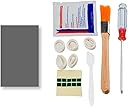
The JOYJOM PTM7950 is a high-performance phase change thermal pad designed for advanced cooling in gaming consoles and laptops. With an impressive 8.5 W/mK thermal conductivity and phase change at 45ยฐC, it dynamically adapts to heat, ensuring superior dissipation. Built for durability, it withstands 1000 hours at 150ยฐC and 1000 thermal cycles, making it ideal for demanding CPUs, GPUs, SSDs, and M.2 devices. The package includes all professional tools needed for precise installation, delivering reliable, low thermal impedance cooling solutions trusted by tech enthusiasts.


| ASIN | B0CQ7F829H |
| Amazon ๅฃฒใ็ญใฉใณใญใณใฐ | ใใฝใณใณใปๅจ่พบๆฉๅจ - 217,365ไฝ ( ใใฝใณใณใปๅจ่พบๆฉๅจใฎๅฃฒใ็ญใฉใณใญใณใฐใ่ฆใ ) ใตใผใใซใใใ - 240ไฝ |
| ใใใใๅบฆ | 5ใคๆใฎใใก4.6 254 ใฌใใฅใผ |
| ใฏใผใฉใผใใผใใทใณใฏใฎไบๆๆง | LGA 771ใ |
| ใฏใผใฉใผใใผใใทใณใฏใฎ็ด ๆ | ใขใซใใใฆใ |
| ใฏใผใฉใผๆพ็ฑๆฟใฎไบๆๆง | LGA 771ใ |
| ใฏใผใฉใผๆพ็ฑๆฟๆ่ณช | ใขใซใใใฆใ |
| ใใใฏๆฐ | 1 |
| ใใฉใณใ | JOYJOM |
| ใใฉใณใๅ | JOYJOM |
| ใใญใปใใตใฝใฑใใ | LGA 771 |
| ใกใผใซใผๅ | JOYJOM |
| ใกใผใซใผๅ็ช | 31x50x0.2mm |
| ใขใใซ็ชๅท | 31x50x0.2mm |
| ๅใไปใใฟใคใ | ็ดๆฅๆฅ่งฆใ |
| ๅๆขฑๅๅ | PTM7950ใตใผใใซใใใ31x50x0.25mmใใใผใซx1ใ |
| ๅ็ฎๅฏธๆณ๏ผL x W x H๏ผ | 5้ทใ x 3.1ๅน cm |
| ๅๅใฎๅ ฅใๆฐ | 1 |
| ๅๅใฎๅฏธๆณ | 5้ทใ x 3.1ๅน cm |
| ๅๅใฎ้้ | 0.05 ใญใญใฐใฉใ |
H**H
Good and performs well in my HP omen
The performance is good, my omen 15 cooled down by 8-10 degree Celsius. Previous peak was nearly 100C at max cpu performance now it's closer to 85-88. Gpu also stays below 70. Good product, though quantity is less, it is enough for 2-3 repastes. i think it should last 1 year per repaste
H**L
Boyutuna dikkat edin
E**N
Was fighting with thermal throttling in Razer 16" / RTX 4090
Crazy! Razer 16" with 4090 got repasted (both GPU and CPU). Just 5 mins of gaming (for "first bake") - temperature stabilized <= 80C. Thermal throttling has gone: was - 90W consumption max, 86C permanently in Elden Ring/Clair Obscur/Wukong/etc., FPS in Elden Ring was never higher than 45-50 (1440p). now - up to 140W consumption, temp <=80C. Wukong FPS increased from 60 (with drops) to avg 120. Elden Ring finally runs at 60FPS (capped programmatically). I literally feel like I got laptop upgraded! Delivery from US to Ireland, despite lack of tracking via Amazon, was super fast - like ordered on Saturday, got it by Thursday.
R**O
THIS THING IS AMAZING! MAKE SURE TO INSTALL IT PROPERLY OR IT MAY NOT WORK
I started to have a CPU overheating issue with my 2020 Razer Blade 15 base model with an i7 10750H. It was constantly reaching 100c+ on nearly all cores at full load. I decided to repaste my CPU/GPU die, but first I did some research for the best possible solution that will help me lower my temperatures even by 5c degrees. Found out about PTM7950. But for some reason, Honeywell doesn't sell to consumers directly. So you have to go off with unknown brands. So I found this one here on Amazon and took a leap of faith and it didn't disappoint for the most part. Let's get the negative side out of the way. This is not quite easy to apply and takes patience. Make sure to freeze these until they are hard so that you can cut them accordingly at room temperature. Then freeze it again so that applying these on the CPU and GPU dies are much easier. But once you're able to install these properly, surprisingly, this thing functions very well. The thickness seems to be just right for my cooler and the adhesive quality (aka stickiness) is on par with most thermal paste. My CPU temps no longer reaches 100c+ on full loads consistently. But this thing is far from perfect. While I tend to only reach between 94c-96c on full load (usually gaming on AAA titles), my CPU idles a bit high to my liking ranging from 71c to 86c. It's not consistent on it's idle temps and fluctuates even when I'm not doing anything and just on the desktop screen with nothing open. While hitting 94c-96c while gaming is respectable on a gaming laptop. From time to time, it will climb to 100c on a couple of the cores out of 6. But it still beats having all cores consistently hitting those numbers previously. Also, you never have to worry about reapplying more overtime like thermal paste do when they degrade. Since I never have to repaste my CPU/GPU again, I don't need to worry about whether or not this thing is easy to clean or not. Overall, if you're looking for a thermal paste alternative for your CPU/GPU, this is definitely recommended. Again, the only reason I gave it a 4 star is because my idle temps are inconsistent and I still reach the 90s while gaming. But it did it's job well enough and solved my issue of overheating. *****EDIT***** Changed the rating from 4 star to 5 star and here's why. After switching to a different thermal solution, I found out that my new thermal pads were a bit thick and not allowing my cooling system to have proper contact with my cpu/gpu die. So I decided to purchase these again and use thermal putty instead where thermal pads are needed. Boy do these things work great! I threw everything at it, games, benchmarks and the CPU only got as hot as 90c. To keep this short as I rambled long enough, here are the results in comparison to before and now. Previous Thermal Solution On CPU Dungeon Siege 2: 94c FC26: 100c+ Call of Duty Modern Warfare 4: 96c PTM7950 (Properly Installed) Dungeon Siege 2: 77c FC26: 85c Call of Duty Modern Warfare 4: 83c ABSOLUTELY BUY THIS! Just make sure to install it properly or it won't work.
A**N
Fantastic heat dissipation!
This product is somrthing every build should have. PTM7950 after application was able to reduce 20ยฐc from the hot spot of my AMD RX 7900 XTX. Also I have seen videos where the temp would go down on further usage. Be careful in applying it. It has potective film on either side, so keep in the freeze hox for a bit of hardening where the removal becomes easy. Use the removal stickers included in the package to peel off the protective film on either sides and best thing is to use a tweezer if you have delicate hands.
Trustpilot
2 weeks ago
1 month ago