Buy anything from 5,000+ international stores. One checkout price. No surprise fees. Join 2M+ shoppers on Desertcart.
Desertcart purchases this item on your behalf and handles shipping, customs, and support to Japan.
๐ Elevate your mobile workspace with Fusion5 โ where power meets portability!
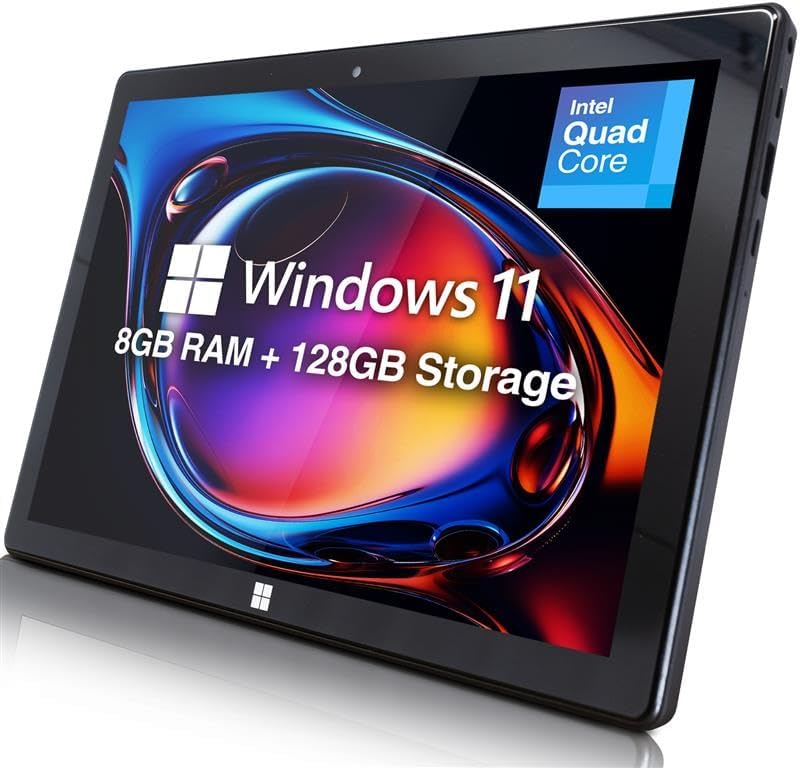
The Fusion5 10" Windows 11 Tablet combines a powerful Intel Alder Lake N100 processor clocked at 3.4 GHz with 8GB LPDDR5 RAM and a fast 128GB SSD, delivering smooth multitasking and quick boot times. Its vibrant 10.1" Full HD IPS display offers sharp visuals, while versatile connectivity options including USB 3.0, USB-C, Micro HDMI, and expandable storage up to 512GB via MicroSD ensure seamless integration with your digital ecosystem. Lightweight and ultra-slim, it runs Windows 11 Home for a familiar, productive experience anywhereโperfect for professionals seeking a portable yet powerful device.


| ASIN | B0F2GBPNW8 |
| Age Range Description | Adult |
| Aspect Ratio | 16:10 |
| Battery Average Life | 8 Hours |
| Battery Capacity | 6000 Milliamp Hours |
| Battery Cell Type | Lithium Ion |
| Battery Power | 18.0 |
| Best Sellers Rank | 5,396 in Computers & Accessories ( See Top 100 in Computers & Accessories ) 102 in Tablets |
| Box Contents | USB 3.0 cable, Micro HDMI cable, 12-month warranty |
| Brand | Fusion5 |
| Brand Name | Fusion5 |
| CPU Model Number | N100 |
| CPU Model Speed Maximum | 3.4 GHz |
| Camera Description | Front, Rear |
| Cellular Technology | 5G |
| Compatible Devices | Keyboard |
| Compatible Flash Memory Type | microSD |
| Country of Origin | China |
| Customer Reviews | 4.3 out of 5 stars 4,542 Reviews |
| Display Refresh Rate in Hertz | 60 |
| Display Type | LCD |
| Display resolution maximum | 1920x1200 Pixels |
| Flash Memory Supported Size Maximum | 256 GB |
| Front Photo Sensor Resolution | 2 MP |
| Generation | 1st Generation |
| Graphics Coprocessor | Intel UHD Graphics 600 |
| Graphics Description | Integrated |
| Hardware Interface | 802.11 ac/b/g/n |
| Human Interface Types | Touchscreen |
| Item Dimensions L x W x Thickness | 25.5L x 1.1W x 17Th centimetres |
| Item Weight | 636 Grams |
| Lithium Battery Energy Content | 18 Watt Hours |
| Manufacturer | Fusion5 |
| Maximum Display Resolution | 1920x1200 Pixels |
| Memory Slots Available | 1 |
| Memory Storage Capacity | 128 GB |
| Memory storage capacity | 128 GB |
| Model Name | FWIN232 PLUS FHD N5 |
| Model Number | FWIN232 PLUS FHD N5 |
| Model Year | 2025 |
| Model name | FWIN232 PLUS FHD N5 |
| Native Resolution | 1920 x 1200 pixels |
| Network Connectivity Technology | Bluetooth, HDMI, USB |
| Number of Rear Facing Cameras | 1 |
| Operating System Family | Windows |
| Operating Systems | Windows 11 Home |
| Operating system | Windows 11 Home |
| Other Special Features of the Product | Lightweight |
| Processor Brand | Intel |
| Processor Description | Intel Alder Lake 13th Gen N100 |
| Processor Speed | 3.4 GHz |
| Product Warranty | 12 Month |
| RAM Memory Installed | 8 GB |
| Rear Facing Camera Photo Sensor Resolution | 5 MP |
| Rear Webcam Resolution | 5 MP |
| Screen Size | 10 Inches |
| Screen size | 10 Inches |
| Size | 128GB SSD |
| Specific Uses For Product | General use, such as web browsing, document editing and multimedia consumption. |
| Total USB Ports | 1 |
| Video Capture Resolution | HD 720p |
| Video Processor | Intel |
| Warranty Type | Limited |
| Wireless Compability | Bluetooth |
| Wireless Technology Type | Bluetooth |
C**L
What a brilliant device...!
My Samsung Tablet finally died and I needed a replacement. I'd long realised that I didn't want another Android tablet again as I'm not very tech savvy and found the interfaces difficult to manage. Imagine my delight when I came across the Fusion 5 tablet computer that runs on Windows 11! For me this is the best solution - a tablet that runs like my computer and interfaces with my desk-top machine seamlessly. And all for less than ยฃ300 - brilliant! Now I can take my entire office out with me when I'm working or travelling away from home. This alone is a great gift - the ability to carry on working on the same project no matter where I am. It's just so reassuring to have the same icons and programmes always with you; I'm so much more productive because of this brilliant device. The Fusion 5 screen is bright and responsive to the touch, so much better than my previous tablet. Another improvement is that the battery lasts all day without charge. I bought a Bluetooth key-board and mouse to complement my Fusion5 - both interface seamlessly with it and give me the familiarity of a separate key board and mouse. Have I any complaints - No! Just a niggle - it takes a 5 second press and hold to get it to start. This is more a testament to my impatience when I've got an idea in my head that needs to be written down! After all my desk-top takes at least 10 seconds of whirring and clicking to get to the same status. As I say, what's not to like with the Fusion 5!
M**A
Decent desktop alternative in a pinch
I bought the Fusion 5 tablet as an emergency replacement for my big desktop that had blown its PSU (under guarantee). I ordered it with the docking keyboard, a 128GB TF/SD card and a screen protector. It all arrived in 2 days which was handy as I had to produce some Word docs urgently for work. I installed a spare Office 365 (you get up to 5 on the standard subscription) and I was away. There was some other software that I needed that wasn't available from the Microsoft Store, and so I had to change from the installed Windows S operating system to Windows 10 Home (a relatively simple couple of clicks from the Settings menu) and so was able to install my favourite photo editor. The 1200x800 screen is fine for simple stuff, but for big docs and spreadsheets it is a bit small and so I decided to connect it to my 27" 4k screen which it would do, which is fine for Word, Excel and photo-editing, but had real trouble with hi-res video. I didn't try it with a spare 1080p screen, but in retrospect that might have been a better decision, but hey-ho. I did have some trouble with the docking keyboard, in that if my thumb just brushed it when typing (especially the space bar) I would find myself typing words in the wrong place! I think that's my problem with trackpad laptop keyboards in general and I really missed the right button function. However, for simple surfing when sitting on the sofa it works fine (as does the screen keyboard). For working at my desk I decided to plug the tablet into an 8-way USB adapter and plug in wired mouse and keyboard, which along with powered external hard drive meant that I could type normally and access my backup files off the drive. We hadn't had a tablet before, and so the Fusion5 is a bit of a happy novelty, and so much easier to use than our ancient smartphone. So what did I like: It works well for most things (e.g. word processing, web stuff, email), the price, the mobility, full-size USB connector, HDMI connection to external (up to 4k) monitor. What I didn't like: An HD screen would be good, though the 10" works perfectly well and you can use it for YouTube. The trackpad was annoying for me, but something I could adapt to (I couldn't work out how to switch it off, which would have been useful!). The tablet speakers are very quiet, but work fine with headphones or external speakers. Overall the Fusion5 is a pretty decent tablet and laptop alternative to my ยฃ2.5k desktop. I couldn't do CAD or video editing on it, and running a 4K screen was marginal with respect to screen refresh rates (and made video unwatchable, though worked fine on it's native screen). The battery life was fair when not plugged into the USB adapter or 4K screen and I got 6hrs of Word processing as an experiment (though most of the time it was connected to its mains adapter). It is a good general-purpose mobile solution. I didn't use the onboard cameras except for Skype (which was fine, except the speakers aren't very loud). It upgraded to Windows 1903 just fine and now with my desktop back it is a really useful mobile (sofa, train meetings) solution.
M**B
Great value Win11 tablet...but some room for improvement
I bought this tablet (Fuson5 FWIN232 Plus FHD) to replace an 8 year old Asus Transformer Win10 tablet, which is still going great but can't be upgraded to Win11. So that is my reference point. Overall Im pretty impressed by the Fusion5: it's a good deal for the price, and very good vfm compared with say the Surface Pro models. There are not a lot of viable alternatives out there. It peforms well, the spec says it all really. I appreciate the 256GB SSD, the USB 3.0 a welcome addition alongside the USB-C, it's responsive and does what I need it to do. A few areas for improvement whihc I miss from my Asus: - The docking keyboard really should come as standard, not an option - My biggest gripe is the lack of charging via the USB-C port (it is NOT USB PD). It only charges via the dedicated Charging port. This is a big deal as I need to use my Fusion5 on the move and dont want to carry around a massive/expensive 12v power bank. So my solution is a PD to DC Adapter Cable I recommend this one: https://www.amazon.co.uk/dp/B0CHJM3GC4 > i Can now run the Fusion5 off a standard powerbank with a USB PD output, the adapter upconverts to 12V. - I also miss an LED that will show battery charging status (ie charging or charged) - If you buy one of these cases (https://www.amazon.co.uk/dp/B0865WFN1V) and despite the claims, it won't quite fit and you'll need to hack out your own cutouts to get access to the USB ports. Overall though I'm impressed, well done Fusion !!
J**S
Excellent build quality - Amazing price - Just the job for me!
I've been wanting a tablet with a Windows OS, but I can't justify the outlay for a Surface. Browsing, I came across the Fusion5 10 inch Windows 11 Tablet PC on Amazon last Sunday evening. The spec looked suitable for my requirements, and the price suitable for my pocket, so I took the plunge and bought it there and then. On Monday morning, I couldn't believe it - the Amazon courier was ringing the doorbell before I'd finished my breakfast! Opening the box I discovered a really good quality, solid tablet, that doesn't look or feel like it comes from the "bargain basement" of the market and, as I'm finding out daily, represents excellent value for money. I've been retired a long time now, but most of my experience with computers has been with Windows systems, and so it suits me to a tee. I've only had it for three days, but I'm already completely at home with it. It's quite quick enough for me and the screen is clean and bright. I've downloaded and installed all my familiar software and files, so it's business as usual, but in a tremendously useful, compact and mobile form, which feels like itโs built to last and withstand the rigours of travel. So, I'll definitely be using it to display music on my gigs, instead of humping around a library on paper! Iโve already decided to get the keyboard to complete the set.
L**T
Fusion5 versatile prodict and reliable product at a very competitive price
I bought this Fusion5 Windows PC Tablet in March 2025 as it had what I was looking for at a very good price compared to other laptops on the market. I decided not to upgrade my two old Windows 10: 14" and 10" laptops because I wanted Fusion5 for work, to run on MS Windows 11. I am pleased that the Fusion5 tablet I bought is lighter and also quicker to connect for MS Teams meeting and Google Meet and also to create my videos, such as for Zoom, YouTube and other social media. Initially, I felt a sense of unfamiliarity with the Fusion5 tablet, being used to having Samsung phones and an an old Samsung cellular tablet, that doubled as my backup phone with an sd card to save and view offline many photos and files ehen I went abroad. The call provision is not available on my Fusion5 tablet. At any rate Fusion5 has an onscreen keyboard to help navigate to tasks and different icons. There is an add-on keyboard available to facilitate, to avoid using fingertips on the screen (none of my soft tip pens worked to tap on the screen). Screen clarity is good. To conclude, it is a versatile, reliable product at a very good competitive price.
M**S
Good value
It is a good Windows 11 tablet. Very easy to set up and it is now completely compatible with my Desk Top Laptop. Screen resolution is excellent for watching films. The sound quality could be better BUT if you have some Bluetooth earphones or plug-in ones the sound is greatly improved. For the size I would say it is perfect. You would not expect it to perform as quickly as a Desk-Top computer but it does the job. Charging is quick, although these days I would have expected a USB charger, but that is not a problem. I also bought a keyboard and a mouse which connects with no problems and makes it a bit easier to use. All in all I would say it is good value for money.
L**E
It's great as a portable little Windows device
I was on the market for a tablet but the specs on paper for the majority of the competition didn't look too appealing to me. Especially for the ยฃ200 price range. Therefore, I decided to give this one a go. The unboxing experience was high quality, and after turning the device on, I was impressed by how great this thing was. Here are just a few points based on my experience: The battery life is quite long-lasting. Inside the device is a huge thin battery that covers most of the back of the display The screen resolution could be higher, at just above 720p resolution, it's not quite Full HD, but I felt it was fine for the most part It runs the Netflix app really well, and I managed to get some decent functionality out of Amazon Prime on the browser. However, the YouTube website felt slow and sluggish and I would recommend using a third-party YouTube app from the Microsoft store. It worked pretty well for simple web searching tasks, and for checking Facebook or Forums. The port accessibility is really useful, with a full USB 3.0 port and a mini HDMI port, there's the possibility to plug in external Hard Drives or anything else you might want to plug into a Windows computer. The touch screen didn't feel too responsive, and the typing experience on the on-screen keyboard felt laggy, but this is to be expected considering it's a Windows device (you can always connect your own keyboard) I was able to have Discord and Skype running on the machine to take calls or receive messages, but Skypes interface feels really sluggish while in calls if you have a little patience you might manage it (I think this is just Skype's problem though) If you are looking for something smaller and lighter than a netbook or laptop, but still want to be able to have Windows 10, this is for you. Though if you are looking to have many applications open or to use professional recorce intensive software you might want to look for something higher end. It works great as a little computer you can just take with you wherever you go. It's perfect to use as a little computer you can have next to your bed to quickly access the internet or messages, or even watch Netflix before sleeping! But if you are looking for something to play games, or do heavy multitasking, this device doesn't perform too well. Perfect for light tasks such as messages, emails, Netflix!
B**K
Fusion5 Win10 PC-Tablet for Meade Telescope Control
I have a Meade ETX 125PE Telescope which can be controlled via a Laptop using appropriate Planetarium software and a #505 RS232 โ USB Prolific Interface cable. I own a Lenovo Android Tablet with a Planetarium App installed but can only connect to Bluetooth enabled Telescopes which my Meade isnโt. The other issue is there does not seem to be an Android Planetarium App which allows Telescope control via a USB Interface. I have recently updated my Planetarium Software on my Windows 10 Laptop which works brilliantly. However I really wanted a Tablet sized Device rather than my 14โ Laptop to control my Meade Telescope in the field. The solution presented itself as the Fusion5 10โ Win10S PC-Tablet. I decided to buy the 4Gb RAM-128GB Storage version for the best possible performance. The Fusion5 had the important full size USB Socket I needed (actually USB3) for the #505 Interface cable. This may have been a somewhat extravagant purchase for Telescope control but it is exactly what I wanted plus it does everything else that can be done on a Win10 Platform. I use it for e-mails, Internet based research, Non-Microsoft Office Apps, Streaming Videos via my Google A/C etc. Infact because of its convenient size I am using this PC-Tablet more now than my Laptop. In case you are wondering the Telescope control on my Fusion5 works perfectly, making slewing to specific Night Sky Objects a piece of cake and an absolute Joy. The Fusion5 feels like a quality product with a Screen Protector already applied. The Touchscreen is accurate and fast although, because of my large fingers, using a stylus is better which has the added bonus of not leaving skin oils on the screen. Image quality is very good with nice clear images and realistic colours. All in all I am very pleased with this PC-Tablet which does all that I want it to do. That said there are a few things that I feel need to be mentioned; Firstly, this PC-Tablet is shipped with Win10 S-Mode. After some research it seems that this is a PRO-version of Win10, but is very Secure and Virus Safe, only letting you download Apps from the Microsoft Store. It also means that basically you cannot download Third Party Software (unless in Microsoft Store). So nearly all the software I wanted could not be installed on this device while S-Mode is ON. To install Third Party Software you need to switch S-Mode OFF, which requires a Re-Boot, leaving you with Win10 Home Edition (not PRO) version on the Device. At this time I believe this process cannot be reversed. Subsequently, I have reset this Device to Factory settings, confirming that it does not revert to Win10 S-Mode. Next, if there is one thing which has disappointed me about the Fusion5, it is the lack of output volume from the stereo speakers. Perhaps my hearing is age related but I have no problems with the volume from my Lenovo Android Tablet, Amazon Fire HD Tablet or my Tesco Hudl 2 Tablet. Using an earpiece is fine but you may need to consider buying Powered Stereo speakers if you want this Device to be loud. Lastly, I really wanted a Non-Generic Fusion5 Case / Docking Keyboard for my Fusion5 PC-Tablet but there does not seem to be any available with a UK Layout. Out of the blue, Fusion5 Marketing offered me a Free Gift as a Thankyou for purchasing their Device. As luck would have it one of the gifts was a Docking Keyboard which I chose. The Free Gift arrived within 7 days and I was so pleased as it was a UK Keyboard and works really well. Very Impressed so Thank You Fusion5. As stated I am very pleased with this Product which is only let down by the poor speaker volume. However, as this Device does everything else with Flying Colours, I give it a 5 Star rating but with a slightly Negative bias towards 4.7 Stars.
Trustpilot
1 week ago
1 month ago