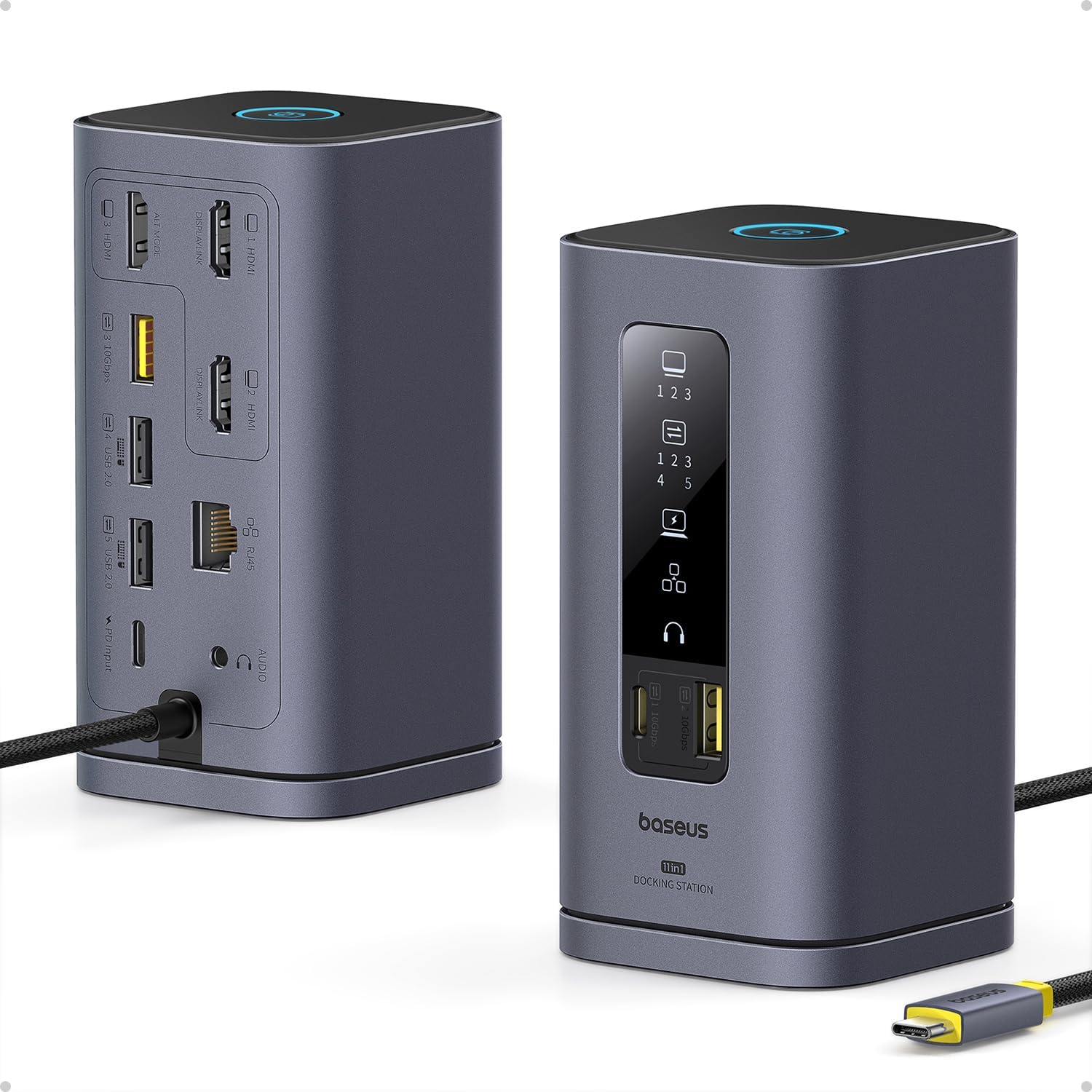
read the UPDATE at the bottom for the happy ending... ************* INITAL REVIEW: BaseUS for Mac, running on a 2024 M4 Pro Max. Initially, it worked beautifully ... for a week. I have an M4 mac and after installing the driver, it displayed to the laptop display and 2 separate monitors via HDMI. Also plugged in where a webcam to the USB-A, an ethernet cable, and power to the incoming USB-C port. I used the macbook's power supply to power the hub. I was happy. For a week. I then left on a trip and returned a week later. Pluged my macbook back in and ... nothing on either external monitor. I tried: restarting the macbook restarting the monitors restarting the BaseUS (well, unplugging it, unplugging everything from it, waiting a minute, and plugging it back in) using only one monitor (each external in turn) I can validate the cables are working by plugging them directly into the macbook. I can also validate the monitors are working by plugging them directly into the macbook via hdmi. When both monitors are connected to the hub, the front panel lights show the external monitors are connected. The indicator lights also show when the webcam is connected, as well as power. and ethernet. The webcam is recognized and usable by the macbook. Only the displays are buggered. I tried doing the "press option while in the display control panel" trick to force the macbook to recognize the monitors. It did not work. As a final step, I tried with the 3rd HDMI port. (previously I'd only used 1 and 2) Connecting the HDMI to the third port, video appeared on an external monitor. (this, of course, does not work for me since I need two external monitors) I honestly don't remember if I'd only ever used ports 1 and 2, but it seems perhaps both of those ports are bad. Poor soldering and the physical ports are buggered? The only pressure on them is from HDMI cables coming out the back and draping down to where they enter cable management ... so really, no pressure at all. While I've seen multiple reviews regarding the company being very responsive, this is for work and I need a replacement soonest. I'll be ordering another and returning this one to Amazon. Hopefully it was a one-off and the next will work. I'll update this review once the next one arrives and I can determine if it works past a week. I'm leaving two stars instead of one because hey...at least the other features still work. ¯\_(ツ)_/¯ *********************************** UPDATE: (spoiler: it was not a hardware problem. And they have *AMAZING* customer service!!) I received my second unit only to find ... it was doing exactly the same thing as the one I already had! So something was up. I'd gotten rid of the previous one's packaging because, hey, it was working great and if something did go wrong, I was sure the manual was available in a pdf somewhere. (sneak peek .. it was/is. I just somehow missed it) When it stopped working I searched high and low to find a manual. The BASEUS site had a page for the model, but somehow I completely missed the manual. <facepalm> Find it here: https://support.baseus.com/product/452/Spacemate-Series-11-in-1-(MAC)-Docking-Station?n=mxobwklbv9 I opened up the manual (printed with probably 6 point type ferchrissakes .. my eyes are OLD, people!) with the new unit I received and - there it was - the note that the unit needed a driver and the magic link to find it. (here it is for some poor soul coming after me: https://www.synaptics.com/products/displaylink-graphics/downloads ). I downloaded the installer and re-ran it only to be kindly informed "You've already got the newest version." Oh. Right. Ok, I knew that. So what's the problem?! I can't believe I got *another* unit that happened to be borked in exactly the same way that my current one is. (when the current one initially worked great) Now here's the rub. These aren't exactly "drivers" ... it's a driver set/program pack. When you install the driver it launches the controller program and everything works splendidly. However, if you subsequently reboot, the multi monitor feature of the hub stops working UNTIL you relaunch the program - DisplayLink Manager. DisplayLink Manager DOES have an option to relaunch at system restart. But was that enabled by default on install? (you can guess). So from where I sat, the unit just ... stopped working. And nowhere - I mean *NOWHERE* online did I find someone saying "oh, yeah. You not only need those third party drivers - the controller needs to be running or things won't work". I was expecting a driver to be, well, a driver. Something that, once installed, I didn't have to think about again. But even THAT could be forgiven if there had been documentation somewhere that detailed what needed to be done. Even the manual simply had a reference to the driver and nothing more. An additional line saying "make sure you set DisplayLink Manager to launch automatically after login" would have saved no end of trouble. Or even better - a big 'ol notification at the end of the install. In the end, the hardware is fine. I was going to update the review, but only bump it to four stars. But I'm putting it at 5. Why? Because, for everything else that went wrong and frustrating and caused me to burn time ... the company saw this review, contacted me, and offered to refund the purchase price. No hassle, no argument, no nothing. Just "we're sorry it caused you inconvenience". I can forgive an *awful* lot for proactive, respectful customer service like that. So five stars it is.