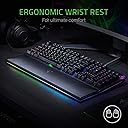
⚡ Elevate your command center with speed, style, and supreme comfort.
The Razer Huntsman Elite is a premium gaming keyboard featuring ultra-fast optical switches with 30% shorter actuation distance, fully customizable Chroma RGB lighting supporting 16.8 million colors, and a magnetic plush wrist rest for ergonomic support. Built with a durable aluminum frame and designed for up to 100 million keypresses, it includes dedicated media keys and a programmable dial for seamless control, making it a top-tier choice for professionals and gamers seeking performance and style.


| ASIN | B07DHNX18W |
| Additional Features | Backlit, Ergonomic, Wrist Rest |
| Antenna Location | Gaming |
| Best Sellers Rank | #51,927 in Video Games ( See Top 100 in Video Games ) #2,455 in PC Gaming Keyboards |
| Brand | Razer |
| Built-In Media | Huntsman Elite Keyboard, Wrist Rest |
| Button Quantity | 104 |
| Color | Classic Black |
| Compatible Devices | PC |
| Compatible Operating System Family | Windows |
| Compatible Tablet Computer Models | AAUB P30 |
| Connectivity Technology | Wired - Attached |
| Customer Reviews | 4.7 out of 5 stars 5,046 Reviews |
| EU Spare Part Availability Duration | 2 years |
| Enclosure Material | Acrylonitrile Butadiene Styrene, Aluminum |
| External Testing Certification | Não aplicável |
| Generation | 1st Generation |
| Global Trade Identification Number | 00814855020720 |
| Hand Orientation | Ambidextrous |
| Item Dimensions L x W x H | 176.38"L x 92.13"W x 14.17"H |
| Item Type Name | Razer RZ03-01870200-R3U1 Huntsman Elite – Opto-Mechanical Gaming Keyboard |
| Item Weight | 3.8 pounds |
| Keyboard Backlighting Color Support | RGB |
| Keyboard Description | Gaming |
| Keyboard Layout | QWERTY |
| Language | English |
| Manufacturer | Razer USA Ltd |
| Mfr Part Number | RZ03-01870200-R3U1 |
| Model Name | Huntsman Elite |
| Model Number | RZ03-01870200-R3U1 |
| Number of Items | 1 |
| Number of Keys | 3 |
| Number of Packs | 1 |
| Number of Sections | 3 |
| Processor Count | 1 |
| Recommended Uses For Product | Gaming |
| Series Number | 20011 |
| Special Feature | Backlit, Ergonomic, Wrist Rest |
| Style Name | Clicky Optical Switch |
| Switch Type | Clicky |
| Theme | gaming |
| UPC | 814855020720 |
| Warranty Description | 2 Years |
S**L
Rather have a keyboard that's has RGB built in function's instead of using an app
This Keyboard is amazing. It looks amazing, feels amazing, sounds amazing and the wrist rest is worth the reason to get this keyboard because I need a reason to justify with me why I'm getting a $200 keyboard. I love the clicky knows the keyboard makes and it feels really nice on my fingertips. I'm definitely going to type some questionable fan fictions with this keyboard that will make you say "Every day we stray farther away from god" So I will honestly admit because It does not have the ability to change the lights by holding the function keys... or it does and I just don't know it yet. Then I would want to return the keyboard and get a cheaper one just to have RGB built-in maybe I should have got the Steelseries Omni keys over this keyboard. It's very difficult to make a decision over comparing keyboards around the $200 price range actually matter of fact I didn't like the Steel series because it looks like a gimmick and people were saying the steel series keyboard worth $200 was overpriced. In conclusion... do your research on what chroma li9ghts are... If you want to make sure you get good RGB and are looking for a $200 then get the CORSAIR keyboard that has RGB not this keyboard. I'm a tough customer to satisfy in terms of high quality when it comes to comparison and doing my research and knowing what I want so I would get the CORSAIR instead iff I knew that I needed an app for the Chroma lights. Razer is lucky I'm keeping this keyboard and ironically I'm a RAZER fan now because it's still an expensive keyboard and I definitely show quality to it's utmost and the wrist rest is in a league of its own. So I sacrifice The RGB lights for chroma lights that I don't really like for the best in terms of quality so I'm confident that I have quality on a scale of 1-10 is a level 10 on the scale of how high quality this keyboard is . This keyboard is my ultimate weapon for years to come and I got the warranty from amazon for confidence that my investment is locked in. In summary, the following in on a level scale from 1-0 Chroma lights Level 3; Honestly, if it was not for the wrist pad having the lights as well this would have been a deal breaker but the wrist rest saves the keyboard. Keys Level 10 It's really hard for me to imagine that it can get any better than this, Indeed this is the best keyboard you can ever have if you spend any more money than $200 you are paying for gimmicks or other things that have nothing to do with then keyboards quality and STOP complaining about the keys being so loud it's not that bad its actually just right for a clicky keyboard. The Havit keyboard for $47 had a louder clicky keyboard with RGB but in functions so I already miss that keyboard... I might buy it again because I returned it to get this keyboard but im apparently greedy and want both of them to know but I keep telling myself if I'm going to get another RGB keyboard then I will get one that is Bluetooth. Wrist rest Level 10 This wrist rest should save me years of grief and discomfort. I would rather spend $200 on a good keyboard with a top-notch wrist rest than spend more than $200 on surgery for my wrist going bad. This investmetn will save my wrist in the future. The wrist rest has lights at the bottom with a magnetic connector to connect ton the bottom of the keyboard. Overall I don't have a justifiable reason to return this keyboard or rate it 2 stars but for now, I will give it 5 stars for the highest in quality that Razer was really truthful about. You want the best quality and make sure you are getting what you pay for dollar for dollar than get this keyboard. Honestly, the chroma lights are not that bad I just need to get use to them.
I**R
If you do not know which keyboard to buy and you've been eyeing this one, buy it.
I have always wanted a mechanical keyboard with cool rgb and all that. My old keyboard stopped working, and I decided to reward myself by buying a nice keyboard. I really liked the feel of the clicky keys, so I bought the clicky optical Huntsman elite and I do not regret it one bit. Firstly, the wrist rest. Wow. Never had a wrist rest, never will not have one again. The wrist rest spoiled me. Next, the RGB is amazing, and even better in person than in the pictures. The colors look beautiful and I find myself just staring at the lights sometimes. The sound of typing may be annoying to some, but it is not as loud as people say. It is not quiet, but not that loud either. With the door closed you won't be bothering anyone else in the house as long as you're not smashing the keys. The feeling of the keys are amazing. I don't think I can ever go back to using another keyboard after getting used to this optical switches. In fact, with all the online homework colleges have been giving out, this keyboard made me dread doing homework less, purely because of the fact that I can type it up with this keyboard. The software is easy to learn and use. It is not the best, but certainly not the worst. I don't game much on PC, but with the little time I have gamed with this keyboard, it is very fun to use, comfortable, and perfect for clicky key fans. For the price, maybe it could have come with PBT keys or a USB pass-through, but in my opinion, those are such minor inconveniences. I am glad I didn't listen to the Razer haters.
C**E
New and different, in a good way
I just received this keyboard 4 days ago and have been using it every night when I get home. Compared to other keyboards (membrane keyboard at work, previously Corsair K70 MX Brown) this one is certainly different. It feels smoother, quicker, and a LOT more comfortable. The wrist rest is really soft and I can keep my hands on the keyboard, typing for long periods of time. It is almost like typing on air compared to others. For gaming, I have played a couple of games, and I kind of miss having keys that push back a little, to feel like I am pushing down on a key when I game. That being said, this keyboard does not have that feeling at all. I'm just not used to it, even compared to Cherry MX reds... These switches just glide. Will take me a little bit more, but I can see myself getting to used to it, just not quite there yet. The thing that everyone talks about or asks about this keyboard... YES IT IS LOUD, even with a pair of audiophile cans on my head, they are loud. For keyboard typing, the clickity clackity of this keyboard is like a machine gun going off, but at a higher pitch. For gaming, I had to change the pads on my headset to firmer padding just to help dampen some of the noise, this didn't help much. If you are in a dorm room and you have a roommate, they will probably break your keyboard or you. If you are in an apartment, your neighbors will hate you... If you are in a house and have others that live there, be nice and sound dampen whatever room this keyboard is in!!! Oh, and the whole chroma, lights, and synapse is pretty cool to. Razer does need to fix the installation and set up of the program though, their installer is not an offline installer, it requires an Internet connection to download and install. If I don't update this review, it means I am loving this keyboard. If I update this review, something happened.
T**R
I have enjoyed this keyboard
It's a great gaming and typing keyboard. Actuation at the top of the press, but won't trigger unless pushed very deliberately, unlike Apex pro with the hairpin trigger by even just resting your fingers on keys. Some people hate on the media keys and the wheel. The wheel feels identical to the wheel on the Arctic Pro Wireless dock, and has a noticable but appropriate resistance for feedback. I do think the key symbols on the media controls should have been illuminated instead of only backlit, but they have a nice click and can be reassigned to anything. The Chroma with Synapse 3 is amazing, and easily my favorite software to use for lighting. It syncs up to my other Razer gear, and it can sync up to Nanoleaf panels which are actually very cool. It makes the entire man cave more immersive during OverWatch especially. Synapse 3 can let you connect games that can take control of lighting (I highly recommend) and it activates some really cool effects that I must say I do enjoy. Q flashes when my ult is ready along with a little display of lights when my meter hits 100%. Also my cool down keys glow blue when usable, and flash red when unavailable which is a nice touch. The wrist rest is extremely comfortable and I'm glad I spent the extra few dollars for it. It has underflow, which shines into the desk, and from my chairs height are decently visible, but it may have been nicer to see the entire light strip. Still, a great wrist rest with a nice leather feel to it. The keys are loud, but you can rest assured the moment you hear that click, your mouse has actuated. I did once hit a key on the side and it stuck momentarily, but that was once and has not ever happened again, but did make me concerned at first. I can say that whether I am doing schoolwork or rolling through OverWatch clicking heads, this keyboard has been exceptionally nice.
M**.
Coming from the K95, this keyboard is a welcomed improvement.
After almost two years using the Corsair K95, my keys started to double click... ee or eee instead of a single e. Trying to trouble shoot the problem, not a single keyboard setting change in windows made any improvements. So I was back on Amazon looking for a decent gaming keyboard. I remember seeing the hype when the Huntsman came out, specifically the different style keys with the light breaking tech inside. What the reviews here and on youtube didn't show or explain was the amazing feel of each key click. The sound is a little bit more light compared to the MX Browns in the K95, with the key klick sound coming between the depress, and not at the end. It's a drastic change, but in the end, it's works and I don't mind it at all. The total depress from start to finish is pleasant, and not overbearing. The included wrist pad, which is lit, does not shine in your eyes when you are posted up and gaming. They engineered the light to shine down instead of up, making it light the desk rather than your eyes. This is a very nice touch. Another highlight is the volume control. You can adjust it from the right side of the keyboard, next to your mouse, which is another improvement over the K95. This keyboard is worth the money. Sure, you could save money going with a different one, but these keys are something special, the wrist pad was developed with the user experience in mind, and overall, this is a 10/10, and I would definitely buy it again!
C**L
Great keyboard but No USB pass through and still requires two USB cables
I love this keyboard for what it's supposed to be a solid performing gaming keyboard, while not wholly mechanical, the hybrid switches do not in anyway feel less tactile and the clicky variant is very satisfying when typing. The RGB lighting is very good, but brings me to my first caveat, the ALT functions on many of the keys are not back lit, so if your typing in the dark, you will have to rely on muscle memory for some of your punctuation and symbols, I can see this being an issue for many. Secondly, upon plugging in the keyboard razer's synapse program will automatically begin installation, make of that what you will, it seems to be a function of all Razer peripherals today, some people like this kind of ease, others find it intrusive. Though by chance rather than design all of my peripherals are razer now so having one software to manage them and synchronize the RGB is quite useful. But, the keyboard in my opinion has what I believe many would see as deal breakers for the price, the first being the lack of dedicated programmable macro keys, but this is clearly shown before purchasing and seems to be the direction the industry is going since you can reprioritize any button on the keyboard through the software. The multi media keys are also not labelled though the placement is standard, so it should not be an issue to figure out which is which. However, the volume wheel is very finnicky, and for example just trying to set the volume to a hundred by turning the wheel, I found it falling back to 96 or 98 multiple times before I could finally max it. The third and what I consider the most egregious downside for the price is the keyboard has no USB pass through, even excusing the price, this might be fine in and of itself, but, it STILL requires two USB cables to be plugged into the PC for the RGB on the hand rest, I'm, genuinely surprised that the little rgb strip on the detachable hand rest requires additional cabling and honestly Razer if it was a decision between USB pass through and RGB leather we seriously went with the leather? Fundamentally and functionally this is a good keyboard at the price of 130 dollars, but even at this price point similar keyboards would provide both dedicated macro buttons and USB passthrough, but yes you would probably have to sacrifice the pretty light show on your hand rest as a result, but ask yourself if that's seriously worth it.
R**O
Not just another random keyboard. This is the real deal
I wouldn't usually use Razer products. I'd usually associate Razer to be one of those expensive "Gaming" companys that really only use RGB and the name as a gimmick when selling products, and it does to an extent. When buying a razer headset you can always find a better quality product for the same price or even lower, same goes for their mice and desktop mats. But hear me out when I say this is one of the best Keyboards I have used in a long time. I spent the extra money for the sound control feature because after having that option on my last keyboard I could not go back. The opto mechanical switches are incredibly made. I've noticed an increase on sensitivity to typing, you barely need to push a key for it to respond due to the use of lasers in the keyboard to detect key inputs. The quality of the media section is amazing, and add to it the RGB glow adds for atmosphere in a dark room. The volume key is lined in a very grippy material that feels very nice without being too rough. The actual pause and skips buttons give nice feedback when pressed. One thing I wish was part of them was that the light would come out of the keys as well like every other key on the board but they dont, not a big deal. The leather wrist rest is amazing, it is super soft and cushioned without there being a dip of your wrists like other wrist rests give you. It feels soft but at the same time being firm and great to rest on. Plus with the magnetic prongs that attach it to the keyboard it adds a simple way to easily attach it and automatically sync with your RGB settings. Incredible! All in all a great keyboard that blows every other keyboard out of the water. I will continue to use this for as long as it lasts.
A**R
Nice optical keyboard
I have been skeptical of Razer keyboards as they have received poor reviews from my friends or online reviews, but this one has pleasantly surprised me. This is my first optical keyboard (I have dozens of mechanical keyboards). Pros: the keys feel fantastic and have proper width between them. The "travel" of the keys also feels good. Tactile and not too loud. I love how I can optimize the color of the keyboard backlights. One of the most responsive and accurate keyboards I have used. The volume wheel is "backwards" to me, but this is not a problem as you can customize the direction of the volume wheel in the Razer Synapse software. The media keys and extra ten keys are a plus for me (I am not a fan of tenkeyless). I don't care for gimmicky macro keys, so I was glad that this keyboard does not have them Cons: I must have a wrist rest, but this one is terrible. It is too high and flat. An after-market angled wrist rest fixed that for me. If you lock Windows, then the Razer software loses connection to the keyboard, and the color scheme you have programmed is lost. This is only a minor issue as it does not affect the functionality of the keyboard. Some people say my keyboard is too loud, but the sound level seems normal to me in comparison to a cherry MX-brown or red keyboard. Value: I purchased this at $120, which was within my price range. I never would have bought it at $200, but seeing how much I like it now, I might reconsider that.
Y**U
使ってみて
キーは黄軸より重く、緑軸より軽い感じがします。 キーの反応はいいので黄軸で少しカチカチなる方がいい人は買った方がいいと思います。 ただblackwidow chroma v2よりキーの位置が高いので慣れるまで時間がかかると思います(人による)
I**V
Uno de los mejores teclados Razer.
Ok por donde puedo empezar con la genialidad de este teclado. En mi opinion creo que esto este es uno de los teclados mas comodos, mejor vistos y con mejor sonido del mercado, las luces a comparacion de otros razer de gama mas baja son super brillantes y apantallantes por el RGB que tiene a los lados y que se expande con el apoya brazos, los switches son optomecanicos (les dejo la tarea de investigarlos), estos necesitan muy poca fuerza para activarlos sin embargo esto puede cambiar entre las dos versiones que hay, el sonido que tiene es muy difrente al de un switch azul MX o un MX verde o Razer Verde. La comodidad que tienen para jugar es buenisima nunca he tenido fatiga desde el dia que lo compre y eso que le he dado bastantes horas de uso entre universidad y horas de gaming. Si lo encuentran en descuento no duden en comprarlo.
C**Y
Just wow
Great keyboard love it, amazing quality
S**A
Next Level Experience!😍
The Keyboard is really awesome... It’s expensive but worth it... Although it took around 13 Days to deliver but Packaging was good and product was safely packed. This keyboard feels very premium.. Razer makes very premium Products❤️😍🔥
J**.
Good keyboard
Great quality
Trustpilot
3 weeks ago
2 weeks ago