💼 Upgrade your laptop storage game—because your data deserves a VIP slot!
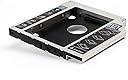
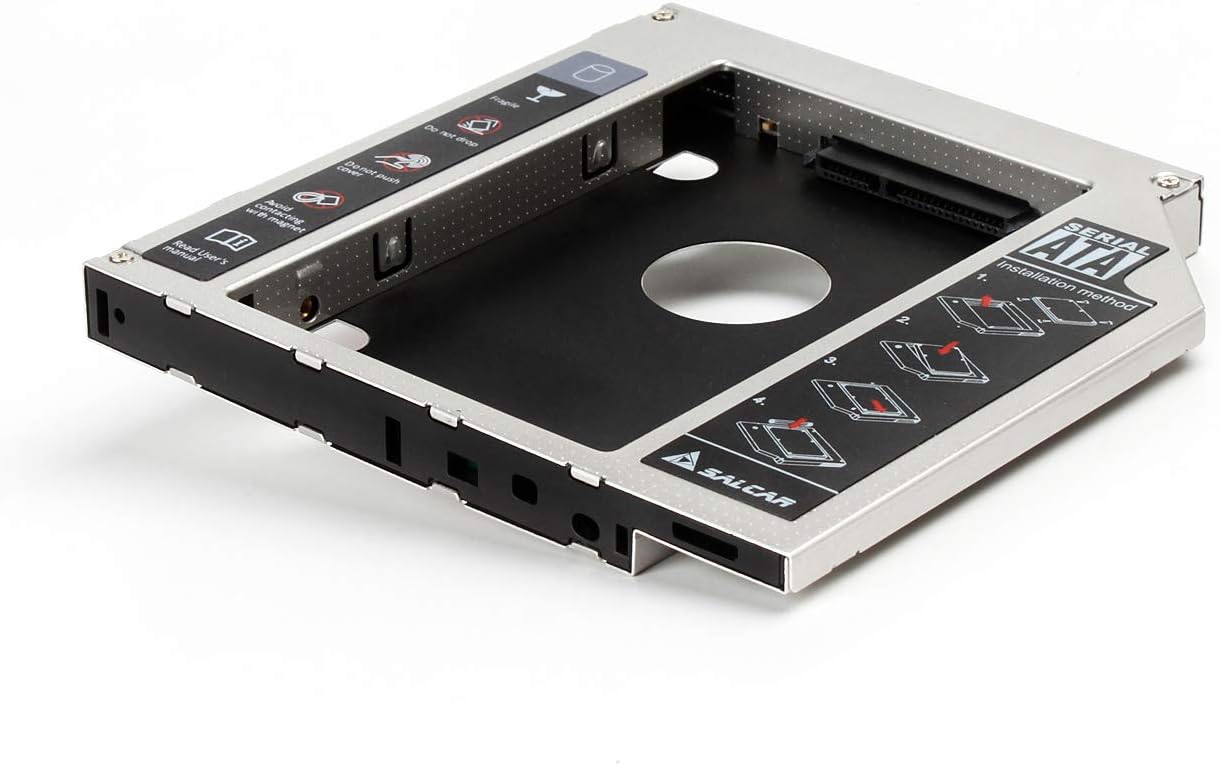
The Salcar 2nd HDD/SSD SATA 3.0 Hard Drive Enclosure Caddy is a precision-engineered aluminium frame designed to fit 2.5-inch SATA HDDs or SSDs into laptops with a 12.7mm drive bay, typically replacing the DVD drive. Supporting SATA III speeds up to 6Gbps, it enables seamless dual-drive setups for expanded storage. The caddy includes an interchangeable front bezel to maintain your laptop’s aesthetic and a dedicated screwdriver for easy installation, making it a practical, cost-effective upgrade for professionals needing more space without buying new hardware.


| ASIN | B0064WEFG8 |
| Brand | SALCAR |
| Brand Name | SALCAR |
| Colour | - SATA-Festplattenanschluss |
| Compatible Devices | Laptop |
| Compatible devices | Laptop |
| Customer Reviews | 4.6 out of 5 stars 5,210 Reviews |
| Enclosure Material | Aluminium |
| Global Trade Identification Number | 04260216387715 |
| Hardware Interface | Solid State Drive |
| Hardware Platform | laptop |
| Hardware interface | Solid State Drive |
| Hardware platform | laptop |
| Manufacturer | Salcar |
| Manufacturer Part Number | 6121 |
| Material | Aluminium |
| Model Number | 6121 |
| Network Connectivity Technology | sata |
| Supported Devices Quantity | 1 |
| The Standard Size of the Hard Drive or the Bay the Hard Drive Is Compatible With (in inches) | 2.5 Inches |
R**.
Does exactly what it says on the tin! I ...
Does exactly what it says on the tin! I have a HP Pavilion 15 Laptop, out of warranty, or I would have thought twice about it! Purchased this item and a 2TB 2.5 inch drive. Fitting instructions are printed on the caddy. The drive fitted the caddy perfectly. Then undid retaining screw for the laptop DVD Drive and slid the drive out. Removed the front trim from the drive (stiff to remove, but just pulls off) and unscrewed small plate at rear of the drive, which takes the retaining screw. The caddy comes with a front trim, which I removed and replaced with the HP one and screwed the little plate to the back of the caddy (the correct screw holes are there). Carefully slid the new assembly into the laptop and replaced the retaining screw. Result - from the outside, nothing had changed. Powered up the laptop and windows10 identified the new drive and asked for a drive letter, name and a quick format). Copied a very large amount of music files to the new drive. Now, for just short of £100, I have a 3tb laptop instead of a 1tb one! I also purchased a little external USB drive for about £25 for the very rare times I need one.
M**C
Good quality product
Good quality aluminium drive chassis. No complaints, it does the job well. Fitted a Sandisk drive into it and there were no problems. Only minor issue was a slightly tight fit in the laptop. Had to take off the stickers on the product for a better fitting.
W**A
Vostro 3550 not really compatible. Very Nice otherwise.
Not really compatible with my Vostro 3550, but with a little bit of creativity it fitted. If the small piece of metal on the back that holds this caddy to my pc was a few mm longer, it would have been the perfect fit.
J**T
Very Cheap and Practical Solution
I had 2 woes with this product: My laptops DVD drive has an overhang at the back which allowed it to be screwed into the frame, to stop it from being pulled out, and 2) the front plate on my laptop was curved, the front plate on this is flat. Thankfully both of these issues have been avoided. The bracket and front plate from my original DVD drive and this caddy could be easily removed, and some extra screw holes on the back meant the bracket could be detached from the old and put onto the new without issue. I imagine this is due to standardisation - but I was releived to find this out anyway. This meant that not only does this product work as advertised, it's also been a seamless transition and I've been able to plug my old laptop SSD into my new Laptop, rather than fork out on an M2 drive which was my only other option to expand my storage. I also really appreciate that there is a screwdriver that comes with the product, and not only does is it designed for the HDD, but it fits into the caddy itself, so you can always keep the tool with the product - very handy! All in all this was a fairly successful venture - it does require some knowhow and some delicate handling if you are changing the faceplate and attaching brackets, but worthwhile nevertheless!
P**O
Simple Reliable and fast to assemble.
Works great simple and fast, just remove the cd drive add the caddy with the drive already in it and you have two disks on the PC that's it nothing else.
1**N
Where to put a 2nd hard drive in a Laptop?
On my laptop one of the most underused items is the DVD drive. So, when I realised that my photo images were impacting on the 'C' drive by their shear number and size, I decided to install a second hard drive. I chose to use a caddy to replace the DVD drive. The caddy took a 2½" SATA hard drive perfectly and slotted into the DVD drive's housing as if it were original equipment. The 2nd hard drive was picked up by the OS and I was set. It was that easy! Regards, 1anson
M**B
Perfect fit for a 2.5" drive to replace an optical drive
The process to fit the 2.5" drive into the caddy adapter was simple and made a lot easier by the tools supplied. Perfect for the job it was created for to replace the optical drive. There was no movement or rattlng when fitted and as a nice touch it looks like an optical drive with the DVDrw markings you find usually on an optical drive
K**D
Salcar - 2nd HDD / SSD Kit ODD send Hard Drive...
Excellent device. I was running out of disc space on my laptop so looking to replace a 1TB disc with a 2TB disc. I came across this and decided to replace my DVD writer with this and fit a spare disc I had lying around. Simple to fit, although I replaced the facia supplied with the one from my old DVD writer to give a better appearance (the fascias just pull off).
F**Y
Bon produit
Acheté pour remplacer un lecteur de disque dans mon Asus, il fonctionne parfaitement. L'installation est facile, petit + : le tournevis intégré. Le disque dur ne bouge pas à l'intérieur, même si il n'y a qu'une seule vis pour le maintenir (et la pression de chaque bord). L'opération la plus "difficile" est d'enlever la face en plastique sans casser les pins, il faut faire attention.
L**M
Bestellt, geliefert, eingebaut - passt hervorragend - Zweck erfüllt - Problem gelöst.
Da ich von einem Desktop-PC auf ein Notebook umgesteigen musste, wollte ich meine alte 512 GB SSD Platte inkl. des installierten Betriebssystems weiter nutzen. Der Laufwerkschacht Adapter erfüllt hierfür genau diese Anforderung. SSD aus dem Desk-PC ausgebauen und in den Laufwerkschacht Adapter eingebauen. Übringens - ein kleiner Schraubendreher liegt mit bei und kann nach der Nutzung im Adapter neben der SSD festgeklemmt werden (so verliert man diesen auch nicht). Den Adapter habe ich in ein MSI GE62 Notebook eingebaut. Hierfür muss natürlich das vorhandene DVD Laufwerk vorher ausgebaut werden. Dann den Adapter in den Schacht schieben und die Schraube an der Rückseite am Notebook festziehen. Im Anschluss noch die Blende vom DVD Laufwerk entfernen und an die Front des Adapters festklicken. Das wars. Passt hervorragend. Die Platte wurde sofort erkannt, inkl. Betriebssystem. Somit konnte ich alles wie im Desk-PC weiter nutzen, ohne größeren Sicherungs- oder Installationsaufwand. Kurzum: Für meinen Anwendungsfall eine richtig gute Lösung.
S**.
HP 625
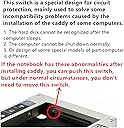
Ich habe den Festplattenrahmen für ein HP 625 Notebook gekauft, da der Festplattenplatz der SSD zu knapp wurde und mir noch eine SATA -Festplatte zur Verfügung stand. In der Verpackung waren keine Gummis, wie von anderen Käufern beschrieben. Aber dafür sind im Rahmen 2 Schrauben zur Befestigung der Festplatte angebracht. Cool, Festplatte einstecken, die vormontierten Schrauben mit dem beiliegenden Schraubenzieher anziehen und so ist die Festplatte sicher befestigt. Gummis braucht man da nicht mehr. Anschließend das DVD-Laufwerk ausbauen und den Festplattenrahmen einbauen. Der Rahmen passte genau und ließ sich mit dem Befestigungsnippel, welcher sich auch ohne Probleme am Festplattenrahmen befestigen ließ, des DVD-Laufwerk im Notebook befestigen. Es ist auch der oft vermisste Schalter eingebaut, den man wohl bei Shutdownproblemen einiger Hersteller umlegen muss. Den habe ich aber nicht betätigen müssen. Auch eine LED ist eingebaut, die grün leuchtet, wenn die Festplatte betriebsbereit ist und verändert sich bei Datenübertragung (flackern, blinken). Dies ist auch durch die original Blende des DVD-Laufwerks zu sehen, welche sich auch ohne Probleme am Rahmen befestigen lies. Die original Blende passt genau und steht auch nicht vor. Top. Hier hat der Herstellers reagiert und auf die Kundenrezessionen reagiert. Die Verarbeitung ist für diesen Preis O.K. Der Einbau war auch ohne eine Einbaueinleitung nicht schwer. Was soll ich noch sagen, die Festplatte wird unter Linux, hier ein Ubuntu 14.04 LTS, und unter dem Zweitbetriebssystem Windows 10 plug'n play erkannt. Eine Treiberinstallation für Windows war nicht notwendig. Eine Verlangsamung des Bootvorgangs von der SSD konnte ich nicht beobachten. Es ist mir auch gelungen, ein Ubuntu Betriebssystem auf der im Festplattenrahmen eingebauten SATA-Festplatte zu installieren und zu booten. Ob das auch unter Windows funktioniert kann ich nicht sagen. Jetzt muss sie nur noch lange genug funktionieren. Von mir eine Kaufempfehlung.
M**O
Adattatore Ottimo per Secondo HDD su Notebook (Versione 12,7 mm)
Visto che con il portatile lavoro moltissimo avevo l'esigenza di poter avere a portata di mano un secondo Hard Disk all'interno del notebook, e questo Salcar faceva al caso mio, perché si va a inserire al posto del lettore DVD del notebook. Il costo è molto basso, e in dotazione abbiamo un piccolo cacciavite integrato nell'adattatore, con i suoi dovuti incastri per poterlo riporre di nuovo li a fine installazione, la mascherina frontale, facilmente sostituibile con l'originale del notebook, e l'ottimo adattatore ben costruito. Detto questo scopriamo se è un ottimo prodotto! PRO - Rapporto qualità/prezzo elevato - Viene montato al posto del Lettore DVD - Completo e pratico da montare - L'HDD dopo il montaggio rimane fermo e non si muove - Prestazioni ottime, pari all'Hard Disk Sata SATA - Prodotto Utilissimo CONTRO - Come già segnalato attenzione allo switch nascosto Il prodotto mi ha convinto, è stato facile da installare nel portatile, ho potuto cambiare la mascherina in dotazione con la mia originale del notebook, non si nota la differenza tra questo e il lettore prima montato, e le prestazioni SATA sono paragonabili a quelle della porta principale. CONCLUSIONE: PRODOTTO CONSIGLIATO Non vedo motivi validi per non valutarne l'acquisto, visto l'ottima qualità del prodotto, e la sua utilità.
B**W
Passgenau, erfüllt seinen Zweck
Diese Bewertung gilt für den 9mm Salcar-Caddy. Ich habe ihn gekauft, um ein HP 250 G6-Notebook mit einer zweiten SSD auszustatten (eine Verbatim-SSD mit 7mm Bauhöhe). Der Caddy ist passgenau gearbeitet. Das Umsetzen der Bezel/Frontblende des alten optischen Laufwerkes auf den Caddy ging problemlos. Die SSD wird mit zwei Madenschrauben gehalten. Ein leichtgewichtiger Schraubendreher wird mitgeliefert und kann sogar im Caddy verstaut werden, nachdem die SSD verbaut wurde (an genau der Position, an der er sich bei Auslieferung befindet). Das Produkt wird in einem frustfreien Pappkarton geliefert. Die Montage klappt wie in der Videoanleitung gezeigt; abgesehen davon, dass man bei der Demontage der Frontblende vorsichtiger sein sollte, wenn man das nicht täglich macht. Die Dinger werden mit vier Rastnasen gehalten, die man mit einem kleinen Schlitzschraubendreher nacheinander vorsichtig biegen und lösen kann. Alles in allem ein sehr gutes Produkt. Ich bin zufrieden.
Trustpilot
2 weeks ago
5 days ago