Desertcart purchases this item on your behalf and handles shipping, customs, and support to Japan.
🚀 Future-Proof Your Home Network with TP-Link’s WiFi 7 Powerhouse!
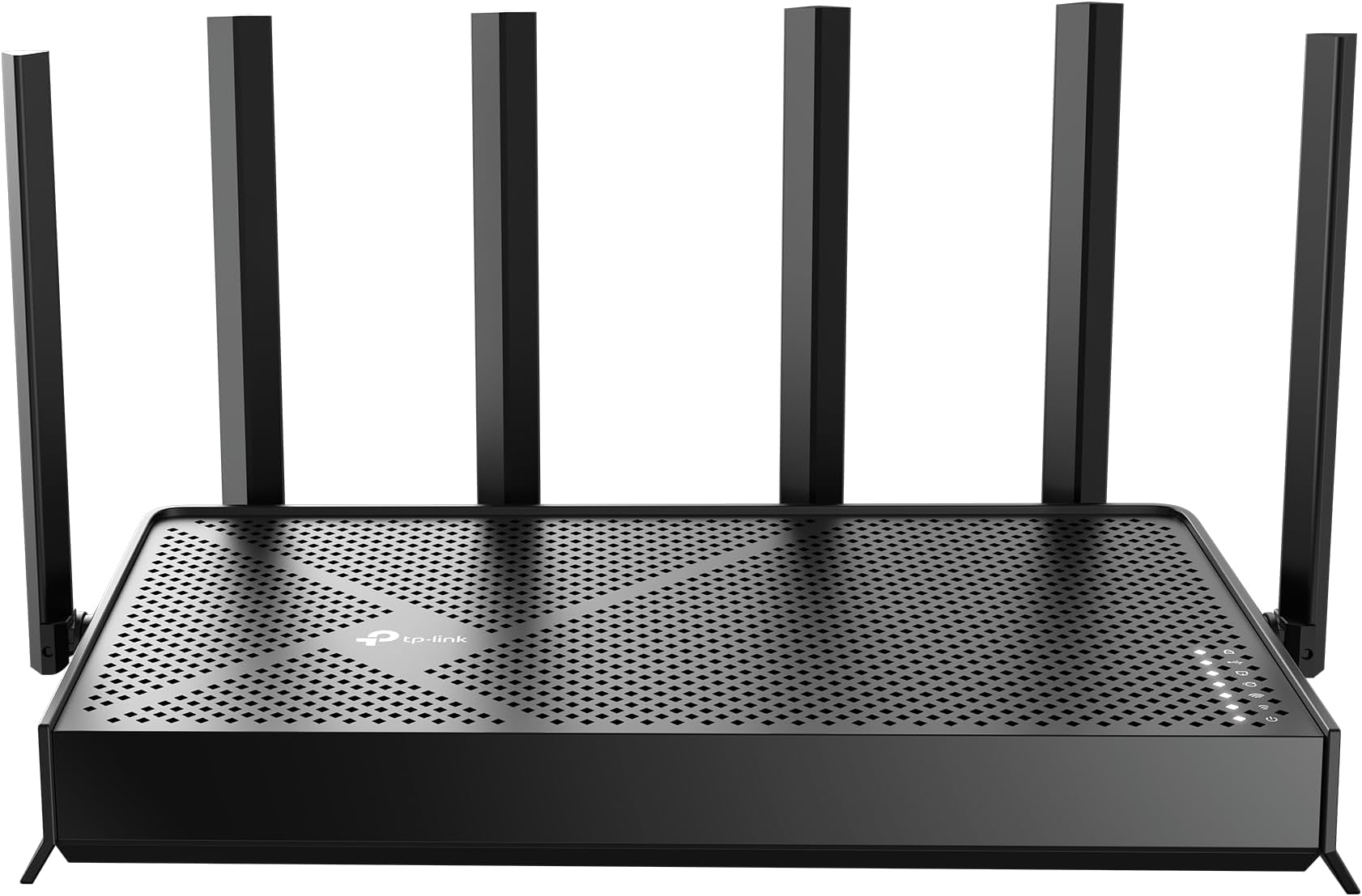
The TP-Link BE6500 Archer BE400 is a cutting-edge WiFi 7 router delivering ultra-fast 6.5 Gbps dual-band wireless speeds, dual 2.5 Gbps wired ports, and expansive 2,400 sq.ft. coverage supporting up to 90 devices. Equipped with a quad-core CPU, advanced Multi-Link Operation, and robust security features including HomeShield and WPA3, it ensures seamless streaming, gaming, and smart home connectivity. Easy to set up and mesh-expandable, it’s designed for modern homes demanding high performance and top-tier network protection.


| ASIN | B0DVBP5L6Y |
| Antenna Location | Home |
| Antenna Type | Fixed |
| Best Sellers Rank | #18 in Computers & Accessories ( See Top 100 in Computers & Accessories ) #2 in Computer Routers |
| Brand | TP-Link |
| Built-In Media | 1 * Power Adapter, 1 * QIG, 1 * RJ45 Ethernet Cable, Wi-Fi 7 Router Archer BE230 |
| Color | Black |
| Compatible Devices | Gaming Console, Personal Computer, Security Camera, Smart Television, Smartphone |
| Connectivity Protocol | Wi-Fi 7, Wi-Fi 6, Wi-Fi 5, Wi-Fi 4, Wi-Fi 3, Wi-Fi 2, Wi-Fi, Ethernet, USB |
| Connectivity Range | 2400 square_feet |
| Connectivity Technology | Ethernet, USB, Wi-Fi |
| Control Method | App, Remote, Voice |
| Controller Type | App Control, Voice Control |
| Coverage | 2400 Square Feet |
| Customer Reviews | 4.4 out of 5 stars 1,290 Reviews |
| Data Transfer Rate | 2.5 gigabits_per_second |
| Frequency | 5 GHz |
| Frequency Band Class | Dual-Band |
| Item Weight | 1.4 pounds |
| LAN Port Bandwidth | 2.5G/1G |
| Manufacturer | TP-Link |
| Maximum Upstream Data Transfer Rate | 6452 megabits_per_second |
| Mfr Part Number | Archer BE400 |
| Model Name | Archer BE400 |
| Model Number | Archer BE400 |
| Number of Antennas | 6 |
| Number of Ports | 5 |
| Operating System | Linux |
| Other Special Features of the Product | Access Point Mode, Guest Mode, Internet Security, Parental Control, QoS |
| RAM Memory Installed | 1 GB |
| Router Firewall Security Level | High |
| Router Network Type | dual-band |
| Security Protocol | WPA2-Enterprise, WPA2-PSK, WPA3 |
| Special Feature | Access Point Mode, Guest Mode , Internet Security, Parental Control, QoS |
| UPC | 810142822220 |
| Unit Count | 1 Count |
| Voltage | 110 volts_of_alternating_current |
| Warranty Description | 2 Year Manufacturer |
| Wi-Fi Generation | Wi-Fi 7 |
| Wireless Communication Standard | 802.11.be, 802.11ac, 802.11ax, 802.11g, 802.11n |
| Wireless Compability | 802.11.be, 802.11ac, 802.11ax, 802.11g, 802.11n |
D**L
Powerful WiFi 7 Router With Excellent Signal and Easy Management
I picked up this TP-Link BE6500 WiFi 7 router mainly to improve coverage and device management at home, and overall, it has performed very well. Setup and programming are straightforward through the app, and managing connected devices is simple once everything is configured. The signal strength is excellent, with very good coverage and stable speeds even with multiple devices connected simultaneously. Compatibility has also been very good with a mix of newer and older devices including smart TVs, phones, tablets, gaming systems, IoT devices, and laptops without major connection issues. The router does a good job automatically selecting the appropriate band for devices, helping maintain stronger and more efficient connections throughout the house. The build quality feels solid, and the router stays responsive even under heavier network usage. The overall appearance is modern and clean without looking overly bulky, making it easier to place in visible areas of the home. Heat management is also better than expected. Even after long periods of continuous use with many connected devices, the router only gets mildly warm and never excessively hot. The ventilation design seems to handle airflow well and helps maintain stable performance. One thing I noticed is that if placed too close to certain Bluetooth devices, there can be some interference, so placement matters for best performance. Once positioned properly, though, the connection stability is very strong. Compared to older WiFi systems, this router feels noticeably faster and more capable of handling multiple smart home and streaming devices. In terms of value for the money, it feels like a strong investment for larger or busier home networks. Overall, a powerful and reliable WiFi 7 router with strong signal coverage, excellent compatibility, good heat management, modern appearance, easy management tools, and very strong overall performance.
C**S
Huge WiFi stability, range and speed improvement over ISP gateway!!!
Excellent router. I have AT&T fiber and the gateway and extender always had wifi connection issues. I have 5 security cameras that always had connection issues. After setting up the TP-Link BE6500, I haven't had a single security camera drop connection. The single strength, distance, and speeds have all drastically increased. I wish I had before screenshots but previously with the AT&T gateway, the best speeds I could get over WiFi 7 was 600 Mb/s. Now I can get over 1 Gb/s down and up. Setup was super easy and fast on the TP-Link side. Getting the IP Passthrough to work on the AT&T gateway was the most difficult part and even that wasn't difficult. Setting up the security IoT 2.4 Ghz network was super easy in the app too! Very happy with this purchase. I don't know why you would need anything else more expensive than this. Great bang for the buck!
D**D
Very pleased with this router!
I had been using only my cable provider’s modem for a long time, but recently decided I wanted more control over my home network and better security. My goal was to create separate networks for my personal devices, work devices, and entertainment devices such as my TVs and gaming consoles. After comparing several brands, I chose this router because of its features, security options, and overall value for the price. Setup was incredibly easy. The instructions were clear, concise, and easy to follow. I chose to use the web interface instead of the mobile app, and the entire process was straightforward. Creating multiple networks was simple, and I had no issues configuring separate networks for my personal devices, work equipment, and entertainment devices. From the time I opened the box to having all of my devices connected and online, the entire process took about 20 to 30 minutes. Everything connected immediately once the networks were created, and the router offers far more customization and features than I expected at this price point. The router itself is compact, although not tiny, so it does require a little space. That wasn’t an issue for me since I live in a studio apartment. As far as performance goes, I’ve been very impressed. The signal strength has been excellent, and my devices actually seem more responsive than they were when connected directly to my provider’s wireless modem. Streaming has been smooth, and I haven’t experienced any buffering issues. Even my PlayStation has maintained a strong, reliable connection. Overall, this router accomplished exactly what I wanted it to do. It gave me better network organization, improved security, excellent performance, and a surprisingly easy setup process, all at a very reasonable price. I would highly recommend it to anyone looking for an affordable router with strong features and enough flexibility to create a more secure home network.
A**S
Major Upgrade Over the BE5000 – Rock Solid Performance
I originally had the BE5000 model and constantly dealt with WiFi instability, random drops, and inconsistent performance. After getting frustrated with ongoing issues, I decided to upgrade to the BE6500, and the difference has been night and day. The BE6500 has been significantly better to work with. Setup was straightforward, firmware has been stable, and I have not had a single WiFi issue since installing it. No random disconnects, no weird slowdowns just consistent, reliable performance. Speeds are excellent, coverage is strong throughout the house, and the 2.5Gb ports are a great addition for higher speed networking. It feels like a properly refined version compared to the BE5000. If you’re debating between the two, the BE6500 has been far more stable in my experience. Very happy with the upgrade.
J**E
USB file share with Chromebox no-go
TP-Link BE6500/Archer BE400. I have modest home network, several WIN PCs, Samsung phones & tablets, 5 Rokus, and one Asus Chromebox. I have medium network skills. I replaced a now deprecated Netgear router with this unit. Overall I found it very good and easy to set up, EXCEPT I could not get file sharing to work where I wanted it. Critical to my selection of this unit was the USB port on the router which is my alternative to a NAS. Got the WIN 8.1, 10, & 11 on the file share with some hassle, but just could not get the Chromebox access figured out. Finally, with help of ChatGPT, I determined something about the smb implementations of Chromebox made it incompatible with this router, although no problems with my old Netgear router. Bottom line: DON'T EXPECT FILE SHARE WITH USB PORT TO WORK ON A CHROMEBOX. There is a low performance work around, namely to install a 3rd party file manager on the Chromebox that incorporates file sharing via ftp connection. Since the file sharing is a minor aspect of my home environment I won't return the router but if this is critical to your use, don't expect it. Otherwise, this seems like a good value for the other features. I live in an old house with Roku units in 5 different rooms; I had to use a range extender to get furthest units connected with the old Netgear unit. With this TP-Link router I have retired my range extenders and have good performance with the Rokus.
A**R
Great product
Setup directions were clear and easy follow. I had to have a little help from Mel in customer service who very helpful and able to take care of the problem quickly and efficiently. Router works great!
A**R
Excellent upgrade from an outdated Netgear router.
I installed the be6500 upstairs in my home and it covers over 3000 square feet plus much of the yard. There have been no issues with the speed and connectivity. One Ring device was not compatible with WPA3 security protocol but everything else is working great.
C**1
Excellent long range router
Excellent router. Pushes all of the speed we get through our modem throughout the mesh network we have set up with a TP Link extender. This is my second TP Link Archer router and I have had nothing but great experiences. The first one got cooked by lightning so I bought this replacement. Very easy to set up with the app. Nice parental controls included in this newer version. Highly recommend this router. The extender connects super easy via “easy mesh” if you need to cover a larger property or outbuilding.
J**A
Compra excelente
Excelente! Nunca mais problema de falha na comunicação, downloads e uploads aproveitando toda a largura de banda, maior área de cobertura e agora pega em todos os cômodos da casa com sinal forte.
J**.
Excelente producto
Mejoro demasiado el internet, sobre todo si lo utilizas en Mesh en casas que tengan techos gruesos de concreto
D**T
Waste of money
The Wi-Fi coverage area is very poor; it's a waste of money. I should have bought a cheaper one instead—I made a mistake.
J**R
Wifi 7
Produto funcionando bem até agora, melhorou o sinal da casa.
A**0
Buena respuesta
Muy buen producto, respeta la velocidad a través de RJ45
Trustpilot
3 days ago
2 months ago