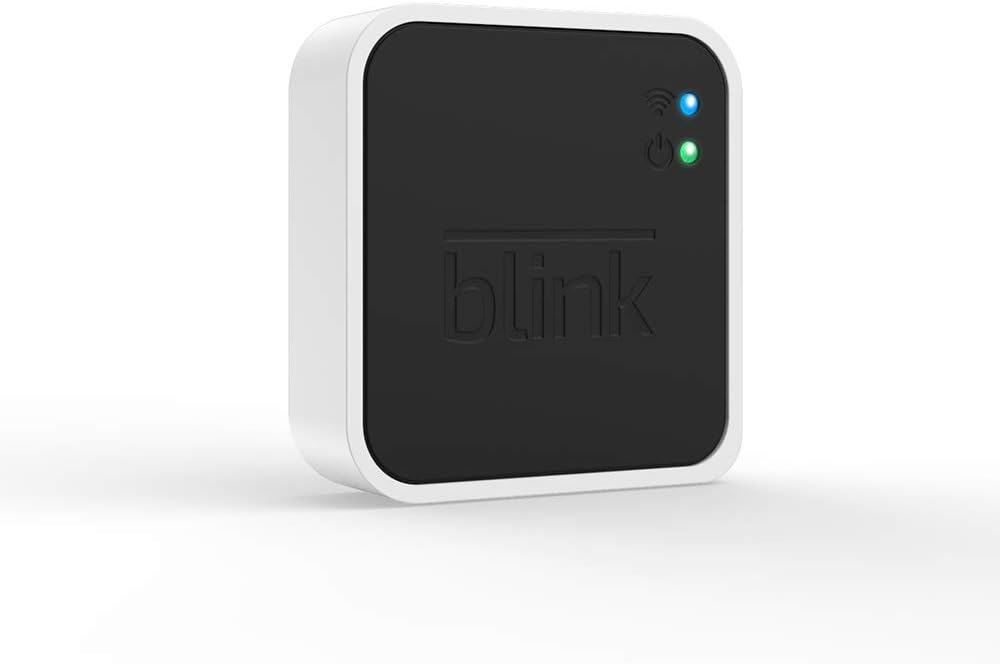



Blink Add-On Sync Module 2
Product ID: 685564843
💾Supports up to 256GB local USB storage
📱Control & view clips via Blink app
🔗Connects up to 10 Blink devices
🔐 Unlock total Blink control and storage freedom—no fees, no limits!
The Blink Add-On Sync Module 2 is a compact hub that connects up to 10 Blink security devices, enabling centralized control and local video storage via a USB flash drive (up to 256GB). It offers seamless access to motion clips through the Blink app or computer, all without monthly fees, making it an essential upgrade for any Blink-powered smart home.
| ASIN | B084RQ6MHJ |
| ASIN | B084RQ6MHJ |
| Batteries Included? | No |
| Batteries Required? | No |
| Color | White & Black |
| Customer Reviews | 4.4 4.4 out of 5 stars (48,057) |
| Customer reviews | 4.4 4.4 out of 5 stars (48,057) |
| Date First Available | 1 April 2022 |
| Date First Available | 1 April 2022 |
| Included components | Blink Add-On Sync Module 2 |
| Item Weight | 131 g |
| Item model number | 53-024486 |
| Item model number | 53-024486 |
| Manufacturer | blink |
| Manufacturer | blink |
| Material | Plastic |
| Part number | 53-024486 |
| Product Dimensions | 6.2 x 5.9 x 1.8 cm; 130.5 g |
| Product Dimensions | 6.2 x 5.9 x 1.8 cm; 130.5 g |
R**S
Streamlining Security with Blink Add-On Sync Module 2
As a jewelry, 3D design, wax carving, lost wax casting, sand casting, smelting and forging, laser engraving, and sublimation company, ensuring the safety and security of our workspace is paramount. That's why we recently integrated the Blink Add-On Sync Module 2 into our security system, and it has completely transformed the way we monitor and protect our premises. First and foremost, the Blink Add-On Sync Module 2 seamlessly integrates with our existing Blink security cameras, providing us with an additional layer of control and flexibility. With its easy setup process and intuitive interface, we were able to incorporate it into our security network within minutes, without any hassle or complications. One of the standout features of the Blink Add-On Sync Module 2 is its ability to enhance the functionality of our Blink cameras. By connecting multiple cameras to the sync module, we can create a comprehensive surveillance system that covers every corner of our workspace. This ensures that we have eyes on all areas, allowing us to detect and respond to any potential security threats effectively. Moreover, the Blink Add-On Sync Module 2 offers advanced features that enhance our security capabilities. The ability to remotely arm and disarm our cameras, receive instant alerts on our mobile devices, and access recorded footage from anywhere gives us peace of mind knowing that our workspace is protected 24/7. Another aspect that we appreciate about the Blink Add-On Sync Module 2 is its reliability and durability. Designed to withstand the rigors of continuous use, this device operates flawlessly day in and day out, providing us with uninterrupted security surveillance without fail. Overall, the Blink Add-On Sync Module 2 has been a game-changer for our company's security infrastructure. Its seamless integration, advanced features, and robust performance make it an invaluable asset in safeguarding our workspace and ensuring the safety of our valuable assets. If you're looking for a reliable and efficient security solution for your business, look no further than the Blink Add-On Sync Module 2. Highly recommended!
C**A
Great Sync Module for Blink Doorbell live view
The setup is simple, very accurate as it connects to the internet, the box is very small as it looks like a local server hub, it looks compact and portable as it can be placed anywhere as you want. The only way I would use is really time live for the doorbel camera, and other as local cloud storage. I would recommend for anything that works for live view doorbell, or other as cutting subscription cost.
H**C
Great Add-On – Easy Setup and Reliable Performance
The Blink Add-On Sync Module 2 works perfectly and was very easy to set up. It connected quickly to my existing Blink system and keeps everything running smoothly. Performance has been reliable, and it helps manage and store footage efficiently. A great addition for expanding a Blink setup. Highly recommended.
G**I
2 out of 3 worked - Good Device - Good Eco System
This is a general review of Blink camera system and Sync module itself. After researching the available products, ring, wyze, etc. I selected Blink system for setting up my video perimeter. It had all the right features at a very affordable overall price. When you purchase their cameras they give a month of cloud service so you can try things out. Their cloud pricing is also very affordable and competitive. At the same time, Blink offers this thing called a Sync module in case you don't want to pay for cloud subscription. Initially I couldn't find documentation of how / what this thing does so what I'm writing here is based on experimentation. At a high level, Sync module offers a subset of feature of the cloud and is basically designed to do one thing: Record and store videos when a camera detects motion. Other features such as periodic taking pictures and storing is not not supported. Here's how things work with Blink app. It organizes the various cameras (outdoor, mini, doorbell, etc.) into what they call a "System". A "System" is pretty much a way to group things together. A group of cameras have the same on/off schedule, can be armed/disarmed at the same time, show up on the app on the same page, etc. Most importantly, a group of cameras share a single Sync module. For example, let's say you want to use blink to monitor two separate physical locations. If you are using the cloud, you can create a single group and add all the cameras to it even though they are located apart. But, if you don't want to use the cloud and instead use a sync module, you'll need to create two "Systems", each with its own Sync Module. Once you decide how to group your cameras, adding them to the account / app is easy. First, you add the Sync Module, then each individual camera. The process is very quick. I've done it a dozen times already and it's gone without a problem every time. Once created, you can arm the group for motion detection and recording. Every time motion is detected, the camera saves the video footage to the Sync Module. Once saved, you can look at saved video clips from the app, just like you'd if you had the cloud subscription. I've been very happy with the functionality of the Syn Module. I've recommended it to a bunch of other people and can say that so far, I know about 5 households that bought the Sync Module + a bunch of cameras and been using them with success. I've attached a few pictures of the app to show what you'll see if you setup a group and some of the adjustments available for an individual camera. ------------------------------------------------------- The only problem i've had so far is one of the Sync Modules I purchased had a really strange issue. Everything worked except that it wouldn't actually record video to the USB. Camera would detect motion, send a notification, but no recorded video would show up. I did all the troubleshooting steps, called their support a few times, and unfortunately it wasn't solved. Also, there are no troubleshooting indicators available to figure out what was going on. Things either work or don't. I wish they provided some logs or other indicators to the user. At the end, I returned the thing, bought a new one, and it worked. So my conclusion is that specific Sync Module had an issue (hardware / software / who knows).
P**D
Stopped working after one a half month but back online
I bought 4 outside cameras, two inside mini and hook them to two Blink sync modules 2 with USB stubs. The whole system was working fine until the last day when both modules got off line without any reason. I have trying to reconnect all kind of way removing one from the server and register again without success so now the system is useless. Not sure if I would recommend it if it does not get solve. Huge disappointment. After contacting tech services i hook them back within a minute. So i'm pretty sure Blink was doing some work on their server but never notified are warned any customers because those paying for the cloud would want a discount and that's too complicate for them to handle. Anyhow and raise my evaluation from one to four star because when it's working it is a fairly good system.
Trustpilot
2 months ago
1 week ago