🎮 Dominate your day with power, speed, and style.
The Acer Predator Helios 300 PH315-51-78NP is a high-performance gaming laptop featuring a 6-core Intel i7-8750H processor (up to 4.1GHz), NVIDIA GeForce GTX 1060 6GB graphics, and a 15.6" Full HD IPS display with a 144Hz refresh rate. Equipped with 16GB DDR4 RAM and a 256GB PCIe NVMe SSD, it offers fast multitasking and quick load times. Dual AeroBlade metal fans ensure efficient cooling, while connectivity options include USB 3.1 Type-C, Gigabit Wi-Fi, and Bluetooth 5.0. With up to 7 hours of battery life and a sleek metal chassis, it’s designed for gamers and professionals who demand power and portability.


| ASIN | B07CTHLX8C |
| Audio Output Type | Speakers |
| Audio features | Enhanced audio quality, Dolby Audio Premium, supports various audio formats |
| Automatic Backup Software Included | Windows 10 Home |
| Available M2 Slot Count | 1 |
| Battery Average Life Standby | 7 hours |
| Battery Cell Type | Lithium Ion |
| Battery Life | 7 hours |
| Best Sellers Rank | #118,450 in Computers & Accessories ( See Top 100 in Computers & Accessories ) #21,906 in Traditional Laptop Computers |
| Bluetooth Version | 5 |
| Brand | Acer |
| Built-In Media | AC Adapter, Laptop, Power Cord |
| CPU Codename | Coffee Lake |
| CPU L1 Cache | 256 KB |
| CPU L3 Cache | 9 MB |
| CPU Model | Core i7 |
| CPU Model Generation | 8 |
| CPU Model Number | Core i7-8750H |
| CPU Model Speed Maximum | 4.1 GHz |
| Cellular Technology | Wifi |
| Color | Black |
| Compatible Devices | USB devices, external displays, mice, keyboards, storage devices, Bluetooth-enabled devices |
| Compatible Flash Memory Type | SD |
| Connectivity Technology | USB, Wi-Fi |
| Control Method | Touch |
| Customer Reviews | 4.3 out of 5 stars 2,226 Reviews |
| Display Maximum Resolution | 1920 x 1080 |
| Display Refresh Rate in Hertz | 144 |
| Display Resolution Maximum | 1920x1080 pixels |
| Display Technology | LED |
| Display Type | LED |
| Form Factor | Laptop |
| Global Trade Identification Number | 00191114710760 |
| Graphics Card Ram | 6 GB |
| Graphics Coprocessor | NVIDIA GeForce GTX 1060 |
| Graphics Description | Dedicated |
| Graphics Ram Type | GDDR5 |
| Hard Disk Description | SSD |
| Hard Disk Interface | NVMe |
| Hard Disk Size | 256 GB |
| Hard-Drive Size | 256 GB |
| Hardware Interface | Bluetooth 5, HDMI, Secure Digital Card, USB |
| Human-Interface Input | Touch Pad |
| Item Dimensions L x W x Thickness | 15.35"L x 10.47"W x 1.05"Th |
| Item Type Name | Acer Predator Helios 300 PH315-51-78NP Laptop, i7-8750H, GeForce GTX 1060, 15.6" 144Hz, 16GB DDR4, 256GB PCIe NVMe SSD |
| Item Weight | 5.5 pounds |
| Keyboard Description | Backlit |
| Keyboard Layout | QWERTY |
| Lithium-Battery Energy Content | 32 watt-hours |
| Manufacturer | Acer Computer |
| Maximum Display Brightness | 300 nit |
| Memory Clock Speed | 2666 MHz |
| Memory Slots Available | 1 |
| Memory Speed | 2666 MHz |
| Memory Storage Capacity | 256 GB |
| Mfr Part Number | PH315-51-78NP |
| Microphone Form Factor | Built-In |
| Model Name | Acer Predator Series |
| Model Number | PH315-51-78NP |
| Model Year | 2019 |
| Native Resolution | 1920 x 1080 pixels |
| Notebook Pointing Device Description | Touch Pad |
| Number Of Cells | 4 |
| Number of Items | 1 |
| Number of Packs | 1 |
| Number of Ports | 2 |
| Operating System | Windows 10 Home |
| Operating System Family | Windows |
| Other Special Features of the Product | Backlit Keyboard |
| Power Device | AC adapter |
| Processor Brand | Intel |
| Processor Count | 6 |
| Processor Series | Core i7 |
| Processor Speed | 4.1 GHz |
| RAM Memory Installed | 16 GB |
| RAM Memory Technology | DDR4 |
| RAM Size | 16 GB |
| RAM Type | DDR4 SDRAM |
| Ram Memory Maximum Size | 32 GB |
| Resolution | 1080p |
| Screen Finish | Glossy |
| Screen Size | 15.6 inches |
| Speaker Description | Speakers with enhanced audio quality and Dolby Audio Premium support |
| Specific Uses For Product | personal, gaming |
| Supported Monitor Maximum Quantity | 2 |
| Total Number of HDMI Ports | 1 |
| Total Usb Ports | 4 |
| Touch Screen Type | No Touchscreen |
| Touchpad Feature | True |
| UPC | 191114710760 |
| Unit Count | 1 Count |
| Video Output | HDMI, USB-C |
| Video Processor | NVIDIA |
| Voltage | 240 volts |
| Warranty Description | Two-year International Travelers Limited Warranty (ITW) |
| Warranty Type | Standard |
| Wireless Compability | 802.11ac |
| Wireless Technology | Bluetooth, Wi-Fi |
G**S
Good Gaming laptop for a Budget
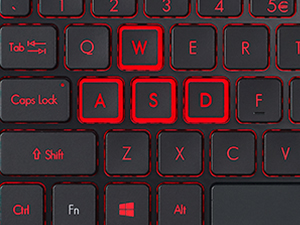
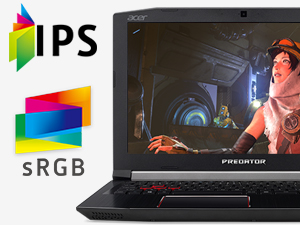
Chances are you know a bit about computers if you've made your way through all of the laptop options to this guy. If you are new to buying computers, I will break down some of the specs, what they mean, and what I feel their value is. If not, scroll to the end for my final thoughts. For the new guys, here's the breakdown: SCREEN: 144hz IPS 1080p display. 144hz means you get 144 frames per second. Most laptop screens are going to get 60hz or nicer ones get 120hz. 144hz is fast. IPS displays are good for wide viewing angles and color production. I am surprised to see a 144hz IPS display on a gaming laptop because in the past, IPS were only used for graphic design. 1080p is Full HD, and is more than adequate for gaming on a 15 inch screen. 4k is kind of overkill especially for a budget. A 27inch 144hz IPS 1080p display goes for up to $300. I would estimate the value of this laptop's display at ~$150 GRAPHICS: Nvidia gtx1060. I wouldn't buy a laptop without a graphics card, and it has to be NVidia. The 1060 is a great value and is perfectly capable of handling games at 1080p. The 1070 and 1080 are more for 4k gaming and make them kind of overkill and not as budget friendly. The 1060 should be able to connect to a 4k tv and play games in 4k, but they would probably look better in higher settings in 1080p on that same 4k tv. A desktop gtx 1060 still goes for about $300. CPU: Intel i7-8750h. This is a beast. 6 cores with hyperthreading. It supports ultra HD resolutions without a graphics card. I won't bore you with all of the details about how beastly this is. Bottom line, it is a top of the line CPU. the desktop's i7-8700 goes for just over $300. a RAM: 16GB of ddr4 should suffice for just about anything. Leave a hundred screens open on your browser and play games while using photoshop. Who cares right?? You could get more but it would be overkill for a budget gaming machine. This much ram for a laptop sells for around $150 Storage: 256gb M.2 PCIe NVMe SSD. A lot of letters right? This is probably the fastest type of drive in the consumer market. Rather than a giant block in your laptop, this is a small card that goes in the motherboard. It is fast!!! No more PTSD every time you restart your computer. 256GB is enough for windows and several large programs like photoshop. I don't recommend this as a storage drive, only as an operating system/large program drive. That's where the problem lies. This is the only drive in the laptop. You can easily install a second drive in the bay on the bottom of the laptop. It takes 3 minutes. I would recommend a hard drive from western digital. The installed 256gb m.2 drive goes for $120. However, adding another drive adds $100, upping the price of the laptop to $1300 (its currently at $1200) Bells and whistles: 1 USB 3.1(type c), 1 USB 3.0, 2 USB 2.0, 1 HDMI 2.0, SD Card reader. (no thundercat port) HIgher end laptops have more bells and whistles like extra ports and fun other things. This comes with the basics, and most people won't need more than that. Keyboard: red backlight, side numpad. Can't change the colors. Kind of basic keyboard. This saves on overall cost of the laptop and its a bell or whistle I can live without. FINAL THOUGHTS: Adding up the assumed monetary value of the Display ($150), GPU($300), CPU($300), RAM($150), and Storage($120), We have a base value of $1020. I can't easily estimate the motherboard, battery, laptop shell, power cord, and other small parts, but assuming all those other parts add up to ~$300, that makes the value of this laptop around $1300. It sells for $1200 so it is a good value. Biggest selling point in price range: Other similarly priced laptops offer similar specs, but not many can boast of having that 144hz IPS display. Some competitors are at 120hz which isn't anything to scoff at. The M.2 NVMe is a must if you are considering other competitors. Other than that, most laptops in this pool offer the same general specs (CPU, GPU, RAM) CONCERNS: Audio: Audio kind of sucks. If you hold the speakers towards you, they sound fine, but they aren't even close to ear level so all the sound is getting muffled by your lap. I usually use my headphones, but there are also a lot of bluetooth speaker options nowadays. Materials: The case is solid. Parts of it are metal and other parts are plastic. Oils from your fingers show up very well all over the laptop. Wear vinyl gloves when playing games (jk don't). You may have to clean it often. Overheating: All gaming laptops will get hot. In fact most other laptops I considered buying were criticized heavily for getting too darn hot. The ones that weren't criticized for that were criticized for breaking at the hinges. I purchased this one because it was reviewed as being sturdy and cooler than other gaming laptops. I haven't had any specific problems with this laptop, but others have suggested boosting the fan if in a hardcore gaming session. Invest in a cooling pad. It should be very hard to overheat this laptop to the point of failure.
P**K
Amazing deal
I was highly skeptical of this laptop as it seemed like a too good to be true price for the features packed into it, but after 8 weeks or so of tweaking and testing I've managed to figure it out well. Here's my summary: NVME Storage Device: No one should purchase this laptop without the intention of installing a 2.5" drive of some sort, 256gb isn't enough to store many games. 256gb is the perfect amount of room for your OS and applications and for that purpose its more than sufficient. Read speeds test around 2600mbps seq read / 1200mbps seq write so the system is really responsive and smooth. I personally installed a 1tb SSD as these days I was able to make that happen for around $100 in addition and use it for game storage. It's fast all the way around now. 144hz Panel: It's not the prettiest or perfect, if you need a laptop for content creation and extreme video / photo editing you shouldn't be looking in this ballpark anyways. It is a little on the dark side and you might find yourself turning the brightness in games up, but compromises always have to be made in the name of saving power for laptops. The 144hz is smooth and yes actually is 144hz. It doesn't have G Sync but screen tearing isn't nearly as bad as it would be at 60hz or 75hz. 1080p has low enough of demands to where you can see some pretty high frame rates with the right settings to get in the 100fps +in Destiny 2 and some other lower demanding titles. Its so smooth playing D2! CPU: This is the part of this laptop that blew me away performance wise. Out of the box and without tweaking anything you will be upset with its performance. My first Cinnebench R15 run was at 650 points only and the frequency running Prime 95 was hovering around the 2.4ghz area. Temps were in the mid 80's after an hour which isn't very good but not bad compared to what I saw in other reviews. Number one culprit was power limit throttling. After installing ThrottleStop and spending a few hours tweaking around and benchmarking I was able to get it stable at -140mv CPU / Cache and to get the power limit up to 56.8w. These Cinnebench runs yielded a score of 1251 with all cores running at 3.8ghz for the test. An hour long stability test of Prime 95 at this point had an average clock speed on all cores of about 3.4ghz and max temps at 75c. My desktop has a 7700K OC'd to 5ghz on all cores and its best Cinebench score was 1100... so yeah I'm pretty impressed. GPU: Lets be honest here, the mobile version of the 1060 with 6gb is nothing special to brag about nor is the desktop 1060 6gb. I only use this to game when I'm not at home and on the go. If I'm sitting around my house I have other options that are far more attractive. That being said, one should expect to play more recent games at medium settings to keep frame rates at or above 75fps and the most demanding AAA games at low settings. Metro Exodus wouldn't run smooth at 1080p, 1600 x 900 was the only option with low settings. But Destiny 2 at medium settings at 1080p could yield over 100fps consistently. The benchmark I ran to give people a good idea of the performance to expect was Superposition at medium 1080p preset settings. Max temps after 4 runs was 65c with max frame rates of 81fps and an average of 63fps. Given the CPU and 144hz panel a better GPU would make sense, but that wouldn't fit into this price point. Actually for a better GPU it would add at least $500+ to the price tag on this thing which is a significant 50% increase in the overall price which makes this an even sweeter deal. Battery Life: No chance at battery life being good on this laptop. Undervolting and messing with the power settings can give you 2 - 3 hours max just browsing or doing some type of productivity like emails and such. Gaming performance is seriously limited on battery and you can expect to kill your battery in an hour or less. If $3,000 laptops have battery issues you can surely expect a $1,000 laptop to have them as well. Design: I saw a review that said it looked like an angry 14 year old designed it, it really does haha. I bought some carbon vinyl wrap to cover up the top and it looks so much better and doesn't.
T**5
Runs quite warm, but with some tweaks, is a very good gaming laptop for the price.
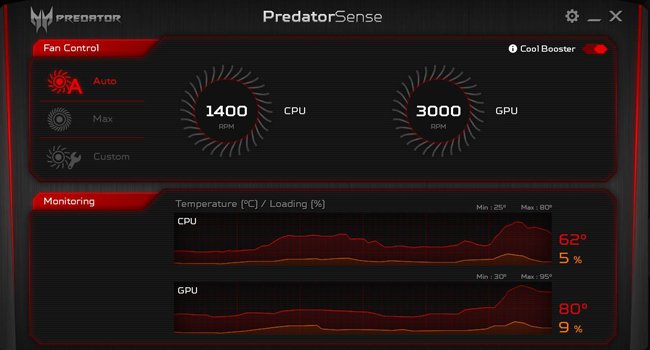
My son bought this to use as his gaming computer to replace his 3-year old Acer Aspire. It was recommended by a friend, so after some research, we made the purchase. First, this model comes with a 225 GB SSD. If you're going to use it for gaming, you're probably going to want more space. I purchased an additional 2 TB HDD, which is easy to install on this laptop. Plug it in, format the new HDD, and it's ready to go. Since the Windows OS is installed on the SDD, it is fast to boot and respond. We use the HDD to store the games, which are large files. I've learned that the Predator Helios is notorious for running hot. This particular model can vary based on how it was manufactured. At times, the thermal paste that helps transfer heat from the CPU & GPU to the cooling system can be subpar from the factory, which can cause it to run hot. You can send it back to Acer to have it re-pasted while under warranty. I've heard mixed results from this. Some coming back running cooler, others coming back the same or worse. It often depends on where you live and who does the work. Those savvy enough can re-paste with high quality thermal paste, which I've read yields very good results in reducing temperatures. But re-pasting isn't for the novice, so don't try it if you're not comfortable working inside computers. The laptop my son received did run pretty warm. It's possible that running hot can reduce the life of your components, or at the very least, decrease performance because the CPU and/or GPU will automatically "throttle" to help cool themselves. In a sense, they decrease performance to cool. For gamers, this isn't a good thing. Something I learned about after looking for ways to cool this laptop was something called "undervolting." This is a method in which you use software to reduce the voltage running to the CPU in order to cool it down. Again, it's not for complete novices, but isn't as difficult as re-pasting. It's all done through software and there are lots of guides, including videos, to be found online. Undervolting my son's Predator decreased the temps to a much more comfortable level. They still run a bit high sometimes, but nothing like it did out of the box. Re-pasting a laptop can possibly void the warranty if you do it yourself, so I'll probably wait until the 2-year warranty has expired, then re-paste it myself. The 8th gen. Intel i7 CPU in this laptop is more than capable of handling my son's gaming needs, as is the NVIDIA 1060 GPU. The metal casing makes it quite a bit heavier than his old laptop, but also makes it feel more durable. The CPU & GPU are located above the keyboard (kind of between the keyboard and the screen) so with the metal casing, this area does get quite hot to the touch. But is out of the way enough that you really have no need to even touch it. The included Predator Sense software is a nice addition. It allows you to monitor the temperatures of the CPU & GPU, as well as the speed of the fans. You can also control the fan speed with this. Other than that, you can get rid of most of the "bloatware" (branded software installed by manufacturers that isn't really needed) to help make the laptop run more efficiently, especially for gaming. Battery life isn't worth mentioning if you're gaming. Besides, when gaming, you should plug it in anyway so it runs at peak performance. For someone looking for an everyday computer to surf the web and handle basic use, this Predator is overqualified and you might want to look for something cheaper. For gamers who don't want to spend $1500-2000 on something more high-end, this laptop is a very good option. My son has been using it primarily for gaming for about a month and a half now and, once we got everything dialed in, has been a very satisfactory machine.
D**Z
I'm impressed, which is rare with technology and I
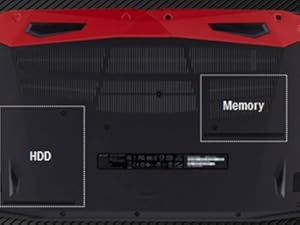
I've had some time to run this laptop through its paces after several weeks testing it out. I was a bit concerned about the small storage, but it is easy enough to upgrade it or add an SSD or small format mechanical drive for storage needs should that become necessary. For now, the 240 GB M.2 SSD works at about 60% capacity. I did find it curious that it runs considerably faster than a similarly equipped tower I have, but that one also has a great deal of hardware and drivers since it serves as the main computer out of 4 for a Boeing flight simulator. Out of the box the Acer Predator Helios 300 15" screen was ready to go. I removed the trial antivirus and Office 365 versions, and installed my preferred OS, the prerelease version of Windows (I've been doing it for years due to the unusual way I use my computers). I then got into the tools and assigned specific programs to either the default GPU or the Nvidea GTX-1060 6GB GPU as appropriate, regardless of whether I would be using my MR headset (also Acer) or not. I added an external switch controlled USB 3.1 hub and the MR headset and was impressed. The sound, when sent through the laptop speakers, is pretty good, on par with TV's roughly the same size, though a bit softer than I'm use to due to the speakers pointing down rather than at me. It's plenty load enough to be heard in the next room clearly, but not so loud it bothers the neighbors like the flight simulator does (I guess I'm louder than the nearby airliners taking off, lol). Once I was happy that everything worked, I allowed Acer to update any outdated BIOS requirements, and then had to get into the BIOS to turn the screen backlighting on full time, rather than have it turn off after a few seconds of inactivity (annoying, but saves power if on battery only). This picked up the speed a bit further towards what I had expected according to all I researched about this machine. I then personalized the screen lid with my own stickers, preferred to the Predator logo and name at university. The primary function of the Helios 300 is in the virtual world, mimicking as closely as possible the arrangement of multiple screens from the flight simulator "inworld" so I could study more effectively and productively for my classes when my disability leaves me stranded in bed at somewhat unpredictable and annoying times. I have Second Life and Sansar set up, both of course to the GTX-1060. Second Life does not appear to have a working model for mixed reality (or even full virtual reality from what I've read), but my testing with Sansar does appear to work rather well. Both operate at roughly 60 fps when I hit the turbo mode, heating things up to roughly 80 deg Celsius at maximum settings on the main screen (Second Life) and with mixed reality (Sansar). A quick word to Linden Labs about the controllers not being recognized had them coding to fix that problem. I'm stationary in the real world, so the controllers are much needed in the virtual world to move about (hence the choice of mixed reality rather than Oculus or Hive at twice the price, plus costs and problematic setup of sensors, in a wheelchair, not happening. For school I get Office365 Student and Educator from the University, all the apps, plus speech to text apps for days I cannot type. I find I do have to use the headset I have for me to be heard properly, the mics built into the laptop tend to pick up everything and try to type words it interprets from the sound of GE and PW airliner engines screaming on departure over my apartment complex. It even tries to type out the birds having their early morning music jam in the large tree outside my window. The headset doesn't pick up anything more than a foot from its front, so problem solved. If planning on intense gaming with this little beast, I strongly recommend a cooling pad under it. At 80 C, that's 20 degrees from being able to boil water at sea level, so a tad warm on the lap. I do not recommend closing the lid during MR/VR sessions at all due to the high temperatures, especially when ambient room temperature is more than 70 F or so. The Helios 300 also comes with 16 GB DDR4 memory, which I intend to upgrade to the maximum 32 GB when I go to add an additional large capacity storage drive. Adding storage and RAM is easy, one screw each for access, 4 additional screws for removing the drive caddy waiting for your storage option. One note on the drive this one came with, what happened to the Optane M.2 drive the machine is supposed to come with? Intel reports that it was installed, but the drive my system arrived with is not the Optane drive it was told was installed. Just a thought, so long as it operates as specified I'm good, and the Optane storage module was never in the description, so no worries. Just an odd thing to come across, I guess. Despite having the extra $200 to go with a 17.3" screen rather than the 15.6" (with a 1 TB drive instead of 256 GB), I am using this one for school when unable to use my main rig, and take it to every doctor appointment to stay caught up with school even if they opt to admit me into the hospital (life with my disability). The 15.6" is much easier to handle behind me than the heavier and larger 17.3" I have retired, which means it can go in my backpack rather than rest on my lap and then slide rapidly forward to the floor when I inevitably have to stop short to avoid running someone down in the hallway that just stepped out from around a corner. Still, the picture is crisper than the older and larger one, which makes watching documentaries or reading my assignments much more pleasant due to reduced eye strain. 2 hours before bedtime (at home), the screen switches modes (a Windows feature) to seriously reduce blue light levels, which works rather nicely to insure I am ready for bed on time and not lying awake for a few hours after. As mentioned, I do not advise having the lid closed when the laptop is running, not even in sleep mode (as technically it is still running), since heat can build rather quickly. I hate touchpads, largely because one of my meds reduces electrical conductivity in my digits (fingers and toes), so touch screens and pads do not see me or act much differently than I had intended. I picked up a rather nice gaming mouse (unknown where the previous one I ordered ended up, but it wasn't with me) that works rather nicely, and it allows me to switch dpi settings on the fly depending upon my range of motion limits on any given day (the higher, the faster and further the pointer on the screen moves, a gaming feature that works nicely wit disabilities as well). On better days, or when I need finer control on a mesh object I am building, I can down-tune it to move more slowly and shorter distances with the same effort. Just a thought, throwing it out there in case others would rather a mouse over a touchpad. The touchpad is easily enabled and disabled using Fn + F7. If you are like me and type a lot, this is a handy little feature. At first, I wasn't certain about the keyboard, since I rarely get along with this particular design. I can type with confidence, however, as it feels quite mechanical compared to my retired Acer laptop I thought had the same design. The red backlighting is easy on the eyes, even when typing in the dark. Just be sure to get into the BIOS to turn the backlighting to always on, or do what I did early on after the update and just memorize the positions of keys that do nothing unless you combine it with another key, pressing those will turn the backlighting back on. It's LED, so they contribute little heat and consume very little power, but for some every watt counts I guess. The numeric keypad works okay, I'm literally use to actual 10-key calculators, so this one is smaller and more bunched together, but I'm sure I will adjust. I never recommend hibernation mode, since it rarely comes back up the way you had it when you told it to save what you were doing. Odds are it'll come up with problems, requiring you to reboot anyway. Sleep mode works (with the lid open), and you can shut it down and later quickly power right back up again. This laptop is "brick-able" if stolen, so keep your serial number handy just in case. You'll lose all your data, but that happened when someone ran off with it anyway. The idea is to destroy the data and make the computer unusable without having to replace everything other than the case, power supply, and battery. It's cheaper to buy one than it is to steal one (most portable electronics are going to this) Do what I do and save important things (like my classwork for the current term) on the one drive, it will then be waiting for you when you get home, to work, or to class when you sign in with your Microsoft account email. Also, be smart and pick a randomly generated password and PIN, you will find life much easier if you do. I use Windows Security for antivirus and firewall protection, it's free and I figure it is their operating system therefor they know where all the security issues are. If not, everything is backed up regularly anyway. There are plenty of videos on YouTube to show you how to easily upgrade storage and memory, including upgrading of the M.2 primary drive, not to mention lots of tips and tweaks for all gamers and power users. Make sure one of the first things you do is register your new laptop with the manufacturer to start your warrantee. I did not go with the Amazon one, mainly because by the time I might need it, I've already replaced the laptop with the latest and greatest anyway. I've had excellent experience with Acer laptops for several years, and have worked on the hardware side of things with tower, desktop, all-in-one, and laptops, so simple repairs I can do for myself (since 1978). If you aren't comfortable doing those repairs, the Amazon warrantee is a very good one (from what I've been told), and I do get it for peace of mind with tech I do not know how to repair. To date, I have yet to have a warrantee issue with Acer, and I look forward to that continuing with this machine. The current price for this laptop is excellent, a bargain when you consider a similarly equipped gaming tower now costs much more. Grab one while you can, and have fun!
G**G
Great Gaming Computer
I bought the Predator Helios 300 over Black Friday weekend 2018 and was a bit anxious before and after the purchase. “Will this be the right laptop?” I thought with some trepidation, or more than once, “God, I’ve made a huge mistake!” The big reason for this was the price for the thing - $1,000 or more, plus the $175 or so on accident insurance - as well as the many reviews saying it gets too hot and too loud. I did a lot of research and it came down to this Predator Helios or the HP Omni. I decided on the Predator, and when I got it I downloaded and installed two Ubisoft games: Assassin’s Creed IV Black Flag and Tom Clancy’s Ghost Recon Wildlands. I would suggest removing some of the bloatware - there isn’t too much - and then restarting the computer. I didn’t restart, and as I began to download my games from Ubisoft, it was clear there were some problems. “Why is it only giving me 400 kb/s...or less?” I thought. After a restart, though, I got up to around 7-8 mb/s. Not that fast, but the games got downloaded and one of my concerns was alleviated. I started AC Black Flag on the highest settings with the best, full-screen resolution of 1920x1080 60hz. The game played great, it looked great, and there were no lags. More important, there was no rapid heating of the computer and the fans never kicked onto their max setting. After an hour of gameplay the fans were going at about half-rate with an average of 70 degrees and a few spikes as high as 87 degrees. When I stopped the fans stopped and the computer was soon down to around 60 degrees. It usually sits steady at 45 degrees when you’re doing nothing. Oh, and that max fan setting doesn’t sound like jet engines, as one reviewer wrote. I wouldn’t even liken them to the stovetop fan or the bathroom fan. If you were in another room, I don’t think you’d hear them. If you’re sitting in the living room, you can hear them but they’re not so loud they take away from your experience or someone else’s activity. Ghost Recon Wildlands got pretty hot during the intro, running around 85-90 with spikes up to 96 degrees. The fans were running at about max at that point, but again, this isn’t a huge bother. With headphones, you don’t notice. I asked my wife if it was too loud and she said no from about 15 feet away. That game pretty much runs in the upper-90s throughout. When playing Fallout 4, the highest temp I reached was 93. When playing XCom 2, I usually got in the upper 90s for temps. I have no problem with the GPU heating up anymore, as I overclocked it after downloading the Intel performance program. All in all, I’m happy with this purchase. I had to get a gaming laptop as my wife won’t let me get an Xbox - my preferred system - saying it’s a bad influence on our 7-year-old son. I can see her point, but I had to pay $700 more to play the same games. Oh well - that’s marriage. I’m glad I have a system that will play all the games from the past few years, as well as all the games that will come out for the next couple years, and hopefully more. I have no problems with this system, and plan to use it solely for gaming, keeping my other $250 laptop for MS Office and most internet tasks. I was worried this would be a bad purchase, but so far after 25 days of playing it for around 4 to 6 hours a day, it’s still working fine. I’m glad I bought it.
A**A
Another Gamble Laptop
I’ll preface this review with saying that I am returning the first one of these laptops that I purchased. What does that mean? The laptop isn't perfect! I'd give it a 3.5 as of now. The Bad! Ok, so what went wrong? First laptop the “B” key is sticking. Every 5 or 8 taps and it sticks down. Not happy about that on a $1300 laptop, but moving past that. Overheating. Well, everyone has read the reviews. Yes this laptop can run hot. Too hot to the touch in certain areas. This is the main reason for my first return. Also saw frame drops where every 15-30 minutes things would slow down a bit. Acer really needs to address this as its really the only weak point. Build quality could be a little better. I would prefer a more robust design. At the very least less plastic and more aluminum or something. Maybe Acer could offer a Heavy Duty line that is more durable and offers better cooling. Maybe i'm one of the few who wouldn't mind a heavier, thicker laptop as long as it performed well and was built like a tank. Battery life sucks. Get over it, its a gaming laptop, but its bad. I was watching Netflix with the brightness turned all the way down, powering my little cool pad and speakers and I had about 2-2.5 hours of battery life. Maybe 3. Memory is something you'll want to upgrade. After installing GTA 5 and a few small games I've run out of room. Not a big deal though when you take into account that this is simply an area where Acer saved money and passed the savings to the consumer in final price. The Good Picture quality is brilliant. I am very happy and impressed with the picture. Note that I am not very experienced with HD picture, but this is the best computer picture I've ever seen. Speed. This laptop is fast, startup in 7-8 seconds, surfing the web, downloads, streaming videos, gaming, its remarkable. I'm blown away Sound, its a laptop, I won't even comment, get some external speakers. Quality. Pretty happy with the overall quality. The back lit keyboard is very nice, the keys feel great. Touch pad feels high quality. Screens flexes a good it though, and the laptop doesn't feel indestructible but it ought to hold up for daily use. Gaming is great on here. I play GTA 5 with mods, high graphics, and it just runs great. Only exception being the overheating and every 15-30 min frame drops. Hopefully the Second model doesn't have any issues, will update if it does. Second model has issues! Seeing some very noticeable backlight bleed around the bottom border of the screen. In addition to that I see two stuck or dead pixels in the middle of the screen. The quality control on these laptops is really terrible. I've given up.
B**2
Great screen, great for gaming, heating issues can be easily fixed by undervolting.
Screen Quality: Excellent. 144 Hz, 1920 x 1080 pixels. Screen looks excellent for the price. Youtube and games look great on this screen. Big enough and completely suits all my needs for gaming and watching videos. A lot of laptops in the same price range only have a 60 Hz screen. While that's decent, the fact that this one is 144 Hz is pretty impressive. Battery Life: Meh. It isn't going to last very long even if you're just chillin' watching youtube videos or netflix. Gaming, it's definitely not going to last more than an hour or so. But I always have it plugged in, so I don't really care about this. However, you have to make sure it's in "better performance mode" and not "best performance mode" while doing hardcore gaming. When I put it all the way up to the best performance mode possible while gaming, my battery was actually slowly draining WHILE it was PLUGGED IN. The drain was slow, but it got down to about 94% after an hour or so. That's a bit lame. But after putting it in the proper mode and undervolting and such, there's no issue and it stays at 100%. This is just potential minor issue, but I think it's worth mentioning. Gaming: I can play GTA V at 60fps on ultra settings. League of legends on ultra settings at about 110 - 120 fps. Good enough for me. You should of course search up acer helios predator 300 gaming videos on youtube if you're curious how it performs in various games. It does much better than a PS4 pro. So I'm pleased. Every game I play nowadays, league, GTA, apex legends, etc, runs smoothly and at a high enough fps, so it's good enough for me personally. Cons: Space. You're going to want to spend money on purchasing and installing an extra 1TB or 2TB hard drive or SSD if you're a hardcore gamer like me. The built-in 256 GB SSD the laptop comes with is nice, but with the size of many major games nowadays, it's just not going to be enough for you. Thankfully my laptop came with the screws and stuff you need to install a second SSD, which is what I did. I dropped another 150$ on a second 1TB SSD. I've heard that some people had their "cage" missing that you need to install an SSD, and had to contact Acer to get one mailed to them for free. I was lucky enough to have a cage and screws included with mine. Overheating: Not a problem anymore since I undervolt mine and bought a cooling pad and it runs just fine and at safe temperatures, but if you haven't done either of these things I've heard that the laptop can potentially reach unsafe temperatures. ***You will likely have to go on youtube and watch a video or two on how to undervolt your computer so it doesn't overheat while gaming. After doing this I saw virtually no drop in performance but a humongous drop in heat while gaming, so it seems to have fixed everything. After undervolting, I'm able to play demanding games like GTA V on ultra while staying in the 55 - 60 degree Celsius range which I've heard is quite safe and optimal. But it's annoying to do all this if you're a computer noob and don't really want to learn how to do it. It'd be nice if the computer didn't have overheating issues in the first place. Before undervolting, I may have saw heat spikes of about 75 - 80 degrees Celsius while gaming. I am not an expert on computers and GPUs and CPUs and what temperatures they can safely handle for how many years and such. But I've heard people with this computer voice real concerns that their helios has reached 85 - 90 degrees or even higher under certain conditions. I can understand why that would make anyone nervous. That seems quite hot and is a definite issue. Learn to undervolt it a bit or reapply some thermal paste or both and everything should be peachy. I've had it for about a month and I'm quite pleased. I think the CPU and GPU in this laptop are quite good and the price is acceptable. Overall I'm pleased with my purchase and would definitely recommend to anyone getting into PC gaming.
E**M
the predator- a great laptop for the price *updated*
backstory ------------ lets start with I have liked the concept behind predator laptops since they were announced , that being said I have never gamed hardcore on laptops , more generic use for work and some side games when time permits on towers. I've had roughly 3 laptops myself, for various tasks, my 10 year old one still works, but its an original duel core from intel so lacking in performance in present standards, also typically build towers or servers for my friends and family. gaming or otherwise or work. currently the reason i bought this as my newer (ish) laptop had met a tragic fate by being mashed to pieces two stories up, and thus left me without one, I was able to salvage the SSD (thanks crucial!) SO for myself I wanted a laptop close enough to a gaming pc in terms of performance and usage so when at the office I can render and model and massively number crunch, ect in short times., close to what I can at home. but more or less I wanted a no compromise machine that was powerful and able to do anything I throw at it. So far the predator has accomplished this. Now I purchased the three bundle , which significantly lower the laptops price to 800+$ with a gaming predator headset and gaming mouse pad (a great deal if its still available) The laptop itself: ------------------- it has all the bells and whistles and low bloatware , the machine tears apart big compressed files fast and with my old laptops ssd in the extra bay I was able to get to working on it fast and effectively. the current m2 via stock is intel & reads 3000+ writes 1000+ (I prefer the Samsung m2 which is equal read and 3k write) the ram is 2667mhz clock speed but it clocks via cpuz to 1330hz I probably will upgrade the ram as i see it as a choke point in this system to 32 gb as that the only choke point of this purchase I see I am not big on OC, but did play with predator sense using it , but overall I keep it lowered to normal levels I ran benchmarks against my friends using the OC, these were an alien-ware laptop and a msi laptop both are 3k$ laptops and I was only a bit behind and even won in some places rather impressive to me and my friends. this thing performs very well for what it cost. overall everything about it has been very impressive, ive tried DMC5 at max and warframe, and cod games as well as skyrim all at max, fan speeds hit 4k. It does get warm and ive done the bios and predator sense updates and its been doing better, also nvidia updates & win 10. Still seems like it gets hot, I have noticed on research they tend to put meh thermal paste and very little on the chips and require a new thermal paste if you want cooler temps. seeing many have done this upgrade and cut the heat issue down to impressive levels makes me think that might be a good area to start (low cost fix) ive done live renders in 3dcoat and 7brush , its been great . the mousepad on left lower corner clicks in a weird way unlike other side of its pad , But its precise and works -a minor complaint Battery life- yes a big deal for me most of my lower end laptops I've had or used barely last 1+ hour and so far the predator on battery for work has done 5+ with win 10 eco mode on . that is pretty nice , gaming on DMC5 I did 3 hours which for me was great no complaints on battery. note that on battery it switches to the innate gpu on the i7 (max clock on power is 4.7 naturally via intel stepping and on battery 2.2) the 1060 it comes with is fine and with the new nvidia update can utilize the rtx functions (a happy surprise to me) 1060 6gb is minim for this update the "overheating " now ive read plenty of review and i investigated the laptop on inspection the gpu and cpu have almost to no thermal paste, what is on it is a dust like residue and its not making good heat transfer . I used kryonaught thermal paste (thermal grizzly) and applied after removing the old "paste" and cut my temps on idle to 30C and the highs are 70-80 id suggest update to current predator sense and use the cool boost , but since i did that quick fix ive had zero heating problems anything further develops and I will update for now its a good worker and predator laptops have 2 year warranty from ACER but I do recommend getting a good warranty likes square trade or whoever you trust Update: no overheating after kryronaut upgrade , and i have a to go laptop stand to help mitigate heat further
Y**G
FPS drop and freezing...
"Gaming"... 144hz screen but Overwatch in low resolution (full low) drop 2 or 3 times per game at 30fps during 10sec... 20 degrees in my room so it's not the weather... Was sceptical to buy Acer. First and last time.
G**A
Potencia y encanto.
Impresionante, poderosa y bella Laptop. Nada.mejor por los 24mil que pagué por ella. En efecto tardó un par de semanas en liberar la aduana, me pidieron algunos papeles, nada complicado. Pedida el 23 de noviembre y arribada el 7 de diciembre 2018. Imbatible a ese precio. La tarjeta 1060 es la de 6 GB! El teclado, la pantalla son sublimes. Vale oro cada kilo que pesa ! Muy recomendable.
T**H
Dissapointed at First. Solved over heating😃. Love it😍
Update: Heat was a problem on the keyboard on left side. But so happy I bought it.Delivered less than 24hrs after I ordered👍. Packaging👌. (Earlier review on delivery and opening) Have not used it yet. The electrics! the plug for electricity is not usable. it is not for uae use. I now have to find a suitable adapter. Wish I could upload a Pic of it. Dissapointed 😕☹️ can't use untill I have a safe electric connection to the lap top. 😣
J**R
Acer is nice
Good laptop
S**S
problème de surchauffe cpu 97 degré en jeux
Problème de surchauffe cpu 97 degrés
Trustpilot
2 months ago
1 month ago