Desertcart purchases this item on your behalf and handles shipping, customs, and support to Japan.
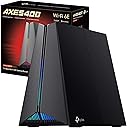
🎮 Dominate the digital battlefield with speed and style!
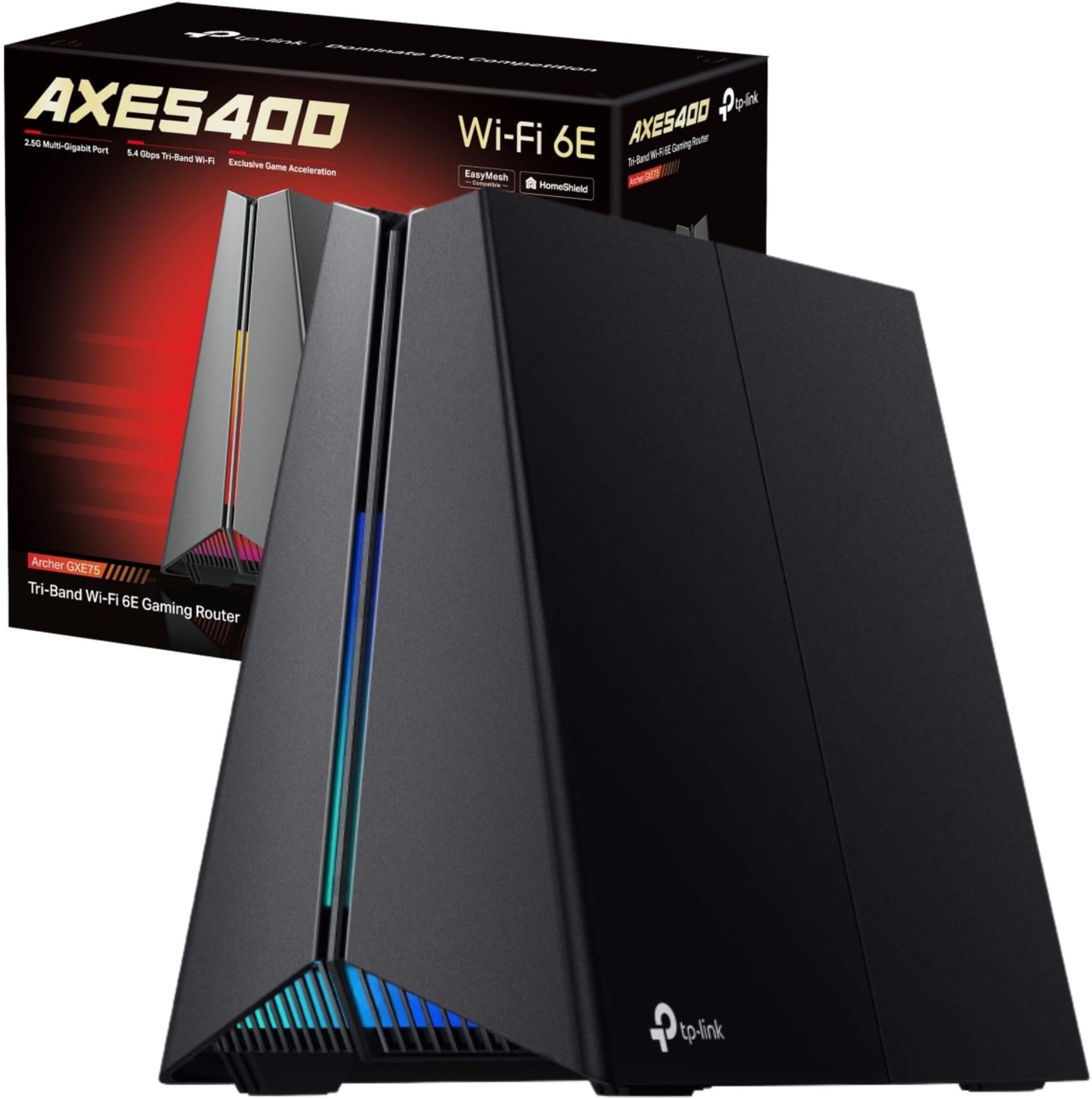
The TP-Link Archer GXE75 is a tri-band WiFi 6E gaming router delivering ultra-fast 5.4 Gbps speeds, a 2.5G WAN port, and four optimized antennas for whole-home coverage. Designed with gamers in mind, it features a dedicated game panel for real-time network monitoring, customizable RGB lighting, and robust HomeShield security to protect your online experience. Compatible with EasyMesh for seamless mesh networking, it ensures low latency, minimal lag, and stable connections for the fiercest multiplayer battles.


| ASIN | B0DLL5W4HR |
| Antenna Location | Gaming |
| Antenna Type | Internal |
| Best Sellers Rank | 14,575 in Computers & Accessories ( See Top 100 in Computers & Accessories ) 114 in Routers |
| Box Contents | Power Adapter, RJ45 Ethernet Cable, Wi-Fi 6E Gaming Router Archer GXE75 |
| Brand | TP-Link |
| Brand Name | TP-Link |
| Colour | Shadow Black |
| Compatible Devices | Gaming Console, Personal Computer, Smart Television, Smartphone, Tablet |
| Compatible devices | Gaming Console, Personal Computer, Smart Television, Smartphone, Tablet |
| Connectivity Protocol | Wi-Fi, Ethernet |
| Connectivity Technology | Ethernet, Wi-Fi |
| Control Method | App, Touch |
| Controller Type | App Control, Push Button |
| Coverage | whole home |
| Customer Reviews | 4.4 out of 5 stars 2,598 Reviews |
| Data Transfer Rate | 5400 Megabits Per Second |
| Frequency | 6 GHz |
| Frequency Band Class | Tri-Band |
| Frequency band class | Tri-Band |
| Has Internet Connectivity | Yes |
| Has Security Updates | Yes |
| Is Electric | Yes |
| Is Modem Compatible | No |
| Item Dimensions L x W x H | 23.7L x 13W x 19.3H centimetres |
| Item Weight | 1.07 Kilograms |
| LAN Port Bandwidth | 574/5400 Mbps |
| Manufacturer | TP-Link |
| Manufacturer Part Number | Archer GXE75 |
| Maximum Upstream Data Transfer Rate | 2500 Megabits Per Second |
| Model Name | Archer GXE75 |
| Model Number | Archer GXE75 |
| Model name | Archer GXE75 |
| Number of Antennas | 4 |
| Number of Items | 1 |
| Number of Packs | 1 |
| Number of Ports | 5 |
| Operating System | Tenda OS |
| Other Special Features of the Product | Access Point Mode, Alexa Compatible, Beamforming, Parental Control, QoS |
| Product Warranty | 3 year Manufacturer |
| Router Network Type | hybrid |
| Security Protocol | WPA2-Enterprise, WPA3 |
| Special feature | Access Point Mode, Alexa Compatible, Beamforming , Parental Control, QoS |
| Unit Count | 1.0 count |
| Wi-Fi Generation | Wi-Fi 6E |
| Wireless Compability | 802.11a, 802.11ac, 802.11ax, 802.11b, 802.11n |
| Wireless communication standard | 802.11a, 802.11ac, 802.11ax, 802.11b, 802.11n |
G**Y
Excellent - a great alternative to BT Broadband!
Despite living in London, we are in rather a dead spot as regards mobile reception. To add insult to injury, we cannot get fibre broadband and the 'copper' connection we get from BT is slow and unreliable. Indeed, over the new year, we lost BT broadband completely for 3 days until it was eventually fixed. Even now, we still get annoying intermittent drop outs - particularly exasperating when watching sport! Tethering using a mobile is not an option even in an emergency - the signal indoors is too poor. I initially purchased this TP-Link 4G+ LTE MR600 router to give us a backup solution. Given the bad mobile reception, I paired it with an external Poynting XPOL (V2) 4/5G antenna. Set up was easy - I connected the external antenna (in place of the ones provided with the router) using the SMA connectors, popped in a test "3" SIM and everything burst into life! The admin interface via a browser or the TP-Link Tether APP is straightforward and it's easy with a bit of practise to find your way around. It's all rather comprehensive for a router in this price range and there are also lots of settings and useful statistics. Note - if you want to use SIMs from a provider that uses another carriers network [GiffGaff (O2), Smarty ("3"), Tesco (O2) etc], you will need to adjust the APN settings manually. However, it is very straightforward and all providers publish their required settings on the web. The gigabit LAN ports allow us to connect to our home network with a NAS, printers, YouView, Blue-ray box and smart TVs etc. Currently, our BT Hub still acts as our DHCP server - but that will soon change - see below. I purchased a selection of cheaper pre-paid SIMs (EE, 3, O2, GiffGaff, Vodafone, Tesco, Smarty etc) to test out which supplier is best in our area. I had expected EE or Vodafone to be best but O2 / GiffGaff / Tesco were surprising but clear winners - with a solid 4G+ LTE connection (40-40 band), a consistent 75% signal (2 out of 3 bars) and download speeds averaging above 50Mbps (in a range of 28-67 Mbps). Uploads are 4-6Mbps. That result is more than adequate - we can watch streamed football on one TV, Netflix on another and stream internet radio in the kitchen - all simultaneously. We've never been able to do that before! The other good news with O2 is that I can use a GiffGaff SIM - as they run on the same network but are cheaper and contract free. The Tesco Mobile unlimited data options are also interesting (to us)! However, to be fair, performance will depend on location so you will need to test what is best for you. For my part, I am in the process of cancelling our BT Broadband - this 4G+ LTE router solution is so much better and more stable! UPDATE:- After a few days, we started to find that for about an hour at dawn and dusk, the router would suddenly flip to alternative LTE bands with a much lower download rate - which could interrupt streaming football or films - most annoying! We tried an alternative antenna (Poynting XPOL V3 directional, high gain) and while there was an improvement, the problem still happened occasionally. TP-Link support were great. They believe the issue is due to our odd situation with an alternative mast's broadcast reflecting off buildings causing interference particularly around dusk. They sent me a beta firmware that allowed me to set a specific LTE band thus effectively eliminating interference. It works a treat! Indeed, we also got an increase in download speeds and we often see 85 Mbps. The worst case (in busy times) we see is about 35 Mbps. The connection is rock solid. The result is very acceptable - and a big thanks to TP-Link support. It's worth paying a bit more! UPDATE 2:- I have subsequently upgraded to a V2 model as that has manual LTE band selection built in as a default option. This works absolutely fine and negates the requirement to run Beta firmware. Otherwise, the 2 versions are to all intents and purposes, identical. I returned my older V1 device to standard firmware and installed the device in my daughter's new flat (she has no requirement for manual LTE band selection). We are both chuffed!!
"**"
Highly recommended for gamers.
5 months in and still connected since Day 1. Very Reliable. Great speeds. Having received only a dual band wifi 7 router from my ISP, following upgrade to 2300Mbps fibre, I was shocked at the "lower" speed I got from that. I was more surprised how much the GE550 improved speeds from wifi 7 devices. ISP supplied router (dual-band) = around 900Mbps TP-Link GE550 (tr-band) = around 2000Mbps Compatibility is excellent. No issues encountered with any device. The Quality-of-Service (QoS) features allow you to easily prioritise either devices or specific apps/games. You can also prioritise based on the service you're using (e.g. it can automatically prioritise connection to EA or Steam/other gaming service). The 5Gbps ethernet ports are way better than the 2.5Gbps of the ISP supplied router. These can also be prioritised. Wireless range is decent enough. We live in a 3-storey house with router on ground floor. Connection is fine throughout the house. Speeds of 800Mbps+ on the top floor. Compared to other similar tri-band routers, the price was acceptable - many alternatives did not offer the gaming oriented features. Easy setup via TP-LINK Tether App. Highly recommended for gamers looking for fast connectivity.
R**D
Does The Job Well
This works as it should, put a SIM in, turn it on, find the 4G signal sweet spot in your property, connect your devices and you're away. Mine is high up on a bedroom wall next to my Android TV Box that I've connected it to test, plus it's a good spot for signal strength. A couple of things you might want to know from my experience. On the 3 network there is no Signal Aggregation for 4G+ as 3 only use one of the bands covered by this router, however despite that I get between 30mbs & 60mbs download speeds, sometimes even higher. This comes to another point, the speeds vary a lot because the router 4G signal strength indicator constantly moves between II and III giving big fluctuations in download speeds, this is despite me using a 3 SIM in a phone to test the signal before buying the router which showed full signal strength throughout my flat. So once you find that 4G sweet spot keep monitoring it and tweak the position and aerials a bit. I found the best aerial set up is to have the blades at 90° to each other and each blade twisted so the flat sides are also at 90° to each other that way you cover all the signal angles. Obviously you can tweak them to suite you and if you're in a very strong signal area for your network you probably won't need to. I also tested the router with my EE phone contract SIM which has a very strong signal in this area and again the lights on the router fluctuated but I recorded 90mbs consistently. While EE has signal Aggregation here it didn't light up the 4G+ indicator on the router but then it doesn't on my phone either which strangely 3Mobile did but as I've said before that doesn't really matter if you're getting 30mbs and over unless you want to game or multi stream IPTV or the like. I've been using this a month now and performance wise it's been good to excellent however I have had a couple of annoying moments, firstly the IPTV that I was using as a test kept freezing which it doesn't on my main broadband connection so I hardwired it and it's fine now. I was surprised about this as I was getting 30mbs minimum but when I checked my upload speed I found it was very poor at the time at 5mbs, this is critical for streaming and video calling and the particular IPTV I was testing is very resource heavy. Now this is not the routers fault it was down to the network provider 3 but my point is that this type of broadband may not suit all types of day to day streaming activity if connectivity is variable even if the signal looks good. If you have strong high speed 4G then this probably won't be an issue but remember this router doesn't have the sophistication of phone hardware so data receipt and transfer from 4G to WiFi will have it's problems now and then. I connected to this router to work for a few days and it was faultless except it didn't like a conference call using Microsoft Teams it continually froze but as soon as I switched to my home broadband on a different router it was fine so it again it was a 3 Mobile bandwith problem but it did highlight issues on relying on this type of broadband if you don't have to. I haven't had problems with any functions or services on any other devices while connected to this router, just as mentioned with IPTV on my android box which hardwiring resolved and the conference call which was most certainly down to the network not the router. The router settings can be accessed either via an App on your phone or web interface, it's basic but effective and each one has a couple of different options so you'll probably be wise to access it through both depending on what you want to check. The nature of this beast is "Plug and Play" so not much you'll really want to tweak but it's there if you want to set up things like static IP's, enhanced security or parental controls. Overall good bit of kit and if you're in a very strong 4G or 4G+ area it could be a competitor for wired broadband or at the very least a more than capable back up.
M**.
Pros: Great product, read my review - Cons: 3 network doesn’t fully work
ADSL internet available in my building is terrible - 3Mbps max download and under 1Mbps upload. Obviously noticing my 4G connection is far better from my iPhone (EE) and my work laptop with a Vodafone 4G connection is excellent so decided to stop wasting time with broadband and bought this. Getting a max so far of 118Mbps download speed using Vodafone with 4+ aggregation enabled. Can’t complain at that. At worst it’s around 50Mbps but seems to average higher than that around 100. I did buy a 3 network SIM card for use with this setup and the 4G+ aggregation DOES NOT appear to work and I’m getting download speeds of around 25Mbps which is poor, so if you’re planning on using 3, don’t - and if you’re tied into a 3 contract already maybe don’t bother with this purchase yet. (I read that for some reason the hardware doesn’t support the aggregation with 3 network) I am within my 14 day period so can cancel easy and am likely to get a new Vodafone sim only contract as an alternative. I also tested with EE and am seeing similar positive results to Vodafone but without quite as good speeds - still ~70Mbps My location’s London SE4 - you can maybe test with different networks before you commit to a new data contract, testing using friends phones etc - also, it’s fairly hassle free to receive SIM cards in the mail and try them before you commit which is effectively what I’m doing. (As long as you cancel the ones you don’t want within 14 days!) The router itself doesn’t disappoint - zero setup needed, works straight out of the box so excellent purchase for people that don’t want mess around and get infuriated with more IT struggles after presumably sick to death of trying to remedy ADSL broadband nonsense. Config tools simple, easy and responsive.. WiFi range is excellent - getting full signal from all devices including chromecast audio devices buried away. The 2.4Ghz and 5Ghz bands are combined into a single broadcasted SSID which is nice as the cheaper products don’t do this I’ve noticed. Not a cheap purchase but I recommend - nice to know you can pick up and set up somewhere new with no hassle too if you move house.
O**9
Good quality product at a reasonable price
I bought this WiFi router for its 4g capabilities as a "failover" second source of broadband for when my main Virgin Broadband link goes down. I work from home and can ill-afford to be off the internet for several hours while Virgin sort out their broadband act. My main link from Virgin Broadband runs at 500 mbs receive (35 mbs transmit) and is generally stable. The Archer only provides around 24 mbs receive (18 mbs transmit) on a 75% 4g signal but this is faster than BT can provide in my area and the 4g link is pretty stable. I find the 4g link provides a good stand-by replacement for general internet use. Both broadband links are fed into an Ubiquiti EdgeRouter Lite which has been configured in "failover" mode. If my main Virgin broadband link goes down the 4g link automatically cuts in. The Archer impressed me from the outset since it was only necessary to put in the 4g SIM card (a data unlimited phone SIM from Virgin Media supplied as a freebie from my main subscription) plugged it in to the mains and it immediately established connection with the 4g network despite then being in the poorest 4g reception area in the house. I logged in via the WiFi network using the default user id and password and was immediately able to access the web portal application which is clean and slick, sensibly arranged and easy to configure. Internet access was immediately possible from the WiFi connection and minutes later after a reboot I was able to use my own SSID and default password. Later I connected it to my home network and it works just as well over the wired network. In connecting it to the EdgeRouter it was necessary to make some adjustments to the Archer LAN IP and gateway address since the default LAN IP and Gateway are 192.168.1.1 which clash with the EdgeRouter IP default IP location. A change to 192.168.200.1 for the Archer fixed this and it now works very well. I will not go into the Archer's full range of features here but if you read the specifications it is a full-featured device and very capable. It will service a traditional broadband link if required to do so. However, for me the attraction is the 4g link and my experience is that it works very well indeed anywhere there is a workable 4g signal. That would include remote locations (on holiday for example) and even caravans/motor-homes assuming a suitable power supply is available. The WiFi signal it puts out is dual-band, stable and quite strong and can be picked up all over our house. It was easy to set up and has a fuss-free online interface application. In my experience there is a lot to like about the Archer MR600.
J**N
Finally no Wi Fi Drops outs!
I've had nothing but issues with the Virgin Media hub 3 (4-year-old tech) and Virgin basically ignored my issues. With working from home, we really needed a good wi fi connection to the office, the kitchen, and outside. This has hands down solved it all! The setup is very easy, just a case of putting the Virgin router on modem mode, then connecting this TP-Link router and that's it. Works like a dream. (Make sure to turn off the Virgin router before you connect the TP-Link router, then turn it back on or else you'll get an orange internet light. Can't fault the signal, WI FI 6 is brilliant, and so far today, I've had no WI FI dropouts. I even tested the signal in the garden which is nearly 60 ft away and the signal is good (Good enough to stream music) I also got this because if I need to, I can extend it using the TP-Link Deco mesh systems Highly recommend! Also, I've had no issues with the heat, I saw reviews about it being hot to touch, it's warm, like any other electrical device. Updated 12/04/2022. --- This is amazing! I've had no dropouts since installing this. WIfi 6 is fast and all devices in the house are connected without issue. Highly recommend this! This solved all my Virgin wifi issues. Update on the warmth...Not hot at all and it has been on since I installed it. Parental controls are quite handy. I can set time limits for their devices. You can name the devices on your network so you can see what is connected.
P**Y
Good midrange device with some caveats if you're using Three UK
Bought primarily to deal with the poor WiFi on my Three HomeFi (B311s) with a chance at better LTE, pretty much worked straight out of the box slaved to the B311s or using it's internal LTE modem. WiFi now strong enough throughout the house despite sitting it in a window. I have poor signal quality here and LTE/3G performance isn't much different to the HomeFi. Update: had it a few months now and I can confirm carrier aggregation will not work on 3UK in most places and TPLink don't seem interested in correcting that, SMS (from 3UK at least) doesn't work in the router interface, again no sign they want to fix it. 1 star removed because if you're using 3UK it's effectively only a cat3 router and buying this is a gamble on TPLink ever updating the now 5 month old firmware. That said, following 3UK network updates and finally finding the exact window spot for the router, it gives a stable and acceptably faster speed. I strongly suggest enabling daily reboot in the advanced settings, otherwise it slows down and stutters after a few days. Also ignore the manuals advice on having the antenna vertical, try them splayed at 45deg as well, it significantly improves my signal which has disruption from all the buildings between here and the mast.
V**S
Good Design.
So far, so good. I installed it last night, because I couldn't wait. Set up was fairly straight forward, because I already had an older TP Link Router, so I visually copied the settings, resetting the network name when I finished, which meant I didn't have to reset all the peripherals. I did have to rejoin the Amazon Dot, because it gave me a red ring & complained that the network password has been changed. I do like the fire effect LEDs in the front, and I thought they might irritate me, but they don't, and I'm used to them now; they can be quite relaxing. Now, for the speed and coverage. My older router was ok, but it was a bit hit & miss around the house. In the bathroom especially, when I'm bog browsing, it would be slow, annoyingly so. Now, with this, I'm getting 433Mbps sat on the bog...! I was amazed and very happy. I will write another review in the future, after I've been using it for a while, but so far I'm happy. Oh yes, and the design, I love the design...!!! It looks a lot better than a flat unit with an array of antenna sticking out, that are usually pointing in the wrong direction.
E**A
top
Il migliore per il 4G plus
C**N
Va muy rápido
Estoy encantada, va muy bien y rápido.coge buena cobertura.
S**O
Perfect! Fast and reliable
Using it with home wireless 5G Virgin UAE, and even though It will only use the 4g speed, being 4g plus it works so much better than the chinese 5g routers supplied by virgin. Best choice
R**E
MR600 تي بي لينك
من أفضل راوترات استقرار ممتاز عائلة تي بي لينك من الأجهزة معروفه وتستحق الثقه المهم أن الراوتر برمجته أسهل شي بالنسبه للراوترات الاخرى لغه عربيه متوفر تطبيق سهل جدا والأهم الدخول عن بعد والخدمات اوصي فيه MR600 للي يبي راوتر مستقر وسريع وان شاء الله تدعون لي
P**E
Nickel
Installer dans mon camping car réception parfaite jusqu'à maintenant dans tout les endroits où je me suis rendu , je n' ai eu qu à coupé le câble d origine pour le connecter sur l alimentation d une des lampes intérieur. Je recommande vivement.
Trustpilot
2 weeks ago
1 month ago