Buy anything from 5,000+ international stores. One checkout price. No surprise fees. Join 2M+ shoppers on Desertcart.
Desertcart purchases this item on your behalf and handles shipping, customs, and support to Japan.
๐จ๏ธ Print Anywhere, Impress Everywhere!
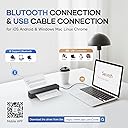
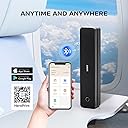
The iDPRT MT610 Pro is a compact, inkless thermal printer delivering sharp 300 DPI prints in 4-6 seconds. Compatible with laptops and smartphones via Bluetooth and USB, it supports US Letter/A4 sizes and features a long-lasting 2000mAh battery for up to 4 hours of continuous use. Perfect for professionals on the move who demand fast, reliable printing without the bulk or mess of traditional ink.


| ASIN | B0DB248HC6 |
| Additional Printer Functions | Print Only |
| B&W Pages per Minute | 35 ppm |
| Best Sellers Rank | #31,539 in Office Products ( See Top 100 in Office Products ) #49 in Portable Thermal Printers |
| Brand | iDPRT |
| Built-In Media | 1 x Instruction Manual, 1 x MT610 Portable Printer, 1 x USB Data Cable, 10 Sheets x Thermal US Letter, APP "HerePrint" |
| Color | Black |
| Color Depth | 24 bpp |
| Color Pages per Minute | 35 ppm |
| Compatible Cartridge | No |
| Compatible Devices | Laptops, PC, Smartphones, Tablets |
| Connectivity Technology | Bluetooth, USB |
| Control Method | App |
| Controller Type | Android, iOS |
| Customer Reviews | 4.1 out of 5 stars 659 Reviews |
| Dual-sided printing | No |
| Duplex | Manual |
| Hardware Interface | USB Type C |
| Initial Page Print Time | 4 Seconds |
| Ink Color | Black |
| Is Electric | Yes |
| Item Dimensions D x W x H | 10.5"D x 2.2"W x 1.6"H |
| Item Weight | 1.1 Pounds |
| Manufacturer | iDPRT |
| Maximum Copy Resolution Black and White | 300 dpi |
| Maximum Copy Speed Black and White | 35 ppm |
| Maximum Media Size | 8.5 x 11 inch |
| Maximum Print Resolution Black and White | 300DPI |
| Maximum Sheet Capacity | 10 |
| Maximum print Resolution Color | 300 |
| Model Name | MT610 Pro Thermal Printer |
| Model Number | MT610 Pro |
| Model Series | MT610 Pro Printer |
| Number of Drivers | 1 |
| Other Special Features of the Product | 300 DPI Print Resolution, Built-in Battery, Energy Star, Lightweight, Portable |
| Paper Size | 8.5 x 11 inch Inches |
| Power Consumption | 10 Watts |
| Print media | High-resolution paper |
| Printer Connectivity Type | Bluetooth, USB |
| Printer Output Type | Monochrome |
| Printer Resolution Horizontal in Black and White | 8.5 Inches |
| Printer Resolution Vertical in Black and White | 11 Inches |
| Printer Type | Thermal |
| Printing Technology | Thermal |
| Processor Count | 1 |
| Resolution | 300 x 300 |
| Scanner Type | No Scanner |
| Series Number | 4 |
| Special Feature | 300 DPI Print Resolution, Built-in Battery, Energy Star, Lightweight, Portable |
| Specific Uses For Product | Home, Office, School |
| Total Usb Ports | 1 |
| Unit Count | 1.0 Count |
| Warranty Description | 180 days |
| Warranty Type | Limited |
| Wattage | 7.4 Watt-hours |
C**.
Great little portable printer
This is an excellent little printer. I like that you can adjust the darkness and margins and it's easy to use. It also does not take up much room because I stick it in a drawer and only pull it out when I need it. It has always printed sharp, clear words and line drawings. I've never had an issue with it not being able to connect to my iPhone. i've used it quite a bit since I've gotten it and I'm very happy with the price and the product.
D**S
Nice and convenient
Buy some heat sensitive paper, download the app, take a little time to figure it out and.. you can print from your phone! The printer is about the size of the 3-hole punch sitting in my desk drawer. I'm really quite impressed with how easy it is .. and no ink!
A**R
My Thermal Portable Printer
The instructions to set up the printer driver and other matters dealing with the printer comes in a little pamphlet and even though I downloaded the printer driver I could not set my computer to print on this printer. Also, since the pamphlet is so little, I misplaced it and then I was at a loss. Luckily my computer teacher, Catherine, helped me install the printer driver and I was able to print. After my teacher set it up, I found the pamphlet. I din't know how to use the Bluetooth connectivity to set up the printer driver. This is where my teacher came in handy. I still don't know how she did it but she is still my teacher and I can ask her to go over the set up with me on how to do it. The value for the money is great. The color print quality is good; it is quite dark. I am glad I do not have to buy cartridges for ink. How long will this last? What is the life span of a thermal small printer? How often do they have to be maintained and what kind of maintenance do they require? I didn't know a printer could print without ink cartridges. I am amazed.
C**V
Cannot recommend, I wish I could
1-star still implies there is something good about the item and there isnt. I have 3 phones and 3 PCs and installed drivers on all of them and then started testing. From an iphone it printed a photo badly. From a PC it printed a text document as well as my laser printer which was surprising. Very crisp and excellent. From then on, it variously printed half a page and then stopped, or printed entire sheets in solid black, or wouldnt feed paper or printed two lines and then the rest just a black page. The machine began making awful noises. This was maddening. I returned it and quickly got a replacement. On all 6 devices the new one refused to connect to bluetooth and after 1 hour of trying, I gave up. In between, I contacted the company for help but they offered no help, eventually writing to say to contact the seller but there is no seller to contact via Amazon. Since this was the best rated thermal printer I think it wont pay me to try another brand or to try another replacement. I live in my van now and cannot take along my giant laser printer so this was an excellent idea except that they do not work. I hope one day the company tests and fixes the products they sell. Something else important to know. Each time you print, you must first open the driver, go to the Image configuration tab and select how you want the printer to handle the job. The choices are completely non-sensical and there are no instructions how to set up Settings. Its trial and error. The build quality of the device is OK, its small and light and super easy to store. If it just worked I would certainly raise the stars. I regret I didnt take photos for you of the bad printing, I gave all in the return box for the seller to see. I never heard from them.
K**A
Ok
Was ok, canโt get it to work properly
K**Z
Works well enough- UPDATE again
02-06-25 I purchased paper with better registration marks and ran the tests again. I increased the * to 4. Minus a * for the inconsistency with Word files. My test criteria: Handles US and European paper sizes. Handles continuous fanfold Supports Word and PDF files Lightweight Readable output Works with Galaxytab S9 ---- My test results: Galaxytab s9- YES Weight- 525g (this is the lightest weight of the printers tested) Output quality- EXCELLENT print output (Images were not tested) PDF- YES Word- Sometimes (HRT tech support suggests that Word files be converted to PDF) A4- YES US letter- YES Fanfold- YES 02-02-25 This has been an exceedingly frustrating printer. The output quality is the best of the printers tested. My Printer system (printer + app) test criteria: Handles US and European paper sizes. Handles continuous fanfold Supports Word and PDF files Lightweight Readable output Works with Galaxytab S9 ---- Galaxytab s9- YES weight- 525g (this is the lightest weight of the printers tested) output quality- EXCELLENT print output (Images were not tested) PDF- YES Word- NO A4- YES US letter- YES Fanfold- MOSTLY NO. Continuous fanfold relies on registration marks. There seems to be a sensor offset at about 8 cm from the right paper edge (the reg mark must be on the paper non-print side) but it is inconsistent in reading the mark (This is probably a problem in the app not the printer but both must work together). You can save Word files as PDF and feed single sheets of paper (this is tedious). If that is not a problem then the printer is good. The output quality is good enough that if your documents are short, it may be ok. 01-02-25 The HerePrint app fails with Word files. That makes this print rather useless. The app handled PDFs. The printer does not handle continuous fanfold paper. Feeding sheets one at a time is not a deal killer but why would I do it? Print quality is good and the weight is very good at 525g. The latch mechanism is good.
N**N
Cool Printer!
I found it hardest to connect by my laptop because of all the things you had to go into after you downloaded the stuff for it on the laptop, took forever trying to figure it out so I just had success connecting it to my phone by Bluetooth through the app you download for it on your phone and printing happened immediately, and I love all the controls on the app for the printer how you can make your ink and paper then the ink quality really good just choose the darkness and lightness of your prints carefully to turn out good. The only horrible thing about this is the SOUND, I was covering my ears when it prints... it's a really shrieky annoying screech like noise only last few seconds the whole time it's printing. I love you can sit this anywhere and print anything, it's all black and white ink but it's still nice. The directions pretty easy far as how to connect and turn the printer on and love the added thermal paper it already comes with for a start because I used all those for trat printing but it was all folded and I didn't like that really. I was testing this for papers I'm making to go with hand written gospel tracts I made. I'm printing this from Google Docs/Drive, pictures of the Lord Jesus to show His shroud for His resurrection and that it's visual proof He paid for our sin and you can see your Saviour's face.
P**L
great printer
What I was looking for in a printer. I previously tried Phonemo's printer and had a couple issues with it. This printer solves those issues. 1. The sticker on this printer came off very easily. The phonemo sticker left a very scuffed surface which made the printer look bad. 2. The app is simple and clean. The phonemo app was cluttered and full of a lot of functionality most people won't use. I do have a couple things I'd improve - not enough to take away from 5 stars. - the app seems to want to print my image twice for some reason. Could be something I'm doing wrong but it's not obvious to me at least. - the fact it opens up slightly as opposed to fully feels weird. They mention on the sticker it doesn't open all the way so it's not confusing. It just feels like it should open more and I could see that part breaking by people who don't read the sticker. - the app seems to print the image to the full size of the paper regardless of image size. Again, this could be something I'm not understanding - but one solution would be to provide image resize/reposition functionality on the print screen. The margins can be used to size it so resizing isn't necessarily missing from the app - it's just not intuitive. Overall I really like this printer. Hoping it holds up over time :)
J**E
A fantastic printer
This is amazing I have a hp printer but because I don't use it very often the ink dries and at 30.00 a time not worth having . I can just print a recipe or receipt when I need it. So easy to use .
J**H
Portable
Good printer take and use anywhere
B**S
No label printing options
The printer worked straight out of the box. Downloaded the Hereprint app, without creating an account I was able to test print using the free A4 sheets provided. The Black is not the blackest, but it's still worth it. You do have to faff abit with individual papers to get it straight, but when using the continuous papers its quite straightforward. I gave four stars because I really need to print labels, but the app does not have an option for this. In the materials section, they've catered for printing puzzles and cartoon. But navigating differently sized labels, which is one of my reasons for investing in a Thermal Printer. There's no option, I'm disheartened this is not a consideration. If there's someone who could offer help or guidance, on printing differently sized labels? I will greatly appreciate this. Thank you.
A**U
Print quality.
Am not satisfied with this as the print quality is not as i expected .
K**Y
Great item
Perfect item . Mobile . Easy to use.
Trustpilot
1 month ago
3 days ago