Desertcart purchases this item on your behalf and handles shipping, customs, and support to Japan.
⥠Unlock the future of WiFi â faster, smarter, everywhere!
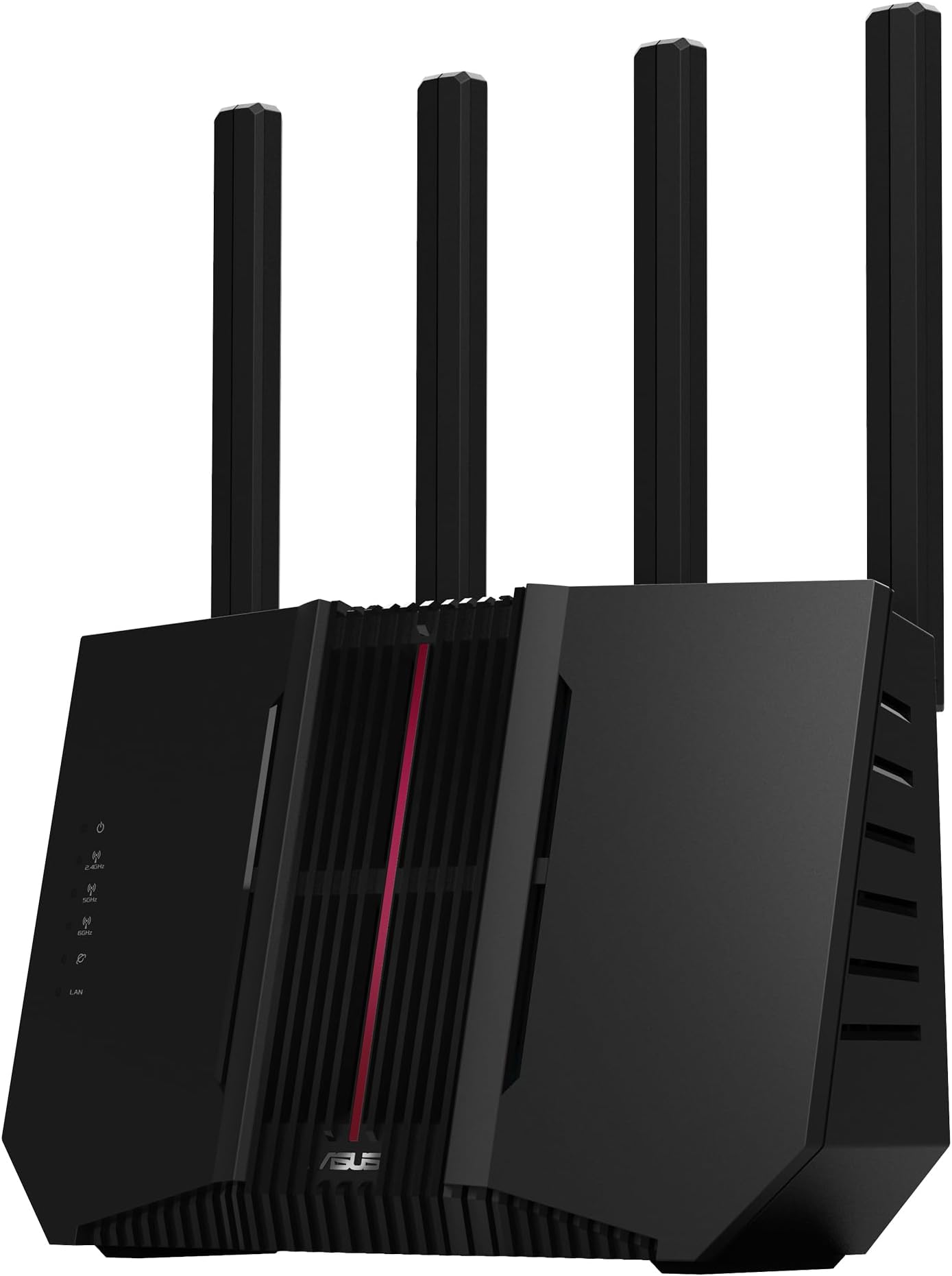
The ASUS RT-BE92U is a tri-band WiFi 7 router delivering blazing speeds up to 9700 Mbps via new 320MHz channels and 4096-QAM. It features Multi-Link Operation (MLO) for enhanced network stability, AiMesh support for seamless whole-home coverage, and a 10G port plus four 2.5G ports for ultra-fast wired connections. With subscription-free security, VPN capabilities, and dedicated gaming optimizations, itâs designed for professionals and smart homes demanding next-level performance and reliability.


| ASIN | B09T9BMKR3 |
| Antenna Location | Heim, Spiel |
| Antenna Type | Internal |
| Best Sellers Rank | 32,715 in Computers & Accessories ( See Top 100 in Computers & Accessories ) 283 in Routers |
| Box Contents | cable power adapter warranty card quick start guide |
| Brand | ASUS |
| Brand Name | ASUS |
| Colour | Black |
| Compatible Devices | Computer, Mobile Device, Gaming Console, Streaming Smart Home Device |
| Compatible devices | Computer, Mobile Device, Gaming Console, Streaming Smart Home Device |
| Connectivity Protocol | Wi-Fi |
| Connectivity Range | 2750 Square Feet |
| Connectivity Technology | Wi-Fi |
| Control Method | App |
| Country of Origin | China |
| Coverage | 2750 square feet |
| Customer Reviews | 4.0 out of 5 stars 405 Reviews |
| Data Transfer Rate | 5764 Megabits Per Second |
| Frequency | 6 GHz |
| Frequency Band Class | Tri-Band |
| Frequency band class | Tri-Band |
| Has Internet Connectivity | Yes |
| Has Security Updates | Yes |
| Is Modem Compatible | No |
| Item Dimensions L x W x H | 24.7L x 10.2W x 28.7H centimetres |
| Item Weight | 1.15 Kilograms |
| LAN Port Bandwidth | 10 gigabits_per_second |
| Manufacturer | ASUS |
| Manufacturer Part Number | 90IG0950-MO9A0V |
| Maximum Upstream Data Transfer Rate | 5764 Megabits Per Second |
| Model Name | RT-BE92U |
| Model Number | 90IG0950-MO9A0V |
| Model name | RT-BE92U |
| Number of Ports | 6 |
| Operating System | ASUSWRT |
| Other Special Features of the Product | WiFi 7, multi-link operation (MLO), AI WAN detection, AiMesh support, subscription free network security, VPN, smart home master, one-tap security scan |
| Product Warranty | 1 Year Manufacturer |
| RAM Memory Installed | 1 GB |
| Router Firewall Security Level | Maximum |
| Router Network Type | hybrid |
| Security Protocol | WPA2-PSK |
| Special feature | WiFi 7, multi-link operation (MLO), AI WAN detection, AiMesh support, subscription free network security, VPN, smart home master, one-tap security scan Special feature WiFi 7, multi-link operation (MLO), AI WAN detection, AiMesh support, subscription free network security, VPN, smart home master, one-tap security scan See more |
| Unit Count | 1.0 count |
| Voltage | 12 Volts |
| Wi-Fi Generation | WiFi 7 |
| Wireless Compability | 802.11.be |
| Wireless communication standard | 802.11.be |
B**T
Great product
Quality product. I replaced my old router as one of the nodes in my mesh network as the current node was bottle decking the transfer speeds This new router replaced the old one as the main feed and the speeds have been a massive increase due to the old router being a previous generation, but works well as a replacement node. Setup was a doddle with the ASUS app. Great product
A**R
Excellent coverage and powerful performance! .
This ASUS router is incredibly powerful with a super stable connection. The best part is that it can be linked with my old ASUS router, so now the Wi-Fi covers every corner of my house perfectly â no more dead spots anywhere! Iâm really impressed with its performance and how easy it was to set up. Highly recommended!
S**N
Poor range. Wireless backhaul hopeless.
Very disappointed with these. I have a fairly large area to cover but have no blind spots with my current mesh set up of 6x AX92u routers. Due to using wireless backhaul, I'm limited to around 450mbit from the nodes but the reviews and advertising suggested I should be able to get over 1gbit using the BE92u. Sadly this was not the case. The nodes insist on connecting to the main router, regardless of uplink preference settings and the range is pitifully small. There were huge gaps in coverage and speeds quickly dropped off as you walked out of the room with the primary router. Sat on top of it I was getting 1gb+ but 20ft away it was half that. Walk into the next room and there were disconnections or drops to 2.4ghz. Totally unfit for purpose (Asus support is really difficult to get through to and hopeless when you do!) and so I returned them. Back to my stable AX92us again. Ah well.
R**L
Best router for the price out there
Very good quality router, easy to set up, got all function you need for Gamer and household . Signal in the whole house now even on second floor. Recomended for everyone
J**E
Seems an Immature product, not ready for release.
TL;DR....I sent it back. Very disappointing. Its running Merlin, as the stock firmware is even less stable than Merlin. Its as unstable as it could be without getting sent bsck (yet!) I've had to resort to nightly automatic reboots to clear up what appears to be a memory leak, and even when functioning "correctly" it doesn't have anywhere near the coverage (even when running with Tx Power to the max) of the old RT-AC86U it replaced (even 2.4GHz, which should have the best penetration, is crippled) I also wanted to run with a WireGuard VPN (Nord VPN) but that proved a non-starter, just could not get it to run, so reverted to the slower OpenVPN. I'm not running with anything complex, only 10 or so clients at any one time, not vast amounts of streaming data, no use of DFS channels, no multilink, no channels above 40MHz. Its basically an immature product, should not have been let out on the market in its present form. Until I can get some reliability and performance, probably in a later firmware revision, my old but stable RT-AC86U is back doing the work
P**P
Very unstable, intermittent WIFI and WAN disconnection for no reason
Still have the very well known random/intermittent wifi disconnection issue out of the box. Bought this newer Wifi router thinking to replace my older AC86U. Follow the very straight forward settings and everything seems to be working ok, not until I start having some web conference with coworker. Connection keep dropping intermittently, sometime it is the wifi, sometime it is the WAN. Tried updating the firmware to latest but still the same. Put back the older AC86U router and everything working as it should. Come on, I think wifi router nowaday is not something than new and the user experience shouldn't be like that. I will probably go back to source an older RT series Router instead of wasting my time with this newer generation.
C**W
Poor backward compatibility with Mesh nodes and weak signal
I already had an Asus Wifi router and some XD4 Plus mesh nodes. The XD4 nodes will not connect to the new mesh network from this router. I contacted Asus support, have done everything they suggested, and still they try to connect but give an error message at the end of the process. I give up. The router gives a very weak WiFi signal at the end of a very small home, with only thin plasterboard partition walls. The nodes will not connect, so I am left with blind spots. I was better off with my older router, which worked seamlessly with the nodes.
C**J
La entrada perfecta al WiFi 7: Potencia, Asuswrt-Merlin y realidad de uso
Vengo de un router muy sĂłlido de gama media (el ASUS AX58U) que ha rendido genial durante años, pero con mĂĄs de 30 dispositivos conectados en casa, necesitaba un salto de calidad. Tras probar este ASUS GT-BE92U, puedo decir que el cambio ha merecido la pena. AquĂ os dejo mis conclusiones tras exprimirlo a fondo: â Cobertura y Potencia: Sin ser "milagroso" (la fĂsica es la fĂsica y los muros existen), la mejora es notable. Donde el router anterior sufrĂa para llegar, este llega con comodidad. Hay que recordar que una mejora de 3 dBm implica doblar la potencia de la señal, y este aparato lo cumple de sobra manteniendo la estabilidad en toda la casa. â Diseño: A diferencia de sus hermanos mayores (como el BE98 o el futuro BE19000AI), que son autĂ©nticos "mastodontes" horizontales, este BE92U tiene un diseño vertical, alto y estrecho. Se acomoda mucho mejor en cualquier mueble sin ocupar medio salĂłn. â Asuswrt-Merlin: Una de las razones principales para elegir ASUS es el soporte de la comunidad. Este modelo es compatible con el firmware de Merlin, lo que le da una vida extra y funciones avanzadas que el firmware de stock no siempre aprovecha igual. Si te gusta "cacharrear" y tener el control total, esta es la opciĂłn ideal frente a otros WiFi 7 que vienen mĂĄs "capados". â ïž La realidad del WiFi 7 y los 6 GHz: Este router tiene las tres bandas (2.4, 5 y 6 GHz), algo imprescindible para llamarse WiFi 7 "de verdad" (cuidado con otros modelos que son "mediopensionistas"). Eso sĂ, no os hagĂĄis ilusiones falsas con la banda de 6 GHz: Vuela (literalmente) en la misma habitaciĂłn o espacios abiertos, pero en cuanto cruzas un par de paredes, la señal cae. Es fĂsica. Mi configuraciĂłn: Dejo la red IoT en 2.4 GHz y uso las bandas de 5 y 6 GHz para los dispositivos potentes. El router gestiona esta convivencia de maravilla. đ§ Bug visual MLO: Si sois exigentes, os aviso de una "pijada" del firmware actual (tanto oficial como Merlin) relacionada con el MLO (Multi-Link Operation). El MLO es una tecnologĂa nueva que a veces se lleva mal con dispositivos antiguos (en mi caso, provocaba inestabilidad en una TV). Si desactivas el MLO para ganar estabilidad (recomendado por ahora), verĂĄs un bug cosmĂ©tico: los mĂłviles WiFi 7 conectados pueden aparecer en la lista del router como "conectados por cable" o directamente no aparecer, aunque tengan internet y vuelen. Si activas el MLO globalmente, se arregla el icono, pero puedes perder estabilidad en otros aparatos. Mi recomendaciĂłn: MLO desactivado. Prefiero estabilidad total a que el icono se vea bonito. Es algo que ASUS irĂĄ puliendo con actualizaciones. En resumen, comprado en oferta (Black Friday), me llegĂł la revisiĂłn de Hardware 1 (fabricada en 2025) y va perfecta, ignorad los rumores de foros sobre revisiones malas. Es un "bicho" muy serio, con puerto de 10Gbps y preparado para durar años. Si buscas estabilidad, firmware Merlin y WiFi 7 real sin irte a precios desorbitados, es el sustituto perfecto.
T**U
hakkını veren cihaz
ĂrĂŒn harika. efootball oynuyorum genelde ps5âte. oyun öyle bir akıcı oldu ki anlatamam. hakkını veriyor cihaz. kurulumu çok az uÄraĆtırmasına raÄmen bitirdim baĆarılı bir Ćekilde kullanıyorum. teslimat da çok hızlı idi. cumartesi sipariĆ verdim pazartesi teslim edildi.fiber altyapıda direk modem olarak kullanılabiliyor. kĂŒĂ§ĂŒk olan ont kutusundan direk bu routera baÄlantı yapılabiliyor. herkese teĆekkĂŒrler.
G**G
Router
Good saler and the router good to use
M**O
âââââ Perfektes Upgrade auf WiFi 7 â Fritz!Box-System erfolgreich abgelöst!
Ich habe mich dazu entschlossen, mein bestehendes Heimnetzwerk aufzurĂŒsten und das ASUS RT-BE92U System zu integrieren. Die alte Fritz!Box 7590 fungiert nun nur noch als reines Modem, und der Rest der Netzwerkarbeit wird jetzt von der neuen ASUS-Infrastruktur ĂŒbernommen â ein Schritt, den ich nicht bereut habe! Leistung & Mesh-Abdeckung (Mein Highlight): In Kombination mit zwei zusĂ€tzlichen ASUS RT-BE90 Einheiten habe ich nun ein absolut perfektes Mesh-Netzwerk im gesamten dreistöckigen Haus. Die WiFi 7 Performance ist exzellent; die Verbindung ist stabil, schnell und deckt nun jeden Winkel ab, an dem ich zuvor Empfangsprobleme hatte. Konfiguration & Möglichkeiten: Wer von einer Fritz!Box kommt, wird merken, dass die Konfiguration beim ASUS-System etwas komplexer ist. Man muss sich tiefer in die Materie einarbeiten, aber genau das ist fĂŒr mich ein groĂer Pluspunkt: Man hat einfach deutlich mehr Möglichkeiten, das Netzwerk nach den eigenen BedĂŒrfnissen zu optimieren und anzupassen. Es ist ein System fĂŒr Leute, die Kontrolle wollen. Weitere Highlights: - AiProtection: Ein echtes Alleinstellungsmerkmal ist, dass AiProtection kostenlos mit an Bord ist. Das bietet ein gutes Sicherheitsplus, ohne dass man monatliche Abo-GebĂŒhren fĂŒr erweiterte Sicherheitsfeatures zahlen muss. - StabilitĂ€t: Seit der Umstellung lĂ€uft das System absolut zuverlĂ€ssig. Die Integration der verschiedenen Komponenten funktioniert tadellos. Fazit: Der Umstieg auf ASUS WiFi 7 war die richtige Entscheidung. Wer bereit ist, sich ein wenig mit der Konfiguration zu beschĂ€ftigen, wird mit einem leistungsstarken, hochgradig anpassbaren und zukunftssicheren Netzwerk belohnt. Ich bin sehr zufrieden und kann das Setup fĂŒr groĂe HĂ€user mit hohem Anspruch an die KonnektivitĂ€t absolut empfehlen!
L**T
trÚs bon routeur qui s'est amélioré.
Jâai vu beaucoup de mauvaises critiques, mais je pense quâelles Ă©taient justifiĂ©es au dĂ©but de la vie du routeur. Depuis, ce dernier a reçu de nombreuses mises Ă jour, dont la derniĂšre est la version 3.0.0.6.102_37563 du 27/06. Câest avec cette version que fonctionne mon routeur actuellement. Cela fait une semaine que je lâai, et je nâai rencontrĂ© aucun des problĂšmes Ă©voquĂ©s dans les commentaires plus anciens, comme les redĂ©marrages ou les plantages. Jâai Ă©galement analysĂ© les logs du routeur, et tout fonctionne correctement. Pour moi, le routeur est stable. Je suis un peu déçu par le Wi-Fi sur la bande 6 GHz, qui capte moins bien (ce qui est normal, car cette frĂ©quence pĂ©nĂštre moins bien les murs). Mais curieusement, les dĂ©bits restent Ă©levĂ©s, mĂȘme avec une rĂ©ception moyenne. Jâutilisais auparavant un AX92U tribande, ultra stable, que jâai gardĂ© pendant 5 ans et qui reste trĂšs compĂ©titif. Jâai une fibre 1 Gbit/s symĂ©trique, et avec lâAX92U, jâatteignais au mieux 700/600 Mb/s sur mon iPhone 15 Pro. Avec le BE92U, je monte Ă 950/910 Mb/s, quasiment au maximum de ma connexion. Il faut dire que le BE92U a plus de RAM, un processeur plus puissant, et que le tĂ©lĂ©phone est connectĂ© en 6 GHz. En termes de couverture, les deux routeurs sont Ă©quivalents. Je nâai pas testĂ© lâAiMesh car un seul routeur suffit Ă couvrir toute ma maison. Jâai sĂ©parĂ© la bande 2.4 GHz sur un SSID diffĂ©rent (pour mes objets IoT principalement), et jâai mis les bandes 5 GHz et 6 GHz sur le mĂȘme SSID. Plus tard, je vais avoir deux tĂ©lĂ©phones compatibles Wi-Fi 7, et je compte exploiter le MLO (Multi-Link Operation : 5 GHz + 6 GHz), ce qui nâest pas encore possible pour moi actuellement. J'ai Ă©galement activĂ© les serveurs openvpn et wireguard ainsi que aiprotection La seule chose que jâai dĂ©sactivĂ©e manuellement dans les paramĂštres, câest lâassistance Ă lâitinĂ©rance sur les trois bandes, ainsi que le Wi-Fi 7 sur la 2.4 GHz (je nâai aucun appareil qui lâutilise). Je lâactiverai peut-ĂȘtre plus tard avec le MLO. Je suis restĂ© sur le firmware dâorigine Asus, car la version Asuswrt-Merlin sortie en avril est plus ancienne, donc je ne lâai pas installĂ©e. update du 02/08/2025: asus merlin a sorti un nouveau firmware plus rĂ©cent j'ai test et il consomme moins de ram (plus optimisĂ© avec des options supplĂ©mentaires) mais le firmware original fonctionne aussi bien. Chez moi, jâai 25 pĂ©riphĂ©riques connectĂ©s : âą 10 sur la bande 2.4 GHz, âą 12 sur la 5 GHz (Wi-Fi AC), âą 3 sur la 6 GHz (Wi-Fi 6E). Les appareils vont des camĂ©ras Reolink, un aspirateur Dreame, des enceintes Bose SoundTouch, iPad, iPhone, un NAS Synology, jusquâĂ des assistants Alexa.
Trustpilot
2 months ago
2 weeks ago