Desertcart purchases this item on your behalf and handles shipping, customs, and support to Japan.
🚀 Unlock the future of home WiFi with Archer BE550 Pro — speed, coverage, and control in one sleek powerhouse!
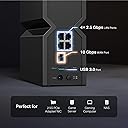
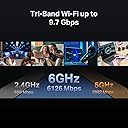
The TP-Link Archer BE550 Pro is a tri-band WiFi 7 router delivering up to 9.7 Gbps speeds with ultra-low latency, powered by 6 internal antennas and advanced beamforming technology. It features a 10 Gbps WAN port and four 2.5 Gbps LAN ports for multi-gigabit wired connections, supports EasyMesh for seamless whole-home coverage, and offers comprehensive network security via HomeShield. Compatible with Alexa, Google Assistant, and all WiFi standards, it’s designed for professionals and tech-savvy users demanding future-proof, high-performance connectivity across up to 2,000 sq. ft.


| ASIN | B0DM6RF34J |
| Antenna Location | Gaming, Home |
| Antenna Type | Internal |
| Best Sellers Rank | #59 in Computers & Accessories ( See Top 100 in Computers & Accessories ) #6 in Computer Routers |
| Brand | TP-Link |
| Built-In Media | 1 * Power Adapter, 1 * QIG, 1 * RJ45 Ethernet Cable, Wi-Fi 7 Router Archer BE550 Pro |
| Color | Black |
| Compatible Devices | Gaming Console, Personal Computer, Smart Television, Smartphone, Tablet |
| Connectivity Protocol | Wi-Fi, Ethernet |
| Connectivity Range | 2000 square_feet |
| Connectivity Technology | Ethernet, USB, Wi-Fi |
| Control Method | App, Remote, Voice |
| Controller Type | App Control |
| Coverage | 2000 square foot |
| Customer Reviews | 4.2 out of 5 stars 338 Reviews |
| Data Transfer Rate | 10000 megabits_per_second |
| Frequency | 6 GHz |
| Frequency Band Class | Tri-Band |
| Item Weight | 2.6 pounds |
| LAN Port Bandwidth | 10G/2.5G |
| Manufacturer | TP-Link |
| Maximum Upstream Data Transfer Rate | 10000 megabits_per_second |
| Mfr Part Number | Archer BE550 Pro |
| Model Name | BE9700 Tri-Band Wi-Fi 7 Router |
| Model Number | Archer BE550 Pro |
| Number of Antennas | 6 |
| Number of Ports | 5 |
| Operating System | Linux |
| Other Special Features of the Product | Access Point Mode, Guest Mode, Internet Security, Parental Control, Remote Access |
| Router Firewall Security Level | High |
| Router Network Type | Tri-Band |
| Security Protocol | WPA/WPA2-Enterprise (802.1x), WPA2/WPA, WPA3 |
| Special Feature | Access Point Mode, Guest Mode , Internet Security, Parental Control, Remote Access |
| UPC | 810142822695 |
| Unit Count | 1 Count |
| Warranty Description | 2 Year Manufacturer |
| Wi-Fi Generation | WiFi 7 |
| Wireless Communication Standard | 802.11.be, 802.11ac, 802.11ax, 802.11g, 802.11n |
| Wireless Compability | 802.11.be, 802.11ac, 802.11ax, 802.11g, 802.11n |
S**E
Great router/AP! The 10Gbps port runs OK at 2.5Gbps. Web config page IP is in the Tether app.
I bought this TP-Link Archer BE550 Pro to use in Access Point mode, fed by a 2.5 Gbps ethernet cable from my AT&T fiber router. Replaces a decade-old Wi-Fi 5 dual-band Netgear Nighthawk extender/AP to get Wi-Fi 7 Tri-Band. The first big question I had, that nearly prevented me from ordering this one, is that 10Gbps WAN port in back. Is it multi-gig, or is it fixed at 10Gbps? Nowhere on the box or on the webpage says. Even more confusing since other similar TP-Link models have a separate 2.5Gbps WAN/LAN port marked along with three 2.5Gbps LAN ports. Well turns out the answer from TP_Link customer support is yes, the 10 Gbps IS a multi-gig port that specifically will work fine with 2.5 Gbps (and I'm assuming 5Gbps and 1Gbps but I didn't ask) and linked up just fine with my 8 port 2.5Gbps TP-Link ethernet switch. All of this means this Archer BE550 Pro router is future-proof, since I eventually expect to upgrade to 10Gbps throughout the house in a couple of years when the prices come down. This BE550 Pro router comes with a short funky flat ethernet cable with shielded RJ45 connectors that I'm sure must be rated for 10Gbps (but works great at 2.5Gbps, of course). All you need for 2.5 Gbps though is Cat5e or Cat6 (what I'm using in the house) cable. Another hiccup is how to access this router's web setup page, or more specifically, how to find out what IP address it landed at on your network to do that. The Tether app does a great job with initial setup and some of the basic settings, including the ability to switch from router mode to access point mode. But then...anyone who has spent years with routers will say "where are the rest of the settings" and assume the the router will probably come up with a settings web page with more at its IP address. But where? The AT&T router is at 192.168.3.1 (I use a .3 subnet on the publicly un-routable 192.168.x.x for home network) but remember this is in Access Point mode, so the BE500 Pro IP will be somewhere else. Running a IP scanner doesn't really help much, nothing to ID the device, which by default will land in your DHCP IP block (I run both static IP and DHCP blocks). Turns out the answer is in the Tether app. Click on its entry under the first "My Devices" screen, THEN click right on the picture of the router itself on the next screen. That will come up with an info screen and on there will be the Archer BE550 Pro's IP address. Just log into that IP in your browser and use your TP Link website password for the password. You are in! :) The web setup pages do have a pretty extensive list of settings. So far I'm very impressed with this router, in all three bands, and especially the IoT setup. I'm using 2.4 GHz and 5Ghz IoT bands for the solar panels, Ring doorbell, water softener, and remote control of a Mitsubishi mini-split A/C system. The Wi-Fi 7 6Ghz band is working great to a cell phone and an external Tri-band Wi-Fi adapter on a laptop. The Tether app alerts every time a new device has joined one of the networks, which is handy. Recommended!!
D**T
Great Wi-Fi 7 Router!
This is a very FAST router! It's WiFi 7, so it can handle multi-Gigabit speeds. Via a hardwired CAT 6 ethernet cable, I've gotten 1 Gbit/sec speeds. Via a WiFI 7 compatible client (e.g., Samsung S24 Ultra, 25, 26...), i got 1.8 Gbit/sec. My cable Internet is 10 Gbit! If you have a cable speed to your house greater than 1 Gbit, there are two ports you can use: 2.5 Gbit and 10 Gbit speeds feom your optical or cable modem. Cable here is limited to 2 Gbit. While Optical is 10 Gbit (up and down). This Internet provider (optical) is called Sonic. The cable provider is called Spectrum. I bought this router bec I wanted it to take in the full 10 Gbit speed coming from my optical Fibre. So, check carefully before you buy to ensure it can handle the max speed of your Internet provider. The setup was via their app. And that went fairly smoothly. I got it for $200, which is thought was a good value. Remember, the bottleneck is not your Internet provider. It's the router (so you're purchasing a WiFi 7 router). But to attain top speeds, you client must be WiFi 7 or 6. But it's also compatible with older versions. The signal strength is sufficient considering I'm living at a two-story house with 1300 sqft. Router sits on the second floor. Overall, it's a fast router. And i thought the value was worthwhile...👍
N**L
Great speeds, ok range
This router has been working absolutely great for the most part. All of my devices that are capable of it are connecting it gig plus speeds. The range on it could be a little bit better though. My previous Rider was able to reach all the way into my basement, but this one is having some problems connecting to older 2.4 GHz devices that are a little farther away
B**N
Perfect router for our church
I do all our churches technology work and wanted to upgrade our router to something faster. Having worked with TP-link products, I decided on this router. I like how easy it is to set up this router. Since our church doesn't have to have super high tech products having 1 10G port and 4 X 2.5G ports is perfect. We also run a mesh system because the church is mostly cinder block and it cuts down on the range, but it seems like I can pick this one up further away compared to the one I swapped out.
J**.
Doesn't Work After 90 days and Replacement is Worse with poor service and no help from Amazon
Is the absolute worst item I've ever bought online. Bought to replace my LinkSys router that went bad after 8 years that I verified was not working correctly and could not be fixed. Router worked for about 90 days before it kept dropping my internet connection. I followed every single support recommendation to fix the router, including resetting all of the settings and redoing them, and they finally agreed to take it back and send me a new one that I had to pay for in advance and wait for a refund by returning the old one. I get the new one and hook it up, it wouldn't start correctly and was showing the exclamation point error so I did a hard reset on it (out of the box). Set it up within 10 minutes it was showing the error again. Did all of the steps recommended by support with the original one and it continually shows the exclamation point every ten minutes like clockwork. So now I have two junk routers that don't work and I'm using my cellular hotspot on my phone to work from home and run a side business. Amazon won't provide support because it's past 60 or 90 days even with the 3-year purchased Asurion plan (worthless) and I'm left to fight with the insurance company who won't do anything because the router is under the 2-year warranty, and fight with TP Link for another two weeks to get another router that may or may not work. TP Link is garbage, their support is worthless, Amazon won't help (so this is my last purchase from them and their affiliate companies and I'll be switching to WalMart where you can take the product to the store with the AllState warranty for an instant refund or replacement). Zero value for the money, Zero stars for service, reliability, and actually doing its intended function. Range was not any better than my previous LinkSys (I wish I would have bought the same brand, but paid more for this router because it was supposed to be better). Easy of use would be 5-star except it doesn't work to use it, so it gets Zero stars there as well.
J**Y
Outstanding!!
Performs as advertised. I was using the latest and greatest that Google Nest had to offer with a 1Gbps ISP. My home is a smart home with 35 devices including 4k security and doorbell video. I knew my Google WiFi was lacking, but I didn't realize how much until I commissioned my BE550 Pro BE9700. Now my WiFi is beyond great. I'm using every bit of the ISP 1Gbps now. Setup was very uneventful. From the time I opened the box until my smart home devices were back online was no more that 15 minutes. I used the same SSID and password so all devices came right back online and work significantly faster. I should have bought this sooner.
J**N
Perfect for everything
Most reliable router I've ever used. Can stream my PC's display all across my house via Sunshine and Moonlight with perfect connection, and VR works especially well on the 6ghz band. A little pricey but for what it's offering I'd argue it's definitely worth it.
O**E
The Best Router I've Ever Owned
The NYTimes Wirecutter recently rated this TP-Link broad band router #1. I used that recommendation to buy this router, and I think it is the best router I have ever owned. It was easy to setup and the Advanced Options are also straightforward to implement, such as enabling the router to serve as a VPN. I would also rate TP-Link's Support section as Outstanding. All too often IT support sections provide a 'lick and a promise' support for issues that aren't easy to solve. TP-Link worked diligently with me to get some issues with setting up the VPN router function to fully function. I expect to use this TP-Link Archer BE550 Pro router for several years. Consider buying this router, which is a very good buy.
O**K
Excellent featured BE9700 WiFi 7 router but requires careful setup
I’ve purchased a 2nd TP-Link Tri-Band BE9700 WiFi 7 Router (Archer BE550 Pro) mesh router after getting the 1st one working. I wish I could say that it was easy getting the 1st one working, but it was a very frustrating 6 hour experience, likely because the 1st unit was an Amazon store return that had been misconfigured before return. The setup should be easy and straightforward using the TP-Link Tether app, but initially I couldn’t access the router WiFi or web portal. After isolating the unit and doing 2 resets to factory setting I could finally access the unit and the setup went fine. A firmware update was also required. Units are stable and providing good throughput. Rather than buying this unit just for speed (which seems to be the most often quoted criteria), I researched the technical feature set, what was included, and what you have to pay an extra subscription for before choosing this particular vendor and model. I also read the TP-Link Community feedback to see what network issues are encountered and solutions, etc. There are a lot of optional networking features you can deploy to optimize your particular network that will likely take some time to review and test. The separate subnets for different traffic types (IoT, regular users, visitors, DMZ, etc.) and the mesh backhaul service using Ethernet (or the 6G wireless channel option) to connect the 2 units works great and to my mind are the best features for home networking functionality. Tl;dr: always isolate your unit, do a factory reset, and restart your ISP modem before trying to setup the unit, to help avoid being caught by any ‘Edge Cases’ lying in wait for you that can cause the setup process to totally fail.
D**.
Still feels like a beta product
I bought it to use it as an Access Point because it is significantly cheaper than one with the same feature set as other well known brand. However, it feels like a beta testing while trying to test out things. Here are some issues. - MIMO causes massive micro lags - Setting MLO kills 5GHz band randomly and some times it needs factory reset to bring it back. - When MLO actually works, it is still slower than single band of 5GHz or 6GHz. What is the point? - Signal in 5GHz and 6GHz band feels weaker than previous products that I have tried, resulting in slower speed. Probably antenna design/placement issue? Ultimately, it fits my need and works well enough to I am keeping it, but if you expect every feature that it claims to have to work perfectly, you will be disappointed.
B**N
Data speeds are horrific and essentially unusable
This router is a waste of time to buy. I didn't have any of the connection issues that people seemed to have, I managed to get it connected very easy with the TP Link tether app. My problem was with the data speeds. I get roughly between 250 and 280 Mbps download and 195 Mbps upload on my bone stock old Telus modem. When I connected to BE9700 i would get a VERY unstable 55 Mbps download and 30 Mbps upload, and that was from maybe 40' away. The modem was essentially unusable as it couldn't even support 1080P streaming. Definitely not a gaming router and BARELY a streaming router.
A**R
Excellent & Reliable
Great router, great range and setup configuration options. Easy to setup - ver impressed - return the Ubiquiti Dream and got this less expense one which out performs Ubiquit at least in my setup.
A**E
Fantastic router marred by monthly subscription for basic features
This is an absolutely fantastic router with all of the features that I wanted and everything works perfectly. They were on sale so I decided to buy three and make my own mesh network system out of three routers instead of traditional mesh products and I am very happy with the results. So far this new mesh network made out of three of these units is stellar. These have all the options that I would expect a router to have that can be accessed through a web interface without an online account which is great because I absolutely hate using apps to configure routers. The only reason it doesn't get five stars is because there are basic features that pretty much all other routers give you permanent access to and TP link forces you to pay a monthly subscription to access basic features which I think is absolutely ridiculous. So, I bought this product understanding that I don't need the features that you would have to subscribe to. If you are considering this router I would look at the features behind the pay wall and if those are features that you would like to use then maybe look at another company as this is the only company that I've come across that forces you to pay a monthly subscription to access some really basic router functionality. This would be the perfect router if they didn't have the monthly subscription service to access some basic stuff. So, if you're buying this router just know what you're getting into as for me it's totally fine because I don't want/need those features but if you do then your total cost of ownership over time is going to be insane.
Trustpilot
3 days ago
1 month ago