Buy anything from 5,000+ international stores. One checkout price. No surprise fees. Join 2M+ shoppers on Desertcart.
Desertcart purchases this item on your behalf and handles shipping, customs, and support to Japan.
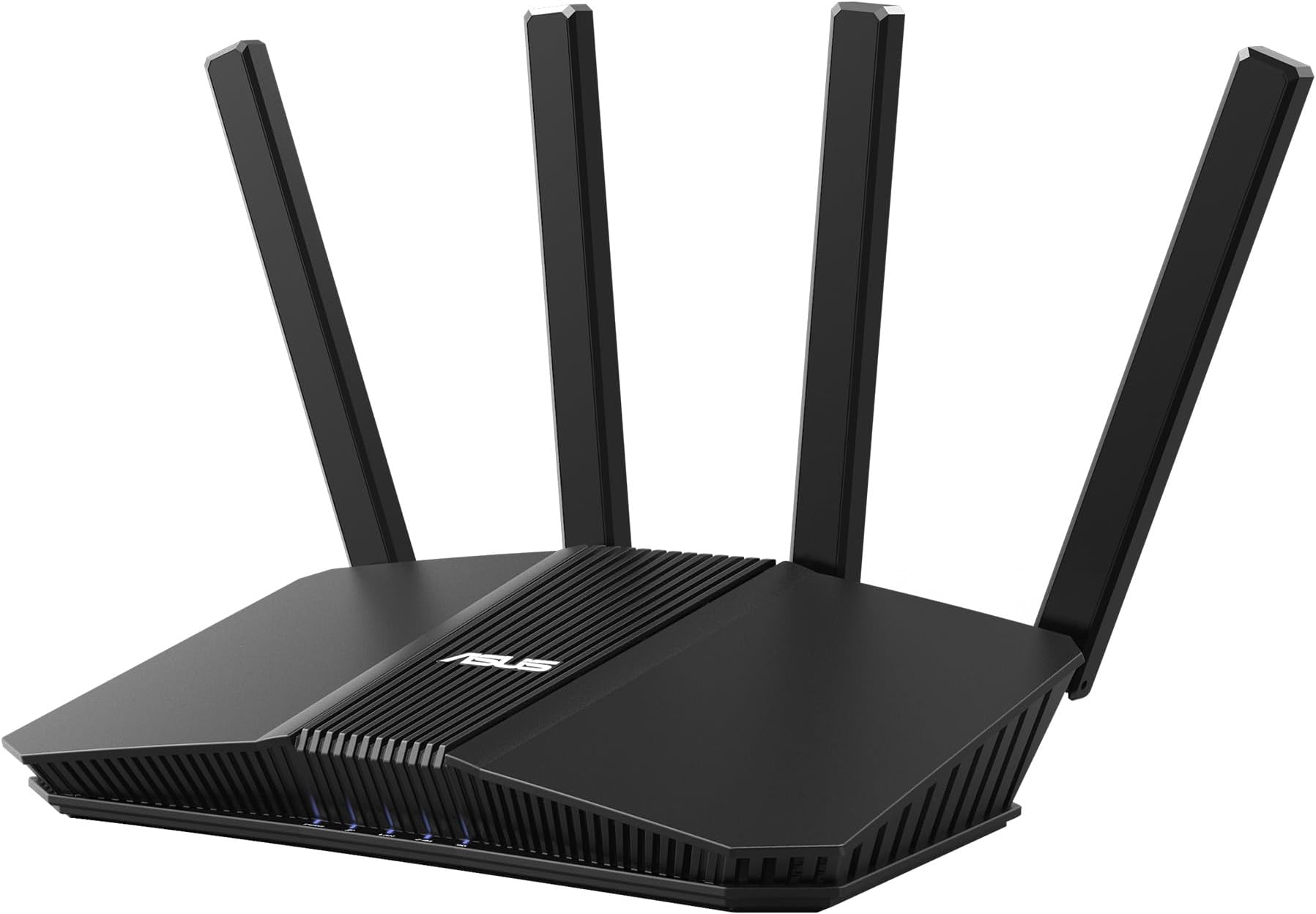
🚀 Elevate your home network to pro-level speed and security — because buffering is so last decade!
The ASUS RT-BE58U WiFi 7 router delivers cutting-edge dual-band wireless speeds up to 3600 Mbps with 4096-QAM and 160MHz bandwidth. Featuring Multi-Link Operation for stable connections, dual-WAN support including 4G/5G tethering, and commercial-grade AiProtection Pro security, it’s designed for seamless smart home integration and professional-grade network performance backed by a 3-year warranty.


| ASIN | B0DHWBS9G6 |
| Antenna Location | Business, Gaming, Home |
| Antenna Type | Internal |
| Best Sellers Rank | #147 in Computers & Accessories ( See Top 100 in Computers & Accessories ) #21 in Computer Routers |
| Brand | ASUS |
| Built-In Media | Power adapter, Quick Start Guide, RJ-45 cable, RT-BE58U gaming router, Warranty card |
| Color | BLACK |
| Compatible Devices | Personal Computer |
| Connectivity Protocol | Wi-Fi, Bluetooth |
| Connectivity Range | 2000 Square Feet |
| Connectivity Technology | Bluetooth, Wi-Fi |
| Control Method | App |
| Controller Type | Web Interface, Mobile App Control, Command Line Interface |
| Coverage | 2000 square foot |
| Customer Reviews | 4.0 out of 5 stars 419 Reviews |
| Data Transfer Rate | 2882 Megabits Per Second |
| Frequency | 160 MHz |
| Frequency Band Class | Dual-Band |
| Has Internet Connectivity | Yes |
| Has Security Updates | Yes |
| Is Modem Compatible | No |
| Item Dimensions L x W x H | 7.6"L x 2.3"W x 9.37"H |
| Item Weight | 1.01 Pounds |
| LAN Port Bandwidth | 3600 Mbps |
| Manufacturer | ASUS |
| Maximum Upstream Data Transfer Rate | 2882 Megabits Per Second |
| Mfr Part Number | RT-BE58U |
| Model Name | RT-BE58U |
| Model Number | RT-BE58U |
| Number of Antennas | 4 |
| Number of Ports | 5 |
| Operating System | Linux-based |
| Other Special Features of the Product | 160MHz bandwidth, Alexa Compatible, Internet Security, VPN, AiProtection |
| Router Firewall Security Level | High |
| Router Network Type | Wired Router with Wireless Capabilities |
| Security Protocol | Firewall, VPN, AiProtection, WPS support, WPA/WPA2/WPA3-Personal, WPA/WPA2-Enterprise |
| Smart Home Compatibility | Smart Home Compatible |
| Special Feature | 160MHz bandwidth, Alexa Compatible, Internet Security, VPN , AiProtection |
| UPC | 197105452916 |
| Unit Count | 1.0 Count |
| Warranty Description | 3 year |
| Wi-Fi Generation | Wi-Fi 7 |
| Wireless Communication Standard | 802.11.be |
| Wireless Compability | 802.11.be |
S**O
so pleased!
in my cost cutting I stopped paying for the router that Spectrum provided me & bought my first router about 3 months ago & was disappointed with it. It was unreliable & had to often reconnect my phone to the wifi if i had left my apt, and other devices as well I had to reconnect. Which leads me to this, my 2nd router purchase & I am very pleased with it. Totally reliable with no drops nor need to reconnect devices. Great quality. It fit my needs perfectly in my small living space. Connection reaches every room no problem now.
S**I
Fast, modern, and NO extracurricular corporate nonsense.
Zero complaints. My biggest make or break while shopping for an upgrade was whether or not I was allowed to administrate this device or if some corporation shoehorned themselves as a pseudo administrator (Lookin at you Netgear) This router does what a router should do without requiring some sort of an account or other encrappified steal yo data scheme just to access basic functionality. -You can either configure it through an app or do it the old fashioned way through a browser whatever you prefer! -There is no external account requirement just to access the config page (Seriously screw you Netgear) -The config page has this beautiful dark aero GUI and shows tons of technical details -I see it supports direct control through an Alexa, not my thing personally but if you want it, its there! -Blazing fast quad core processor and a whopping 1Gig of ram. (At least I think thats a lot for a router) -Lots of extra functionality that I might not use but others might appreciate The setup wizard was also a breeze, straight to the point and was done in less than 2 minutes. Did I mention that there was no nonsense I had to carefully opt out of? I went in kind of expecting something but there was only one dialog for what looked like basic diagnostic data sharing which I declined and was still allowed to use the router. Over Wifi I got 890Mb down over my 1Gig plan while next to the router though range is a non issue in my studio. Id imagine with its four antennae it probably has an acceptable range. I think value wise it was worth what I bought it for considering everything that it does right out of the box
N**F
Works good for connection and speed the settings for certain things don't.
So far so good was an easy setup took 10 mins max. Configuring the settings isn't hard but parental settings do not work. You can't block URL with this or anything. I tried some of the DNS filtering settings for family they have built on it blocks certain devices from even connecting so I was forced to turn off. You will have to look up guides and hopefully they work if you do want clean browsing it blocks websites that it shouldn't and you have to pay monthly for configuring access. The coverage/range has been good all devices connect fine through my whole house on wifi so 1200sqft or so. You can choose to set two different wifi channles for 2.4 and 6 incase some aren't compatible. Quality seems fine I recommend but not if you're looking for a simple plug up set some simple settings for safe family surfing.
H**R
Nothing but trouble!
Nothing but trouble. Don't even consider buying this model. After two plus weeks fighting this router, calling Asus tech support, making hundreds of adjustments, resetting and upgrading the firmware, etc., I'm returning this unit as defective. This particular unit can see the ISP at full speed, the wired LAN runs at full speed but the WAN is unusable. Websites won't load properly, it takes minutes for some pages to appear, some websites are glitchy, wireless speeds randomly range between 3 to 27 MBS on a 120 MBS connection, range is sub par, video calls freeze and phones don't work correctly. Asus typically makes good products--maybe I just got a defective unit this time. This particular model was made in Vietnam.
M**O
Wonderful wireless router
This router is extremely capable. The Asus interface makes it very easy to set up and manage, even if you’re not a networking expert. It delivers excellent speeds and handles multiple devices at the same time without any issues. One of its biggest advantages is Wi-Fi 7 support, which helps future-proof your network. I also love that I can create separate networks for IoT devices and guests, adding both convenience and security. Highly recommended.
A**.
BE58U is a solid router and great as a mesh component
This BE58U router is my second ASUS router. My first, an AC66U has been repurposed as a mesh node on my new Asus mesh network. The BE58U is probably overkill for my needs - about 20 connected devices over 3 floors and 3200 SF home. No gaming but 2k Netflix and other streaming. I have no devices that currently use wifi 7 and since the AC66U node is only wifi 5 there's no dedicated backhaul channel. First, the BE58U by itself seems to have slightly less range across both 2.4 Ghz and 5 Ghz bands than the old AC66U router. If I was using this by itself, I'd be disappointed and probably return it. As a mesh router using the AC66U as a node, it's a whole different story. Coverage and speed across both bands is vastly improved and at least part of my home is future-proofed for wifi 7. Much better set-up than my old TP extender set-up. In a perfect world, I'd have a wifi 7 tri-band router and mesh node but cost is an issue. For now, a dual-band wifi 7 coupled with an older wifi 5 node gets the job done nicely with room for future upgrades (maybe a cheap Asus wifi 6 router on E-bay?) BTW, setup was easy, no random network drops or resets, unit runs relatively cool, no network incompatibilities or glitches. I've had none of the issues mentioned in any of the negative reviews - at least not yet and never had issues with my AC66U. The Asus software and phone app are easy to us and provide a lot of useful information. The network security tools are also very good. I consider this a solid value and the mesh network a real upgrade in house-wide coverage.
A**D
Not happy with Amazon Resale; ambiguous about product.
I am definitely unhappy with how Amazon Resale handled this product. I ordered two of this WiFi router, intending one for my own use and one as a gift. I opened one of the boxes to install my own and make the setup of the gift easier. I will be returning the unopened box, First of all, the product description said "Used - Mint". I understand that the box had been opened and that the product may well have been at least tried out. When I opened the box I found most of what I expected, but the boxed had been 'repacked' by just tossing the router into the box with only the liner packing in place. The actual router looked clean, with no apparent scuffs or scrapes. The power supply, however, was a disaster. ASUS branded and still in its clear protective wrapper, it was simply *WRONG* -- 19V / 1.75A output (should be 12V / 2A) and the connector, thankfully, not compatible with the socket in the router. Fortunately, I had a suitable substitute in my reuse/repurpose/recycle closet. I could move on to installing the router into my network, replacing an older ASUS WiFi Router. Now to the router itself. I've used ASUS products for years, even a couple of decades. In general I have found their products to be rugged, performant, and relatively easy to set up. I am replacing an ASUS RT-ACRH18, which I have used for years and which I thought I knew inside-out and upside-down -- the new router would be a simple unplug the old, plug in the new, and tweak the tuning a bit. I think my hubris caught up with me on this one. Six hours later, I finally got my network stable again and learned that there is a whole world of AiMesh WiFi terminology that I didn't know, which made setting up my WiFi access point confusing. I won't describe in detail how I needed to use both routers, two computers, a tablet, and a mobile phone to complete the swap-out. Suffice it to say that I've taken my estimation of my network skill down a couple of notches. I'm a retired old coot who hasn't kept up with all the changes in my former career (systems engineer). That said, I did find the "quick start guide' to be a bit too brusque -- downloading the full product manual from the ASUS support site. (Another old coot foible -- I prefer 'hard copy' (PDF will do) manuals to YouTube 'self help' videos -- I had a full set of the AT&T/Bell Labs UNIX hard-copy docs.) Ultimately I had to reconfigure one of the PCs to act as a dedicated configuration tool. In the end, the ASUS RT-BE58U is now working along well in my network. Terminal devices are faster, some showing WiFi 6 connectivity, the highest of which they are capable. Drop-outs are non-existent. I am pleased with the overall performance of the product. Final score: Amazon Resale -- big FAIL; ASUS -- yes, I was overconfident, but I had to download the documentation *I* needed to complete the swap-out. Brand loyalty and a bit of humility will keep me buying ASUS products.
J**N
Amazing upgrade experience from an older ASUS router.
If you're replacing an older ASUS router, this is a dream. ASUS really puts a lot of work into their firm/software. Using the mobile app for setup was seamless. All I needed to do was plug in this new one, hit "setup new router" on the app, once discovered it asked if I wanted to import SSID & password settings from my old router (said yes), then waited for setup to complete. Unplugged my old RT-AC68U & BAM!!! - everything was already up and running. For people like me, with a ton of connected devices (Climate Control, Irrigation, Security Cameras, etc.), having an option to import settings while still upgrading from WPA2 to WPA3 security was super satisfying. Also, being able to turn my old RT-AC68U into a mesh satellite for my upstairs bedrooms was a nice bonus. Additionally, If you want a cheap (and admittedly lazy) way of having a local media NAS [Network Accessable Storage], you can just plug in a huge external drive via the USB3 port and VOILA you've got your entire digital MP3/4 & MKV library available on any of your smart TVs, streaming boxes, or mobile devices that have access to your network. As I had been doing this on my previous router, it was [almost] a simple plug & play solution. "Almost" as I had to delete the files on the drive generated by the first router to avoid quirky library organization issues. Not necessary, but I'm a neat freak. Great work ASUS. I love your dedication to equal development of both hardware and software. Too many companies focus only on one or the other. P.S. BRING BACK SMALL FORM FACTOR ZENFONES!!!
C**R
Great Service
Good quality product with fast turnaround time from the supplier and Amazon.
M**N
أداء فوق الممتاز و تغطيه واسعة النطاق
افضل جهاز راوتر منزل اشتريته الحمدلله، مدى ممتاز و تغطيه رائعة، أداء متفوق على أجهزة اعلى منه مستوى و سعر،، انصح به بشدة
G**R
Great router.
I love Asus routers, this does not disappoint. Needed another router for house mesh. Good connection and speed.
W**H
Mesh capable
Good router, Fast, good app, IoT and Guest networks, Mesh, WPA2 and WPA3.
I**V
Does not have 6 Gghz band
Does the job Powerful CPU 1GB RAM FusionVPN WiFi7 2,5Gb port
Trustpilot
5 days ago
2 weeks ago