We remain fully operational. Our teams are working around the clock to ensure your deliveries continue safely.

DOWNLOAD THE APP


Customer Services
Copyright © 2025 Desertcart Holdings Limited
DOWNLOAD THE APP


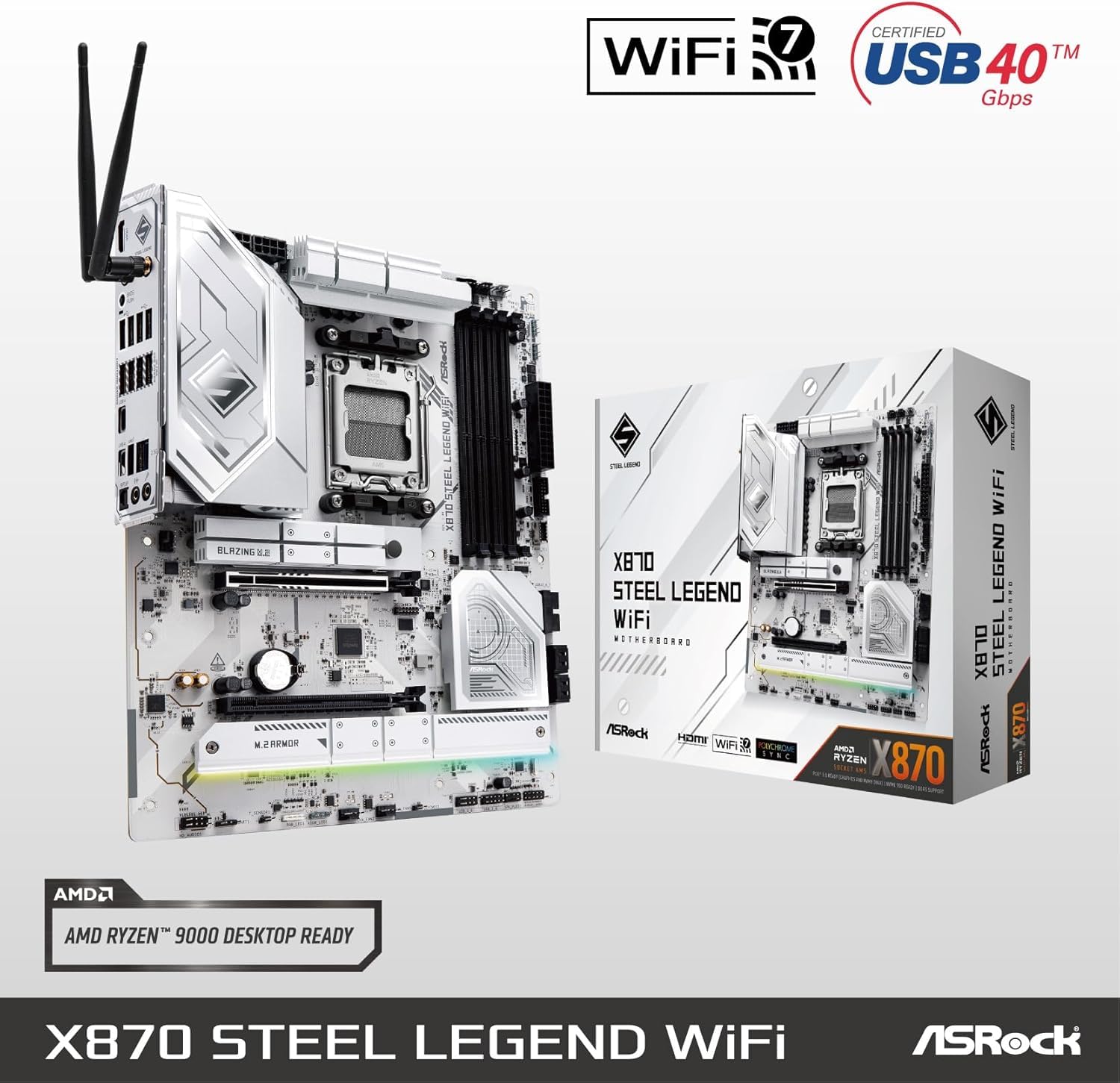


⚡ Elevate your build with the ASRock X870 Steel Legend — where power meets precision.
The ASRock X870 Steel Legend WiFi 7 motherboard is a high-performance ATX board designed for AMD Ryzen Socket AM5 CPUs. Featuring a robust 17-phase 80A Dr.MOS power design, dual USB4 Type-C ports, and next-gen Wi-Fi 7 connectivity, it supports up to 256GB of DDR5 RAM at speeds up to 8000 MHz. Its professional white aesthetic is complemented by an 8-layer PCB and metal backplate, while advanced multi-layer M.2 heatsinks ensure optimal thermal management for NVMe drives. Ideal for professionals and enthusiasts seeking stability, speed, and future-proof features in their PC builds.
| ASIN | B0DG4FK9HP |
| Batteries | 1 CR2032 batteries required. |
| Best Sellers Rank | #23 in Computer Motherboards |
| Customer Reviews | 4.2 4.2 out of 5 stars (778) |
| Date First Available | September 5, 2024 |
| Item Weight | 4.5 pounds |
| Item model number | X870 STEEL LEGEND WIFI |
| Manufacturer | ASRock |
| Product Dimensions | 13.62 x 11.06 x 2.95 inches |
J**L
Surprisingly good motherboard
I was very skeptical about this motherboard, the last time I had purchased an ASRock motherboard was over 5yrs ago & it only lasted one year. I was very surprised when I received the package, and opened the box, it was literally so beautiful, I seriously paused for a moment to just appreciate the beauty. The motherboard is put together very well, I couldn't believe it's an 8-layer PCB, has a metal back plate, and all of the PCIe lanes correctly setup for the lower price that it is verses the competition. I do understand that there have been issues with previous versions of the bios mostly with PBO settings. My motherboard came with bios 3.20, and I promptly updated to 3.25, now there is another bios version available, however I believe this is for upcoming new CPUs & I haven't yet updated my bios to the latest. I also do not use PBO, I set a multiplier & set the CPU core voltage & SoC voltage & it's been stable. I am using a 9800 X3D, set all 8 cores to 5.4 GHz, set CPU core voltage to 1.24v (it actually goes lower on its own), & SoC voltage to 1.24v (it also goes lower on its own). While I don't dismiss there could be an issue with this motherboard & it killing CPUs, I do think it is mostly due to users just plugging in the CPU and just allowing it to run at system defaults, which has shown will do in the CPU based on how good the cooling it has. The only issue I had with the motherboard is that it has to have a thumb drive formatted as Fat32, which means you need a smaller size drive to get this done. Once I got found a smaller size drive, it updated quickly and all is well. The only other downside for me is that the bios looks likes & feels like something from early 2000s, so this is also why that you are stuck to using a Fat32 formatted drive, so if ASRock wants to truly fix something, this would be a huge plus if they could fix their bios & be able to use larger size drives for updates. One last issue I had is the memory list, I have 3 different memory kits & only one is on it, however, its rock solid on the EXPO I profile, so I just mention this as a warning to make sure to look at the qualified memory list, & also this is the first time I've seen a M.2 drive support list, again make sure to go over this list to make sure you don't have compatibility issues later. Overall, I would recommend this motherboard & has been completely stable since the start & I will come back and change the review should something happen. Speaking seriously, I am about to give up on AMD due to mostly memory compatibility issues, I still have Intel systems working today & are older systems & they were stable from day one & didn't have to jump through all these hoops to just get it working, I truly hope AMD can get this sorted out soon, because at this moment I have no hope, because we are like 3yrs or more into the platform & memory issues still exist. ASRock needs to seriously work on their own software for their products. The software they have made to control the system fans, while works, it doesn't work well & also their software for the lighting control works, it's just very clumsy & strange to use. It would be great if they could get their software put together better. My Computer build: Windows 11 Pro CORSAIR 7000D AIRFLOW Full-Tower ATX PC White Case ASRock X870E NOVA WIFI AMD X870E ATX Motherboard bios v3.25 AMD Ryzen 7 9800X3D overclocked to 5.4ghz all cores 1.24 volts G.SKILL Trident Z5 Neo RGB Series 64GB (2 x 32GB) 288-Pin PC RAM DDR5 6000MT/s Model F5-6000J3040G32GX2-TZ5NR Samsung 980 Pro M.2 2280 1TB PCIe 4.0 x4 NVMe (boot drive) Crucial P3 Plus M.2 2280 4TB PCIe 4.0 x4 NVMe (game drive) Western Digital SN850X 1TB PCIe 4.0 x4 NVMe (backup drive) be quiet! Silent Loop 3 420mm CPU AIO Liquid Cooler with 6 Phanteks D30-140mm fans setup in a push/pull in front of case 3 Phanteks D30 140mm set as exhaust on top of case 1 Phanteks D30 140mm reverse blade fan as rear intake fan ASRock Phantom Gaming PG-1600G 1600W 80 PLUS GOLD & Cybenetics PLATINUM Full Modular Power Supply ATX3.1 & PCIe5.1 ASUS TUF Gaming GeForce RTX 4090 OC Edition Gaming Graphics Card Logitech Z906 5.1 Surround Sound Speaker System THX certified CORSAIR K70 RGB PRO Wired Mechanical Gaming Keyboard-Cherry MX RGB Red Linear Switches Corsair Dark Core RGB Pro SE Qi Wireless Charging Certified ASUS ROG Scabbard II Extended Gaming Mouse Pad Creative Sound BlasterX AE-5 Plus 32-bit 384 kHz PCI-e Interface Sound Card Samsung S90C 55” QD-OLED TV 4k UHD HDR 144hz Free sync Premium Pro (main monitor) LG OLED42C2PUA 4K evo OLED TV (2022) – (second monitor)
A**Y
A Great Motherboard Once You Get To Know It!
It seems every MB I considered had it’s detractors and I carefully considered the reviews I found on Amazon and Newegg and I read many. There seemed to be a consensus that the ASRock Phantom Gaming X870E Nova had the best bang for the buck feature wise. My experience with it is that it was relatively easy to work with, it’s well laid out, seems to be very robustly built with a sturdy back plate and has a robust power stage. The instruction manual has a lot to be desired, I’ve seen far better in the past and it took me a bit of time to figure out where everything is in the BIOS but with time and patience I figured it out. Remember to go to the ASRock website and download the Software/BIOS Setup Guide in addition to the User Manual. Remember to configure the BIOS to use the Integrated Graphics Controller from the MB prior to installing the GPU which requires the proper drivers being installed first which you download from the GPU vendor. Also ASRock can install the necessary drivers for the MB in the BIOS, Boot into the BIOS, and a notification will pop up in the lower right corner of your screen saying, "Do you want to one-step-install the latest drivers simply from ASRock Auto Driver Installer?" Select YES and it will do it as long as you have a network connection. After I installed Windows 11, the MB kept failing to boot because my BIOS was not set to by default to enable Security Device Support, the computer would go into a rapid cycle where it could try to open Windows and then reboot because it didn’t see “Security Device Support enabled”. So hit F2 go into the BIOS, click on “Advanced” scroll down to Trusted Computing and Enable it and it will boot! After this it has been smooth sailing ever since. It boots very quickly, is rock solid, it’s in use hours a day – no issues. I’m using G.SKILL Trident Z5 Neo RGB Series (AMD Expo) DDR5 RAM 64GB (2x32GB) 6000MT/s,CL30 (Remember to enable EXPO in the BIOS) Ryzen 9 processor, Asus RTX 4060, Seasonic Vertex 750 PSU, Scythe Mugen 6 Dual Fan Black Edition CPU Air Cooler – All purchased on Amazon. I would certainly buy this again now that I know a bit more about it. I hope this helped those of you struggling with the decision and may your next build be GREAT!! Art
S**R
Produto de alta qualidade. Entrega um pouco acima do prazo mas era final de ano então é aceitável. Recomendo.
S**B
Ok, there were a few problems in earlier bios versions that had a soc voltage anomaly/bug that you should be aware of. This has been widely reported on but fixed according to ASRock. I have had no problems on the board at all, it is well built, good quality and is a good price compared to other motherboards with similar or even lesser specs.
J**H
The delivery by local seller was fast Was skeptical on Asrock X870E when I saw print on the box mobo was produce in Vietnam - Hooked up with a 9800x3D cooled by Lianli GA2 Performance on Rad 7900XTX in Lianli 011D EVO case - No need to do BIOS update and booting up on Win 11x64 without a hitch. - XPG DDR5 2x16 was boosted to 6000 with PBO enable No compatibility issue so far. Did some gaming for few hours, no stutter or hang up. Will update later after tweaking and getting some milage out of the combo Good Buy if you can get the stock
O**6
今回クリエーティブ用途でMac Book / Mac mini のようなモダンPCをWindowsで組むというコンセプトを立て要件を見積もりました。 とはいえ、Windowsデスクトップなのでてんこ盛りに。 1. M.2 3枚必須 (System:1TB / DATA1:2TB / DATA2:4TB) 2. NVIDIA RTX対応 ≒ PCIE 5対応 ≒ ATX3.1/PCI 5.1対応 850W 電源(ここが鬼門。在庫切れ多発) 3. DDR5 64GB 4. 静音性の追求 5. Windows 10から11へ移行 6. 最新I/O対応、例えばUSB4でDockingStationやディスプレイ出力、WiFi 7対応 7. マザーボード側の電力安定性(I/O周りに影響するので電源側のスペックも影響) 結論からいってRyzen 7 9700Xをベースにこのマザーボードはド安定してます。 Windows10をインストール時はWifi7が対応しておらず、対応ドライバーなし/デバイスエラーが出たので焦りましたが、OSアップグレード後にドライバーがAsRock App Shopからインストール可能になり、11アップグレード後は平然と動作してます。 おかげでDTM/2D-3Dアセットデザイン/動画編集/AI/アプリケーション開発など全部出来る過不足ない拘りのPCが爆誕。 Thunderbolt専用デバイスでもない限り、およそ接続できない物はない状況です。 というか、映像出力ポートが手持ちのGPU含めるとHDMI x2 DP x3 USB4 x2 =7 Portもあり、Radeon GPU+Nvidia GPUもあり、WiFi 7/BTあり、M.2 スロット三つあり、SATAも4つ。 M.2_3が埋まるとPCIE4だかSATAポートが二つ死ぬようですが、PCIE5にGPU突っ込むんで困らず、SATAドライブは速度的にUSB 3.1で外部接続にしてしまっても何も問題がない。 そもそもハブもあるのでUSBポートが余り、SATAドライブ類は全てPCケースの外に排出した方が配線がスマートになり、適当な2.5ケースで余ったSATA SSDを運用したり、HDDならNAS導入を考えるべきかも。 最後に一応SSDの速度を計測してみた所、PCIE5/PCIE4で同じクルーシャル製 T500シリーズの1TB/2TBで違いがありました。どうやらPCIE5だと余裕があるからか公称値出る模様。 参考までに画像を添付しておきます。 本来1TB(C:)より2TB(D:)の方が7000付近らしいんですが、1TBのC:の方が勝ってる状況はモヤつく('・ω・`)
Y**S
Top demais. Chegou antes do prazo. Perfeita para um R9 7950x.
Trustpilot
1 month ago
3 days ago