Desertcart purchases this item on your behalf and handles shipping, customs, and support to Japan.
🚀 Elevate your storage game — never settle for slow or scattered!
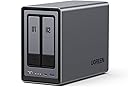
The UGREEN NAS DXP2800 is a high-performance 2-bay desktop NAS designed for content creators and enthusiasts. Featuring an Intel N100 quad-core CPU, 8GB DDR5 RAM, and 2.5GbE networking, it supports up to 80TB storage with dual M.2 NVMe slots for cache acceleration. Its user-friendly interface and AI-powered photo management make it ideal for secure, centralized data storage and effortless sharing across devices.


| ASIN | B0D22HBFK1 |
| Additional Features | Dust Resistant |
| Best Sellers Rank | #1 in Network Attached Storage (NAS) Enclosures |
| Brand | UGREEN |
| Built-In Media | Power Adapter, Quick Start Guide, Screwdriver Kit, USB Cable |
| Color | Grey |
| Compatible Devices | Desktop, Laptop, Smartphone, Tablet, Television |
| Connectivity Technology | SATA |
| Customer Reviews | 4.5 out of 5 stars 1,075 Reviews |
| Data Transfer Rate | 334 Megabits Per Second |
| Digital Storage Capacity | 80 TB |
| Enclosure Material | Metal |
| Form Factor | 3.5-inch |
| Global Trade Identification Number | 06941876239641 |
| Hard Disk Form Factor | 3.5 Inches |
| Hard Disk Interface | Serial ATA |
| Hard Disk Rotational Speed | 7200 RPM |
| Hard-Drive Size | 80 TB |
| Hardware Connectivity | Ethernet, SATA 6.0 Gb/s, USB |
| Hardware Platform | x86 |
| Installation Type | Internal Hard Drive |
| Item Weight | 2.58 Kilograms |
| Manufacturer | UGREEN GROUP LIMITED |
| Mfr Part Number | DXP2800 2-Bay |
| Model Name | DXP2800 2-Bay |
| Model Number | DXP2800,2-Bay (Diskless) |
| Number of Items | 1 |
| Read Speed | 312 Megabits Per Second |
| Special Feature | Dust Resistant |
| Specific Uses For Product | Business, Multimedia, Personal, Gaming |
| Unit Count | 1.0 Count |
| Warranty Description | 2 Year Manufacturer |
D**C
Simple, Fast, Performant, Great Software. Buy now, don't look back.
This is the easiest, best 4 bay NAS money can buy. You will be up and running in _no_ time. Snapping in four drives of whatever size you choose takes moments. I unwrapped four Toshiba N300 Pro 18TB drives and snapped them into the chassis in about 4 minutes. Connected the NAS to my 2.5GB ports on my lan and had everything up and running and updated with the latest software in under 30 mins. Time to get going is important, but what's more important is how does it run over time? I am 9 weeks into owning the thing and I can tell you this: The software is easy. The system is complete... it's robust... it has features I'll never use--and that's cool if you're looking for a gimungous media server or whatever... I needed it for digital camera RAW storage in a RAID5 scenario. I couldn't say more good things about the product. Managing permissions for users on your LAN is easy, managing storage and basic drive management, etc. is easy. Updating the software routinely as patches and security updates are released is easy. Once upon a time Apple owned "easy" and now iOS has 1138 settings in the general tab and nobody can make it do anything--but this NAS is _easy_. And good. High performance reads and writes near theoretical limits... I literally can not say enough good things about it. Buy it and don't look back. Great value, great performance.
B**7
Great NAS, UGREEN is awesome
I'm an IT nerd by trade. Normally, i build my own NAS units out of old machines. This time i decided to bite it and just buy a NAS because i'm lazy in my older age. This NAS is easy to set up and get running. has a ton of options for anyone, completely user friendly, easy to upgrade. Flexible thatit supports most x86/x64 based operating systems. you'd just need to upgrade the primary boot drive internally which is a 128gb SSD i believe. Yes you can run windows server on this thing but the default UOS has everything you'd need with less overhead. You can run TrueNAS or UnRaid if you want. tons of videos online showing you what to expect. Note that if you do change / swap the OS, you should either image the default boot drive or pull the drive and replace it then store the original drive in a safe place because ugreen has said you cannot download the stock base OS and restore it. The image i included or attached is the desktop. this is the web interface. the unit has a physical HDMI port and does supply video but i have not used it. Do yourself a favor though. upgrade the ram. the 4 bay unit has 1 ram slot. uses DDR5 i have DDR5 5900 in it, a single 32GB module. The Ram module runs at 1.1v i believe too. it will speed up the transfers and help the unit do what it needs to. Also drop in a pair of 512gb NVME drives and assign them as cache drives. this will boost the overall throughput too. i dropped in a pair of 2tb nvme drives just because i have a couple of them laying around. My unit i stuffed in 4 24TB sata NAS drives. you can use desktop drives but just know this thing will hammer on those drives so desktop drives might suffer in longevity and might prematurely fail. NAS / Enterprise grade drives will last longer and they are built to suffer. I have NAS grade drives in my unit. All are 7200 RPM. i get anywhere from 240MB/s to about 290MB/s transfer speeds this is before i added the cache drives. now i usually get around 730MB/s the unit manages the cache automatically. it will fill the cache drives then shove the data from cache to long term storage as it goes. I have mine configured for RAID 0, BFS file system. it asks you how you want it configured when you plug drives in and do the initial setup.
A**H
Ugreen NASync DXP2800: The Best Value for a Home Media Server
The DXP2800 is a powerhouse for families moving their data off expensive cloud subscriptions like I have done. For anyone running Plex for home media server and Immich to replace google photos, this 2-bay unit delivers incredible performance at a stellar price. Key Highlights: Plex & Immich Heaven: The Intel N100 CPU handles 4K transcoding and Immich’s AI-heavy tasks effortlessly. It’s perfect for creating your own private, fast, and secure media cloud. Massive & Fast Storage: Supports two large SATA drives (up to 30TB each) and includes two M.2 NVMe slots. Put your app metadata and database on the SSDs for instant responsiveness. Premium Build: The aluminum chassis feels solid and durable, far superior to competitors' plastic designs. Easy Setup: UGOS Pro software is user-friendly and makes setup a breeze, even if you’re new to NAS systems. Docker support expands functionality hugely. The Caveat (The Noise): The only real drawback for large media libraries (like my 16TB drives) is the chassis can amplify HDD vibrations during heavy writing. Quick Fix: Placing the unit on a silicone mat or adding some felt pads inside the bays silences this minor quirk immediately. Verdict: This NAS is an absolute winner. It has the hardware to crush any home media task and is easily the best self-hosting solution I've used. A must-buy if you want to take ownership of your digital life!
W**G
Awesome little NAS, easy to run your own firmware
Very happy with this 2-bay NAS, it supports booting off NVME and makes it easy to install the Linux distro of your choice. The N100 CPU easily hits line rate on the 2.5G NIC with a pair of 12TB HDDs.
P**B
Very high quality hardware, but instructions leave a LOT to be desired...
The UGreen 2800 NAS is an exceptionally well built, very high quality unit that comes well packaged with quality connectivity cables. However, even if you have been working with PCs the better part of your life do not be expecting a simple 'plug and play' setup. If you are not technologically adept or able to navigate your way through setting up devices to communicate with each other through your home or budiness network, I'd strongly suggest you don't attempt to set this up without the aid of someone who can. The connection of the unit itself is straight forward. Drives load easily and connecting instructions up to the formatting of the drives are fairly clear and easy to understand. But that is where 'easy to understand' takes a holiday for what I would guess is probably 65% of the people who buy this thinking it's going to be like plugging a USB cable in between your PC and a desktop storage drive. A NAS is a computer, not a simple data storage device. The instructions that come with it cover nothing about setting the unit up to properly communicate with your PC through your home network. You are going to have to find out how to do that through your own research. When you have finished familiarizing yourself with the formatting and setup process for the hard drives in your NAS (drives are a seperate purchase and you need to check for their compatibility with your NAS on UGreen's site) be prepared to take VERY careful notes the whole way through the setup process. All the passwords, network addresses, administrator info...write down everything about the setup in detail as you will be using that information to set things up later. I personally found the UGreen site somewhat difficult to navigate, but what you will need to do is go there initially for instructions and app downloads. Even then, you will want to have your AI equipped search engine handy to research the plethora of additional questions that will come up for everyone but a person who has worked with this technology at work or been exposed to it by an associate. UGreen needs to get a layman who is NOT an engineer to write a soup to nuts set up manual covering all aspects of both PC, Mac and mobile device setup and connection of everything to your network so all devices can find and communicate with the NAS and each other. That manual will also need to be written so a kid can understand it. UGreen (like all NAS manufacturers and most You Tube video producers) seems to be of the opinion that producing exhaustively detailed setup instructions on any mental level below that of an IT expert would somehow 'insult' the average user's intelligence. And as most of you will find out, nothing could be further from the truth. This review has already turned into War & Peace, so I will not attempt to leave such a set of instructions here (although I produced one for myself). Still, UGreen really needs to develop one and INCLUDE that manual with the purchase of the device or at the very least on a very obvious spot on their website. If such instructions exist, I was unable to locate them. The best advice I can give is for people new to NAS system technology is to download the UGreen NAS desktop app to your PC or MAC and their mobile app to your phone. Everything you will need to get the NAS to find your PC, Mac or phone through your network is in those apps. It is just a real pain to get all the details correct so it will function. The good news is, once you figure it out, it does practically run itself. The bad news is, unless you are very persistent and have a good AI model search engine to assist you, you may have a lot less hair left once you get to that point. Please note...the UGreen NAS product itself is five stars all the way...my four star rating is due solely to the lack of simplified instructions that anyone could follow.
P**R
Pro NAS Vibes
I'll be honest, was a little intimidated at first to dive into the NAS world, but so glad I did. TLDR: Spending the slight difference for the Pro vs the Plus seems to be worth it as well. Overall extremely happy with the responsiveness, ease of use, and upgradability. Would absolutely recommend using an old nvme for a read cache on your main volume, as it speeds up access as well. You want to read more? ... Ok: As we are in the RAM apocalypse right now, I have not purchased any sodimm-ram yet, hopefully by Christmas life will return to normal so I can check out if that helps, but 8gb is working well for Plex and Jellyfin 4k HDR, Dolby Vision and Dolby Atmos streams at native speeds. No issues whatsoever as of yet (had for about a week). Using a 24tb 3rd party renewed hdd, an 18tb 3rd party renewed and the aforementioned nvme to read cache the 24tb hdd. -First thing you should do after getting it set up, is google Marius Hosting, use their step-by-steps to get DockHand set up, and start enjoying your new NAS vibey life. -Noise level - so true story, at about 80% cpu usage (was using to generate trickplay of Jellyfin huge library), my wife walked in and asked if I had some sort of "ocean noise machine" because it sounded so soothing and white noisy. So for what it's worth, it is pretty quiet and at full send so far, seems calm cool and collected. -Durability - Made of a nice aluminum (saying in British accent) chassis (Jeremy Clarkson accent). Seems to be built like the Toyota's of old that were indestructible. Fans and access panels and hdd trays all look and feel really nice too. -Speed- 8bg of sodimm-ram off the shelf is working perfectly fine for now. Will upgrade when RAM apocalypse ends. But again this is literally streaming 4k atmos and vision, at direct levels sooo not sure I need it for now, but I will, who am I kidding. -Compatibility - I mean I literally bought 3rd party (like not Seagate or WD) renewed (and yes chill ran extensive SMART data tests on different platforms and test PC before I threw them in here, calm down), and they are working wonderfully, no issues. Ugreen detected them instantly, didnt mess around with anything for them to show up. Alas my coffee is gone. And this review is probably more than you wanted to know. So I dunno, not a Fan boy of much, but Ugreen is forsure my NAS Waifu. And on that note... adios.
N**Z
Excellent NAS for Personal Online Storage
Pros Small compact size allows for effective placement. Quiet on standby mode. Storage expandability, reliability and security. UI keeps updating with better features including AI interface. Durable casing with polished metal finish feels more premium. Fast upload and download speed. Cons A bit heavy than I had expected. Experience minor lag for videos (Probably due to the network) Conclusion I use Ugreen NAS for personal storage including photo and video gallery along with some records. I've experienced that photos applications that are unable to detect some people and animals, but I do like the location tagging feature carried over to the application. Also dealing with backup and organizing seems a bit of a hassle for me from which I eventually gave up organizing on how I wanted by rather let the application keep regular back up. Music application UI could be improved rather than feels more like a generic google music application. On the other hand, the UI keeps updating very frequently but for every update I do notice improvement and changes to the application and security but during the update you would be expected loose access for your NAS for a couple of minutes. Apart from it, I love the UI for application like Theater that organize the videos very effectively. As the update progresses, I believe Ugreen would be improving the applications and OS over time. The minor downside I had was to reroute network connection since Ugreen NAS requires ethernet connection, but it seems understandable for faster transfer rate. I highly recommend Ugreen NAS for people that deals with constant online storage subscription. Trust me as I had lost 5 years of photos and in multiple cases due to phone damage and switching.
W**L
Great entry level NAS with advanced features to explore
VERY solidly constructed with a thick, HEAVY aluminum unibody, no sharp edges or unfinished surfaces. The design is well thought out and easy to access the M.2 drives and RAM. I thought there were 2 RAM slots but realized you can upgrade to a single 16 GB stick. It would be nice if there were 2 slots so I didn't have to keep a spare 8 GB stick, plus a 16 GB stick adds another big chunk of money to the total cost. Everything was easy to setup and works flawlessly with 2x12TB HDDs and 2x2TB M.2s. With an HDMI port this functions as a low cost HTPC and NAS in one box that doesn't require me to get too deep in the weeds managing things. I was considering the UGREEN mini PC with 4x M.2 drives but this one allows for much cheaper, larger capacity drives with the option for M.2 speed.
M**L
The Best Investment for Apple Users! A Game-Changer for Cloud Storage
I’ve been following the UGREEN NASync series since its Kickstarter days, and as soon as it hit Amazon Canada, I didn't hesitate. After nearly a year of daily use, I can confidently say this is one of the best tech investments I’ve ever made. The "Apple Tax" Solution: The real value of this NAS became clear when I bought my new MacBook. As many know, upgrading internal storage on a Mac is incredibly expensive. By using the DXP2800 as my personal cloud, I was able to buy the base model laptop and store all my heavy files, photos, and media on the NAS. I can access everything from anywhere in the world, saving me hundreds of dollars in hardware upgrades. Performance & Reliability: Even with the stock 8GB DDR5 RAM (I haven't felt the need to upgrade yet), the Intel N100 CPU handles everything smoothly. I primarily use it for: Automatic Photo Backups: It syncs my phone photos instantly, allowing me to keep my phone storage free. Media Streaming: It serves as a flawless movie hub for my home. Fast Connectivity: The 2.5GbE port is a must-have. A great pro-tip: if you need even more speed, you can use one of the USB ports for an extra ethernet adapter! Software & Build: UGREEN has been very consistent with software updates. The app is intuitive and improves every month. The build quality is premium and feels like it was designed to last. It’s quiet, efficient, and fits perfectly on my desk. Pros: Significant long-term savings on phone/laptop storage. Easy M.2 NVMe and RAM upgrade paths. Solid 2.5GbE performance out of the box. Consistent software improvements. Cons: As a "light to moderate" user, I haven't found any real flaws. It does exactly what it promises. Final Verdict: If you want to own your data and stop paying for monthly cloud subscriptions or overpriced hardware storage upgrades, this is the way to go. Highly recommended for families and small teams!
A**A
Buen equipo
Excelente marca muy intuitiva para los que no sabemos mucho de servidores y lo que me gustó que es muy potente con la configuración de memorias que trae por defecto solo hay que buscar un buen disco duro que sea rápido
B**.
Wow, highly recommended, fast server, compact size, you can use any hdd
I've never had to deal with a server before. It wasn't too complicated for me to get this server up and running after installing two HDDs and learning how to use it in the meantime. This server seems to have very good specifications and great capabilities. I use it as a backup device for my documents, movies, photos, and for streaming movies after installing the Plex platform (I found it censored) and installing Emby, which is great for streaming movies. This server has an HDMI port. It works great with a Samsung TV. You can stream movies via Ethernet or HDMI. In both cases, I have no problems with 4K@144Hz movies. The 10Gbps and 2.5Gbps Ethernet ports are great for this. I highly recommend this server. It's high quality, and you can buy a high-quality UPS, including the UGreen, which is dedicated to this server, at a good price and they work great together. I also installed one of the HDDs, which isn't dedicated to the server, without any problems.
T**L
Fast NAS and Excellent UGREEN Customer Support
I have a WD MYCLOUDEX2ULTRA 2-Bay NAS. It is set up as 2 x 6TB RAID1. The WD NAS management software is hard to use. It is very slow and has many issues with Apple Time Machine. It does not have sufficient power to support HDDs larger than 8 TB. After reading many online reviews, I purchased the UGREEN DXP2800. I set up 2 x 14TB IronWolf Pro HDDs as RAID1 and 2 x 1TB Kingston M.2 SSD as R/W cache. I installed Tailscale to allow remote access. The backup time is night and day between the WD and UGREEN. It used to take 4+ hours to back up my MacBook Pro (1 TB SSD) using Time Machine. The UGREEN DXP2800 took less than an hour. The other day I had trouble with the UGREEN NAS client on my Windows laptop. I submitted a ticket through my UGREEN cloud account and received help almost immediately. After going back and forth a few times with the UGREEN support team, the problem was resolved. I am impressed by the device performance as well as the timely technical support. I strongly recommend the DXP2800 for home use.
A**S
素晴らしい完成度
本体セール価格と中古メモリ32GB(DDR4-3200 16GBx2枚) 換装でも約74000円に収まった(笑)。ロープライスに反してストレスフリーを配慮した製品造りがとても素晴らしく、初回接続にも関わらず有線LAN端末から専用クライアントアプリによるシステムアップデートと初期設定があっと言う間に簡単に完了してしまう。それ以降は無線接続からも難なくNASにアクセスすることができた(MacbookPro、iPad、iPhone)。独自UGOSはビギナーに配慮したガイダンスが施され、UIもシンプルで扱いやすく動作も軽快。設定作業に手詰まりがなく進めることができた。速度も速くて非常に良い製品です。
Trustpilot
1 day ago
4 days ago