Desertcart purchases this item on your behalf and handles shipping, customs, and support to Japan.
📦 Own Your Cloud, Beat the Subscription Blues!
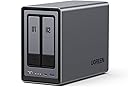
The UGREEN NAS DXP2800 2-Bay is a powerhouse storage solution tailored for content creators and enthusiasts. Featuring an Intel N100 Quad-Core CPU, 8GB DDR5 RAM, and 2.5GbE networking, it supports up to 80TB of storage with dual M.2 NVMe slots for caching. Its AI-driven photo album and intuitive multi-device app make managing and sharing your data effortless, while local storage ensures maximum security and control without recurring fees.


| ASIN | B0D22HBFK1 |
| Additional Features | Dust Resistant |
| Best Sellers Rank | #1 in Network Attached Storage (NAS) Enclosures |
| Brand | UGREEN |
| Built-In Media | Power Adapter, Quick Start Guide, Screwdriver Kit, USB Cable |
| Color | Grey |
| Compatible Devices | Desktop, Laptop, Smartphone, Tablet, Television |
| Connectivity Technology | SATA |
| Customer Reviews | 4.5 4.5 out of 5 stars (1,117) |
| Data Transfer Rate | 334 megabits_per_second |
| Digital Storage Capacity | 80 TB |
| Enclosure Material | Metal |
| Form Factor | 3.5-inch |
| Global Trade Identification Number | 06941876239641 |
| Hard Disk Form Factor | 3.5 inches |
| Hard Disk Interface | Serial ATA |
| Hard Disk Rotational Speed | 7200 rpm |
| Hard-Drive Size | 80 TB |
| Hardware Connectivity | Ethernet, SATA 6.0 Gb/s, USB |
| Hardware Platform | x86 |
| Installation Type | Internal Hard Drive |
| Item Weight | 2.58 kg |
| Manufacturer | UGREEN GROUP LIMITED |
| Mfr Part Number | DXP2800 2-Bay |
| Model Name | DXP2800 2-Bay |
| Model Number | DXP2800,2-Bay (Diskless) |
| Number of Items | 1 |
| Read Speed | 312 megabits_per_second |
| Specific Uses For Product | Business, Multimedia, Personal, Gaming |
| Unit Count | 1 Count |
| Warranty Description | 2 Year Manufacturer |
K**G
Perfect for my uses
This NAS is a game changer for anyone who wants to build their own cloud storage or media server. First, I want to point out that I'm not an expert when it comes to NAS devices or Docker. I used AI a lot to help set up my Docker containers, but it wasn't always correct, so I still had to do quite a bit of troubleshooting. That's not a problem with the NAS, it's just something to keep in mind if you're new to Docker or self hosting. This NAS can hold two HDDs and two SSDs. I have mine set up with the SSDs running the operating system and apps, while the HDDs store my media and larger files. So far, this setup has worked great. The operating system is very user friendly and easy to navigate. UGREEN includes quite a few built in apps, including Photos and Theater, along with several others. The Photos app is very similar to Google Photos and does a great job organizing pictures. It also has AI features that can recognize faces and locations. The Theater app works fine, but if you're planning to build a media server, I think you're better off installing Jellyfin through Docker. It offers more features and worked better for me. The build quality is excellent. The unit feels solid, cooling has not been an issue, and performance has been great. I upgraded from a WD My Cloud EX2, and the difference is huge. Everything is much faster, there are more features, and it's much more flexible. For the most part, the NAS is quiet. I don't spend much time in the room where it's located, so I can't really say how loud it gets under a heavy workload, but during normal use I barely notice it. I honestly haven't found any major downsides yet. I've only owned one other NAS, the WD My Cloud EX2, so I can't compare it to a lot of other brands. If you're coming from a WD My Cloud though, this is a huge upgrade and well worth the money. I would definitely recommend it to anyone looking for their first NAS or anyone wanting to upgrade from an older model.
B**7
Great NAS, UGREEN is awesome
I'm an IT nerd by trade. Normally, i build my own NAS units out of old machines. This time i decided to bite it and just buy a NAS because i'm lazy in my older age. This NAS is easy to set up and get running. has a ton of options for anyone, completely user friendly, easy to upgrade. Flexible thatit supports most x86/x64 based operating systems. you'd just need to upgrade the primary boot drive internally which is a 128gb SSD i believe. Yes you can run windows server on this thing but the default UOS has everything you'd need with less overhead. You can run TrueNAS or UnRaid if you want. tons of videos online showing you what to expect. Note that if you do change / swap the OS, you should either image the default boot drive or pull the drive and replace it then store the original drive in a safe place because ugreen has said you cannot download the stock base OS and restore it. The image i included or attached is the desktop. this is the web interface. the unit has a physical HDMI port and does supply video but i have not used it. Do yourself a favor though. upgrade the ram. the 4 bay unit has 1 ram slot. uses DDR5 i have DDR5 5900 in it, a single 32GB module. The Ram module runs at 1.1v i believe too. it will speed up the transfers and help the unit do what it needs to. Also drop in a pair of 512gb NVME drives and assign them as cache drives. this will boost the overall throughput too. i dropped in a pair of 2tb nvme drives just because i have a couple of them laying around. My unit i stuffed in 4 24TB sata NAS drives. you can use desktop drives but just know this thing will hammer on those drives so desktop drives might suffer in longevity and might prematurely fail. NAS / Enterprise grade drives will last longer and they are built to suffer. I have NAS grade drives in my unit. All are 7200 RPM. i get anywhere from 240MB/s to about 290MB/s transfer speeds this is before i added the cache drives. now i usually get around 730MB/s the unit manages the cache automatically. it will fill the cache drives then shove the data from cache to long term storage as it goes. I have mine configured for RAID 0, BFS file system. it asks you how you want it configured when you plug drives in and do the initial setup.
D**C
Simple, Fast, Performant, Great Software. Buy now, don't look back.
This is the easiest, best 4 bay NAS money can buy. You will be up and running in _no_ time. Snapping in four drives of whatever size you choose takes moments. I unwrapped four Toshiba N300 Pro 18TB drives and snapped them into the chassis in about 4 minutes. Connected the NAS to my 2.5GB ports on my lan and had everything up and running and updated with the latest software in under 30 mins. Time to get going is important, but what's more important is how does it run over time? I am 9 weeks into owning the thing and I can tell you this: The software is easy. The system is complete... it's robust... it has features I'll never use--and that's cool if you're looking for a gimungous media server or whatever... I needed it for digital camera RAW storage in a RAID5 scenario. I couldn't say more good things about the product. Managing permissions for users on your LAN is easy, managing storage and basic drive management, etc. is easy. Updating the software routinely as patches and security updates are released is easy. Once upon a time Apple owned "easy" and now iOS has 1138 settings in the general tab and nobody can make it do anything--but this NAS is _easy_. And good. High performance reads and writes near theoretical limits... I literally can not say enough good things about it. Buy it and don't look back. Great value, great performance.
W**G
Awesome little NAS, easy to run your own firmware
Very happy with this 2-bay NAS, it supports booting off NVME and makes it easy to install the Linux distro of your choice. The N100 CPU easily hits line rate on the 2.5G NIC with a pair of 12TB HDDs.
P**B
Very high quality hardware, but instructions leave a LOT to be desired...
The UGreen 2800 NAS is an exceptionally well built, very high quality unit that comes well packaged with quality connectivity cables. However, even if you have been working with PCs the better part of your life do not be expecting a simple 'plug and play' setup. If you are not technologically adept or able to navigate your way through setting up devices to communicate with each other through your home or budiness network, I'd strongly suggest you don't attempt to set this up without the aid of someone who can. The connection of the unit itself is straight forward. Drives load easily and connecting instructions up to the formatting of the drives are fairly clear and easy to understand. But that is where 'easy to understand' takes a holiday for what I would guess is probably 65% of the people who buy this thinking it's going to be like plugging a USB cable in between your PC and a desktop storage drive. A NAS is a computer, not a simple data storage device. The instructions that come with it cover nothing about setting the unit up to properly communicate with your PC through your home network. You are going to have to find out how to do that through your own research. When you have finished familiarizing yourself with the formatting and setup process for the hard drives in your NAS (drives are a seperate purchase and you need to check for their compatibility with your NAS on UGreen's site) be prepared to take VERY careful notes the whole way through the setup process. All the passwords, network addresses, administrator info...write down everything about the setup in detail as you will be using that information to set things up later. I personally found the UGreen site somewhat difficult to navigate, but what you will need to do is go there initially for instructions and app downloads. Even then, you will want to have your AI equipped search engine handy to research the plethora of additional questions that will come up for everyone but a person who has worked with this technology at work or been exposed to it by an associate. UGreen needs to get a layman who is NOT an engineer to write a soup to nuts set up manual covering all aspects of both PC, Mac and mobile device setup and connection of everything to your network so all devices can find and communicate with the NAS and each other. That manual will also need to be written so a kid can understand it. UGreen (like all NAS manufacturers and most You Tube video producers) seems to be of the opinion that producing exhaustively detailed setup instructions on any mental level below that of an IT expert would somehow 'insult' the average user's intelligence. And as most of you will find out, nothing could be further from the truth. This review has already turned into War & Peace, so I will not attempt to leave such a set of instructions here (although I produced one for myself). Still, UGreen really needs to develop one and INCLUDE that manual with the purchase of the device or at the very least on a very obvious spot on their website. If such instructions exist, I was unable to locate them. The best advice I can give is for people new to NAS system technology is to download the UGreen NAS desktop app to your PC or MAC and their mobile app to your phone. Everything you will need to get the NAS to find your PC, Mac or phone through your network is in those apps. It is just a real pain to get all the details correct so it will function. The good news is, once you figure it out, it does practically run itself. The bad news is, unless you are very persistent and have a good AI model search engine to assist you, you may have a lot less hair left once you get to that point. Please note...the UGreen NAS product itself is five stars all the way...my four star rating is due solely to the lack of simplified instructions that anyone could follow.
A**H
Ugreen NASync DXP2800: The Best Value for a Home Media Server
The DXP2800 is a powerhouse for families moving their data off expensive cloud subscriptions like I have done. For anyone running Plex for home media server and Immich to replace google photos, this 2-bay unit delivers incredible performance at a stellar price. Key Highlights: Plex & Immich Heaven: The Intel N100 CPU handles 4K transcoding and Immich’s AI-heavy tasks effortlessly. It’s perfect for creating your own private, fast, and secure media cloud. Massive & Fast Storage: Supports two large SATA drives (up to 30TB each) and includes two M.2 NVMe slots. Put your app metadata and database on the SSDs for instant responsiveness. Premium Build: The aluminum chassis feels solid and durable, far superior to competitors' plastic designs. Easy Setup: UGOS Pro software is user-friendly and makes setup a breeze, even if you’re new to NAS systems. Docker support expands functionality hugely. The Caveat (The Noise): The only real drawback for large media libraries (like my 16TB drives) is the chassis can amplify HDD vibrations during heavy writing. Quick Fix: Placing the unit on a silicone mat or adding some felt pads inside the bays silences this minor quirk immediately. Verdict: This NAS is an absolute winner. It has the hardware to crush any home media task and is easily the best self-hosting solution I've used. A must-buy if you want to take ownership of your digital life!
N**Z
Excellent NAS for Personal Online Storage
Pros Small compact size allows for effective placement. Quiet on standby mode. Storage expandability, reliability and security. UI keeps updating with better features including AI interface. Durable casing with polished metal finish feels more premium. Fast upload and download speed. Cons A bit heavy than I had expected. Experience minor lag for videos (Probably due to the network) Conclusion I use Ugreen NAS for personal storage including photo and video gallery along with some records. I've experienced that photos applications that are unable to detect some people and animals, but I do like the location tagging feature carried over to the application. Also dealing with backup and organizing seems a bit of a hassle for me from which I eventually gave up organizing on how I wanted by rather let the application keep regular back up. Music application UI could be improved rather than feels more like a generic google music application. On the other hand, the UI keeps updating very frequently but for every update I do notice improvement and changes to the application and security but during the update you would be expected loose access for your NAS for a couple of minutes. Apart from it, I love the UI for application like Theater that organize the videos very effectively. As the update progresses, I believe Ugreen would be improving the applications and OS over time. The minor downside I had was to reroute network connection since Ugreen NAS requires ethernet connection, but it seems understandable for faster transfer rate. I highly recommend Ugreen NAS for people that deals with constant online storage subscription. Trust me as I had lost 5 years of photos and in multiple cases due to phone damage and switching.
J**R
Complete hardware failure, Ugreen refused warranty service after 10 months and 19 days
I bought this NAS last year because it was a touch cheaper than some of the alternatives and offered decent specs. Set it up with two Seagate Iron Wolf 16TB drives and happily used it through the rest of the year. I stored family photos, media libraries, important documents, everything. Came to really rely on it. The built-in Ugreen OS is functional and friendly and uses Debian on the backend so I could log in and do my regular Linux work as well. 10 months and 19 days after purchase it died. No lights, no fan, nothing. Tested the AC adapter with a multi meter and it was outputting just fine. I emailed Ugreen and after a day of assuring me they'd get me fixed up they bounced me two their hardware team and then their after-sales team...who told me I had to go through Amazon for my warranty replacement. Amazon basically laughed in my face and told me they won't exchange something from over ten months ago. I spoke to three Amazon agents and escalated twice with them, they wouldn't budge. I returned to Ugreen to let them know Amazon wouldn't provide warranty service, which was a weird thing for them to ask in the first place. So far, no response at all from their "after-sales" team. I'm completely blown away that a company would sell a piece of hardware for $280 (plus tax) marketed as a secure place to store my important data and then provide zero warranty on the device outside of "yeah, go tell Amazon." This is utterly unacceptable, and to top it off their Ugreen OS uses some weird superblock flags so getting my data off my drives was a real pain. I'm posting the entire email that their "after-sales" team sent to me below so no one else has to go through this. Buy from ANYONE else. Don't be fooled by the enticing up-front promise of this device. When it dies you'll be up a creek and Ugreen won't bother to lift a finger. Hello John, Thank you for your feedback. Since we are an FBA seller, per Amazon platform policies, we can only offer technical support for products. All other after-sales issues need to be handled by Amazon Customer Service. To resolve your issue efficiently, please follow the steps below to contact Amazon directly: Via website: 1. Log in to the official Amazon website. 2. Click Customer Service below the search bar. 3. Select Contact Us and follow the prompts to choose relevant options. Via Amazon APP: 1. Open the Amazon APP. 2. Tap the three-line icon at the bottom right and select Customer Service. 3. Choose Others & English, then select I still need help. Please request human customer service, inform them you have already confirmed technical issues with us, then submit your service request. They will offer you proper solutions. In accordance with Amazon regulations, if the above methods fail to solve your problem or your request gets rejected, please reply to this email, and we will arrange a proper solution for you. Sincerely, Virginia UGREEN NAS UPDATE — June 27, 2026: After I posted this review and pushed back in writing — pointing out that UGREEN's own technical support had already confirmed the mainboard failure, and that a manufacturer's warranty isn't Amazon's responsibility — UGREEN's hardware team did finally confirm, in writing, that they would provide warranty service. Progress. But then their after-sales rep circled back and again told me to go through Amazon and asked for screenshots of my Amazon chats, directly contradicting their own hardware team's confirmation. I provided everything they asked for. They sent a prepaid label, I shipped the unit back at the start of June, and they confirmed receipt mid-June. Here's where it gets strange. A confirmed no-power failure — no lights, no fan, no response of any kind, with a known-good 12V adapter — was, according to them, "resolved" by re-flashing the firmware. They told me the casing was missing a screw and a silicone piece, that the firmware had been re-flashed, that the unit "passed testing," and that they would ship my original unit back rather than a replacement. A firmware flash does not revive a board that draws zero power, so I have little confidence the actual failure was addressed. I confirmed my shipping address on June 19 and was told a tracking number would follow once the unit shipped. As of today, June 27, there is no tracking number and no shipping confirmation. It has now been roughly a month since I first reported the failure, spread across two separate support tickets. I'll update this review again once the unit actually arrives and I can test it. Where things stand now: the hardware failed well within any reasonable lifespan, the warranty process was a maze of contradictions and dead ends, and the "repair" they describe doesn't match the failure their own techs documented.
M**L
The Best Investment for Apple Users! A Game-Changer for Cloud Storage
I’ve been following the UGREEN NASync series since its Kickstarter days, and as soon as it hit Amazon Canada, I didn't hesitate. After nearly a year of daily use, I can confidently say this is one of the best tech investments I’ve ever made. The "Apple Tax" Solution: The real value of this NAS became clear when I bought my new MacBook. As many know, upgrading internal storage on a Mac is incredibly expensive. By using the DXP2800 as my personal cloud, I was able to buy the base model laptop and store all my heavy files, photos, and media on the NAS. I can access everything from anywhere in the world, saving me hundreds of dollars in hardware upgrades. Performance & Reliability: Even with the stock 8GB DDR5 RAM (I haven't felt the need to upgrade yet), the Intel N100 CPU handles everything smoothly. I primarily use it for: Automatic Photo Backups: It syncs my phone photos instantly, allowing me to keep my phone storage free. Media Streaming: It serves as a flawless movie hub for my home. Fast Connectivity: The 2.5GbE port is a must-have. A great pro-tip: if you need even more speed, you can use one of the USB ports for an extra ethernet adapter! Software & Build: UGREEN has been very consistent with software updates. The app is intuitive and improves every month. The build quality is premium and feels like it was designed to last. It’s quiet, efficient, and fits perfectly on my desk. Pros: Significant long-term savings on phone/laptop storage. Easy M.2 NVMe and RAM upgrade paths. Solid 2.5GbE performance out of the box. Consistent software improvements. Cons: As a "light to moderate" user, I haven't found any real flaws. It does exactly what it promises. Final Verdict: If you want to own your data and stop paying for monthly cloud subscriptions or overpriced hardware storage upgrades, this is the way to go. Highly recommended for families and small teams!
保**茂
スマホとの連携、グッド
スマホの写真のバックアップに最適てす。
A**A
Buen equipo
Excelente marca muy intuitiva para los que no sabemos mucho de servidores y lo que me gustó que es muy potente con la configuración de memorias que trae por defecto solo hay que buscar un buen disco duro que sea rápido
B**.
Wow, highly recommended, fast server, compact size, you can use any hdd
I've never had to deal with a server before. It wasn't too complicated for me to get this server up and running after installing two HDDs and learning how to use it in the meantime. This server seems to have very good specifications and great capabilities. I use it as a backup device for my documents, movies, photos, and for streaming movies after installing the Plex platform (I found it censored) and installing Emby, which is great for streaming movies. This server has an HDMI port. It works great with a Samsung TV. You can stream movies via Ethernet or HDMI. In both cases, I have no problems with 4K@144Hz movies. The 10Gbps and 2.5Gbps Ethernet ports are great for this. I highly recommend this server. It's high quality, and you can buy a high-quality UPS, including the UGreen, which is dedicated to this server, at a good price and they work great together. I also installed one of the HDDs, which isn't dedicated to the server, without any problems.
A**S
敷居の低い10G対応NAS
10G LAN搭載のハイエンドスペックでありながら、メモリを32GB(DDR4-3200 16GBx2枚) に換装しても、DDR4の実売価格が安いおかげでコストを抑えられて経済的です。 クライアントから有線LANを経由して、専用クライアントアプリでシステムアップデートと初期設定まで、ものの数分で完了。それ以降は他の無線接続からも難なくNASにアクセスすることができました。UGOSのUIはとてもシンプルで、直感的な操作のし易さもあり、ストレージ設定まで手詰まりなくスムーズに進められます。 1枚目の写真はwifi6E無線接続によるベンチ結果で、NAS本体を無線ルーターの10GLANポートに接続してMBPから速度計測した。(HDDx2台をExt4でRaid0、SSDキャッシュ無効、SMB接続)この辺りがwifi6Eの速度限界でしょうか。 2枚目の写真は有線10G接続によるRAID0、SSDキャッシュ無効で1000MB/s近く出ています。10Ggps対応スイッチングハブを持たないルーター直挿派は、10GLANx2系統付きの4800GTの方が結果的に幸せになれるかも。 M.2 SSDキャッシュ効果に関して、1枚差しはリードのみ、同種同容量のM.2 SSD 2枚差しではリード/ライトの両方に効果あり。論理速度の上限が1250Mbpsなので、特にランダムアクセスに恩恵がありそう。 最後にバックアップに関して。私の用途では外付HDD1台に差分バックアップ(タイマー)の組み合わせで運用上特に問題ありませんでした。
Trustpilot
2 weeks ago
3 days ago