![Canon Megatank GX1020 All-in-One Wireless Supertank [Megatank] Printer | Print, Copy and Scan| Mobile Printing |2.7" LCD Color Touchscreen | Auto Duplex Printing](https://m.media-amazon.com/images/I/61HpTe2PrGL._AC_SL3840_.jpg)


Desertcart purchases this item on your behalf and handles shipping, customs, and support to Japan.
🖨️ Print Like a Pro, Save Like a Boss
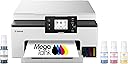
The Canon MegaTank GX1020 is a compact, all-in-one wireless inkjet printer engineered for high-volume, high-quality printing. It offers a massive 3,000-page ink yield per refill, fast print speeds up to 15 ppm, and a user-friendly 2.7-inch color touchscreen. Designed for hybrid professionals, it supports mobile and wireless printing, automatic duplexing, and versatile media handling—all backed by Canon’s 3-year warranty and affordable maintenance.


| ASIN | B0CHLD2P7B |
| Additional Printer Functions | Copy, Scan |
| B&W Pages per Minute | 15 |
| Best Sellers Rank | #151,131 in Computers ( See Top 100 in Computers ) #264 in Ink Tank Printers |
| Brand | Canon |
| Built-In Media | Documentation, MAXIFY GX1020, MAXIFY GX1020 Wireless MegaTank Small Office All-in-One Printer, Power Cord, Set Up Ink Bottles (GI-25: BK, C, M, Y) |
| Color | White |
| Color Depth | 24 bits_per_pixel |
| Color Pages per Minute | 10 |
| Colour | White |
| Compatible Cartridge | GI-25 Pigment-Based Ink Bottles (Cyan, Magenta, Yellow, Black) |
| Compatible Devices | Wireless-enabled Laptops, Computers, Tablets, Smartphones, Chromebooks |
| Connectivity technology | USB |
| Control Method | Touch |
| Controller Type | Android, iOS |
| Customer Reviews | 4.1 out of 5 stars 297 Reviews |
| Display Type | LCD |
| Dual-sided printing | Yes |
| Duplex | Automatic |
| Global Trade Identification Number | 00013803359466 |
| Hardware Interface | USB |
| Ink Color | Black, Cyan, Magenta, Yellow |
| Item Dimensions D x W x H | 37.6D x 38.1W x 18.8H centimeters |
| Item Weight | 6.99 kg |
| Manufacturer | Canon |
| Maximum Copies Per Run | 100 |
| Maximum Copy Resolution Black and White | 600 dpi |
| Maximum Copy Resolution Color | 600 dpi |
| Maximum Copy Speed Black and White | 15 ppm |
| Maximum Media Size | A4/Letter |
| Maximum Print Resolution Black and White | 600 dpi |
| Maximum Sheet Capacity | 250 |
| Maximum print Resolution Color | 600 dpi |
| Model Name | MAXIFY GX1020 |
| Model Number | 6169C002 |
| Model Series | MAXIFY |
| Model name | MAXIFY GX1020 |
| Number of Drivers | 1 |
| Number of Ethernet Ports | 1 |
| Number of Trays | 1 |
| Other Special Features of the Product | Energy Star, Touch Screen |
| Output sheet capacity | 250 |
| Paper Size | 8.5 inches |
| Power Consumption | 21 Watts |
| Print media | Envelopes, Glossy photo paper, High-resolution paper, Paper (plain) |
| Printer Connectivity Type | USB |
| Printer Output Type | Color |
| Printer Type | Inkjet |
| Printing technology | Inkjet |
| Processor Count | 1 |
| Resolution | high |
| Scanner Type | Flatbed |
| Special features | Energy Star, Touch Screen |
| Specific Uses For Product | Multi-Purpose |
| Total Usb Ports | 1 |
| UPC | 013803359466 |
| Unit Count | 1.0 Count |
| Warranty Type | limited warranty |
| Wattage | 21 watts |
A**X
This printer is way better than my old HP
This printer is a minimalist and clean design with no protruding, hard to read buttons. It has a color touch screen LCD that is responsive and intuitive. The matte white textured finish looks and feels premium compared to cheap shiny plastic. It is faster and easier setup than the HP 7300 series printer that was plagued with setup, print and copy issues that I ultimately returned and got this one instead. I’m actually happier with this printer because it not only looks better but print quality is far superior. Tank printers supposedly have less quality prints than cartridge printers but that is a myth or misinformation out there since this printer excels for documents, graphics and photos. The setup is easy but during the ink fill ptocess it says ‘insufficient ink’ using the on screen setup. I was confused since it would not exit out of this setup menu loop so after the yellow was installed, I ignored the message and added the remaining inks. Afterwards, everything was ok and you are prompted to add paper and it goes thru a 12 min calibration process. It tells you this with a countdown to completion in minutes then its ready to print. The wifi network setup is via a QR code that pops up on the display. The setup is generally fast and intuitive and by reading this the insufficient ink prompt won’t throw you off like it did for me. The full color LCD tilts and makes a huge difference vs monochrome displays. Its easy to use with large buttons not tiny lines of text to push or scroll w buttons on other printers. It even has a preview mode so you can view your image in full color and its page positioning before printing. Unlike some other printers I used before, the single display with no other redundant buttons is so much more user friendly. The LCD is just a big deal compared to pushing buttons. Canon makes some great camera gear and gets lost in printers compared to other established brands but the end user and ease of use is engineered well into this product Some printer reviews lead you into thinking tankless printers do not have as good quality as cartridge based, but that is a complete myth as this printer produces sharp and vivid prints, documents and color graphics. Lastly the lifetime cost of ownership is a huge consideration. The Canon OEM ink is affordably priced so you don’t need to search for generics since the price gap is small AND you can purchase replacement printer heads that are NOT outrageously priced. I’ve had to pitch so many good printers that needed replacement print heads that dried up or died before life expectancy but the replacement cost was so high it was cheaper to buy a new printer. That is so frustrating considering our eWaste crisis. Every household should not need to replace a printer every 5 years! So kudos to Canon for making printers that can be kept a lifetime and maintained at an affordable cost. For all the above reasons I highly recommend this Canon or other Canons if you are brand shopping!
H**T
Great little printer came just in time
Had to do a bunch of copies for job and family services for disablity. This is why I wanted one cause SSI and such always want new records and new info. The day I got it had to have a bunch of paperwork turned in on the 30th..copied them all no problem..could not tell which one was original or the copy. Printed a picture of my deceased father he sent me from South Carolina back in 2014 just to see how it would come out. On regular paper not even photo paper yet...the image was beautiful. Now when I set this up I had to do manual wifi in order for it to search for my router..easy setup wouldnt find it, but it was no big deal doing it manual. So I suggest you try that first and just sign into your router to save time. Now last thought. I had a brother printer/copy/scan/fax all in one that I didnt use for a year or two so the print heads wouldnt clean and I was not about to get into all that. Replaced the cartridges bought like a 15 pack hoping after a few cleanings it would be ok. Then got the insert new cartridge into slot...does not recognize cartridge..after about 15 tries it did...then it didnt recognize the black so after reseating it about 15 times it did. Then it went to does not recognize the cyan.....again replaced it until it did..then it went back to black..didnt recognize it. I pitched the printer. Now my rant here is just to explain that whole cartridge business is a nightmare with replacements that actually work. I got this stuck the bottles in each port (setup is easier watching a video on youtube) filled the little tanks after installing the print heads....soooooooooooo easy. NO MESS. They slide right in and release and when done just remove the bottle. I will never go back to cartridges. The display works just fine I know someone said it could be updated and maybe thats true but it does what I need it to do. All in all it prints better than any printer I have ever had..and hell I been on a puter in 85 with dot matrix lol. This thing is a relief so simple to use and so easy to fill I will never go back to a cartridge printer. And Canon known for print quality and picture quality lives up to its name. Definitely would recommend this printer to anyone.
D**T
WOW!!!
I’m 70, and remember trying to get a new printer hooked up to my home WiFi was a hair pulling nightmare. Those days are gone! I am delighted to report the new Canon Maxify GX1020 was a breeze for me to set-up. After downloading the Canon Print app to my IPhone the printer recognizes your existing WiFi settings from the settings on your phone. You merely follow the instructions on the printer’s touchscreen and it easily walks you through each step. You will be instructed to install the black and color print heads but they both are clearly marked and easily drop into place with no fuss. Absolutely no problems encountered. To get my laptop hooked up was just as simple. They provide a link to Canon that has the program needed to be downloaded onto my laptop for a seamless WiFi connection. The ink bottles were even easier to install and since they are GI-25 (as opposed to the more expensive GI-26) ink bottles, they are cheaper to purchase. The 3 bottle color set was only $29 direct from Canon! They claim a new ink bottle set can print 3000 copies. The first picture I printed from the photos on my IPhone is provided. It’s on a plain sheet of A4 paper btw and looks fantastic. I think Canon got this one right. If you do a little research you’ll discover it has many easily replaceable internal components should the need arise. I read through many reviews before making my decision to purchase this printer and I’m totally convinced I made the best choice. I highly recommend this printer for home use. Update: I print our weekly church prayer list so I needed a reliable printer. I work from my laptop upstairs and the printer is in the basement next to the router and an old Dell tower computer (which also is hooked into this printer via WiFi connection). Well … I’m happy to say, so far, this Canon Maxify has accomplished everything I’ve asked of it. The copies print flawlessly on command from my laptop upstairs and they look crisp and clean. Should I encounter any issues in the future I’ll leave you another update. So far so good.👍 Update 01-16-24 Well I’ve been putting this printer thru its paces for over a month and everything still working perfectly. BTW, LU2000 makes a printer dust cover that works great on this printer. It’s measurements are 18.9” W x 15” D x 9” H and sells for $9.99 as of January 2024. Update March 18 2024: Well I’ve been using this printer for 3 months now and it’s still working great! Absolutely no issues. Don’t hesitate purchasing for a good home printer that’s easy to use and more importantly reliable. Still using original ink supply btw. Update: Well, it’s July now and I’m pleased to report after over six months of constant use this printer has had zero hiccups. All is well!👍 Update: 08/2025 This printer is used frequently and it’s operated perfectly since day one. Ink is inexpensive and lasts quite awhile. Don’t hesitate, just buy one! Update: 06/2026 I’m still printing the Church prayer list weekly, and using this little gem for personal projects often. Has been running flawlessly (2 1/2 years), uses very little, and super easy to replace. Highly recommend this printer !!!
C**M
Time consuming set-up! Minimal instructions for set up and functions.
Prints good,set up to scan and email from the printer is horrible. Keeps getting error 3418,Canon said you need your own email domain, wont work on Comcast. Does not make sense. Bought an Epson and set up was a breeze and working perfectly!
L**T
Quality, easy to use All-In-One, but some oddities
The GX1020 was very easy to set up out of the box, just plug in, power it up and follow the prompts on the display. There are a couple of things I had to assume, like the prompt to install "a printer head" when there are two printer heads , and no mention of loading the tray with paper before an alignment test, but overall pretty straightforward. Adding the ink from the bottles provided was simple and clean but I can't find a way to recycle or refill the empty bottles. You will have to connect to your network (USB or wi-fi) to download the operation app from the website you are given but it is all automatic and smooth. I tested the scanning ability first and discovered that each scan requires about 40 seconds after pressing the scan button (seems like an awful long time) and there is no apparent way to access settings to set a scan destination, etc., however once you have saved a scan to a particular location it seems to remember that for subsequent scans. If you have scanned a document and not yet saved it, do not click on any menu items to take you away from the scan window or you will lose the scan and have to repeat it. Odd. Moving on to print a photo, I chose one with lots of color from my library (attached) and inserted a sheet of high gloss paper. The results were impressive with sharp lines, vivid colors and no apparent banding. I'll continue to put the unit through various tests but so far I am happy with it and glad to get away from the cycle of standard ink cartridges drying up from non-use while still full and costing me $120 a year for the privilege.
Trustpilot
1 month ago
1 month ago