Some deliveries may take a little longer than usual due to regional shipping conditions.

DOWNLOAD THE APP


Customer Services
Copyright © 2025 Desertcart Holdings Limited
DOWNLOAD THE APP

🚀 Elevate your home network to warp speed and total control!
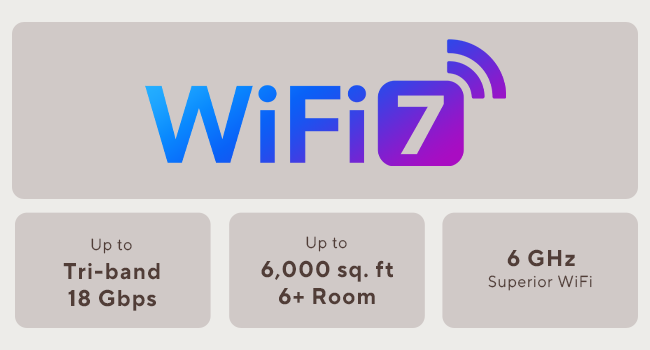
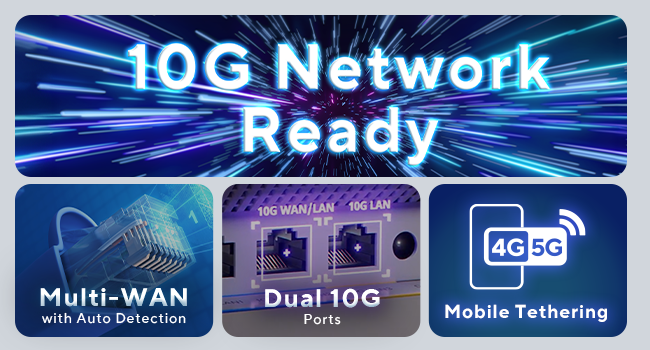
The ASUS ZenWiFi BT10 is a cutting-edge WiFi 7 tri-band mesh system delivering up to 18 Gbps speeds and coverage for 6,000 sq.ft with two sleek nodes. Featuring AI-powered AiMesh for seamless connectivity, dual 10G Ethernet ports, and smart home network segmentation with parental controls and VPN, it’s designed for professionals demanding ultra-fast, secure, and scalable home networking.








| ASIN | B0D696CFBV |
| Antenna Location | Business, Gaming, Home |
| Antenna Type | Internal |
| Best Sellers Rank | #6,778 in Electronics ( See Top 100 in Electronics ) #45 in Whole Home & Mesh Wi-Fi Systems |
| Brand | ASUS |
| Built-In Media | Power adapter, Quick start guide, RJ45 cable, Warranty card, ZenWiFi BT10 router x 2 |
| Color | White |
| Compatible Devices | Personal Computer, Smart Television, Smartphone, Tablet |
| Connectivity Protocol | WiFi, Ethernet |
| Connectivity Range | 6000 Square Feet |
| Connectivity Technology | 5G, Ethernet, Wi-Fi |
| Control Method | App |
| Coverage | 6000 sq.ft |
| Customer Reviews | 3.9 out of 5 stars 669 Reviews |
| Data Transfer Rate | 18 Gigabits Per Second |
| Frequency | 6 GHz |
| Frequency Band Class | Tri-Band |
| Is Modem Compatible | No |
| Item Dimensions L x W x H | 7.3"L x 2.8"W x 6.26"H |
| Item Weight | 1.8 Pounds |
| LAN Port Bandwidth | 10000 Mbps |
| Manufacturer | ASUS |
| Maximum Upstream Data Transfer Rate | 10000 Megabits Per Second |
| Mfr Part Number | BT10 (W-2-PK) |
| Model Name | BT10 (W-2-PK) |
| Model Number | BT10 (W-2-PK) |
| Number of Antennas | 8 |
| Number of Ports | 1 |
| Operating System | ASUSWRT |
| Other Special Features of the Product | Access Point Mode, AiMesh, Internet Security, Parental Control |
| Security Protocol | AiProtection/ VPN/ WPS, WPA/WPA2/WPA3-Personal, WPA/WPA2-Enterprise |
| Smart Home Compatibility | Smart Home Compatible |
| Special Feature | Access Point Mode, AiMesh, Internet Security, Parental Control |
| UPC | 197105429895 |
| Warranty Description | 3 years ARR warranty |
| Wi-Fi Generation | WiFi 7 |
| Wireless Communication Standard | 802.11.be, 802.11ac, 802.11ax, 802.11n |
| Wireless Compability | 802.11.be, 802.11ac, 802.11ax, 802.11n |
A**Z
Runs smooth as silk, with great coverage and lots of configurability
The Asus ZenWiFi Pro ET12 is an excellent router. I purchased a two-pack for our 3,300 sq. ft. single story house. We get our full internet bandwidth of 300+ Mbps in every room of our house, with dozens of connected devices. All the devices, including our older 2.4 GHz thermostats, show strong signals. Each mesh node is the same hardware device, so adding an additional node is as simple as purchasing an additional ET12 unit. The initial setup is very straight-forward, and will get you operational in just a few minutes. Initial configuration is accomplished via the Asus Router app. A nice feature is that no registration with Asus is required to use the mobile app, unlike with some other companies. The lower-level technical aspects of your home network configuration is managed through the Asus router webpages. So, you can uninstall the Asus Router mobile app after initial setup if you want, unless you want to access your network configuration remotely (which requires enabling remote access in the webpages). For my uses, network configuration via webpages is a huge plus - After spending an hour or two fine-tuning my configuration, I always like to save my home network configuration settings locally, just in case I need to reset and restore my network settings for some reason in the future. With mobile app-only router configuration, I haven't been able to export / import my configuration, and some of my configuration settings have been lost in the "cloud". NOTE: One truly excellent feature on the Asus ET12 that I haven't seen on other routers (so far) is the capability to connect to all three WiFi frequencies (2.4 GHz, 5 GHz, and 6 GHz) using a single SSID for your mesh network. For some reason, other manufacturers' routers have required the newer 6 GHz band to use a different SSID than the rest of the mesh network, which defeats a good chunk of having a mesh network in the first place. To enable this functionality, you need to switch the "Smart Connect" option to "Tri-Band Smart Connect". Once it is enabled, the Asus ET12 handles the WiFi 6 and WiFi 6E handoffs seamlessly with a single SSID. The only minus (and, it's a tiny one) is that the ET12 doesn't support an IoT network. That's OK, if you configure your Guest network to be isolated from your Intranet (the default setting). Assigning our IoT devices to the Guest network assigns the guest and IoT devices to a different IP address range than your main network, so your main LAN network is not accessible to the guest / IoT devices. A separate IoT network would provide additional isolation between devices, but having the Guest network on a different IP address range is still decent security. I am glad to see the different IP address range for the Asus ET12 Guest network, since some other manufacturers don't always do this. When other manufacturers assign all devices to the same IP address range, you have to rely that the manufacturer has properly isolated the Guest and IoT devices in their firmware somehow instead of relying (partly) on IP Address isolation. Overall, the Asus ET12 is a great 6E Mesh system, with plenty of functionality and bandwidth to cover our needs for many years to come.
D**E
Best Wireless solution currently available.
I am a cyber security engineer but in my past i have been a network and wireless engineer and so sure i tend to look for the best solutions for bragging rights, however there are more useful features here than bragging rights. First of all i want to say i previously had the Asus Rog Rapture AX11000, so NOT a cheap router by any means, it was a "tri band" 11000Mbps router and top of the line a few years ago, however after moving into our new house, we realized we had a signal issue. Now as a wireless engineer the first thing i have to tell you is to ignore the "square footage" advertisements on routers, of course there are a ton out there that advertise up to 6000 square foot coverage, but this is talking strictly in an open space without walls. It isnt just walls that affect your signal either, how the walls are made, what is in them and even furniture in your room can affect your signal. One thing people do not realize is that a wireless signal can sometimes penetrate through a floor/ceiling better than it can an internal wall. This being said, our old router barely made it halfway from one side of the house to the other on a single floor and our house is under 2500sq feet total. This Router set is PERFECT because the two devices allow full coverage even with complicated floor plans. We set our primary router on one side of the main floor, and the aimesh node (second device) on the other side of the same floor. We now have full coverage on ALL floors as you can see from the images, even in the farthest reaches of our basement or top floor (separated by brick walls and several other internal walls as well as the floor) we never drop anywhere below 500Mbps and have great full signal strength everywhere. The last three pictures are from our backyard outside the house over 300mbps outside 50 feet away, 130Mbps is outside about 150 feet away from the house and the 46Mbps is outside about 200 feet away from the house. The other features are great, there is not much configuration needed for a first timer, just plug your main device into your modem and download the app, create a name and password for each wireless network and keep defaults of everything else. Literally just turn on and plug the second node in somewhere within range of the first router and it auto configures it. Thats it - just plug them in, name and password protect the networks and you are good to go. For those who want to play a bit, there are a lot of cool features, you can choose which network to use for the backhaul between nodes, or even set a priority (use 6hz if available, then 5 then 2.4 or only 5 and 2.4, etc). There are tons of cool features including smart VPN AND PARENTAL CONTROLS AND MONITORING, Mac filtering, built in firewall, QOS to prioritize gaming, or media, or work/business (Per band). Hardware features: one 2.5Gb WAN port and one 2.5GB Lan port (can be used for a wired backhaul between nodes or as an uplink directly to a critical device like media server or backup) and two other 1Gb lan ports for other uplinks on each. Pros: Amazing speed, Amazing configuration, Incredible security, Awesome features, INSANE range, BEAUTIFUL LOOKING DEVICES (These things look super slick and modern sitting on a shelf or counter) NO external antennas to worry about breaking off and replacing (like the 8 $25 antennas on the rog rapture and other asus routers), REDICULOUSLY EASY to set up and configure, VERY consistent speed and range, bragging rights for top tech, great support, 2 year warranty, easy scalability. SCALABLE, RELIABLE, SECURE. Cons: No USB on the back of the devices like other Asus routers (great for network attached media devices), Cost prohibitive: EXTREMELY expensive ($900 for this set) although you DO get two devices, the price will probably prevent several potential customers from going with this solution.
G**B
If you need 2.4 ghz, forget it
5 and 6 ghz performance is outstanding, but 2.4 ghz is non-existing - full signal strength, but 0-.5 mbps performance if luck. I have a 5 node mesh, and have tried for weeks, limiting to just one node, all the way up to five, and trying every one as the main router with factory resets in between. Tried every possible 2.4 ghz setting in the General and Professional tab, and verified with a Wifi Scanner the optimal band (live in a large home and not near neighbors, so interference is not an issue. Disabled the 2.4 band using the scheduler (as the actual Enable Radio button doesn't work either), and reverted to my prior Amplify Alien 6 mesh for 2.4 ghz, and everything works perfectly, with 60-110 mbps downloads - same distance from a node as the ET-12 test. Asus customer support is HORRIFICLY bad - impossible to understand, and they ask for the same information over and over, as though you've never talked to them, and then they either never follow up or eventually follow up with a mis-statement of the very specific issue being reported. After three weeks, not one solitary bit of help, and Ive invested more than 20 hours on this issue. I even tried an AXE1000 ROG and the issue is the same for 2.4. I would easily blame my environment, but the Amplifi Alien test shows it is not, and my prior Orbi and Velop setups also did not exhibit 2.4 ghz performance issues. The older Velop mesh was just unreliable in terms of random reboots and node disconnects, and while the Orbi 960 had stellar performance, the inability to segregate 2.4 and 5/6 ghz bands into distinct SSID's caused too much of an issue with several 2.4 only devices (ie camera, lights, security, thermostats, etc.) that could not connect or be configured.
E**N
Review for Apple HomeKit Users
I had some initial concerns changing to this Asus BT10 router from a HomeKit-compatible Linksys Velop router, but it actually worked out almost as well I had hoped. When I installed the old Linksys router, I used the same WiFi SSID and password from the previous (Netgear) router, and the HomeKit devices switched over with only minor issues. This didn’t work when I tried the same thing with the Asus router. Any device I added with the Linksys router did not transfer. (With the HomeKit Linksys router, I did not have to be on only a 2.4 GHz SSID to install the IoT (internet of things) devices, which was convenient.) Only devices that were installed prior to the Linksys (and Thread devices) transferred to the Asus. I also could not install any new devices to my “Home” with the Asus. I ended up creating a new Home and reinstalling all of my devices to this new Home. I think if I had used a non-HomeKit router before the Asus, and used the same SSID/password combination, this would not have been in issue. Also, I have not switched over to the new Matter-based architecture for HomeKit when I installed the Asus. The documentation for the BT10 (and some other Asus routers) talk about creating an SSID for IoT devices on the 2.4 GHz frequency. I couldn’t find any information on how this was set up, which is partly why I had initial concerns. This actually worked really well. The BT10 lets you create SSIDs on different frequencies using the same subnet. (The default subnet was 192.168.50.1, which I changed to 192.168.1.1.) What this means is you can set up an SSID for your IoT/HomeKit devices on 2.4 GHz, and a *different* SSID for your main WiFi using 2.4/5/6 GHz, and they would all be on the same subnet (e.g., 192.168.1.x). So when I had to re-install my HomeKit devices, I just pointed my phone on the 2.4 GHz SSID and had no issues (I decided to use only the 5 and 6 GHz frequencies on my main WiFi network). No more turning the 5 GHz on and off to install devices. Being on the same subnet means I can control the devices locally on my LAN. I cannot see my HomeKit devices when on a different subnet. The Guest SSID used a different subnet (192.168.52.x was the default). Virtual LANs also seem to use a different subnet, so users on these subnets can’t see or control the HomeKit devices. A nice touch is you can list the devices by the network/SSID (i.e., Ethernet, Wireless SSIDs) they’re on using a browser interface. Normally you get the one list of wireless devices which makes it hard to distinguish all of the IoT devices. So as I added my HomeKit devices, I checked the 2.4 GHz device list so I can rename them on the list instead of using the generic manufacturer name so I can keep tabs on them. I generally used the browser interface for all of the setup instead of the iOS app. It also shows the transmission rates to each device which tells me how good the signals are to my devices outside. So far I haven’t seen any “no response” errors from the devices on the Home app with no difference in performance to the old Linksys (e.g., turning devices ON/OFF.) (I’ve since switched to the new Matter architecture for the Home app without any issues. I had to unplug/plug a few old devices, but otherwise it was fine.) (Random Router Ruminations) A couple of reasons why we switched from the Linksys was because of some WiFi dead spots where I think it was switching nodes. The WiFi would also hang for a bit while the Ethernet was totally fine. So far we have not encountered such issues with the Asus. The speeds are about what I would expect (we have no WiFi7 devices, just 6/6E, but now ready for the next upgrade cycle). I run 10Gb Ethernet among my desktops, and although I didn’t need 10Gb from the router, it’s nice knowing that it’s there if I ever get >1Gb/s internet connection. I’m not running an Ethernet backhaul between the nodes, but I get close to 1Gb Ethernet speed (~700Mb/s) with my WiFi 6 laptop next to the satellite. On an iPad Pro M2 running WiFi 6E I get over 800 Mb/s. For fun, using a 10Gbps Thunderbolt Ethernet dongle, I connected my laptop to the 10G port of the satellite node and got 1700 Mbps, almost double of gigabit Ethernet. Obviously the speed will depend on the placement of the nodes, but that’s not bad for magic wires. All of this was on the Dec 2024 firmware, which it automagically updated itself to as I was setting it up. It’s a bit expensive ($650), but that’s what I get for wanting the 10Gb ports (actually, one of the cheaper 10Gb Ethernet mesh routers, probably because it's only a tri-band wireless device). So far no issues using it with HomeKit (or Home, whatever Apple is calling it now), and it’s been pretty solid overall. I’m very happy with this router. Of the many, many routers I’ve had over the years (D-Link, Netgear, Linksys, Apple), the Apple routers have been the most stable and consistent. The Asus has been just as stable, with the benefit of newer tech and therefore faster speeds.
J**E
Great Plug-and-Play Router, Advanced Users May Outgrow It
I’ve been loyal to ASUS routers for over 12 years, starting with the RT-N66U (Dark Knight), and I’ve never once had an issue with their hardware. ASUS consistently delivers quality, and the ZenWiFi BT10 is no exception. From a performance standpoint, this router is excellent. Coverage is strong, speeds are consistent, and it’s clearly built for users who want a powerful yet simple home networking experience. For most households, this is more than enough router. However, I’m currently upgrading my entire network and building a home lab, which requires more advanced network segregation and VLAN control. While the Guest Network Pro feature suggested some VLAN flexibility, it falls short for users who want deeper customization and granular control. This isn’t a criticism—it’s simply about fit. The BT10 is a fantastic consumer-grade router, but advanced users may quickly reach its limits. I’m returning it only because my requirements have changed. ASUS has earned my trust over the years, and I’ll absolutely continue recommending their routers to anyone who wants a reliable, high-performance home solution.
D**T
Problem with Late Model Samsung Phones and Tablets - FIXED
EDIT: The firmware released on 11/28/22 seems to have resolved the issue with certain Samsung devices. As promised, upgraded to 5 stars! Original Review: I purchased this to replace another very expensive mesh solution that was giving me no end of grief. The hardware is attractive and seems to be full-featured; the firmware is highly configurable and has a very comprehensive and fast UI. To date it's been far less troublesome than the mesh solution it replaces, with one significant fault: A Samsung Tab 8 Plus cannot connect to any ET12 child node on the 6GHz band. It can connect to the parent node, however. And other users have reported issues with certain Samsung devices besides just the tablets. ASUS claims my issue is a hardware issue and has asked me to RMA it. I don't believe that's the case since I can swap the child for the parent node and get the same results ... I connect fine to the parent but not the child. Amazon is replacing the unit for me based on ASUS' RMA request, but I'm not confident this will resolve the issue. I will update this review once the replacement is installed with any successes/failures. EDIT: The latest exchange of emails with ASUS regarding the 6E/Samsung connection issue. First, my reply to yet another identical list of generic troubleshooting steps: This is the EXACT SAME LIST of things ASUS has sent me EVERY TIME. I've worked through them MULTIPLE times. The problem is a very specific one that affects users of certain Samsung devices. It is VERY repeatable. Can you find someone at ASUS with a Samsung Tab S8, S8 Plus, S8 Ultra, Z Fold 3 or Z Fold 4 and actually TRY IT FOR YOURSELVES and stop annoying your customers with the same rote response every time? If not, bump the issue up to Engineering/Development so that someone actually pays attention to it? ASUS' Response: My name is Jxxxxxx Sx. First and foremost, thank you for your patience while we completed our review and research of this issue. We apologize for the delay, and are grateful for the opportunity to continue to assist you. With the escalation that was made for this concern, here is the response from our higher team. Please be advised that our RD team verified the issue in the lab and it seem the problem could be related to the android version on the 3rd party device, it is recommended that you report this issue to Samsung and check for possible firmware update. Please keep in mind that we are available for any future questions or concerns, so please reach out to our technical support team here: Chat with Us . This will allow us to gather more details on the description of the issue you are experiencing directly, especially on more complex and targeted situations. And my response: Sounds like they're passing the buck. I have a few problems with this response: I had no issues connecting my tablet @ 6GHz to my previous 6E mesh solution, a NetGear Orbi RBKE963. I could connect to both the router and its satellites and roam between them. The Orbi had other issues that made it an unsatisfactory solution, so I returned it and replaced it with your ET12 mesh system. My tablet connects successfully every time to the ET12 parent node, regardless of which unit is operating as the parent. It fails consistently on the child node, again, regardless of which is operating as the child. I verified this with two separate pairs of ET12s. My tablet and phone are on the same version of Android and are running the latest version available. While there may be a hardware difference in the radios, it's not one that other vendors appear to be incompatible with. If your engineers are convinced that Samsung is doing something wrong, it would be helpful if they would work with Samsung directly to find a solution, rather than make your customers do all the work. Or at the very least, provide some technical detail as to what is different in the child node's "handshake" that might cause the Samsung tablet to fail. They're obviously not exactly the same and would give us some ammunition for working with Samsung if ASUS is not willing to do it themselves. The ET12s have otherwise been stable and are performing very adequately. I've had none of the connection drops experienced with the NetGear RBKE963. If the 6E functionality worked properly, the ET12s would rate 5 stars ...
A**R
Excellent Product (5 stars), Zero Documentation (0 stars), Okay Software (4 stars)
The ASUS ZenWiFi Pro AXE11000 ET12 itself works extremely well. The range of the network on the 2.4 GHz band covers almost our entire 2-acre property. The 5.0 GHz covers about half the property with strong signal as well. I cannot review the speed because I have not yet upgraded my ISP speed tier. We (my husband and I) are very familiar with computers and with stand-alone routers. This was our first Mesh installation. It took us 2 full days and several factory resets to install this system. If you accept all the defaults or you are a Networking IT expert, it may take the 15 minutes other reviewers have indicated it takes to install this system. The documentation is non-existent and the web-based software is not very intuitive. There is no user manual, just a quick start guide that is only slightly helpful. Each screen in the software indicates it will take you to documentation, but it just takes you to their shopping web portal. We did find some helpful articles at the ASUS support website. The software itself has all the bells and whistles you want and need – firewall, intrusion detection, IP address blocking, traffic statistics, guest network, SSID controls, etc. But it took a long time of poking around to find all of the layers in the software without a true user manual. There were several issues that kept setting us back during installation. First we wanted to change the default IP address. The software allows the change, but then we lost all access to the router system. That cost us 2 factory resets. We called ASUS Support for help, but determined that we were more knowledgeable than the support person. We ended up just accepting the default IP address and resetting all of our end devices that rely on this IP address (i.e., camera system, etc.). Secondly, we wanted to set up a wired Ethernet backhaul. The documentation just said to plug in the units between the LAN and WAN ports. There was absolutely no mention of the software settings. We incorrectly identified a section under “Administration” that had options such as Wireless, Access Point, Bridge, Repeater, and Node. When we made changes to that section, we again lost all access to the Router system and that caused us 3 more factory resets. We finally determined that there is another section for Ethernet Backhaul Mode under AIMesh > System Settings. Thirdly, my husband and I had a huge discussion and disagreement over how to interpret the small yes/no radio button options. One was grey, the other a bright white. We finally used the yes/no radio buttons that control hiding the SSIDs to determine which option was activated. The answer is: grey is activated, white is not. On another note, all screens in the software system are dark grey, light grey and white. Another color would have been much better. Printing the screens for reference does not work particularly well. Lastly, we also struggled because we set several devices to use static IP addresses within the internal router system. Some of them worked properly and some did not even after several ASUS Router reboots. This problem finally corrected itself after the router system had been up and running for about 24 hours. There are a few other little frustrations. The Quick Start Guide gives incorrect instructions for accessing the router system software. Use the Router’s IP address instead. The software option to register your product is also broken. Instead access the ASUS website directly for registration. Now that the system is installed and running properly, we are very happy with the results. We have also thoroughly documented the system for future reference, which is something that ASUS should have done especially at this price point.
A**W
Huge upgrade from ET8
I bought these after trying the ET8's. The only reason I bought these is because Samsung phones don't work on 6E on the ET8's. The ET12 had a similar issue but it was fixed with a firmware update to the router. I can confirm my Samsung Fold4 works great on 6E with these whether I'm near the router or the node. The only thing I don't like about the ET12 is I feel duped into buying way more power than I honestly need. I wanted 6E and I'm not about to wait around and see if Asus fixes the Samsung phone issue on the ET8, so I sprung for these which are known to be working. Design: These are beautiful in an industrial kind of way. They are also solid and weighty. The lights aren't too bright, but they also extend to the brand and model down the side, which is cool. You cannot dim the lights, they're either on or off. You also can't change the color because the color conveys the status of your network. The plexiglass top is thick. The sides have lots of venting for cooling. Nothing about these feels or looks cheap. They blend in perfectly with my entertainment center. Wifi: I'm using dual band smart connect on 2.4 and 5ghz with a separate 6ghz network. I use Moca 2.5 for backhaul. Speeds and range are top notch. My outdoor wifi IP cams have no trouble getting a solid, fast signal with only two points. These 2 points provide a stronger, faster signal than my Google wifi did with 3 points anywhere in or around my house. I have 1 gig fiber internet and at the node on 6E I get 800+mbps download speeds and comparable upload speeds. Blazing fast internet no matter where I am. Settings/app/setup: The web gui is wonderful. After years in google's wifi ecosystem, it's refreshing to actually have a web interface to make changes, set ip reservations and monitor the network. Not only does it provide way more options than most people know what to do with, but using a computer to do stuff is often much more intuitive and easier than an app. That said, the app isn't bad. I used the app to set them up and it was a breeze. Plug them in near each other, then follow the instructions in the app. Couldn't be easier. The app can feel a bit disjointed at times, but still provides loads of usable info and settings. You can do most things through the app, and for things you can't manage there's a link to the web gui right in the app. Overall, I only have a few complaints. Price is the biggest. 2nd is having to go through a third party for advanced features like network monitoring and QoS. I'd feel better if Asus managed this stuff themselves instead of handing it over to whoever Trend Micro is. 3rd is the lack of USB ports. That seems like a huge omission at this price. There are also only four LAN ports per unit. 2 2.5 ports and 2 1g. The 2 1g ports support link aggregation, which is nice. These are undoubtedly more than I need. I don't feel bad about it, because I plan to use these for the next several years. There is consolation in knowing my wifi network won't outgrow these.
Trustpilot
3 days ago
1 month ago