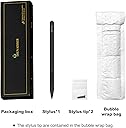
🖋️ Elevate your Surface experience—write, sketch, and create without limits!
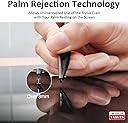
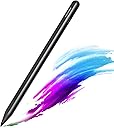
The Taiwan RENAISSER Stylus Pen, designed in Houston and crafted in Taiwan, offers professional-grade precision with 1024 pressure sensitivity levels and palm rejection technology. Compatible across a broad range of Microsoft Surface devices, it features ultra-fast USB-C charging that delivers up to 70 hours of use from just 15 minutes of charging. Lightweight at 14 grams and built with premium aluminum alloy, this stylus balances durability with ergonomic comfort, making it the perfect tool for millennial professionals seeking seamless digital note-taking and creative expression.


| ASIN | B0D4M7K2L2 |
| Are Batteries Included? | No |
| Are Batteries Required | No |
| Battery Average Life Standby | 100 hours |
| Battery Description | Lithium-Ion |
| Battery average life standby | 100 hours |
| Best Sellers Rank | 71,481 in Computers & Accessories ( See Top 100 in Computers & Accessories ) 174 in Graphic Tablet Pens |
| Brand | RENAISSER |
| Brand Name | RENAISSER |
| Charging Time | 15 minutes |
| Colour | Dark |
| Compatible Devices | Surface Pro 11, 10, 9, 8, 7+, 7, 6, 5, 4, Duo/Duo 2, X, Go, Go 3, Book, Book Studio, Studio 2+, Laptop 1, |
| Compatible Tablet Computer Models | Microsoft Surface Pro 7+ |
| Customer Reviews | 4.4 out of 5 stars 10,353 Reviews |
| Enclosure Material | Aluminium |
| Item Diameter | 9.2 Millimetres |
| Item Weight | 14 Grams |
| Item weight | 14 Grams |
| Manufacturer | RENAISSER |
| Material | Aluminium |
| Minimum Required Operating System Version | Windows 10 |
| Model Number | Raphael 510 |
| Number of Batteries | 1 Lithium Ion batteries required. |
| Number of Packs | 1 |
| Number of batteries | 1 Lithium Ion batteries required. |
| Pressure Sensitivity | 1024 Levels |
| Product Warranty | 1-year product replacement warranty |
| Unit Count | 1.0 count |
D**Y
Exactly what you expect at this price
It's good. I've had a similar pen from a competitor before, this one seems easier to write with and magnetically clips to the side of my Surface Pro 7 which is a small but nice addition. It seems a little cheaply made - but that's why it's cheaper than a premium model. It does everything I want accurately including shading. I haven't noticed any lag and have been happy with the accuracy of the pen. I haven't had to charge it yet and I've had it for about a week and used it to draw picture with my children over the weekend so the battery life is pretty good. Perfect for anyone looking to take notes or make sketches on their surface. Update: product lasted exactly 2 years and then the battery died. I used it approximately twice a week in thatt time and aside from the occasional de-sync where it would randomly write at the opposite side of the screen it was a very good product
J**H
GREAT PRODUCT 👍
I bought this pen to use on my new surface pro 7. It's really simple to use even for someone who doesn't know much about technology. As I struggle with motivating myself to do university readings, this pen allows me to effortlessly highlight and make notes as if I were using pen and paper. It is lightweight and functions like a real Microsoft pen for a great price. I highly recommend this product.
A**N
All good so far
I have only had this product for a week so will possibly add to this feedback later. So ar im very impressed though! Its honestly just a better pen than the original Surface pen i had. Im using this with an ol Surface pro 4 which means i dont benefit from the tilt fuction but the pressure sensitivity is excellent and the size of the pen makes drawing a lot more comfortable. Automatically syncs with the surface which is great One small thingive observed - the palm rejection is probably not quite as good as the original surface pen. Mostly good but the odd glitch here and there. All in all a fantastic pen and at £30 a bit of a bargain.
A**R
Compatible with devices that is not listed
This pen will work with most devices, providing your screen is a MPP2.0 touchscreen. Bought this for my Asus ROG Flow X16 as I didn't want to spend £70 on a OEM pen. The description says the pen is only compatible with Microsoft Surface devices but decided to try it out as my laptop has a MPP2.0 screen and therefore theoretically should work. The pen works flawlessly, although it would've been nice if it came with a small pouch or case to prevent it getting damaged over time. Overall, if you want to buy a pen for your laptop for £30, and you're laptop is a MPP2.0, then this is by far the best option.
M**O
Great if you can't be bothered with spending too much on a surface pro pen.
No external batteries needed, just plug this in for an hour and you have an entire university semesters worth of battery life. The magnet works great, sticks to the surface pro like a charm. The cable is short, but if you got both a PC and a surface pro then you can just charge the pen and have it hang by the cable, don't worry it won't fall off. The side buttons are good too, granted they won't blow you away but they're good. The tip is also good, feels a tiny bit squishy but better that than scratching your screen. Not as heavy as the surface pro pens, but honestly as with most original accessories those aren't worth it compared to this.
M**N
Quite a revelation...
I bought this after mislaying my Surface Pro 6 pen and so searched for a proper replacement, but got shocked by the price of the official one. This is thin. Be aware of that. For me that's a bonus. It's comfortable to hold and because it has the flat section, very easy to locate the buttons which allow deletion on one end and selection with the other end. Really nice. The pressure sensitivity is flawless, and it connects to the device very well. I do keep forgetting to turn the pen on - it would be cool if it was able to detect it was magnetically docked and turn off, then detect it's undocked and turn on. That would be cool. Love the fact that the battery can be recharged using micro-USB. Much better than having to have a stock of AAAA batteries... Anyhow, I subsequently found my official Surface pen again. Can you guess. You're right. My surface pen is now the spare, if I lose this one. It's so much nicer to use that I have kept it as my main pen. Don't hesitate, buy it. No sponsorship here - just feel I need to support a really good product.
L**Y
Stopped working after 6 months but good customer service sending another
Pen was great, but stopped working 6 months after I bought it. Contacted Renaisser and they quickly agreed to sending me another. Pen was great while it was working, good charge and accuracy. Only thing is writing would be very slightly uneven / thinner at the start (probably because of the sketching / drawing pressure system) and then be thicker after the first few letters. Overall very happy.
L**S
Good pen, works for microsoft surfafce pro 1
I use this product on a Microsoft surface pro 1 (from like 2013/14) and it works completely fine. The erase and highlight buttons on the pen are very useful and allow me to make notes and move things around with ease. The pen is magnetic too so i just attach it to my surface to keep it in a safe place, I have a tendency of losing things so this is great! The one thing i have to say is that when i am charging my surface the pen doesn't work too well, so i just use the pen when its not charging.
A**R
Really nice pen for Surface..
I am using with Surface Pro 7 and it works really well. Does not have to charge frequently. (I have not charged it till now) Delivery was also as per time mentioned as per Amazon app only. Tip is good and tilt function works It came with new box.. older one came with box named Rena Pen so I was also suspicious first but it work fine so should be genuine only.
A**R
Excellent quality, smooth writing - worth the money!
I have been looking for a replacement stylus for my Acer switch 5 for a long time. After doing a lot of research, I decided to purchase this pen and it was definitely a great investment! It works better than the original stylus that came with my laptop. This stylus is very smooth with great precision. It is very sensitive, yet, palm rejection is excellent. I use it for note taking with Onenote and I love how it also has side button, which acts as an eraser - makes it very easy to erase mistakes. It is also rechargeable and lasts a long time on one charge. No need to purchase batteries anymore. Excellent quality and highly recommend!
M**A
Works great!
Bought this as it is compatible with my Kobo! Works great! Charges fast and keeps charge for a LONG TIME! (Over a month). Magnets that connect it to the kobo and great quality!
J**R
Microsoft has work to do.
The pen is really great. It works well, it's sleek, it's intuitive. I really like it. That being said, Microsoft has a lot of work to do. My laptop uses MPP version 1.51 so I don't get all the "features" of this pen so that might be it. But palm rejection has a ton of improvement to do. I tried apple's pen stuff because a friend let me use it, and it's really, really nice. Palm rejection always works, it's intuitive, it works, it's nice. It's a replacement. This is not a replacement. Palm rejection doesn't work 50% of the time and when it does work it's either slower or just weird. I hope Microsoft works on making something that can replace apple's system. It's already a good system because of cost and how all of the pens are "compatible" with all laptops, but it's not a replacement to apple's system and not a replacement to pen and paper.
T**C
Raphael 520 Penna Stilo per Surface
La Raphael 520 Penna Stilo per Surface è uno strumento essenziale per tutti coloro che utilizzano dispositivi Surface di Microsoft per disegnare, scrivere o prendere appunti. Questa penna stilo offre un'esperienza di scrittura e disegno fluida e precisa, consentendoti di esprimere la tua creatività in modo digitale. Una delle caratteristiche più apprezzate della Raphael 520 è la sua precisione. La punta sensibile alla pressione consente di tracciare linee sottili o spesse a seconda della pressione esercitata sulla superficie del dispositivo. Questo ti permette di controllare con precisione il tratto e ottenere risultati dettagliati e professionali. La sensibilità all'inclinazione è un altro punto forte di questa penna stilo. Puoi inclinare la penna per ottenere tratti più sfumati o spessi, simulando l'effetto di una penna tradizionale. Questa funzionalità aggiunge una dimensione di realismo e espressività al tuo lavoro digitale. La Raphael 520 è dotata di una connettività wireless stabile e affidabile. Basta accoppiarla con il tuo dispositivo Surface tramite Bluetooth e sei pronto per iniziare a creare. Non ci sono ritardi o interruzioni durante l'utilizzo, consentendoti di concentrarti completamente sul tuo lavoro. La batteria della penna stilo ha una durata sorprendente. Puoi utilizzare la penna per lunghe sessioni creative senza preoccuparti di doverla ricaricare frequentemente. Inoltre, la ricarica avviene in modo rapido e conveniente tramite il cavo USB incluso. Il design ergonomico della Raphael 520 garantisce una presa comoda e naturale. La penna si adatta perfettamente alla mano, riducendo l'affaticamento anche durante le sessioni di disegno o scrittura prolungate. Inoltre, è leggera e ben bilanciata, consentendo un controllo preciso e senza sforzo. Una nota da tenere presente è che la compatibilità della penna stilo potrebbe variare a seconda del modello specifico del dispositivo Surface. È importante verificare la compatibilità prima dell'acquisto per garantire una corretta funzionalità. In conclusione, la Raphael 520 Penna Stilo per Surface è uno strumento affidabile e di alta qualità per gli utenti di dispositivi Surface di Microsoft. Con la sua precisione, sensibilità all'inclinazione, connettività wireless e design ergonomico, offre un'esperienza di scrittura e disegno fluida e gratificante. Se sei un artista digitale o un professionista che utilizza dispositivi Surface, la Raphael 520 Penna Stilo per Surface è sicuramente un investimento che vale la pena considerare. Se la mia recensione é stata utile 👍 premi il tasto qui sotto ⬇️
Trustpilot
2 weeks ago
1 week ago