
DOWNLOAD THE APP


Customer Services
Copyright © 2025 Desertcart Holdings Limited
DOWNLOAD THE APP
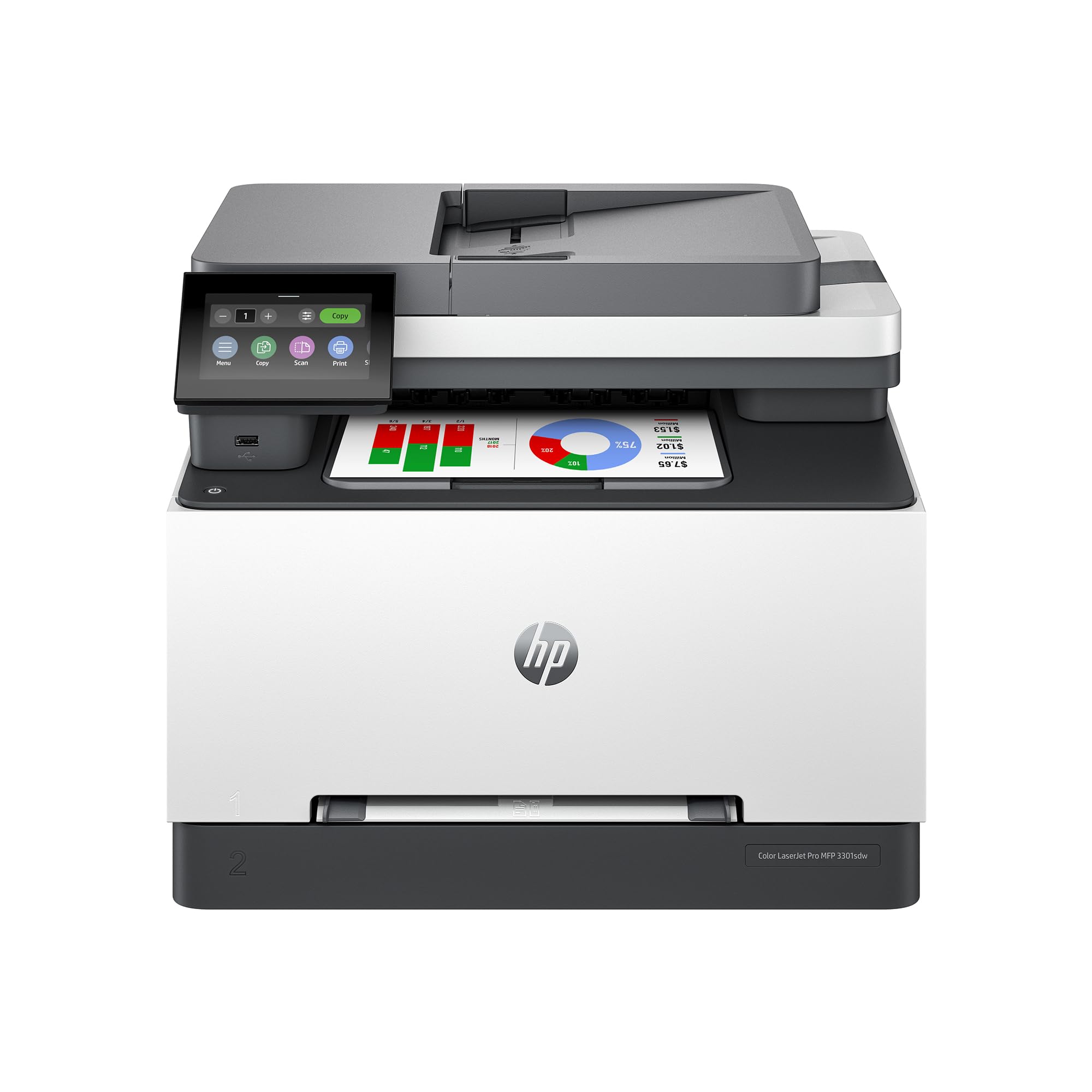
🚀 Elevate your office game with speed, color, and effortless multitasking!
The HP Color LaserJet Pro MFP 3301sdw is a versatile all-in-one laser printer designed for small teams and home offices. It offers fast print speeds up to 26 ppm, professional-quality color output with advanced TerraJet toner, and convenient features like auto duplex printing and a 250-sheet input tray. With wireless and Ethernet connectivity plus the HP Smart app, it enables seamless printing, scanning, and copying from multiple devices. Built for reliability and productivity, this MFP is a top choice for professionals seeking vibrant, sharp documents and efficient workflows.


| ASIN | B0CVR3Z6Y2 |
| Additional Printer functions | All In One |
| Best Sellers Rank | #1,597 in Office Products ( See Top 100 in Office Products ) #4 in Laser Computer Printers |
| Color Depth | > 1 bpp |
| Compatible Devices | Smartphones |
| Control Method | App |
| Customer Reviews | 4.1 4.1 out of 5 stars (894) |
| Date First Available | June 17, 2024 |
| Dual-sided printing | Yes |
| Duplex | Automatic |
| Hardware Interface | Ethernet |
| Included Components | 499Q3F HP Color LaserJet Pro MFP 3301sdw printer; Power cord; Toner cartridge; User Guide; Flyers; |
| Ink Color | color laser toner |
| Item Weight | 37.7 pounds |
| Item model number | 499Q3F#BGJ |
| Manufacturer | HP |
| Max Copy Speed (Black & White) | 26 ppm |
| Max Input Sheet Capacity | 250 |
| Max copy resolution black-white | 600x600 |
| Max copy resolution color | 600x600 |
| Maximum Black and White Print Resolution | 600x600 Dots Per Inch |
| Maximum Color Print Resolution | 600x600 Dots Per Inch |
| Maximum Media Size | 8.5 x 14 inch |
| Model Series | 3301sdw |
| Number of Trays | 2 |
| Output sheet capacity | 250 |
| Print media | Paper (plain) |
| Printer Ink Type | toner |
| Product Dimensions | 16.46"D x 13.44"W x 16.5"H |
| Scanner Type | Flatbed |
| Series Number | 4058 |
| Sheet Size | 8.5 x 11 |
| Specific Uses For Product | Office |
| Supported Media Sizes | Legal (8.5 x 14 inches) |
| Total Ethernet Ports | 1 |
| Total USB Ports | 2 |
| UPC | 196786388248 |
| Warranty Type | limited warranty |
P**E
Sinatra would have sung: ‘Nice & Easy.
I’ve been using laser printers since they first became available, both black-and-white and color. For the first time since Apple stopped making laser printers—a long time ago, I’ll grant you—I’ve found a printer at this price point that delivers print quality worthy of much larger machines. I tested it on both text and images, and it could almost be described as a *graphics-grade laser printer*: the colors are highly accurate, and the print quality is remarkably sharp. Among the positives is the initial setup, which features a very nice color display and a simple, step-by-step guided installation process. macOS users will find the HP Easy Scan app in the App Store, which allows you to import documents directly to your Mac. That’s also where you’ll find the app used to manage the printer itself (HP Print & Support). The only real downside is the price of the toner cartridges, which is frankly excessive for this type of printer. That said, it may be the trade-off for achieving such high print quality—because with laser printers, the technology matters, but so does the fineness of the toner powder.
J**D
5/5 Stars - Solid workhorse for my home office
After my old inkjet finally gave up the ghost (and after spending way too much on replacement cartridges over the years), I decided to make the jump to laser. Did a bunch of research and landed on this HP Color Laserjet Pro - honestly, wish I'd made the switch sooner. Setup was pretty straightforward, though the wireless connection took a couple tries to get right. Nothing too frustrating, just had to restart my router once. The HP Smart app walked me through most of it. Once it was connected, printing from my laptop and phone has been seamless. The print quality is really impressive - colors are vibrant without being oversaturated, and text is crisp. I mainly use it for client presentations and occasional family photos, and both look great. The speed is a huge upgrade from my old printer too. What used to take forever now prints in seconds. Scanner works well for documents, though the photo scanning is just okay - not amazing but gets the job done for basic stuff. Copy function is handy for quick duplicates without having to mess with my computer. Only minor complaints: it's definitely bigger than my old printer, so make sure you have the desk space. Also runs a bit warm when printing a lot of pages, but that seems normal for laser printers. The toner cartridges aren't cheap, but they last way longer than inkjet cartridges did. Overall really happy with this purchase. It's been reliable for about 6 months now with zero paper jams or connection issues. Would definitely recommend if you're looking for a dependable color laser for home office use.
J**N
Great scanner/printer even from iPhone
Ordered to replace my old hp laser jet. I wanted to be able to print from my apple phone and to scan documents to my computer. Works great. There was the problem with the starter toners. Order replacements when you by this unit cartridge doesn’t long. But as long as you know up front it is still worth buying. I ordered the extended cartridge when I bought.
M**C
Excellent laser printer for your home office
This printer is worth the extra cost, print, copy scan, etc with color or black and white effortlessly, a friendly user interface, not terribly heavy and does not take up a lot of space. Not really meant for a high volume office environment but perfect for a home office. Easy setup and clear instructions, I am not sure what the toner cost is yet but the print quality is good, I have not had any jams yet. For the limited amount of printing I do this is a great choice whether hard wired, wifi, or using a USB drive input.
J**S
Great Printer and great value for money
Another quality Printer from HP. Easy Setup. Works well with Apple iMac and iPhone. Colors are good and printer is relatively quiet.
S**.
small problem early but worked fine after
So far so good. Basic setup via Wi-fi was very easy. Printer destination was selectable as soon as i clicked print on my mobile phone document. Printer defaulted to black and white. Printout was quick under black and white. When i then changed to print using color, the printer displayed critical error, must restart. After restart, the printer lost the print job, so i had to click print again to create another print job, but it worked fine after that. i will update after further use.
R**A
Medio decepcionado de que ni HP, ni Amazon venden el toner original de HP, solo se consigue el toner original en HP US y necesitas tarjeta de crédito americana. Seria muy bueno que al menos Amazon ofrezca el toner original de algo que ofrecen en Mexico
Trustpilot
2 months ago
4 days ago