Desertcart purchases this item on your behalf and handles shipping, customs, and support to Japan.
🌟 Elevate your security game with 4K solar-powered smart surveillance — because your peace of mind deserves the best!
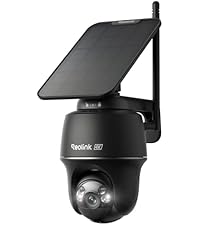
The REOLINK Argus PT Ultra is a cutting-edge 4K 8MP wireless outdoor security camera featuring 360° pan and 140° tilt with intelligent auto-tracking. Powered by a detachable solar panel, it offers hassle-free installation and continuous operation. Advanced motion detection with instant alerts and customizable zones ensures precise monitoring of people, vehicles, and animals. With flexible local storage options up to 512GB and compatibility with Reolink Home Hub, it delivers premium surveillance without monthly fees, all housed in a durable, weather-resistant design.


| ASIN | B0D1K25BMM |
| Alert Type | Motion Only |
| Antenna Location | Outdoor Security |
| Best Sellers Rank | #44 in Dome Surveillance Cameras |
| Brand | REOLINK |
| Built-In Media | Argus PT Ultra *1, Solar Panel *1, Quick Start Guide *1, Wall Mount Bracket, Ceiling Mount Bracket, Solar Panel Bracket, Mounting Template, Strap *1, Pack of Screws, USB-C Charging Cable, Solar Cable (4.5M) |
| Color | Black |
| Compatible Devices | Smartphone |
| Connectivity Protocol | Wi-Fi |
| Connectivity Technology | Wireless |
| Control Method | App |
| Controller Type | Amazon Alexa |
| Customer Reviews | 4.0 out of 5 stars 2,427 Reviews |
| Effective Still Resolution | 8 mp |
| Field Of View | 110 degrees |
| Flash Memory Supported Size Maximum | 512 GB |
| Flash Memory Type | Micro SD |
| Focus Type | Auto Focus |
| Form Factor | Dome |
| Frame Rate | 15 frames per second |
| Indoor Outdoor Usage | Outdoor |
| Indoor/Outdoor Usage | Outdoor |
| Installation Type | Screw In |
| Item Dimensions | 3.85 x 3.85 x 4.8 inches |
| Item Type Name | Security Camera |
| Item Weight | 1.37 kg |
| Light Source | LED |
| Manufacturer | REOLINK |
| Model Name | Argus PT Ultra-B+SP |
| Model Number | Argus PT Ultra-B+SP |
| Mount Type | Wall Mount |
| Night Vision | Night Color |
| Night Vision Range | 33 feet |
| Number of Channels | 1 |
| Number of Items | 1 |
| Other Special Features of the Product | Local Recording, Night Vision, PTZ Technology |
| Photo Sensor Resolution | 8 mp |
| Photo Sensor Technology | CMOS |
| Power Source | Solar Powered |
| Product Grade | Residential |
| Recommended Uses For Product | Outdoor Security |
| Room Type | Garage, Office, Store Room |
| Shape | Dome |
| Special Feature | Local Recording, Night Vision, PTZ Technology |
| Specific Uses For Product | 360 Degree Coverage |
| Unit Count | 1 Count |
| Video Capture Format | MP4 |
| Video Capture Resolution | 4k |
| Video Encoding | H.265 |
| Viewing Angle | 360 degrees |
| Voltage | 5 volts_of_direct_current |
| Water Resistance Level | Water Repellent |
| Waterproof Rating | IP64 |
| Wattage | 21.6 watt-hours |
| Wireless Technology | Wi-Fi |
| Zoom Ratio | 10 |
| Zoom Type | Digital Zoom |
J**R
Surprisingly awesome
I was not expecting to love this camera. Having the ability to pan while being solar worried me that power consumption would be an issue. I tested the camera by getting it to a full charge and then removing the solar panel entirely. With active storage to a 128 GB micro sd card, it was able to have perform motion capture with audio to disk for 2.5 days (having the camera facing our back door and taking the dog to and from the back yard throughout the day). The quality of audio and video is awesome, and the infrared LEDs are brighter than cameras I've had in the past. I would expect clarity up to 30 feet in the dark, but not more than that (easily supplemented by an infrared spotlight to span a long driveway in my case). Setup was super easy using your cellphone with a QR code scan by your phone, and then using the camera scanning a similar QR code that pops up on your phone. The whole activation took about 2 minutes. There is a second Type-C USB connector for charging in-house, or supplementing if you have another solar panel ramped down to 5V. I was also pleasantly surprised to see how well the housing held up under heavy rain. In lieu of putting it under an eave, I place it between two of the joists of our pergola. Lastly, and best of all, I went into my existing Reolink NVR PoE setup and clicked rescan after making sure the new solar camera was on the same network, and it showed right up. Just be aware, you will not get rolling video to disk the way you do with the PoE, but it is arguably better. Not only does the motion capture work well, but the snippet are somehow labeled with a paw when animals are detected. A raccoon showed up on our porch, and a little paw icon was stamped on the video snippet and in the video samples that show up in the playback tool, which is also available through the NVR interface. If you have a PoE solution watching the perimeter of your home, parking one of these things high in a tree as a failsafe would be a great idea for additional peace-of-mind. Will be buying a few more in the coming months. See the attached screenshot from the phone interface (black and white because infrared was active). Note the raccoon going toward my pool and the paw icon in the highlighted clip. The next two clips were me going out the backdoor (no animals present). Great job, Reolink.
A**R
Improve home security
I have bought several of these cameras for my home. They are very easy to install , extremely durable as they are great for outdoors. You can install these with screws or tape, so that is an added bonus. You can adjust the sensitivity of the motion detection which is amazing. The app is user friendly and I can check my cameras all day long, including playback of motion detection clips. They are a great value for your money and I cannot recommend these enough!
T**R
Great camera, poor instructions.
The camera was great, the quick start instructions were terrible. I had trouble getting it set up but I finally figured out what to do. I used the Windows app to set up the camera, and it told me to input the UID. I didn't know what this was and where to find the UID. The instructions didn't tell me. I used Microsoft Copilot AI and it told me where to find the UID; it said it would be on the bottom of the camera and that the UID code would start with 9527, and sure enough it was there. Again no mention of this in the instructions or on the app. Another problem was that the device failed to connect to the wifi. So this required pushing a reset button with a special tool, that resembles a needle with plastic handle on the end, that you insert into a hole on the camera to do this. It took a bit of handling and moving the camera around on it's base to locate the hole. The instructions mentioned very little of this, but there were diagrams showing the parts included and one showing where things were on the camera body. After pushing the reset button I was finally able to get it to connect to my wifi, and it can connect to either 2.4 GHz or 5 GHz wifi. The windows app tells you to enter the information for the wifi, but the field for the SSID of the network didn't specifiy that it wanted the SSID, it just said WiFi and then password below it. So once I entered ther SSID (which is the name of the wifi network) and the passcode, it connected ok. I noticed an item on the app called calibration and that adjusted the orientation of the camera and did some other calibration steps moving the camera to it's limits in pan and tilt. So apart from the quick start instructions being poor, the camera does work very well, and the picture quality is excellent. Given the low cost for such a high quality piece of tech, it's an outstanding value. The app controls the camera very well in pan and tilt. To zoom in or out, you use the scroll wheel on the mouse. When zoomed in on something, you can move the zoomed in area around using the mouse. If you double click the image in the app, it will go to a screen that can show multiple cameras at the same time. So if I decide to add more cameras later, I can view them all in one place at the same time, or cycle through each camera sequentially. Many brands of security cameras require an internet connection in order to work, and I find that extremely limiting especially when my internet connection goes out. Also those brands that require an internet connection tend take a lot longer to connect to the camera. The Reolink cameras can connect to the Reolink web site, but this is optional and not required to use the camera. Consequently, the Reolink camera connects very quickly like in about one second or less. If it wasn't for the poor startup instructions I would give this camera 5 stars easily. It's a great buy. If you decide to get one, hopefully my comments here will help you get started with it.
K**R
Very disappointed and concerned
I honestly wish I didn’t have to leave this review because I have so many other Reolink products and love them all and believe Reolink has one of the best products on the market. But I finally got a lemon, actually 2 lemons unfortunately in the same order. I have other solar cameras so I’m used to setting them up and aligning them with the sun.. After setting up the first camera where the panel gets close to full sunlight exposure I noticed that even with 10* hours of direct sunlight it barely increased 5%. If I connected with my phone to view or look at any saved clips it would drop 2-3% pretty fast. After being setup for maybe a week I swapped panels with the other new camera and apparently it came from the same manufacturing date because it did exactly the same thing. I checked the connection to both the panels and the cameras and both are connected properly and working…unfortunately they are not charging properly for some reason nor seem to be able to hold a charge.. Both cameras are easy to setup and view with my iPhone using the app. The only issue is with the solar panels. I will continue to research to see if any fixes are even possible but I unfortunately missed the return window so I’m stuck with 2 solar cameras that won’t work. At this time I can’t recommend them and as a huge loyal customer and owner of well over 10 other products including a POE system it definitely concerns me. I will update if anything changes but at this time I would strongly recommend choosing a different product.
S**.
Great quality video and pictures
These outdoor solar powered wireless security cameras are Great. These cameras are a bit different when it comes to some of the other solar powered wireless security cameras as they will work on both wireless networks of 2.4 and 5GHZ wireless bands which helps a lot with the triggers and distance if you have them a little bit away from your router. They get really good picture quality video quality is phenomenal, has great motion detection night vision is really Great. Once they are charged up and then mounted the solar panel keeps them charged real well. The other security cameras that I have dropped about 3% one time during a really bad storm as it was really dark, then these did not drop any battery percentage they stated 100% at all times during the day when the storm was going and the sun wasn't out as well as at night time when it was extremely dark as the storm was passing on. I have them mounted at a pretty decent distance from my router as my house is fairly old there's only one Network location in my home and it is in my bedroom which is in the back of the house these cameras are all the way in the front and they are constantly getting 100% wireless connection. They are tried and true weatherproofed we had a pretty good snowstorm / ice storm not long after I got them where we got about 8 in of snow and about 2 inches of ice. They have some really good settings for the motion you can block out areas that you do not want the motion to trigger a recording, you can rotate the cameras however you want them to get some really good angles anywhere you need them in your yard or wherever you decide to mount them. Good night vision is really good, they have people and animal detection you can set it to where they will not trigger false recordings if you have children that play in the backyard and the cameras are there or a dog that you don't want to trigger a false event as well, among several other settings which are great. I use SD cards in the cameras that I have they will take up to a 128 GB SD card. Or you can use their cloud service of course you have to pay extra for so I opted out of that. It can rewrite over the SD cards once they get full. Or you can format them yourselves directly from the app for The cameras.
A**S
updated Reolink Solar CameraReview
Updated Review, Shortly after writing my original review, Reolink emailed me and asked me how they could fix my issue. They were very receptive to my complaint. They offered to send me a new solar camera, which I had decided against getting another one. They then asked me if I would like to have them send me a different camera, they gave me two options. I was very pleased with that and chose the outdoor wifi security camera. This camera is a very good camera. Reolink has proven to me that they are committed to customer satisfaction. I would recommend them to anyone that needs a good security camera. I have updated my review to 5 stars because of the great customer service. I bought my first Reolink camera around 7 years ago and it is still working fine. I have 11 cameras now and am pleased with them. I still can’t say I would want a solar one just because I need my cameras to work well at a distance of 200-300 feet and I not sure the solar camera can do that. Original review: I have several Reolink cameras, this is the first solar I have purchased. The first one I received did not work, they replaced it. This one is not as good as the Reolink you plug into electricity. It does not stay connected to internet, constantly goes off. I can only use it if it’s less than 100’ from the router and it sometimes drops internet then also. It does not follow motion either. Very disappointed in this camera. Reolink has been my go to camera for 4 years, but I won’t buy another solar camera from them.
D**B
Solar-Powered Flexibility with Clear Video, But Wi-Fi Needs Help
I’ve been using the Reolink 4K Solar Security Cameras for a few weeks now, and overall, I’m really happy with how flexible and easy they’ve been to install. Since my home gets solid sunlight in different areas, I was able to place these cameras in multiple outdoor spots without worrying about running power cables. The solar charging works impressively well — after a full day of sun, the battery charges quickly and can last up to 18–24 hours of continuous viewing. That’s a big plus for me, especially since I hate dealing with wires or frequent charging. The PIR motion sensors help conserve battery by keeping the camera mostly in sleep mode until movement is detected, which makes sense and works as expected. Video quality is definitely one of the highlights. The 8MP footage is sharper and more detailed than my old Ring Spotlight Cam, especially at night — the color night vision is a nice upgrade, making everything look more natural instead of just black and green. I can clearly see faces and car details, which matters to me for home security. Integration with Home Assistant has been smooth too; I can pull up live feeds, control the pan-tilt functions, and get alerts without relying on the Reolink app. Speaking of the app — it’s not perfect, but once you get used to it, it’s functional enough. I also connected mine to the Reolink Hub, which helps keep everything centralized and gives me local storage options, which I appreciate since there’s no subscription fee. My biggest issue has been Wi-Fi stability. Compared to my older Ring camera, this one struggles a bit on my main network, especially when the signal dips. I ended up having to buy a Wi-Fi 6 satellite (extender), which helped, but it’s a little annoying that I had to spend extra just to get a reliable connection. For a camera that’s already relying on solar power and wireless connectivity, solid Wi-Fi is kind of a must. That said, the trade-off is worth it for me — no monthly fees, great video, and the freedom to install them almost anywhere. If your Wi-Fi is strong, these would be a no-brainer. As it is, they’re a solid choice — just be ready to boost your network if needed.
A**Y
Reolink solar
I recently installed a Reolink solar surveillance system, and I’ve got to say—it exceeded my expectations. The biggest advantage is the solar setup. Not having to run wires or worry about power sources makes installation simple and clean. Once it’s mounted, it pretty much takes care of itself. The battery stays charged, even with regular use, which is a huge plus. The video quality is solid—clear during the day and surprisingly sharp at night. Motion detection is responsive, and the alerts come through quickly without being overly sensitive to every little movement. I also posted a video so you can see the actual quality for yourself, along with the location where I mounted it. That way you get a real-world look at how it performs, not just specs on paper. Another thing I like is the app. It’s straightforward, easy to navigate, and lets you check your cameras anytime without any headaches. Setup was quick, and everything synced without issues. Overall, if you’re looking for a reliable, low-maintenance security system without dealing with wiring, Reolink is definitely worth it. It does exactly what you need it to do—set it up, and it just works.
J**S
Genial
Es una súper cámara la resolución es magnífica
A**R
Great Security Camera
We have this in a location removed from the house and it works so well. Easy to setup and the images are great day and night. This is the third Reolink camera I have purchased and all are super great.
S**.
Excellent product
Completely impressed, uses wifi, clear image, live viewing from anywhere as long as wifi signal is available, we use it as a driveway announcer also, let's one know if the motion detected was a vehicle, person, or animal. Has been in operation for a few months now even past minus 20 degrees Celsius, always maintains battery via solar as it is in a remote location. No more surprise visits picks up the motion every time. Even if the wifi signal is lost, it will still record events to the SD card, which can be viewed once the wifi signal has been restored. Would recommend easy to setup as well. Nice app functionality.
A**D
كاميرا ممتازة لكن ..
الكاميرا ممتازة لكن مشاكلها جدا كثيرة بداية من عدم فعالية الشحن باللوح الشمسي وبالتالي انتهاء الشحن ونهاية بانقطاع الاتصال بالإنترنت المتكرر رغم قرب رواتر الانترنت من الكاميرا والذي لا يتعدى المتر !! وبالتالي فالكاميرا غير عملية وعديمة الجدوى وفوق هذا كله البائع غير متعاون وخدمة مابعد البيع غير محترفة وغير متعاونة .. رفضوا ارجاع الكاميرا بدعوى وجودهم في الولايات المتحدة وبعد المسافة وادعاء انتهاء وقت الارجاع وهذا غير صحيح .. اكتب هذا التقييم توضيحا لتجربتي مع البائع والكاميرا حتى يستفيد غيري ...
A**N
Buen producto, mal servicio post venta.
La imagen de la cámara es muy buena, es facil de instalar y configurar, la app no tiene anuncios molestos lo que le da un plus, sin embargo mi cámara luego de algunos meses trabajando bien quedó solo con un led en rojo y dejo de transmitir video, contacte a soporte de Reolink y me ayudaron a realizar pruebas pero ninguna funcionó por lo que para aplicar la garantía me piden contactar al vendedor pero ha sido un problema ya que desde Amazon no hay una opción directa, solo una de un chat bot que me dice que no puede ayudarme a contactarlo. Necesito que alguien de Amazon pueda revisar el tema y llegar a una solución.
Trustpilot
1 month ago
1 month ago