Desertcart purchases this item on your behalf and handles shipping, customs, and support to Japan.
⚡ Power Your Dual-Desk Hustle with One Click!
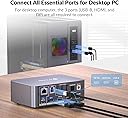
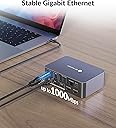
The AV Access KVM Switch iDock C10-US is a professional-grade 2-in-1 dual-monitor docking station that enables seamless switching between a USB-C laptop and desktop PC. It supports dual 4K@60Hz mirrored displays (macOS limited), integrates 12 essential ports including USB 3.0, SD card reader, audio jacks, and Gigabit Ethernet, and delivers 60W power delivery to keep your laptop charged. Featuring EDID emulation and auto wake-up, it ensures flicker-free, instant switching with no driver installation required. Housed in a durable aluminum alloy chassis, it’s designed for hybrid workspaces and home offices seeking streamlined productivity and minimal desk clutter.


| ASIN | B0CW2JGRN4 |
| Best Sellers Rank | #202,863 in Computers & Accessories ( See Top 100 in Computers & Accessories ) #489 in KVM Switches |
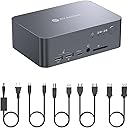
| Box Contents | 1.Dual Monitor KVM Switch with Docking Station 2.USB-C to USB-C cable (USB 3.2 Gen 2, 1m) 3.USB-A to USB-B cable (USB 3.0, 1.5m) 4.HDMI 2.0 cable (1.5m) 5.DisplayPort 1.2a cable (1.5m) 6.Power Adapter (20V/6A) 7.User Manual |
| Brand | v AV Access |
| Brand Name | v AV Access |
| Colour | Black |
| Compatible Devices | Laptops (Mac and Dell) |
| Customer Reviews | 4.0 out of 5 stars 218 Reviews |
| Hardware Interface | DisplayPort , Ethernet, HDMI |
| Input Voltage | 20 Volts (DC) |
| Item Highlight | 4K@60Hz, EDID, 60W USB C Charging, 5 USB-A, SD, Audio & Gigabit Ethernet, Dual Monitor KVM Switch for Home Office |
| Manufacturer | AV ACCESS |
| Manufacturer Part Number | iDock C10-US |
| Model Number | iDock-C10-US |
| Number of Items | 1 |
| Number of Packs | 1 |
| Number of Ports | 16 |
| Total HDMI Port | 1 |
| Total USB Ports | 5 |
| Unit Count | 1.0 Count |
| Wattage | 120.0 |
I**O
Very good stuff
Quite expensive, but it is very good...no issue at all
ポ**ポ
HDMI接続できず、、、(※訂正:できました)
PC側のhdmiが接続不能だった。一回繋がったのだが、以降ずっと駄目ですね ハズレ個体かな、、、 信頼できるメーカーから買ったつもりだったのでショックです。 問い合わせてレビューアップデートします。 ※追記 自分の使い方が間違っていました PC側のhdmi inはhdmi outの2番に繋ぐ必要がありました。 さらに、AV Accessさんから謝罪の連絡と返品手続きの案内が丁寧にきておりました。 自分の確認不足なのにすみませんでした。 その後は快適に利用できておりますため、星5に訂正します。
A**S
Happy but I need a different ine
Amazing product - Just not suitable for me as a Mac user, I need multiple displays for work not mirrored. Looking forward to the iDock M10 soon. Massive thanks to Johnny, from AV Acess for the support. Always contact support before you attempt to refund.
J**S
⭐⭐⭐⭐⭐ Best KVM Docking Station I’ve Purchased – Seamless Switching and Excellent Connectivity
⭐⭐⭐⭐⭐ Outstanding KVM Docking Station – Exactly What I Needed The AV Access Dual Monitor KVM Docking Station has been phenomenal. This is by far one of the best KVM devices I have ever purchased. Switching between my computers is seamless. I can move from one computer to the other without any issues, and my monitors and connected peripherals transition right along with it. So far, I have not been able to bog this thing down. One of the biggest advantages for me is the number of USB ports and the flexibility they provide. I currently have a high-definition webcam, professional USB microphone, keyboard, and wireless mouse connected, and everything works flawlessly. The additional USB 3.0 connectivity means I am not forced to choose which peripherals I want to share between computers. I also still have room for expansion if I need to add more devices later. Another huge benefit is the USB-C power delivery. The KVM charges my laptops while they are connected, which eliminates additional power adapters and cables from my desk. That alone makes my workspace considerably cleaner. I also regularly switch between my work laptop and personal laptop. All I have to do is disconnect the USB-C cable from one laptop and connect it to the other. My entire setup is immediately available without having to reconnect my camera, microphone, keyboard, mouse, monitors, or other peripherals. Everything simply stays connected to the KVM and works. That is exactly what I wanted from a KVM docking station: one centralized setup that allows me to change computers without rebuilding my workstation every time. The AV Access unit has handled everything I have connected to it smoothly and reliably. It provides the USB connectivity, power delivery, peripheral sharing, and expandability that I was looking for. If you have a multi-computer workstation with dual monitors and several USB peripherals, especially a webcam and professional microphone, I highly recommend this KVM. Five stars without hesitation. Excellent product.
M**O
Fast switching between two devices, as described
It works perfectly. Exactly as described, fast switching between my usb-c laptop and my "legacy" connection desktop with two monitors.
Trustpilot
4 days ago
2 weeks ago