👓 Elevate your reality—see sharper, play harder, work smarter.
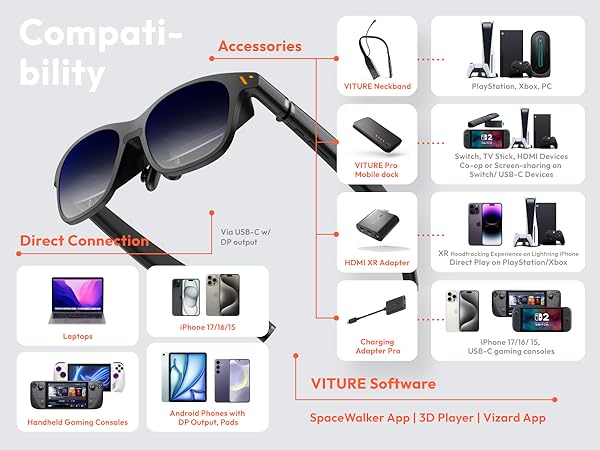
The VITURE Pro XR Glasses deliver a groundbreaking XR experience with a massive 135" 120Hz OLED display boasting over 1000 nits brightness, tailored myopia adjustments, and advanced electrochromic film for ultimate visual clarity. Compatible with iPhone 15-17, Android, Mac, PC, and gaming consoles, these glasses combine premium Harman audio, durable aircraft-grade construction, and versatile multi-device support to redefine immersive productivity and entertainment on the go.


| ASIN | B0D3LRH8G4 |
| Additional Features | 3DoF, Adjustable Electrochromic Film, Multiple Screens, Spatial Video/ Spatial Photo, VR Videos |
| Age Range Description | Adult |
| Band Color | Black |
| Band Material Type | Silicone |
| Best Sellers Rank | #19 in Video Display Glasses #8,831 in Home Theater Accessories |
| Brand | VITURE |
| Built-In Media | Anti-Clip Hair Cover, Charging Cable, Glasses Case, VITURE Pro XR Glasses, Nose Pads (4 sizes: 1, 2, 3, and 4) |
| Case Material Type | Resin or Metal |
| Clasp Type | Buckle |
| Closure Type | Buckle |
| Color | Jet Black |
| Communication Feature | Wireless, Wired |
| Compatible Devices | Smartphone, Tablet, Gaming Console, PC, MAC |
| Compatible Phone Models | Compatible with Android devices, iPhone 17/16/15 (not included iPhone 16e & iPhone Air) |
| Connectivity Technology | USB-C |
| Controller Type | Button Control |
| Customer Reviews | 4.0 out of 5 stars 2,672 Reviews |
| Display Type | OLED |
| GPS | No GPS |
| GPS Geotagging Functionality | No GPS |
| Human Interface Input | Buttons |
| Item Dimensions | 6.3 x 1.85 x 2.13 inches |
| Item Dimensions D x W x H | 6.42"D x 1.88"W x 2.11"H |
| Item Weight | 78 g |
| Manufacturer | VITURE Inc. |
| Maximum Display Brightness | 4000 nit |
| Metrics Measured | 34D/VR |
| Model Name | V1241 |
| Model Number | VITURE Pro XR Glasses |
| Operating System | Nintendo Switch, PlayStation, XBox, iOS, Android,macOS, Windows |
| Resolution | 1920 x 1080 per eye |
| Screen Size | 135 inches |
| Shape | Oval |
| Special Feature | 3DoF, Adjustable Electrochromic Film, Multiple Screens, Spatial Video/ Spatial Photo, VR Videos |
| Sport Type | Baseball, Cycling, Run, Walking |
| Style Name | Modern |
| Supported Application | Productivity, Multimedia, Sports |
| Supported Satellite Navigation System | GPS |
| Target Audience | Unisex Adults |
| UPC | 850047431332 |
| Unit Count | 1 Count |
| Warranty Description | 2 Years |
| Warranty Type | Standard/Full |
| Water Resistance Level | Not Water Resistant |
| Wearable Computer Type | Smart Glasses |
| Wireless Provider | NET |
J**.
Significant Improvement Over Original Viture Glasses
I like the fact that everything I wanted improved on the original Viture One Glasses has been improved. The screen is bigger (I wouldn't want it any larger) , the screen is brighter (Also adjustable), the screen is sharper (especially around the edges), the sound is 5db louder (with recent update & can raise or lower), & the lenses tint darker (blocking out almost all light). Others complained about the fit, but while I think the fit isn't perfect, I like the fit & find it comfortable for around 3 hours straight then I take a break. Just like sunglasses fit, everyone's head, face, & eyes are different. So, I think they did a really good job to accommodate everyone for a happy median. The quality of these glasses, just like the original Viture Ones, is excellent craftsmanship. I think they can improve the fit by making an increased variety of nose pieces either with new purchase of glasses or buying just an increased variety nose piece set. Nose piece cushions could be a little more comfortable maybe by exploring other materials like memory foam, different foam/rubber ratio combination, or maybe some slip resistant neoprene like covering over the nose contact area. Also, the screen should be able to be moved vertically up or down more tailor screen placement if in between nose pieces (I don't have this problem but I've read someone else has. I think that the next model glasses should be 4k @ 120hz to push it to the next level. The tinting feature should also be further improved to block out 100% of light. I dont know if they can do it or not, but it would be cool to have a cable that's magnetic connector from glasses to a full hdmi (to eliminate the adapter). It would also be nice to have volume & brightness control on separate glasses frame arms instead of 1 up & down control buttons with shared function on same glasses frame arm. I also think these are the best xr glasses on the market & hopefully Viture stays on top (& I think they will). Last but not least (by far) Vitures customer service is #1 out of any company I've dealt with thanks to Emily (give promotion). She is very friendly, knowledgeable, helpful, & irreplaceable (especially nowdays)! Thank you & I really appreciate these new Viture Pro Glasses as I don't have to lug out a big tv into my truck as I'm an over the road truck driver.
J**M
The best in the market for XR Glasses
As a avid user of the Viture Ones when they were released, I felt that Viture as a company focused on quality and features that other competitors out there weren't prioritizing. I tried the XReals, Rokids, and TCLs all to which fell short in my opinion. From the get go, the one thing that stood out with Vitures glasses was the build quality of the frames and the fact that the glasses could actually get bright enough to see the screen. The one issue I did have with the Viture Ones though were that I could not get the blurry edges to go away no matter what adjustments I made to the glasses and after switching out all of the nosepieces. In come for the Pros. The blurry edges are gone. The build quality of the glasses feels even more premium. There's no longer a need for a lens shade accessory because the glasses have an electrochromatic film that actually blocks out enough of the light. The glasses themselves get even brighter than they did before which makes it more of a differentiator from competitors. The sound quality doesn't replace the need for earbuds but they're good enough that when you don't feel like having earbuds stuck in your ears or your earbuds run out of battery, you have a decent sound system in the glasses to lean back on. But most importantly, i like how they just work. With some of the other offerings out there, I literally had to download software, wait for the glasses to update, fire up the software, etc. just to get the glasses working. For the Vitures, I can literally just plug it in and it's ready to go. In terms of aesthetics, I really like the subtle touches that they've made to the glasses. There weren't any drastic design changes that were made but just enough to show some distinction from the previous generation. I also heavily use the glasses with my Steam Deck OLED LE and the glasses color scheme along with some of the accessories matches perfectly with my Steam Deck OLED LE. It's almost like they were made to be purchased together! Lastly, I would have to say that the customer service at Viture is top notch. I'll specifically call out Emily Wang who literally went above and beyond to address some of the questions I had from the get go in making the purchase and ensuring that I had extremely positive buyer experience as a returning Viture customer. It feels good to know that if I ever run into an issue, there's a solid customer service system in place that I can fall back on. Overall, extremely happy with my purchase. Thanks Viture!
N**H
The future is tomorrow, not today.
New Review: I recently got my 2nd replacement from Viture directly (the first exchange was from Amazon), and I can say I am happier with this than my first 2. The picture are finally horizontally leveled and the focus is aligned where it should be for the most part. The only thing I noticed was that this pair, the right arm that puts out sound seems to be .5 db higher than the left and the picture isn't as crisp like my first pair but I can still live with it. If I were to rate the crispness and clarity from my first pair to my current pair would be 1st pair 10/10, 2nd pair 5.5 (due to misalignment and blurry edges), 3rd pair 9/10. I don't know if they went through people's misaligned returns and fixed them because when I first tried it on the view seemed different as something got wider but I'm not complaining because It took a little over a month to finally get a good pair. Since this product is relatively new, I can see that there could be manufacture mishaps since Viture One Pro glasses are high in demand! I'm not trying to deter anyone from buying this glasses but I am telling you that you may have to do a exchange from Amazon (assuming you bought it from here) or to get an exchange from Viture directly until you get a good pair. Not saying the other pairs didn't function, it did but if it's misaligned, blurry edges, horizontal framing isn't leveled then I consider it a defective item (and others as well). For those who are going to use this glasses on your desktop PC or any other PC that doesn't have a USB-C Alt Display port and want to use Viture's Spacewalker for PC, you'll need to get any HDMI or Display port cable to USB C Alt Display that also has a USB cable to provide the data. I personally bought from the WJESOG store here on Amazon. HDMI to USB C Adapter Cable 6.6ft 4K@60Hz with USB Power Adapter,HDMI Male to Type C Male Converter. Also you'll need to buy a USB C female coupler, I personally bought this also from Amazon on Celluliarze store. Celluliarze USB C Coupler USB C Female to Female Adapter (2 Pack) 240W 40Gbps Type C Extender Connector Video Thunderbolt 4/3 Data. If you're not using the Viture Spacewalker then it'll act like an extended monitor using the official Viture Pro Mobile Dock or the adapter or something like that I listed above. My rating on the star has not changed. Even though it has soured me going through 3 pairs to get a good one, I will have to say that the Viture's customer service is top notch and they came through. I'm pretty sure if I didn't get a good pair again that they'll make it right but I'm so glad that I don't have to test that. Because of that I'll be buying a second pair eventually! Old Review: My first pair that I bought had calibration issue where the screen isn't leveled and I had to raise the right side of the arm abut an inch of the glasses, or tilt my head to the left about 2-3 degrees to even out the picture. I returned it to get an exchange as it's something that can't be fixed yourself but a mfg level defect. My new pair while isn't perfectly leveled, I only need to tilt my head left about 1/4th of a degree or just slightly lift the right arm of the glasses. With my first pair before I sent it out, the PID was pretty generous compared to the ones I have now. Although I probably have to tweak the adjustment with the nose pad to get the right angle and distance. The picture quality isn't as crisp and clear like my first pair, but the edges of the screen isn't as blurry as other AR/XR glasses. My 1st pair was perfect minus the misalignment issue, the current pair feels like the left screen is tilted slightly where the focus isn't quite achievable regardless of the myopia adjustment but it is still tolerable compared to previous generation glasses, however I paid for the current gen and I expect current gen clarity. I may have to exchange it again but I hate the waiting for replacement. The official discord channel is very helpful and while some of us had to do an exchange, the service is pretty great experience so far. This current (Pro) glasses recently came out and I do believe that there's some mfg adjustment to do to become more consistent, these Pro glasses have been selling like hot cakes and it has been on back order multiple times. If you can wait for another 3-4 months, I'm sure that they'll be able to fix or lessen the mfg misalignments but I'm afraid that the introductory price will no longer be available. So unless you're willing to go through the hassle of possible return or exchange while it's still about $100 cheaper then go ahead. I'm going to buy myself a second pair eventually and if that one is better then I'll use it as a primary while my current one will be for guest to use when I hook it up to the Viture Pro Mobile Dock.
K**N
Virture XR Pro Glasses Review: Great for Movies, Not for Productivity - UPDATE 2026 5 stars
I purchased these glasses to assess the productivity of XR glasses in a Linux environment. I tested them with Breezy Desktop, and the author has done an excellent job of making the experience more user-friendly. However, I recommend against buying these glasses if you're looking to replace physical screens with virtual ones. The 50-degree field of view (FOV) at 1080p is inadequate, and I experienced constant screen drift, which necessitated frequent manual adjustments to maintain the correct position. If you're considering using these glasses to connect to your phone for watching movies or playing games while on a plane, they may be suitable for that purpose. However, if you aim to accomplish serious work on a Linux computer, I strongly recommend avoiding this device. I forced myself to write this review while using the glasses, and I'll need to take some Tylenol for the headache I developed during the experience. The technology simply isn't advanced enough yet. I'm placing these glasses next to my Meta Quest 3 in my VR junk drawer. I'll give XR another try in a few years when the technology has advanced further. Update 2026. I recently pulled these glasses out of a drunk chore and hooked them up to a Mac Mini running a Hermes agent. Now that I don't have to type much and can dictate and just talk to an agent, these aren't that bad. It's a pretty cool little setup. Before, when I was programming and had to type and stare at a console all the time, these didn't really work for me. Now that an AI agent controls everything, these are pretty cool glasses. I'm updating this to five stars. They didn't work very well back then in the Linux world and didn't meet my needs at the time, but I'm no longer staring at two to four screens trying to program things manually by hand. So, yeah, these are pretty cool. I'm updating the stars to five.
G**O
Entertainment Powerhouse Productivity Sourhouse
First Step to Usable XR Glasses, I'd like to clarify that my three star rating isn't because these glasses are a bad product. It's because without the neck band pro the experience is limited. TLDR: Down to business, these glasses or exceptional for 1080P movies and video game consumption. However not for productivity like coding or excel, which I bought these for. If you're only gaming or just watching a movie on the on the go, this is a great solution. The text however gets exceptionally hard to read when your coding or in an excel. You can scale up but I could never get it to feel like as usable real monitor or vr headset. I wish I got a chance to try this with the neck band pro. It seems to fix my issues to a degree. But overall i'm not a rich person (just like expensive things I suppose). The Virtue Pros are over $400 and neckband pro is and additinal $300 for the 8gb model. $700 is a hard pill to swallow when the Quest 3s exist at $300. Not to mention the dongles and docks. PLEASE MAKE MORE AFFORDABLE. I want to keeps these mind you, but that's because I want to develop the software to fit my needs. They are almost perfect, but it's a lot of money for almost. The Virtue ones are good but suffer from very similar issues. Reason for Return: Still feels like a early adopter purchase. These aren't cheap glasses. The spacewalker app for android is limited in regards to apps that can you can run in it. Moonlight, as a service is on the iPad version but not android . It requires you to purchase a dongle to unlock the 6 DOF on IOS but that feature is native on android? I could not find a way to upload apps I wanted into space walker app to utilize its features. The issue with the spacewalker app again comes to a head if you own a PC over a mac. It worked well enough on mac, but I don't own one. I had to borrow one. On PC whether it be a Thinkpad, XPS 15 laptop or my custom PC using a DVI adapter cable with USB, the screen would drift anytime my head would move. Even when looking straight my head would shift naturally and it would cause the screen to drift. It's an odd and frustrating experience Full Experience Review. Gaming: I played 35 hours of Elden Ring exclusivly on these glasses. If you want to you know, I beat Godrick the Grafted with these glasses. I own a Steam Deck, and use the service called Moonlight to stream my desktop PC. This allows me to push the resolution to 1080P 120hz at max setting with HDR enabled. (There is very little point to set your relation higher). It was a phenomenal experience. There is an XR plugin using a service called Decky Loader that unlocks a lot of the potential of these glasses on steam deck. If you have a Steam Deck or a Samsung phone with DEX and your buying this for gaming its such a good, no great experience. Movies, Youtube. Connected to DEX, via my Samsung S24 I'm able to play any streaming service with a large screen. Not as big as they advertise but I'll get into that later. The dock battery bank that comes in the bundle allows me to connect another pair of glasses. So, I got a pair for my girlfriend and we watched Godzilla Minus One. That was really cool. It was beautiful, the OLED really pops, especially when godzilla does her atomic beam. WOW. The audio howerver was mid to keep it simple. Audio: Mid I've tried the Ray Neo S which are flawed in comparison, however, the Neo S did have very good speakers when you play them next to the Virtue Pro. The best way I could describe it is that Virtue is missing depth, but it gets the job done. There's no bass, and there's no real adjustment, making them louder just makes you realize they're not going to get better. I actually paired some aftershocks I own to watch the movie as the audio has more substance. The Screen Experience: Phenomenal For those of you who think 1080P it's not enough. I'm here to tell you as someone who prefers a 1440P monitor, the mini OLED panels in these glasses are phenomenal. My biggest issue is that it is advertises as a 135" display and best I could get 80" with XR plugin on my Steam Deck and 55" with nothing but the glasses. This is due to the limited field of vision which I do believe is 40⁰. I had to ask my girlfriend for help. Just to measure the perspective screen. The spacewalker app tries to mitigate that allowing you an ultra wide screen or three screens in varying orientations but the windows app was a nightmare to use even after looking for help in their discord. Productivity: DPI issue These glasses have myopic dials. I close one eye, adjust, then do the same for the other eye. When I find a good spot I'll adjust a third time both eyes open to set it perfectly for me. This was great for gaming and movies where I don't have to focus on text. Really helpful for someone who wears glasses. I'm an aspiring developer, it's a side gig if you will. My main job is data science and I am in spreadsheets, everyday and every night. The fact that the spacewalker app constantly, drifts makes it unusable for windows computer with the app. You're better off not using their three monitor solution they provide and just sticking to 1 screen without the app at all. However, I'm able to make the glasses clear for a certain scale. I'd say16pt text and above of legible, however, anything smaller than that is very hard for me to see. Maybe I need the prescription inserts , but that feels like it defeats the purpose of myopic dials. Between the drift of and inability to use three monitors as advertised, not to mention the fact that I'll now need to buy a separate prescription insert, it makes it very hard to use this for productivity. PS: If you bought these glasses don't forget to update them, they added PD adjustment but only after you update. Itwas hard to see a difference but any little bit helps. I'd like to revisit these glasses at some point in the next year. Maybe when they've created a version that has fixed the right leg from overheating or one that allows me to have 6DOF built in, negating the need for the app to work per device.
H**Y
A clamp on my head and a clamp on my wallet... pass. Don't believe the marketing. Not even close.
This product was a disaster. You spend a lot of money expecting what’s advertised, and the effect ends up lame and boring. The glasses were uncomfortable, like a clamp on my head, just to put two screens in front of my eyes. It did create a “tiny movie screen” effect, but it fell short of what's advertised. I returned them the same day after asking myself if the price was worth it. It was absolutely not. I knew that right away. Text was blury and hard to read. I couldn't see the lower half of my screen without squinting. The overall effect was ruined because I just couldn't see me wearing these for very long. I tried to enjoy them but it didn't seem to me that it was worth it at all. I will say that the internal screens looked nice. The problem is the generic approach this company took. It’s better than some cheaper options, sure, but VITURE tries to compete with XReal and they aren't even close. I returned these and bought a more expensive product from a competitor. The difference was night and day. My use case was simple: plug into an RTX 4090 and get a movie-size screen instead of using a TV. This wasn’t for me. I’d look at other options and consider spending more money for a better product. You'll be glad you did. UPDATE: VITURE reached out about this review and we talked. My opinions haven’t really changed about the product or its overall effect. I was surprised VITURE cared enough to follow up, and I applaud them for reading feedback and responding. It was good to see they care about product feedback and customer experience. I’m grateful they tried to help, but my conclusions about the product stands. I can’t recommend this product for my use case (using it with an RTX 4090 as a second, private, immersive screen).Maybe it's better at working on a phone or a Nintendo Switch or something else. It just doesn’t stack up to XReal or the marketing VITURE puts out there about it. In my opinion, if I have to download apps or use a secondary expensive device to the glasses to get it to comeclose to what XReal offers out of the box, then this mainly serves as a cheaper alternative to XReal’s AR glasses but it's barely barely comparable. The glasses were uncomfortable. It felt like a clamp on my head. The glasses connection cable uses a strange proprietary connection that detaches easily because it's held in with magnetic force. The corners of the screen are blurry, and the “movie screen” as a second-monitor effect isn’t really as great as advertised. The screens inside the glasses are nice when you look at them in the center but looking outside of the center... things get blurly and degarde. It's not a floating monitor that exists virtually like they advertise it to be. It's literally two monitors that follow your head which I found to be disorienting. Don't get me wrong, VITURE customer service was friendly, but this was not the right AR glasses for me. *UPDATE 2* I gave it away to my elderly father as a birthday gift. He liked the gift but even he couldn't find a real use for them. Another expensive novelty gift to sit next to his computer he'll never use. This isn't even being sold anymore and honestly I'm not surprised.
V**E
The Best Just Got Better!
As someone who's been a long-time fan of VITURE, I was eager to get my hands on the new VITURE Pro XR Glasses, and man lemme tell ya, they did not disappoint! Having owned the original VITURE One's, I was already used to some great experience but these new Pro glasses take it to a whole new level. First off, the clarity and resolution of the new Sony screens is mind-blowing. Everything is super sharp and vibrant, making it feel like you're in the midst of the action whether you're gaming or just watching a movie. And those Harman Kardon speakers? Absolute game-changers. The audio quality is finely tuned and rich, making the content your watching feel so much more immersive. One major improvement I noticed is the screen edges... gone are the days of annoying blur that took you out of the experience with the first gen glasses. It’s clear that they’ve really listened to the community feedback for this iteration. That being said, there's one tiny gripe: the comfort level. The frames are a bit rigid just like the VITURE One's, in fact they are identical After a couple of hours, they start to feel a bit uncomfortable. It's not a dealbreaker, but if you're planning extended use, just something to keep in mind. All things considered, if you're on the fence about upgrading or diving into the world of XR for the first time, I'd strongly recommend taking the plunge with the VITURE Pro XR Glasses. The improvements over the original VITURE One are substantial, and the overall experience is incredibly immersive. The visual clarity and vibrant screen alone are worth the investment, and the Harman Kardon speakers add a whole other layer of depth to whatever you’re watching or playing. Sure, the comfort could be a little better, but for the leap in quality and immersive experience, it's a minor trade-off. Plus, the minor discomfort can be easily managed with some breaks in between your sessions. So, if you're serious about upgrading your XR setup, the VITURE Pro is a no-brainer. Trust me, once you experience those stunning visuals and pristine audio, you'll wonder how you ever managed without them!
L**N
Exceeded my expectations exceptional image clarity and great sound quality
So far really impressed with these glasses brings a whole new dimension, my wife is no longer upset while I watch you tube etc late into the night. Image quality is fantastic and the sound is great too, very little sound bleed to others.
D**E
These are life-changing.
I’ve been loving my original Viture One XR glasses since they arrived because they gave me back my ability to enjoy TV, movies, and videogames comfortably again after some chronic neck pain I’ve begun experiencing. When I heard there was a new model coming out I knew I needed to get a pair right away! Since the original version has been so good, I’ll recap what’s stayed the same: The glasses are the exact same comfortable size and form factor, they weigh about the same, and they come with the same nice hard-shelled travel case. They continue to use the same reliable magnetic connector instead of USB-C, which is a very good thing because that type of connector isn’t designed to be robust enough for constant movement and slowly becomes loose and unreliable over time. This is based on my experience with my old Rokid Air glasses which were amazing for about a month until the connection started to become unreliable and began constantly cutting out whenever I moved my head at all. DO NOT buy glasses that use USB-C if you value your money! In addition, the new Pro glasses remain compatible with all the original Viture accessories I have on hand like their extension cable and play-and-charge adapter. It’s also still natively compatible with the generic USB-C Thunderbolt extension cables I’ve tried, and you’ll probably need one if you plan to use these with a desktop computer. Input lag remains near-zero; I could swear these actually display content very slightly ahead of my phone’s built-in screen, but that.. shouldn’t be possible, right? Probably just my eyes getting tricked somehow. The main things that have changed are the viewing size of the projected display, the maximum brightness, and the maximum refresh rate. Of these changes, the brightness and refresh rate are the standout improvements by far. I can tell the field of view is a bit wider but it doesn’t jump out at me; it’s nice to have, but that feature alone isn’t worth upgrading for. I gave my old and new XR glasses to a friend to compare and he didn’t even notice that the new version has a larger picture, but the much greater brightness stood out to him right away and the greater motion fluidity was obvious. And it’s a little thing, but one of my favorite improvements is the addition of an on-screen display for brightness and volume adjustment. One other very welcome improvement is that they appear to have corrected the original version’s incompatibility with generic HDMI to USB-C adapters. On my PC at least, I can now use a cheap $20 adapter instead of Viture’s own adapter. I’m very happy to see this! Your mileage may still vary though - I can’t speak for every adapter out there. The much greater brightness seems to be facilitated, at least on Steam Deck, by accepting an HDR signal and tone-mapping it onto the displays’ native 8-bit panels while taking advantage of their incredibly wide brightness range. This does result in some color banding if you’re looking for it, but overall the effect is really outstanding and could easily be confused with true HDR. HDR videos from my Pixel 8A look great too. And speaking of phones, you should consider a smartphone copy of Alien: Isolation and a gamepad clip to be a mandatory purchase with these glasses! The experience is almost as good (BAD! TERRIFYING!!!) as playing it with the virtual reality mod on PC! Although the displays are native 1080p, they can also accept a wide range of other resolutions all the way down to 640x480, making them broadly compatible with just about any device you plug them into. The new 120hz option at 1080p is really fantastic. In addition to the obvious ability to play at higher FPS, this new high refresh rate is also evenly divisible for gaming at 30 FPS, 40 FPS, and 60 FPS, all with reduced input lag and no screen tearing. For movies and TV shows, 24 FPS also evenly divides into 120hz which should eliminate judder. The only thing I’d like to see added here is a 720p 120hz option for added convenience in some niche cases. On Steam Deck, be sure to enter the Settings -> Display menu and specify the output to be 1080p @ 120hz or else you won’t get the benefit of the higher refresh rate. Steam will still automatically limit games to displaying at 720p unless you adjust their launch properties, but relatively few games actually run well at higher resolutions on the Deck so I’ve rarely bothered with this. Unfortunately Steam OS (especially the current beta version as of the time I’m writing this) does have some annoying issues with external displays, but from what I can tell Valve’s aware of this and it should hopefully be fixed soon. Currently you’ll need to manually select 1080p @ 120 after you put the glasses on, then remember to set it back to 800p (or below) BEFORE unplugging them or else the Deck gets confused and fails to re-activate the built-in display. As far as I know, this specific issue isn’t a problem with the current “stable” version of Steam OS though. Just as with Windows, some games also don’t like it when display outputs are changed, so don’t count on being able to plug and unplug the glasses without restarting your game. One of the things I was most excited about with AR glasses was my expectation that they’d improve mobile devices’ battery life. After all, with the big built-in screen turned off, surely battery life would be better… right? Unfortunately this doesn’t appear to be the case. With my Steam Deck OLED completely idle in offline mode and simply viewing a full-screen screenshot in my Steam gallery, here’s how many watt-hours were consumed over the course of an hour: Internal display, max brightness: 5.94 Wh Internal display, min brightness: 5.45 Wh Viture One, max brightness: 6.23 Wh Viture One, min brightness: 5.73 Wh Viture One Pro, max brightness: 6.46 Wh Viture One Pro, min brightness: 6.23 Wh As you can see, at maximum (non-HDR) brightness, the built-in screen actually used the least power, and even at their minimum brightness the Pro glasses still use more battery life than the Deck OLED’s built-in screen at maximum (non-HDR) brightness. I’m quite surprised and honestly more than a little disappointed at my findings; I even repeated the tests to be sure I hadn’t recorded my numbers wrong, but they’re correct. To be fair, the perceived brightness of the XR glasses right in front of your eyeballs is quite high, so “low” on the glasses might be comparable to “high” on the built-in screen. On the upside, Steam Deck OLED has a 50 Watt-hour battery (Deck LCD = 40 Wh) so the reduction in battery life won’t actually be very large, probably only ever measured in minutes. It seems there must be a lot of busy electronics crammed into these tiny glasses. If you want to improve battery life, I highly recommend picking up Viture’s play-and-charge adapter which allows you to plug in an external power supply or battery while keeping the glasses connected. It doesn’t cost very much and completely eliminates battery anxiety. Since I now have two pairs of Viture glasses I also got their splitter hub which happens to include a sizable built-in battery pack of its own. After using this with my friends a few times I can strongly recommend picking up this accessory if you can afford it. It’s terrific for local multiplayer games or sharing a movie whether you’re on a couch at home or, as I found, on rainy days while camping. The only thing I’d change with the splitter hub is to add more output ports. Two is nice, but four would be perfect for party games or watching movies together as a family. I still highly recommend it, and the built-in battery adds considerable longevity to portable PCs or Nintendo Switch. Since these glasses are so good now I can really only nitpick or suggest improvements that current technology doesn’t yet allow: The built-in speakers are good but could be a bit louder to help with very quiet content. Some way to adjust IPD would make the glasses usable by a much wider range of face shapes, though it would also add undesirable bulk, so offering a few different chassis sizes might be a better option in the long run. Rather than including multiple different-sized nose cushions in the box, I’d prefer a built-in adjustment knob (similar to the existing myopia correction knobs) that raises or lowers the glasses’ bridge somehow. It might be hard to make this robust enough without adding too much bulk, but would help to make the glasses even more universal. The ability to tilt the front of the glasses up or down would help with viewing angles depending on the user’s face shape. A competing pair of XR glasses already has this feature so it’s certainly a possibility. Variable refresh rate on the glasses would be the holy grail of portable displays and it would completely eliminate this common gripe with the Steam Deck. Higher resolution like 1440p or the addition of true native HDR and 10-bit displays would, needless to say, be a terrific upgrade whenever these displays become available. Something I’d really like to see that should be fairly easy to add (maybe even in a firmware update?) is a built-in display scaling feature for people whose face shape means they can’t easily see all four corners of the screen. I seem to be a lucky one - my face shape allows me to easily see all four corners of the Viture Pro display perfectly, but two of the people I shared them with had difficulty with this. Pretty much any device you plug these into will offer output scaling as an option you can adjust anyway, but it would be a nice quality-of-life improvement to have your screen size preference saved to the glasses directly and never need to be adjusted once set, similar to brightness or volume. Now the big question: should you buy these? Personally, I see XR glasses as being the eventual replacement to televisions and monitors. They’re comfortable, they work ridiculously well, and the price is less than half that of the cheapest OLED television you can buy today despite offering a similar or better viewing experience. However, you’re going to be gambling that they work well for your face shape, which is far from guaranteed. You’ll notice the reviews for XR glasses rarely fall in the middle, they’re always “THESE ARE AMAZING!” or “THESE ARE TRASH!”, and different face shapes are the reason for this huge polarization. Steam Deck and most other things you plug them into offer the option to shrink the viewable display if need be, so if you can’t see the whole screen comfortably you can always make use of that option. But if your interpupillary distance (IPD) is simply too wide or narrow, they’ll probably be useless to you. Your IPD should be near the human average (63mm) for optimal comfort and usability, but plus or minus a few millimeters shouldn’t be a problem. I personally think it’s absolutely worth the gamble to try a pair, especially with Amazon’s free return policy. The Pro model is definitely the better product overall, but its upgrades don’t benefit all use-cases. If you already have the original Viture XR glasses, it’s a tough call. The slightly larger viewable display with the Pro model comes with the downside of the screen appearing to be slightly lower resolution, so if your primary use is productivity then I’d say no, stick with the base model. Rather than selling mine, I plan to keep my original Viture glasses semi-permanently connected to my PC for this very reason. The Pro model’s increased brightness, color vibrance, and refresh rate is such a huge improvement for visuals that I think they’re the perfect upgrade (or first-time purchase) for primarily entertainment users - and that’s why my Pro pair will probably be connected to my Steam Deck for the foreseeable future. They’re both excellent but have different strengths. Whichever you feel suits your needs better, definitely buy a pair. It probably sounds silly, but these changed my life. My chronic neck pain is gradually easing as the months roll by, since I can finally both work and relax in comfort again. It’s rare I’ll be a shameless cheerleader for a product, but this is one I’d absolutely recommend to anyone.
S**E
Miglior compagno di viaggio
Questi occhiali diventeranno il vostro miglior compagno di viaggio e non solo. Li ho provati durante un volo di 9 ore e si sono rivelati all'altezza delle aspettative, schermo bello grande, luminoso, con le lenti auto oscuranti che vi concedono maggior contrasto, perfetti per film e per giocare. Nessun affaticamento anche dopo diverse ore grazie anche ai naselli a zero pressione. Ottima l'app e la possibilità di usare il proprio smartphone come mouse.
A**S
Great
Great
山**兎
半年間使用した感想
はじめてのARグラスでこれ選びました。 ジャンル問わずゲームを遊びますが、格ゲーやFPSでも問題なく使えて驚きました。モニターの使用頻度は誇張無しで1/100くらいに減って、仰向けになって使うので腰痛くなくなりました。 音が素晴らしいです。どういうわけか立体的で奥行きを感じるのでせっかく買った2万円のイヤホンを使わなくなりました。ただ高音が苦手っぽいような? 画面は1mくらい先にある感覚です。モニターを使ってるときとほぼ変わらないです。 個人的には高評価ですが、半年間使って不満に感じることもでてきました 【不満点】 ▪️グラスを密着させないと端がぼやける ちょっとでも隙間があると画面端が若干ぼやつく ▪️マルチディスプレイ化?の機能いらない 耳にかける部分のボタンを長押しすると右目と左目で2画面表示にできる。視界がぐちゃぐちゃになる。必要に応じて片目パチパチ?無理 ▪️専用コードなのに予備がない 専用コードなので壊れたら終了なのこわい あと使用後は皮脂がつくからアルコール除菌ペーパー使ってます
D**L
Great warranty
Great customer service! My speakers were giving distorted audio after about a year. When I contacted customer support I got a replacement sent directly when I returned my faulty glasses. Got my new pair within a week! Very satisfied
Trustpilot
3 weeks ago
2 days ago