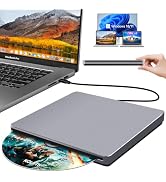
Desertcart purchases this item on your behalf and handles shipping, customs, and support to Japan.
💼 Elevate your digital workspace with the ultimate portable CD/DVD powerhouse!
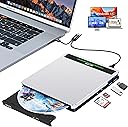
The NOLYTH External CD Drive is a sleek, ultra-portable 5-in-1 device combining a high-speed 24x CD/DVD burner with a multifunctional USB hub featuring USB 3.0 and SD/TF card slots. Compatible with Windows, macOS, and Linux, it offers plug-and-play convenience for professionals needing reliable media access and expanded connectivity on the go.


| ASIN | B0CTHQHN25 |
| Additional Features | 5 in 1 design with 2 USB & 1 TF & 1 SD slot, Aluminium Alloy cover, Plug & Play |
| Best Sellers Rank | #144 in External CD & DVD Drives |
| Brand | NOLYTH |
| Built-In Media | 1 * External DVD Drive, 1 * USB Data Cable, 1 * USB Power Cable, 1 * User Manual |
| Cache Memory Installed Size | 2 MB |
| Color | N-Silver |
| Compatible Devices | Laptop, Desktop, PC, Mac, MacBook Pro, MacBook Air, iMac, Mac Mini, All-in-one computers |
| Connectivity Technology | USB |
| Customer Package Type | Box |
| Customer Reviews | 3.6 out of 5 stars 24 Reviews |
| Data Transfer Rate | 48 megabits_per_second |
| Enclosure Material | Aluminium Alloy |
| Form Factor | External |
| Hardware Interface | USB 3.0, USB 3.0 Type C |
| Hardware Platform | Laptop, Mac, PC |
| Item Dimensions L x W x H | 5.85"L x 5.54"W x 0.74"H |
| Manufacturer | Confoly Tech |
| Media Speed | 24 multiplier_x |
| Model Number | 0726133313151 |
| Operating System | Windows, macOS |
| Optical Storage Read Speed | 24x |
| Optical Storage Write Speed | 24x |
| Read Speed | 24 x |
| Special Feature | 5 in 1 design with 2 USB & 1 TF & 1 SD slot, Aluminium Alloy cover, Plug & Play |
| UPC | 726133313151 |
| Warranty Description | 2 Year Manufacturer |
S**R
Great product
Great CD drive for my friend who had an older MAC but recently upgraded. Works great
M**N
Did not Work, would not purchase
Did not work. CD slot would not open, plus the cord that was sent would not fit the CD provided
A**R
Recommended for laptops only!
Just purchased this drive, so not ready to rate reliability/longevity. But one annoying thing: item details say it works with laptops and desktops. The data cable is a little over a foot long, which is way too short to reach the rear USBC port on my mid-tower from either my work table or the floor. The only level place it will reach is the top of the computer case, which is not a good place due to (1) heat from the CPU and (2) risk of falling. I asked the manufacturer if a longer cable would work, and they did not know. Update, July 20: Ordered a 1-meter micro-USB cable (made for external HD), and it does not work. So will have to find a suitable footstool, or just give it away.
J**R
It's working?
Ok, so far it's working on playing Region 2 DVD's. I bought this so that we could watch some of my wife's vids that are Region 2. It works with that but there is a bug at times. Not sure if it's the Player or the PC. It seems to loose which drive it's under and stops playing the DVD. I am running a HP with windows 8. Our set up is this PC is plugged into the TV under VGA/PC port, the sound external of PC is plugged via 5mm/RCA splitter right into the Home Stereo System. Most Smart TV's can view the internet, but it's patchy trying to navigate this way. Here with the PC/wireless mouse/wireless keyboard we can work this fine. We have more of a refined way of watching what we want. When I ran the first DVD, it did play it without confirming what Region I wanted. But this is day one with this purchase, though and we're still sorting out the bugs. We haven't operated this PC in while so we are still doing updates on OS of the HP. But this drive we bought, came with (2) cables. The first one I'm guessing is for the the built in Flash Drives power cord. The second is the USB. Now this is looking like USB 2 or 3. I use only the USB cable and not the power cable. But the DVD Player works without any lag on the vids. The cables are less than 12". So the best way to use this Drive is apply Velco with sticky backs onto the DVD Player. You can find this stuff everywhere. Peel and stick and stick this drive where you want. I did it on the side of my PC so I can reach the Drive Bay on this player. That way it's not flopping around. This drive is a little flimsy on the plastic side, so it's not going to take a lot of abuse. Stick and be done with it. Also. The manual that came with this is somewhat misleading. The English is that of a Chinese Company, so it's like Yoda from Star Wars trying to explain this set-up. In a way it's hit or miss kind-of. But for a PC DVD player less than 20 bucks. you can' t expect much. I hope I was able to cover some bases for someone. Now my wife can watch the Dukes Boys in German until her heart is content.
W**L
Still lost
It doesn’t work. There’s no video to help with this unit
P**R
Separate cables for power & data.
Wasn’t able to use this item. Two “usb” connections needed (as far I could tell). One connection for data and one connection for power. Too much juggling ports for me, especially when there are drives that can use the same port for data & power.
Y**A
Won’t play DVDs
It will play my cds perfectly fine but it will not play any of my DVDs which is the reason why I got it. Not returning but still disappointed.
K**A
Isn’t compatible with MacBook Air
If you’re planning to burn CDs on your MacBook Air, this product isn’t for you. I tested it with both my 2020 and 2024 MacBook Air models, and neither were able to detect it. Save yourself the trouble.
Trustpilot
3 weeks ago
5 days ago