


🚀 Elevate your desk game with power, speed, and style — all in one sleek dock!
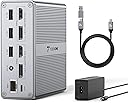
The TobenONE DisplayLink Docking Station is a versatile 18-in-1 hub designed for MacBook, Windows, and ChromeOS laptops. It supports dual 4K@60Hz monitors via HDMI and DisplayPort, delivers 65W power to charge your laptop, and offers multiple USB ports including ultra-fast 10Gbps USB-C and USB 3.1. With gigabit Ethernet, SD/TF card readers, and a premium aluminum build, it streamlines your workspace with a single USB-C cable connection, perfect for professionals seeking a clutter-free, high-performance setup.


| Asin | B0BK3GCHBM |
| Best Sellers Rank | 287,543 in Computers & Accessories (See Top 100 in Computers & Accessories) 1,867 in Docking Stations |
| Brand Name | Tobenone |
| Colour | Grey |
| Compatible Devices | Windows 10/11 & macOS 10.15.x and later, ChromeOS 100.x and later Supports full-featured USB-C, USB 3.0, and Thunderbolt 3/Thunderbolt 4 systems, including M1/M2/M3-based MacBook Pro/Air (Original M1/M2/M3, M1 Pro, M1 Max, M2 Pro, M2 Max, M3 Pro, M3 Max); Intel-based Thunderbolt 3 MacBooks(late 2016+); Dell XPS 13/15, Dell Latitude, Dell Inspiron series; Microsoft Surface Pro/ Go/ Book/ Laptop models; HP ProBook, HP EliteBook, HP Spectre x360 series; Lenovo ThinkPad, Lenovo IdeaPad, and Lenovo Yoga; LG Gram; thousands of other laptops which are compliant with USB-C ports, USB 3.0 or USB 4.0 ports |
| Customer Reviews | 4.3 4.3 out of 5 stars (255) 4.3 out of 5 stars |
| Hardware Interface | 3.5mm Audio, DisplayPort, Ethernet, HDMI, USB 2.0, USB 3.0, USB 3.1 Type C |
| Item Dimensions L X W X H | 33L x 104W x 104H millimetres |
| Item Type Name | Universal USB 3.0 and USB C docking station |
| Item Weight | 19.63 Ounces |
| Manufacturer | Tobenone |
| Manufacturer Part Number | UDS030 |
| Model Number | AS048-2003250D1 |
| Number Of Items | 18 |
| Number Of Ports | 18 |
| Total Hdmi Port | 2 |
| Total Usb Ports | 8 |
| Wattage | 57 |
User
So far it has been good.
Been using it for 5 days and I am not seeing flickers or sudden disconnection which I was experiencing from my other docking station.
User
Broken product and worst customer service
The dock doesn't work and when I returned the item, is till haven't gotten the refund. Horrible customer service
User
My dreams have been answered!
***UPDATE***I ran into a couple problems using this dock as a desktop replacement. I wanted to be able to leave my M2 MacBook Air on all the time, so it would be immediately available whenever I needed it. Tobenone support was outstanding, sticking with me until we solved the issues together.The problems made me consider dropping this to 4 stars, but the excellent support and finding a workable solution brought it back up to 5.Here are the two issues and how to fix them:1. The dock was shutting down when left idle for a while. It was necessary to disconnect and reconnect power to get it working again. The fix: while I had my M2 MacBook Air set to never sleep, I did have it set to shut off the displays after a half hour. This is what was shutting down the dock. I went to System Settings>Lock Screen and set "Turn display off on power adapter when inactive" to Never. If you don't want your displays lighted when you're not using them, you can find a blank screensaver by searching the web. Admittedly, this won't completely shut off your displays.I changed my setup after upgrading to an M3 MacBook Air, wanting to leave the cover open so this more-powerful chip didn't overheat the computer. I found that I could leave the displays set to shut off without creating any problems. I don't have the M2 any more to compare, but it's possible leaving the M2 version's cover open would also solve the problem.2. The dock's USB ports wouldn't recognize some new devices when I plugged them in. It turned out this was because my MacBook Air M2 and the other connected devices together were drawing more power than the dock could supply. The main power drains were two SSD's I had connected. There are two solutions. One: for real power hogs, like an external drive, use a powered version or connect through a powered USB hub. Solution two: connect the MacBook to a power adapter rated at 70 watts or more before connecting to the dock. Per Apple support, the MacBook will use the stronger power source, so this leaves the dock's full power to run connected devices. Right now, using just the dock's power source, I'm running a webcam, gigabit network connection, two 4K monitors, a printer, a 2 TB SSD, and a powered 6 TB SSD, in addition to powering the MacBook.----------------I've been using a laptop since way back when people would stare and ask "what is that thing?" For all those years, I've dreamed of being able to use just one computer - having a laptop powerful enough that I didn't need a desktop.When I read about the M2 MacBook Air, I just had to try it. And it really DOES have the power I need. What was missing was a good way to get the big multiple displays I need to get meaningful work done.The Tobenone DisplayLink Universal USB C Docking Station fills that gap admirably. Following the simple, included instructions, I was able to get set up and running in just a few minutes.Be SURE to follow their instructions to download and install the Displaylink app before trying to use external displays. This is NOT the same as the "Instantview" used with some other docking stations (including some others from Tobenone).I'm using dual Samsung CF396 (LC24F396FHNXZA) curved HD displays (1920x1080), NOT 4K displays, so I can't tell you how well this dock works with dual 4K displays, but it does a great job with these. The second display looks a little washed out, but I think this is a shortcoming of Ventura, which doesn't allow two external displays with the MacBook Air, rather than the Tobenone itself. The required free DisplayLink driver uses "Screen Recording" to get around this limitation, but apparently with some loss of brightness, at least on my display.I do have a single 4K panel, and on it the display from the Tobenone is absolutely brilliant, comparing favorably with the MacBook's own display. I have every reason to believe it would do just as well with a second 4K.All the other ports seem to operate just fine, though I haven't yet had the chance to do intensive speed tests on them.Overall, I can highly recommend the Tobenone DisplayLink Universal USB C Docking Station who wants to turn their MacBook into a desktop-equivalent.
User
Barely gets the job done, and that's about it.
The unfortunate reality for M1 owners is to go the way of the docking station that uses DisplayLink if you are wanting more than 1 extra monitor. In my case, I have 2 extra monitors. So after a good amount of research I purchased this one. It had good reviews and consistently came up on many lists that I cross-referenced.The setup is pretty easy and straightforward. Download the DisplayLink software, it will walk you through all the allowances you need to make on your computer, plug in your monitors, and there you have it. Multiple external monitors.Picture quality is pretty good on each of my 32" monitors. Where I have been having issue is frame rate and lag. When watching any video (YouTube, Netflix, etc) there is noticeable, and distracting frame rate drop. There is also lag with just navigating the cursor across the screen when looking at a website.I've tried adjusting the display settings, but that doesn't seem to work. Even as I type this review, I notice a distinct lag in the typed letters appearing in the text box.All in all it does what it needs to do. I would suggest skipping it for something else if the lag and frame rate thing would be distracting to the point of annoyance for you. It gets to be bad enough sometimes where I am close to returning it, but for the price point I am just going to probably stick with it until I upgrade to the M2 in the future, which to my understanding does allow multiple external monitors without the use of a specific DisplayLink dock.Edit : Have to update this to 2 stars due to there be a constant audio drop when I use bluetooth headphones. It cuts out for a good 3-5 seconds at random. Beginning to think I can't truly recommend this docking station and am considering returning it before the window to do so closes.Update : The latency and audio drops continue to be a persistent issue. I can't give this product any more than a single star. It's distracting, I end up misclicking on links because the cursor lags so much. It's just not a very good hub.I am using this with a Macbook Air M1, btw.**Update**Just yesterday my MacBook Air just stopped connecting to the dock. I’ve tested the cable to make sure it works and it works fine when plugged in to other devices directly from an outlet, but when plugged into the USB C port on the back of the dock it doesn’t work at all. I’ve also tried a USB 2.0 to see if it will work and it still won’t connect to my laptop. So somehow all connectivity to my computer has become invalid. This thing is garbage and I wouldn’t recommend it to anyone. I wish I could give it zero stars.
User
Another Solid Product from TOBENONE
Earlier this year I purchased the USB C Docking Station Dual Monitor for MacBook Pro for my home office. What got me was the price and the functionality offering. Compared to the other options out there the cost was on target. I refuse to $300 - $500 for s docking station. Needless to say its been a total success and I love the device. I have had zero issues with it.Unlike my home office, at work I have two monitors and I have to use one on a display port and one on the native HDMI port on my MAC, I have cables everywhere. TOBENONE came out this unit and I could not resist. Based on my success of the device for home it's a no brainer. This one is more expensive but you get more with it, including a dedicated power supply. So when I get to the office its one cable and I am up and running. It has ports galore eliminating the need for any additional devices.Here is what you get for a few bucks more.• Dedicated power supply• Dual Monitor support for both HDMI and Display Port• Ethernet port• Headphone port• 3 USB 2.0 ports• 3 USB 3.0 ports• Micro SD slot• Standard SD Slot• 10Gbps USB Standard Port• 10Gbps USB C Port• Sturdy Aluminum Case• Universal USB C CableYes these might be listed in the details but it's worth mentioning here for the doubters as I am one of those.After installing the DisplayLink Manager driver the unit came to life with both displays. Please note that you have to Authorize the DisplayLink Manager in the MAC Security Settings under Screen Recording (see image). That's an apple requirement. I have been using it for a week and to date no functionality or compatibility issues what so ever. I have tried both HDMI and Display Port connections and there too, no issues. While there are too many ports to test all of them I have used most and all worked and worked well. I don’t have sophisticated speed testing but my simple test showed the performance was there also. I do video capture and recording from an external microphone. Being in an office environment I do a lot of virtual meetings. The hub keeps up.The port connections are solid and snug. The case is 100% aluminum, solid with finished edges and clean lines. Will not be an eyesore on your desk. will make for that clean minimalist look. There are no drawbacks to this device but I did notice one thing basically a nit ( I am very picky). The universal cable has an adapter from USB to USB C. The rubber holder prevents the port sitting flush to the dock. It worked fine but being an engineer I notice that stuff.
Trustpilot
1 month ago
3 weeks ago