Desertcart purchases this item on your behalf and handles shipping, customs, and support to Japan.
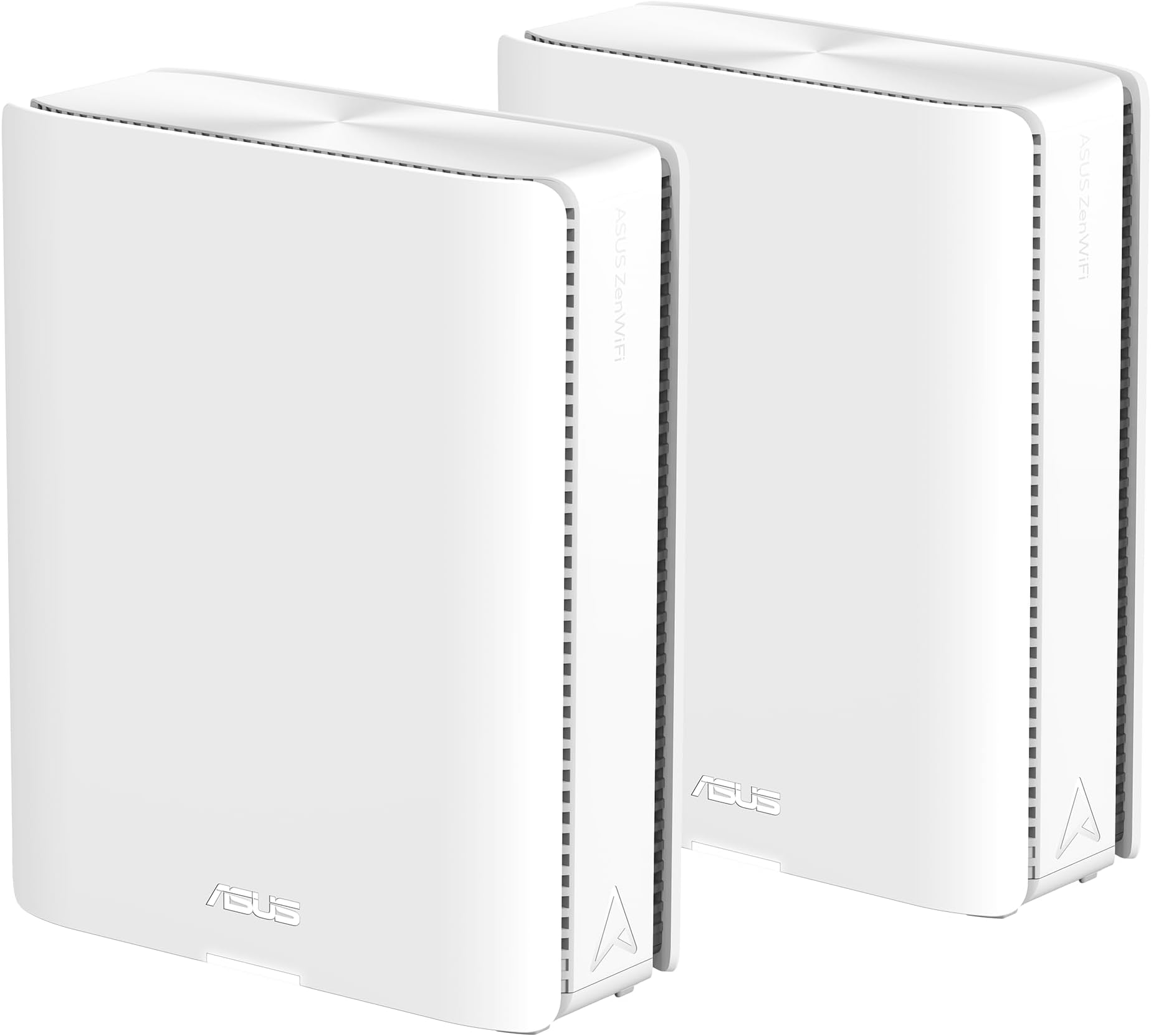
🚀 Future-Proof Your Smart Home with ASUS ZenWiFi BQ16 Pro – Speed, Coverage, and Control in One!
The ASUS ZenWiFi BQ16 Pro is a premium WiFi 7 quad-band mesh router system delivering up to 30Gbps speeds and coverage for up to 8,000 sq.ft. Its AI-driven AiMesh technology ensures seamless connectivity across multiple nodes, while advanced features like Multi-Link Operation, 12 internal antennas, and dual 10Gbps ports future-proof your smart home network. Designed for professionals and tech-savvy families, it offers robust security, parental controls, and flexible SSID management—all managed via a sleek app interface.


| ASIN | B0D398YQPN |
| Antenna Location | Gaming |
| Antenna Type | Internal |
| Best Sellers Rank | #403 in Computers & Accessories ( See Top 100 in Computers & Accessories ) #24 in Whole Home & Mesh Wi-Fi Systems |
| Brand | ASUS |
| Built-In Media | Power adapter, Quick start guide, RJ-45 cable, Warranty card, ZenWiFi BQ16 PRO (2 pack) |
| Color | WHITE |
| Compatible Devices | Gaming Console, Personal Computer, Smart Television, Smartphone |
| Connectivity Protocol | Wi-Fi |
| Connectivity Range | 8000 square_feet |
| Connectivity Technology | Wi-Fi |
| Control Method | App |
| Controller Type | App Control |
| Coverage | 8000 sq.ft. |
| Customer Reviews | 3.6 out of 5 stars 183 Reviews |
| Data Transfer Rate | 11529 megabits_per_second |
| Frequency | 6 GHz |
| Frequency Band Class | Quad-Band |
| Item Dimensions L x W x H | 6.9"L x 2.8"W x 8.6"H |
| Item Weight | 2.9 pounds |
| LAN Port Bandwidth | 10000 Mbps |
| Manufacturer | ASUS |
| Mfr Part Number | BQ16 Pro(W-2-PK) |
| Model Name | BQ16 Pro(W-2-PK) |
| Model Number | BQ16 Pro(W-2-PK) |
| Number of Antennas | 12 |
| Number of Ports | 4 |
| Operating System | ASUSWRT |
| Other Special Features of the Product | 2 Pack, AiProtection, WiFi 7 Mesh Router, blazing-fast quad-band, smart home master |
| Router Firewall Security Level | Advanced |
| Router Network Type | hybrid |
| Security Protocol | VPN, WPA3 Enterprise, WPA3 Personal, WPA2 Enterprise , WPA2 Personal, WPA Personal, WPA Enterprise , WPS support |
| Special Feature | 2 Pack, AiProtection, WiFi 7 Mesh Router, blazing-fast quad-band, smart home master |
| UPC | 197105389106 |
| Unit Count | 2 Count |
| Warranty Description | 3 years ARR warranty |
| Wi-Fi Generation | WiFi 7 |
| Wireless Communication Standard | 802.11.be, 802.11ac, 802.11ax, 802.11n |
| Wireless Compability | 802.11.be, 802.11ac, 802.11ax, 802.11n |
S**T
Setup and final results better than expected
We purchased a new, larger house, and I needed to resolve some coverage and speed issues. My AX86U did an admirable job and while I could have just purchased another, we have some Wifi 7 devices so I figured I'd go ahead and futureproof. I read a lot about my options (primarily Wifi 6E and Wifi 7) on several sites, but ultimately, DongKnowsTech is what convinced me to buy this unit over others. My main reason for writing this review is because there are not many reviews yet, and there are a lot of experiences posted elsewhere that were not good. Based on my experience and what I've read, I believe that this is likely related to bad software on release and has been resolved with firmware updates. Perhaps my experience will help you feel more confident about buying this unit if you are strongly considering it. I was nervous about the setup and performance based on experiences some other people had. The only issue that I had during setup was that the node MUST be close to the main unit when setting it up. Even though they can communicate in different areas of the house, it has a difficult time completing setup if they're not close by and will just flash blue. If you experience this and it's in another room, move it in the same room temporarily to complete setup. Once the setup was complete, I updated firmware on both devices, and updated the MAC address on my ATT Fiber modem which was already in Passthrough mode. Once that was complete, I moved the node upstairs and confirmed that it was working. Since I have ethernet in the room that it's in, I plugged in to utilize ethernet backhaul. I also changed a couple of settings in the Asus router app to prioritize ethernet backhaul over wireless backhaul. Once that was done, I confirmed that I still had a connection upstairs, and the app confirmed that it was using wired backhaul. Ran some speed tests on my phone and I was getting 700+mbps on the unit upstairs on 5ghz. Faster than I expected. Wifi downstairs is just as strong. My office and gaming pcs are plugged in ethernet, and I'm capping out at 900-1000mbps whereas I was previously hitting 600-750mbps. NOTE: I switched out all of my ethernet cables to Cat 6A, so this may have had an impact on speeds. Previously, I had Cat 5E and some cables that were not marked and may have been lower grade. One odd thing that I have run into is that my Bravia 7 does not want to connect to any network that has 2.4, 5, and 6ghz available. If I limit it to 2.4 and 5, or one or the other, OR just 6ghz, it will connect fine. But, it will not connect to a network with all 3 active. For now, I have it on it's own network using 6ghz but I'll have to dig into this. I have not had any issues with any other devices connecting. That includes TVs, Hue bridge/bulbs, tablets, game consoles, soundbars, robot vacuum, smartwatches. Everything is working. Overall, I'm very happy with the product. The setup was painless and though I expected good coverage, the speeds are better than expected. It has the same Asus features that I'm familiar with, without extra fees. The only thing that I'm not happy about is the price. I know it will come down and Wifi7 devices will be cheaper in time, but I needed a solution now and didn't want to re-visit again in a couple of years. Since I used Amazon Rewards, in combination with a lower priced Like New unit with Amazon Resale, the price was quite as hard a pill to swallow.
J**N
Awful Smart Home Connectivity & Customer Support is a Scam
SUMMARY: I chose not to listen to poor reviews for this router in favor of more recent reviews that mentioned firmware updates have resolved the issues. I'm on the latest firmware and after 16 days of testing I've finally decided to warn you not to buy this router. Key negative points: terrible stability for smart home devices, mesh coverage is questionable, and a horrible support team. I'd have patience with the network issues if I felt like the support team was keeping me informed of firmware updates their working on, but they have completely ghosted me after I provided all the proof that this is an issue on their end. ISSUE: Anyone spending this much money on a router mesh system is likely doing so because they have a large number of smart home devices. In big letters on the front of the box, it bills itself as a "Worry-free Smart Home Mesh". Those words will sting with painful irony if you go through the lengths I have to try to get this to be stable and reliable. I'm a full-stack developer and work with complicated systems for a living so I'm no stranger to troubleshooting, configuring, researching, etc. I've given it my all and I can't get this to work with my existing network of 2.4 ghz-only smart home devices. PRO-TIP: No support team told me this, this is just something I discovered on my own. If you're having trouble getting devices to even sign in on the 2.4 ghz or IoT networks, then disable MLO and disable the radio bands for the 6 ghz networks. It makes no sense, because that shouldn't interfere with the IoT network or 2.4 ghz bands, but things will magically connect if you do that (so basically disable everything you're paying a premium for). The problem is, after they connect, they will only have a connection lifespan of 15 or so minutes before they lose connection and then take a while to reconnect - even if the signal is excellent (which is not a problem I've ever had with my 8-year-old Netgear routers). HORRIBLE CUSTOMER SUPPORT: I've spent hours in communication with the third-party support teams for my smart home devices (a big chunk of these devices are LIFX - their support team is excellent, btw). After trying all the configuration changes suggested by other experts, I finally reached out to ASUS support to see what they could offer. Their phone support line is a joke... I'd be on hold for 5 to 10 minutes and then it would hang up on me before ever connecting me with a person... It took 6 of these calls before I reached somebody. When I finally did and explained my situation as well as all the troubleshooting steps I'd tried so far. He admitted that I'd already gone above and beyond all the troubleshooting steps that he would've suggested and he'd elevate this to their advanced team. He had me send router logs and comments to get a ticket started... all good, seemed like I was finally going somewhere. 2 business days later, I got an email asking for the same logs sent a different way, plus many different forms and technical information that they wanted to gather... I spent a good hour or two collecting all of that information for them and sent it off... 4 business days later, I got an email asking really low-level questions that would have had me repeating information. I answered the questions and asked if they have reviewed the documentation I've already sent (because if they had, they wouldn't have needed to ask those questions again). After not hearing anything 4 business days later, I reached out again asking if they could let me know if they had given up or were still reviewing my case. And now today, an additional 5 business days later I still haven't received any reply... That's three weeks of the support team stalling me until they ghosted me. I honestly think that there is no "advanced support team" and they didn't expect anyone to have the patience to get this far. Their script doesn't cover how to continue pretending like they're doing something. THE GOOD AND THE BAD: It's unfortunate... I really wanted this to work out as ASUS offers parental controls and other protections that other brands charge a subscription fee for. They've got a *ton* of nice customization options and ways you can set things up. If it *worked*, it would be an excellent choice. That's about as positive as I can be with this router. If I paid $50 for this router, I might give 3 or 4 stars with a "you get what you pay for" kind of review. The value and support is not there for the premium cost which justifies the 1 star review. Ignore my review if you're ready for a "Worry-Filled Smart Home Mesh". First and last ASUS purchase for me and now all this wasted time and effort is going to be returned to Amazon.
A**R
This router is perfect after finishing the configuration.
I'm using this as an AiMesh node with my main BE98 Pro router. The initial setup was a pain, but after it was done, it started working great. A quick tip: I'd recommend setting up three WiFi networks at most. Use the main MLO WiFi for your important devices like your phone, tablet, console and PC. Then, put all your IoT devices (surveillance cameras, smart bulbs, smart TV and etc.) on the separate 2.4GHz and 5GHz networks. Also, make sure get rid of any old devices that are still on 802.11ac or older (even some devices using 802.11n). They really do bottleneck your router's bandwidth and slow everything down. This router has a lot of great features, and it was easy to set up AdGuard Dns and NordVPN. The speed is super steady and rock-solid. The only thing I don't like about these new Asus routers is that you have to reboot the router and all the nodes every single time when you add a new IoT devices. If you don't, it just connects and disconnects over and over. The range for 2.4GHz and 5GHz is really great, but the 6GHz range isn't. If you have a big house with a lot of walls, the 6GHz signal won't be very good. Overall, I recommend this routers. It's pricy but worth to buy it.
S**N
Update: one router died. Messy setup but working well
Update: Adding a star as Asus did process a refund which also covered tax. Replaced with a deco and everything is stable. The software is not as well flushed out, but everything is there that’s needed. Speeds are similar. Update: 2-3 weeks after returning the dead router I received an email. They do not have a replacement and are asking if I would accept something different. You know as miss matched hardware in a mesh system works great! And given I have the top of the line I would be getting something less. Please learn from me and avoid this like the plague. I had to pay shipping to send the dead unit back so I am $1k in with a totally unstable system, no mesh, no replacement for the dead unit. And you better know networking well to get it up and running and use a clone MAC address for it to work with at least my ISP. Wish I would have kept the box and sent it back while I had the chance. Update. Set up was not seamless at all. Adding additional networks is easy but unstable. Random drop outs across all networks. If you have something that can only do 2.4 you will need a separate network for this if aggregating the main one (which is a main feature). Used for what 3 weeks and one of the routers is dead. No lights, no body home. For over $900 this is absolutely crazy. Paid the cash so I would have a rock solid system. Threw away the box otherwise I would return this and go through the pain of setting up something else. Like most people buying this the pain is real we have a smart home so maybe 40 devices. Old review: Well I figured this would be plug and play as far as getting the router and node up and running. It was not. Spent 2 hours getting both the router and the node to play nice. Wondering if it threw in a firmware update without me knowing. Finally up and running and the performance so far is good. The mesh is more stable than most looks like it uses the WiFi backbone of you have a cat5 in your walls. I have a g tv in my sunroom that would not work with my prior mesh combo on netgear. Older stuff. With this in the same locations it runs fine. Just hoping it will be stable after the messy setup. I do have the iot running, basically a guest network, with about 20 google devices on it. And unlike others this seems to be working fine. I did add a few things to the static address table too. May update the rating if my confidence goes up in its stability.
D**K
Absolutely the Best Router WiFi I have ever used. Real "AI."
Why did you pick this product vs others?: Why did you pick this product vs others?: Comcast/Infinity replaced my failing modem, and snuck in a router which destroyed my home network (DHCP conflicts, although it took a while to comprehend what was wrong). I discussed with Grok what home router was reliable and not prone to intervention by the CCP, and Grok stated that this router had an excellent reputation for reliable hardware with a 3 year warranty, extra large heat sinks, etc., so I bought a pair. First, this widget worked with my as yet unknown second router that I did not appreciate Comcast had snuck in, the "AI" in thing is clearly real, it handled the DHCP conflicts itself before I figured out what was going on, second for the first time ever I get strong signals all over the house (I have subfloors and drywall that RF just does not propagate through), third it is very fast, and fourth "it just works." The "AI" in this thing is really real, much to my surprise. I suspect it is using active beamforming to get such a strong signal and while many advertise this, this one actually functions! I strongly recommend this device. Eventually I discovered that Comcast/Xfinity had snuck the router in, despite denying it, and I think Xfinity stands for infinitely stupid tech support, but despite the router address conflicts, this router "just worked" from the outset, plug it in, run through the setup, "it just works." Therefore, I can very strongly recommend this router for "solving everything," "just working," has the strongest WiFi signal I have ever experienced (in 15 years), and is all around very solid. Novice or pro, this router preserves your time, which is priceless. Pay the price. Get the best.
T**A
Best WiFi Network I've ever owned
The BQ16 Pro started out rough for me. It was crashing often and would lose it's configuration settings occasionally. I was assuming it was just a bad system. But I called ASUS support and we were able to determine that one of the nodes was defective. After receiving the replacement, it has been phenomenal. 1. The speed is fantastic. I was looking for a system that would allow us to take advantage of our 1GB Internet connection via AT&T. Speed from my iPhone 17 are over 1 GB when connected to the main router, and around 500 mbs when connected to the node. 2. Pretty easy to set up. I have an IT background, but I think that most would find this to be a relatively painless implementation. 3. Control over my network was the most important factor to me, and the BQ16 Pro delivered that in spades. I have different groups configured that have settings for Internet filtering and scheduled downtime. I'm easily able to temporarily bypass scheduled downtime via the app. My only complaint here is that my previous WiFi system would send me a notification if a new device joined the network. I'm not able to do that with the BQ16 Pro. 4. Note that configuration of the IoT network is going to be a "must have" if you have a lot of devices in your home. Some of my TP-Link smart switch devices could not connect to the regular network, as well as a scale. Surprisingly, my Peloton had trouble with the main WiFi network as well. Putting all of them on the IoT network fixed the problem. 5. Reporting features are fantastic. I'm able to see top consumers of bandwidth, traffic monitors and analyzers, statistics, etc. Lots of stuff for me to geek out on. 6. Coverage is great. I have a 3,300 Sq. Ft 2 story home. The main router is in a corner office on the 1st floor. (Not an ideal location being in the corner of the house, but that's where the AT&T router is). The node is also on the 1st floor in the middle of the house. I was nervous about going from 3 to 2 access points and how that would impact the 2nd floor. But there isn't a place in the house that doesn't have a strong connection. 7. Very easy backup and restore of system settings. This may sound small, but when I received my replacement system I did a quick restore, saving me hours of configuration time. 8. The Trend Micro protection that comes free is great as well. (Unlike some of the competition that charges an additional fee for such protection). I'm giving it 4 stars instead of 5 for: 1. Not providing a way to receive a notification when new devices come on the network. This is important to me as when my kids' friends come and get on the network, there is no filtering on their device unless I go in and put them in a group. 2. The tech support was weak. Granted, we were able to determine that one of the devices was defective. The technician was very friendly and was trying his hardest to help. But there was a major language barrier. He clearly didn't understand a lot of the things I was saying, and would respond with a few of the lines he had memorized in English no matter what I said or asked. Overall, definitely worth the money. These are a lot more expensive than other options out there. But I just couldn't find other options that were cheaper and checked all the boxes I was looking for.
G**1
Asus ZenWiFi BQ16 Pro setup is rock solid
I ordered my Asus ZenWifi B16 pro router on Amazon after online research including a review on "Dong Knows Tech". I was impressed with the fact it contained all the capabilities of Wi-Fi 7 at launch. Specifically, AFC which makes the 6GHZ range similar to that of the 5GHZ. I already owned the Asus ZenWiFi ET8 mesh system, which had 6GHZ but was extremely limited in range. That being said, I have noticed that my Samsung S24 ultra phone has benefited from this extended range. It is my only Wi-Fi 7 device that I can roam around the house with. My desktop has a Wi-Fi 7 pci card installed, also has amazingly fast speeds, but is in the same room as the main router. The setup for the 2 Mesh system unit was difficult. It took multiple attempts to get the main unit connected to my Cox gateway after multiple resets by myself and Cox support. Once online, it took multiple attempts to get the node connected even though it was within the recommended three feet. I then started to set up my B16 pro similar to the ET8. That also took a great deal of time as each setting change caused the main units led to go red. I had to reset to factory settings twice before it finally remained stable. I do want to note that both units came pre-installed with the latest firmware (3.0.0.6.102_36789). Things remained stable until I added AiProtection. I noticed CPU spikes and dropped network pings, until I disabled it. Since disabling, I have noticed stable CPU usage. This is disappointing as I have used Ai Protection on all my Asus routers and surprised it caused an issue with this high-specced device. I then attached my WE Easystore external portable drive to the USB 3.0 slot. RAM usage increased from 41% to 51% (1050MB used 998MB free) and has remained at that percentage. Finally, I added my ZenWifi ET8's as nodes and connected them via Ethernet. I turned the Ethernet Backhaul mode switch to on (it is off my default). I also set the Backhaul Connection Priority to 2.5 WAN only. So far, this setup has been rock solid and I have had no dropped connections. Overall, I am pleased with my purchase of this cutting-edge technology.
S**.
Be Ready for Frustration
I'm not one to leave reviews, but I wanted to warn people this is not a good, stable, reliable device. Maybe if you use it as a vanilla setup,you'll be fine but I wanted to make minor configuration changes.To be honest, I don't have a lot of networking skills, but don't feel I should need them. I wanted to an IoT network which was on a different subnet of my main network. No matter what I tried, I couldn't get it to work. There wasn't enough options allowing me to setup VLANs the right way. I settled by having the IoT network on the same subnet, but in isolation mode. Isolation didn't matter. IoT devices could still interact. Next, whenever you make a slight tweak, like adding a device to your static IP list, it was cause all devices to disconnect, the router took what seemed like 5 minutes to be available again, and clients struggled to reconnect. I tried to contact support. Their solution was to factory reset the device. They didn't even bother to look at the logs. The final straw what the network kept going down. Sometimes it would be one of the networks, Main or IoT, or both. A reboot would get it going again but devices wouldn't connect for a long time which was incredibly frustrating. I would even lose connection while hardwired directly to the main router, and it was during a video call. When the system was working, I had amazing speeds, even through the mesh node, using my Pixel 9 Pro. I'm sending the device back. I hooked up my old router, an Alien Amplifi with an extra router as a mesh node, and immediately everything came back online. I guess I will try again when I figure out a more stable device. Good luck!!
J**N
Amazing
There's work even better than I'd hoped. I have 900 Mbps broadband and I now get the full speed in another room, through two brick walls with just wireless backhaul (no cable). The functionality is also exceptional. So far I have a separate IoT wireless network and a Wireguard VPN server set up and it's only day one. Very expensive, but they live up to the hype.
A**R
Fácil de configurar
Son fáciles de configurar y es la mejor tecnología de Wifi
S**U
Wow! Speed and Range!
I screwed up my first attempt at setting it up, but resetting the "base" unit allowed me to do it properly, and since then it's been flawlessly issuing a ~1GB signal without interruption. Handles multiple IOT devices as well as sometimes two laptops, two tablets, two handhelds, and one or two video streaming devices, with no interruption in service. Expensive, but worth it.
A**R
Seriously Disappointed
Terrible product. Kept dropping connections after initial setup, and I couldn't load web pages without broken images or watch a YouTube clip without major timeouts. Not what I expected from a top-of-the-line router.
J**N
Don’t buy if shipped from the US
Product was good while it worked, but after 11 months it stopped working. It is covered by warranty, but the seller who sold it through amazon.co.uk is US based, and he is refusing to honour the warranty. ASUS similarly are refusing to honour the warranty because it was bought from Amazon UK, but shipped from the US. Amazon are being little help in achieving a resolution, meanwhile, I’m £1,200 out of pocket with no internet.
Trustpilot
3 weeks ago
2 months ago