💼 Light up your workspace, not your worries.
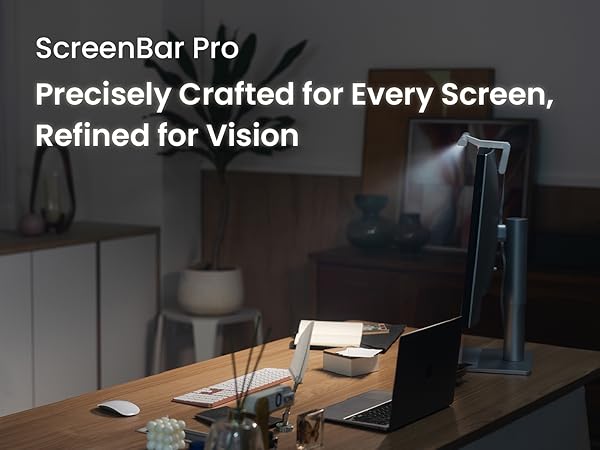
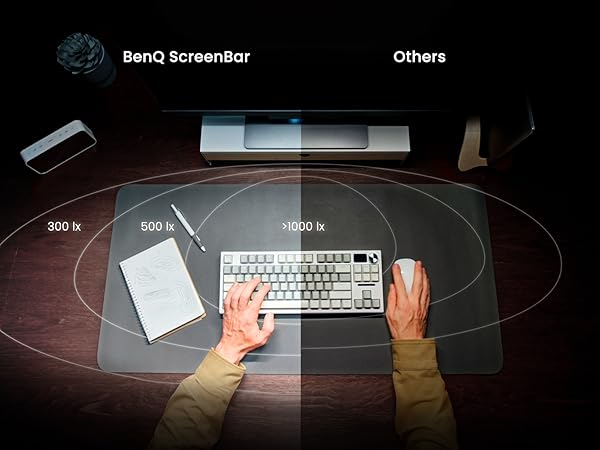
The BenQ ScreenBar Pro is a premium LED monitor light bar designed for professionals who demand eye-care and efficiency. It delivers ultrawide, 1000 lux brightness with adjustable color temperature, fits curved monitors up to 1800R with a patented clamp, and features a motion sensor for automatic on/off. Its asymmetrical lighting prevents glare and screen reflection, enhancing comfort and productivity. Powered via USB-C and controlled by touch, it’s a sleek, space-saving upgrade for any modern workspace.


| ASIN | B0CZ9P1QW9 |
| Additional Features | Adjustable Color Temperature, Patented Clamp, Ultra-wide Illumination |
| Age Range Description | Adult |
| Base Material | Aluminum |
| Best Sellers Rank | #14,954 in Tools & Home Improvement ( See Top 100 in Tools & Home Improvement ) #5 in USB Reading Lamps #103 in Desk Lamps |
| Brand Name | BenQ |
| Brightness | 1000 Lux |
| Bulb Base | BA21D |
| Color | Black |
| Connectivity Technology | USB |
| Control Method | Touch |
| Customer Reviews | 4.8 out of 5 stars 1,040 Reviews |
| Efficiency | High Efficiency |
| Finish Type | Polished |
| Finish Types | Polished |
| Global Trade Identification Number | 04718755093227 |
| Included Components | Transformer, lamp fixture |
| Indoor Outdoor Usage | Indoor |
| Installation Type | Clamp-mounted |
| Is Product Cordless | No |
| Is Waterproof | False |
| Item Dimensions D x W x H | 5.31"D x 19.68"W x 3.62"H |
| Item Type Name | monitor light |
| Item Weight | 800 Grams |
| Lamp Type | monitor lamp |
| Light Source Type | LED |
| Lighting Method | LED |
| Manufacturer | BenQ |
| Manufacturer Warranty Description | 1-year warranty. |
| Material Type | Acrylonitrile Butadiene Styrene, Aluminum, Polycarbonate, Zinc |
| Model Number | 9H.W4KWT.WS2 |
| Mounting Type | Desktop |
| Number of Items | 1 |
| Number of Light Sources | 1 |
| Number of Pieces | 1 |
| Power Source | Corded Electric |
| Product Dimensions | 5.31"D x 19.68"W x 3.62"H |
| Recommended Uses For Product | Reading, Task Lighting |
| Room Type | Dining Room, Living Room, Office |
| Shade Color | Black |
| Shade Height | 9.2 Centimeters |
| Shade Material | Metal |
| Shape | Rectangular |
| Specific Uses For Product | Dim room, Gaming setup, Home office, Monitor, Office |
| Style Name | Modern |
| Switch Type | Touch |
| Voltage | 5 Volts (DC) |
| Water Resistance Level | Not Water Resistant |
| Wattage | 5 watts |
S**R
Outstanding in nearly every way. But here's a reason why you might not want to buy it...
My office isn't well-lit. For years, I've been using a desk lamp, which is essential for reading and writing, but my desk isn't huge and the lamp reduces the amount of useable workspace. Amazon somehow sensed my frustration and suggested this BenQ monitor light bar. The price ($120) seemed a bit high for what you get, but I figured I'm not just getting a light, I'm freeing up space which will really be useful almost every time I need to work at my desk. So I bit the bullet and ordered one. I've been using it for a month now, and I really love it. Setup was easy and fast. All the controls are on the top of the light bar and they're touch controls. It's easy to adjust the brightness and the color temperature (warm vs. cool light) to your exact liking. There is no learning curve, everything just works, you don't have to think about it or read a manual. It has a feature that turns the light on whenever it senses movement within a couple feet. Practically, it turns the light on when I sit down at my desk and turns it off about 10 or 15 minutes after I leave. I love that it's powered by USB-C, rather than batteries you have to replace when they wear out. Like many monitors, mine has extra USB-C ports for peripherals, but the ports also provide power to accessories like this light. Okay, so why should you consider NOT buying this? Simple: Amazon sells other monitor light bars that do almost everything this one does for half the price (or less). I decided to get a second monitor light bar for my office at work, and I was about to buy another one of these. But the Amazon algorithm showed me other monitor light bars that cost less, by a brand called Quntis. They make a variety, ranging from $40 to $70. I bought a 20" wide Quntis model for $55. For me, the Quntis has one disadvantage. Almost all of their models, including the one I bought, has a separate remote controller that's about the size and shape of a hockey puck. And it uses 3 AA batteries (included in the package, thankfully). I strongly prefer the all-in-one operation of the more expensive BenQ. My desk gets pretty cluttered, and things on my desk sometimes get misplaced. Without the Quntis remote, you simply cannot use the light bar. Also, the adjustments to brightness and color temperature have only four levels; with the BenQ, it's easy to dial in the exact brightness and temperature you want. Looking at the user reviews of the Quntis light bars, many people say they like the separate remote. You might, too. Hardly anyone complains about the lack of fine adjustments to brightness and color temperature that you get with the BenQ but not the Quntis. I really can't recommend spending $120 for the BenQ when for $55-ish you can get a Quntis that does practically everything the BenQ does, with very minor compromises that most people can life with. That said, I'm not sending my BenQ back to get a refund and buy another Quntis.
E**.
Perfect Fit for My Curved Monitor Setup
This light bar really exceeded my expectations. It fits seamlessly on my 34” curved Dell monitor, and the silver color blends in perfectly, sleek, clean, and not distracting at all. It’s also super lightweight, so it doesn’t feel bulky or awkward up top. What really impressed me is the mounting design. It uses these soft rubber “clamps” (for lack of a better word) that grip the monitor really well without damaging or scratching anything. It feels secure, even on a curved screen, and doesn’t budge once in place. I’m powering it straight through a USB-C port on my monitor, so no need for wall adapters or extra cables cluttering the desk. The lighting itself is excellent, fully adjustable brightness and color temp, with a nice downward angle that avoids glare completely. I was worried it might feel harsh or distracting, but it’s the exact opposite. Super comfortable, even after hours of use. Bonus features like the motion sensor and webcam mounting clip just round it out. Thoughtful details all around. If you’ve got a curved monitor and want a clean, functional lighting upgrade, this one nails it.
P**S
Good feature and light quality
There are many features to like for me. 1. They auto sensing your presence works well. Its detection area is good in that it you have to be in the sitting position and on the desk area. For an example, it does not turn on when you just walk to it and just stand near sitting chair. However, when I put my phone down near one side of my keyboard, it automatically turns on while I was standing. Very good coverage area that isn't too wide or too narrow. 2. Adjustment buttons are touch sensitive. That means in theory zero force needed to control the light bar and as the result no movements or vibrations are transferred to monitor (may cause wobbling) or light bar itself (so no slightly out of position overtime). 3. Like the LEDs indicating current controls that are active - automatic on/off enabling/disabling, brightness settings etc. One minor issue thought, the turning off/on button itself does not have LED indicator. For those who sometimes need to turn off the bar right away (rather than let it go off automatically some time later on) and the room is dark (except the light from the bar), it is hard to find the on/off button without backlight LED like other control buttons. That is the reason that one star is taken off. 4. Auto brightness feature is good and seems to work well for me the way it adapt to surroundings light. 5. Total brightness, it has plenty of of brightness. My preference is even less than half for most of the time. 6. Area of coverage is great. It lights up the screen without causing any reflection from the screen. It also lights up the working space in front of you. The bar can be rotated slightly to increase desk area coverage. It should cover most use cases well, however. 7. I have not adjust any temperature setting from the bar. The default warmness is good and should be good for photo editing as well. At least it includes cool/warm light settings. 8. Installation is easy and simple. 9. Build quality is excellent. Packaging is also premium inside the box. The box itself is plain like cardboard box but items inside are well packaged with protection materials on the bar (sleeves) and other items that are included. The box is very sturdy (although it serve one time but it shows how attention to details by BenQ). Very good product.
A**.
Rien à voir avec la qualité médiocre de la compétition: - bonne stabilité et adaptabilité - détection de mouvement: s'éteint quand on ne l'utilise pas, énorme plus par rapport aux autres modèles - ajustement automatique en fonction de la lumière ambiante - retient les réglages avec possibilité de sauvegarder un favori - éclaire parfaitement le bureau sans illuminer l'écran: l'angle est réglable La perception de ce qui est cher varie selon les points de vue; difficile à dire si ce produit vaut vraiment presque 3 fois le prix de la compétition. Cependant la qualité est amplement au rendez vous et après avoir renvoyé 2 autres articles similaires bien moins chers, c'est au final celui ci que je garderais.
A**E
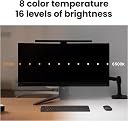
Ich arbeite viel im Homeoffice und habe lange nach einer Lösung gesucht, um meinen Arbeitsplatz optimal auszuleuchten, ohne dabei wertvollen Platz auf dem Schreibtisch zu verlieren. Die BenQ ScreenBar Pro war für mich ein echter Gamechanger – hier meine ehrliche Einschätzung nach einigen Wochen täglicher Nutzung. Erster Eindruck & Verarbeitung - Die ScreenBar Pro wirkt hochwertig und modern. Das matte Schwarz passt zu jedem Setup. - Die Montage ist super einfach: Die schmale, patentierte Klammer sitzt stabil auf dem Monitor, Eine Webcam lässt sich recht gut „oben drauf“ stellen – perfekt für Video-Calls, weil man selbst auch gut ausgeleuchtet wird. - Alle Bedienelemente sind direkt an der Lampe angebracht und reagieren zuverlässig auf Berührung. Beleuchtung & Funktionalität - Die Lichtleistung ist beeindruckend: Mit bis zu 1.000 Lux in der Mitte und einer großflächigen Ausleuchtung (bis zu 115 x 60 cm) ist der gesamte Arbeitsbereich optimal beleuchtet – kein Vergleich zu einer klassischen Schreibtischlampe. - Besonders angenehm: Das Licht blendet nicht, erzeugt keine störenden Reflexionen auf dem Monitor und ist augenschonend – gerade bei langen Bildschirmzeiten ein echter Pluspunkt. - 16 Helligkeitsstufen und 8 verschiedene Farbtemperaturen lassen sich individuell einstellen. Von warmem Licht für entspannte Abendstunden bis zu kühlem Licht für konzentriertes Arbeiten. - Der Bewegungssensor ist im Alltag super praktisch: Die Lampe schaltet sich automatisch ein, sobald ich am Schreibtisch sitze, und nach ein paar Minuten Abwesenheit wieder aus – das spart Energie und ist einfach komfortabel. Persönliche Erfahrungen im Homeoffice - Ich habe die ScreenBar Pro sowohl an einem flachen als auch an einem Curved-Monitor getestet – sie passt bei beiden problemlos und sitzt stabil. - Besonders in dunklen Wintermonaten oder bei langen Abenden am Rechner ist das gleichmäßige, blendfreie Licht eine echte Wohltat für die Augen. - Die Lieblingsfunktion: Ich habe mir einen Modus mit etwas wärmerem Licht gespeichert, der perfekt für Videokonferenzen ist – so sehe ich immer frisch aus, ohne künstlich ausgeleuchtet zu wirken. - Die Bedienung direkt an der Lampe ist intuitiv, auch wenn ich mir manchmal eine kleine Fernbedienung wünschen würde, um nicht immer zum Monitor greifen zu müssen. Kritikpunkte - Die Lampe ist nicht ganz günstig, aber die Investition lohnt sich für alle, die viel Zeit am Schreibtisch verbringen. - Der USB-C-Anschluss braucht etwas Platz hinter dem Monitor – bei sehr engen Setups sollte man das bedenken. - Wer eine Hintergrundbeleuchtung für den Raum sucht, sollte wissen: Die ScreenBar Pro leuchtet nur den Bereich vor dem Monitor aus, nicht dahinter. Fazit Für mich ist die BenQ ScreenBar Pro zu einem unverzichtbaren Begleiter im Homeoffice geworden. Sie sorgt für eine angenehme, augenschonende Beleuchtung, spart Platz und lässt sich flexibel anpassen. Wer viel am Schreibtisch arbeitet und Wert auf Komfort und Ergonomie legt, wird mit dieser Lampe sehr glücklich – klare Empfehlung für alle, die ihr Homeoffice auf das nächste Level heben möchten!
A**K
The product is expensive, but worth the money. You understand this clearly when you use it. Adaptive brightness adjustment and automatic switching on and off depending on your presence at your workplace are extremely convenient. A truly smart and technological device.
S**.
Amazing quality screen bar that provides perfect light coverage for my desk. Intuitive touch controls make it really easy to use and the different functions make it super versatile throughout the day. Even though it’s pricey compared to others it’s worth every penny
ع**ز
منتج جميل وعملي وسهل التحكم بدرجه السطوع والاضاءة كل شي فيها رهيب
Trustpilot
1 day ago
1 month ago