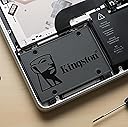
Desertcart purchases this item on your behalf and handles shipping, customs, and support to Japan.
🚀 Upgrade your speed, storage, and sanity with Kingston A400 SSD!
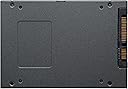
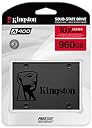
The Kingston 960GB A400 SATA3 2.5" Internal SSD delivers up to 500MB/s read and 450MB/s write speeds, making it 10x faster than traditional hard drives. Designed with durable flash memory and no moving parts, it offers enhanced reliability, shock resistance, and quiet operation. Ideal for desktops and notebooks, this SSD provides ample 960GB storage capacity to boost system responsiveness and multitasking efficiency, backed by a 3-year limited warranty.


| ASIN | B079XC5PVV |
| Additional Features | Backward Compatible |
| Best Sellers Rank | #24 in Internal Solid State Drives |
| Brand | Kingston |
| Built-In Media | Kingston Technology A400 960GB SATA III M.2 Internal SSD |
| Cache Memory Installed Size | 960 |
| Color | Black |
| Compatible Devices | Desktop,Notebook Computer |
| Connectivity Technology | SATA |
| Customer Package Type | Single Drive |
| Customer Reviews | 4.8 out of 5 stars 234,135 Reviews |
| Data Transfer Rate | 450 megabits_per_second |
| Digital Storage Capacity | 960 GB |
| Enclosure Material | stainless steel |
| Form Factor | 2.5-inch |
| Global Trade Identification Number | 00740617277357 |
| Hard Disk Description | Solid State Drive |
| Hard Disk Form Factor | 2.5 inches |
| Hard Disk Interface | Solid State |
| Hard-Drive Size | 960 GB |
| Hardware Connectivity | SATA 3.0 Gb/s |
| Hardware Platform | PC, laptop |
| Installation Type | Internal Hard Drive |
| Item Dimensions L x W x Thickness | 3.94"L x 2.75"W x 0.28"Th |
| Item Type Name | Kingston A400 960GB SSD |
| Item Weight | 1.44 ounces |
| Manufacturer | Kingston Digital, Inc. |
| Media Speed | 450 |
| Mfr Part Number | SA400S37/960G |
| Model Name | A400 |
| Model Number | SA400S37/960G |
| Number of Items | 1 |
| Read Speed | 500 megabytes_per_second |
| Special Feature | Backward Compatible |
| Specific Uses For Product | personal, gaming, business |
| UPC | 740617277357 |
| Warranty Description | Limited 3 Year |
K**G
Big Improvements for the $
PRODUCT: Kingston A400 120GB SSD SUMMARY: This drive is a great deal for improved performance if you don't need a whole lot of space. It’s top-notch for an entry-level SSD, but because of how bare-bones it is, you might need to be prepared for a very slightly more difficult process to set this up than with some other popular SSD choices. MY SITUATION: I’m not precisely an IT professional, but I do deal with all the tech for the small business I work for, and I’d rank my IT skills as medium-high. I'm working on updating the computers in an office with 16 employees, and with most of the computers needing a boost in speed, it's great to be able to buy several of these for a good price. The vast majority of our work documents are stored in shared locations, so none of our computers need a whole lot of space—our staff are generally only using 50-70GB on their drives for the OS and a pretty standard array of programs, so 120GB is the perfect size for us. Because most of our computers are at least three years old, the hardware only supports SATA II, so we're not seeing the huge improvement in speed that we might if we were going from HDDs to upper-limit SATA III speeds, but regardless, speeds have more than doubled in the four computers I've swapped these into so far, and users are seeing improvements, particularly in startup speeds for the computer (from more than 3 minutes down to 30 seconds) and for individual programs. See images for CrystalDisk comparison before and after on one of the machines. I'll post an update once I put together the brand new build I'm about to do with one of these. ISSUES IN THE PROCESS: I did run into a couple of issues that threw me off while installing these. The first was that the drive would not show up after hooking it up in the case and rebooting. It didn’t show in This PC or in Computer Management. The solution was to run Windows Memory Diagnostic, which is easily found through the start menu and took maybe 5-10 minutes to run on the two computers that had this issue. After that, I was able to see the disk in Computer Management, and I GPT partitioned each of the drives from there. See pieced together image for visuals on the process for getting this settled. The other slight hiccup I had was the computer refusing to boot from the drive once I removed the old HDD; this was easily resolved by changing the boot mode in the BIOS from Legacy to UEFI, which was necessary because I had partitioned them all as GPT. OTHER NOTES: I planned on mounting all of these with some heavy-duty Velcro we have lying around the office, which I’ve heard several places is fine because SSDs don’t have moving parts, so they don’t need to be held super-steady, and skipping a mounting bracket saved about $6 per drive (which is nice when buying several). The Velcro is doing just fine for three of the drives, and the fourth computer, conveniently, had a hot-swap bay with a 3.5 slot on one side (where the old HDD was), and a 2.5 spot on the other side that worked perfectly with some spare screws from the last case I bought.
R**Y
Kingston Quality At a Good Price
With a 3.5 inch mounting bay adapter it worked well in an older Dell Tower PC giving it significantly better performance. Computer now boots to login screen in 12 seconds instead of a few minutes. It was an easy fast upgrade with no surprises.
M**A
Great choice if you are looking for a sturdy and durable drive!
It is a great option and for a very good price; I've been using Kingston SSD drives for a few years and I'm not disappointed at all. I'm currently using this drive for work and It's been working very well. Installation was easy too and It has a great compatibility with my laptop.
S**G
Awesome
TL;DR - Seq Read - 484.909 MB/s Seq Write 273.819 MB/s. Great boot drive, consider the 240 gig. Low cost boot drive, been running fine now for several months. Boots windows 10 in a well aged HP 8200 Ultraslim (SATA 3) before I can even remote into it. Super lightweight and runs cooler, perfect for portable devices. Currently running at 26c in a cramped case while running updates. By far the easiest and best bang for your buck upgrade that can be done to any PC. I did have a small issue when first using this drive. I had random lockups that would only be resolved by a power cycle. I cloned my drive the lazy way and fixed my partition in Windows so I can only assume this issue was caused by my error. Keep in mind you will only have approx. 111GB available to use. With Windows and a few programs installed I have about 80GB free. If you're considering using this small of an SSD as your only drive, I would spend a bit more and get a 240/250GB. For my use it's perfect. It's fast enough for it's intended purpose, but my 850 EVO does come out on top in every way in CDM. Below are my speeds, apologies for a block of text: Sequential Read (Q= 32,T= 1) : 484.909 MB/s Sequential Write (Q= 32,T= 1) : 273.819 MB/s Random Read 4KiB (Q= 32,T= 1) : 175.194 MB/s [ 42772.0 IOPS] Random Write 4KiB (Q= 32,T= 1) : 140.007 MB/s [ 34181.4 IOPS] Sequential Read (T= 1) : 419.030 MB/s Sequential Write (T= 1) : 113.445 MB/s Random Read 4KiB (Q= 1,T= 1) : 25.434 MB/s [ 6209.5 IOPS] Random Write 4KiB (Q= 1,T= 1) : 57.463 MB/s [ 14029.1 IOPS]
M**A
Great replacement for older SSDs in older systems.
While this product is very much an entry level SSD using a DRAMless design, if you have an older secondary system that may have been using an 80-120GB SSD (such as the older SATA 2 ones from intel, OCZ and other companies), then this SSD offers a noticeable performance boost. I used this to replace a failed SDSSDH-120G-G25 120GB Sandisk ultra SSD, which was used as the main system drive for a media center PC. The process to restore was quite fast, as I only needed to restore a system image from my weekly backups. Details about the drive: I am unsure of variations in production, but the unit I received, details the following for the controller and NAND. While I have not personally experienced, it, some people have complained about the company changing hardware while keeping the same model number so long as the hardware meets or exceeds advertised specs. If this holds true, then it can mean the potential for variation between devices received, but the combination of Controller and NAND that I received, has worked well Controller: Phison PS3111-S11 NAND: Toshiba 15nm TLC NAND Strengths: Great read performance: Tasks such as bulk transfers (datasets that do not need a very high IOPS), would hover around 500-540MB/s. From my initial stress testing before using it as a system drive for the media center PC, I used it as a secondary game drive for 2 days, trying games such as Ark Survival Evolved, and The Witcher 3. For load times, performance was in line with higher end drives such as my Samsung 850 Pro, thus showing that games that are not IO intensive, do not need a very high end SSD to get great load times. Decent write speeds for a DRAMless TLC drive: Write speeds are slower due to the DRAMless design and small process node TLC NAND. If copying a single massive file e.g., 20+GB video, you can expect speeds in 450MB/s range, but if you are simply copying a folder with mixed files, such as a folder of image files in the 15-30MB range, will drop to the 280-350MB/s range. The peak speeds you see in most synthetic benchmarks are only achievable on linear reads or linear writes. Low temperatures: One benefit to lower end SSDs, is they do not generate much heat. Even when installed on the SSD mounts located behind the motherboard tray (where there isn’t much ventilation), the drive peaked at 30C during a stress test, even though the ambient temperature in the room was 23C Weaknesses: Large drop in performance compared to higher end SSDs, when it comes to high IO mixed workloads, such as if an application such as a screen recorder video editor using it as a scratch disk. You can have as little as 15MB/s worth of high IOPS writes (many tiny writes), and it will take linear reads down from the 500-540MB/s range, down to the 350MB/s range, wall while having no CPU bottleneck (no signs of the process scheduler using 100% of CPU time from any o the cores). This is common for all DRAMless drives where they struggle with mixed workloads. It still handles these tasks better than any of the older SATA II based SSDs that I have used, but it is much slower than modern MLC NAND SATA III SSDs with DRAM onboard. The use of 15nm TLC NAND will mean that write endurance will be low on these drives. This is perfectly fine for users who will mostly be doing reading such as using the drive for game installs, or as a system drive for a computer where you will not be working with many files on the SSD. In my case, since the media is stored on a NAS, the SSD will see very little in the way of writes. The 240GB model is rated for 80TB of writes over the life of the drive. This basically means that it would be a bad choice for write intensive workloads. This ultimately reduces the versatility of the drive, but as long as you understand the limits, and thus make an informed decision, this is a great value for an SSD.
T**N
Second family laptop I revived with an SSD — this Kingston did the same job
In September 2022 I put this Kingston A400 480GB 2.5" SATA SSD into another family member’s laptop that was still running on a mechanical hard drive. Same story as other HDD-to-SSD swaps I’ve done: clone the drive, drop in the SSD, and the machine feels like a brand-new computer again. Night and day. Install and clone were easy. Kingston markets this as an HDD replacement to breathe life into older systems, and that’s exactly what happened here. Years later it’s still in that laptop and still doing the job. Five stars — all the same stuff that makes a SATA SSD upgrade worth it.
N**Y
Speeding Up 2 ( 3) of My Old Refurbished Computers - 13 Year Old PC - Hauling! Linux & Windows 10
Linux - Boots it and Works Like a Dream! I consider myself a very Noobie Linux user. Very. But I had NO issue on loading a dual-boot of Ubuntu Bionic Beaver LTS and Linux Mint Cinnamon onto a year 2006 Dell Optiplex 745 running a Pentium D processor. Booted first time and every time since.BOOTS IN SECONDS. Not lots of seconds. No issues with Grub either. And this Kingston A400 ( 240GB) SSD makes my 13 year old PC whiz-bang quick. So fast, I bought another for another project PC, an HP ProDesk 600 G1 (circa 2013) running Windows 10 Pro. Again - AMAZING response and improvement.Again - BOOTS in SECONDS! And today ( 8 Nov 2019) I ordered a 3rd one for my latest refurb hobby PC before even messing around with it. Another "shouldn't be able to run Windows 10" system. So it does work fine with Linux and Windows. I have heard some internet rumor about MS-DOS trashing the SSD drives, a RUMOR from one place, but I'm not gonna try it. I have SATA drives laying about everywhere ( including 80 GB drives as risers between stacked systems) and most (all) of my DOS recently has been on DOSBox. I play with computers. Inside and out. An over 40 year hobby Mostly MS-DOS and Windows since Windows came out (pre-3.11). Online in the BBS days. I put one of these SSD's in an older PC ( a Refurb previously running Windows 7) installed Windows 10 and my boot time went from over a 1 1/2 minutes to under 30 seconds. THE most impressive and noticeable upgrade I've ever seen. So I almost immediately bought another for another even older hobby system running Linux and got the same increase in boot speed. Cured the jerky mouse movement and hour glass "thinking" annoyances too. A great $30 upgrade. Again, I have now purchased one of these three times. Gonna buy more. $30 making old PCs move from s-l-o-w to GO!
I**R
Nice little ssd
3 months in and no issues, easy cloning software decent for the price.
D**N
bon rapport qualité prix
fonctionne correctement et rapidement
C**R
OS専用で十分な性能を発揮してくれています
長年使用していたHDDが動作不安定になってきたこともあり、プライムデーを機に本SSDを導入しました。 OS専用のSSDとして利用したかったので、適度な容量を低価格で販売されていたのが購入の決め手です。 実際に暫く利用してみて、目に見えてPCの立ち上がりが早くなったので再起動の億劫さが大きく減りました。 ベンチマークの性能を見ても期待していただけの性能は十分に発揮してくれていますので満足しています。
E***
Güzel
Okuma yazma hızı yeterli takılması kolay
P**Z
Excelente mejora para darle nueva vida a una computadora
Compré este SSD Kingston A400 de 240GB para mejorar el rendimiento de un equipo y la diferencia fue muy notable. La instalación fue sencilla y desde el primer uso se siente una mejora importante en la velocidad de arranque, apertura de programas y respuesta general del sistema. La calidad de Kingston siempre me ha dado confianza y este disco ha funcionado muy bien. Es una opción práctica para reemplazar un disco duro tradicional y lograr que una computadora tenga un mejor desempeño sin necesidad de cambiar todo el equipo. El tamaño de 240GB es adecuado para sistema operativo, programas y archivos principales, especialmente si se combina con otro almacenamiento para documentos o multimedia. Me gustó la relación entre precio, rendimiento y confiabilidad. Es una excelente alternativa para actualizar computadoras que todavía tienen vida útil y necesitan un impulso de velocidad. Estoy muy satisfecha con la compra y lo recomiendo para quienes buscan una mejora sencilla y efectiva.
S**N
Awesome!
Works like a charm!
Trustpilot
1 month ago
1 week ago