


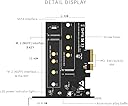


M.2 NVMe SSD PCIe to PCIe 3.0 x 4 Adapter - Support M.2 PCIe 2230,2242,2260,2280 Dual nvme pcie Adapter
Product ID: 59691093
Buy KINGSHARE M.2 NVMe SSD PCIe to PCIe 3.0 x 4 Adapter - Support M.2 PCIe 2230,2242,2260,2280 Dual nvme pcie Adapter: Memory Card Adapters - desertcart.com ✓ FREE DELIVERY possible on eligible purchases Review: Great price and works perfectly! - I installed a Visiontek Pro 500gb m.2 PCIe SSD on this card and it was literally plug and play. No problems/complications at all. Just went into Disk manager(or whatever that's called now in Win 10), initialized the Visiontek drive, formatted it and that was that. All done. Here are the stats that I got from Chrystaldiskinfo after the installation; Sequential Read (Q= 32,T= 1) : 1147.734 MB/s Sequential Write (Q= 32,T= 1) : 1069.127 MB/s Random Read 4KiB (Q= 8,T= 8) : 604.156 MB/s [ 147499.0 IOPS] Random Write 4KiB (Q= 8,T= 8) : 685.843 MB/s [ 167442.1 IOPS] As you can see, this card is transfering data back and forth exactly as it should for this type of drive. Dont let the small price tag fool you. This card works great. Really, theres no reason for anyone to give this simple card a negative review. Basically, its just a portalway between your drive and your mother board. User error/ignorance would be the most likely cause of any installation/use issues related to this card. Review: Cheap, bootable and fast! - I paired this card with a WD Blue 500GB SATA-III (B key) SSD and Samsung 970 EVO 1TB NVMe (M key) SSD. The WD Blue acts as my boot drive. Everything worked out of the box. No driver install. No fussing with Windows to get the drive to recognize or Windows to install.
| ASIN | B077VG23T7 |
| Brand | KINGSHARE |
| Connectivity Technology | USB |
| Customer Reviews | 4.8 out of 5 stars 12 Reviews |
| Hard Disk Interface | NVMe |
| Hardware Connectivity | PCI |
| Hardware Interface | PCI |
| Item Weight | 0.11 Kilograms |
| Manufacturer | KINGSHARE |
| Mfr Part Number | 並行輸入品 |
| Model Number | 並行輸入品 |
T**A
Great price and works perfectly!
I installed a Visiontek Pro 500gb m.2 PCIe SSD on this card and it was literally plug and play. No problems/complications at all. Just went into Disk manager(or whatever that's called now in Win 10), initialized the Visiontek drive, formatted it and that was that. All done. Here are the stats that I got from Chrystaldiskinfo after the installation; Sequential Read (Q= 32,T= 1) : 1147.734 MB/s Sequential Write (Q= 32,T= 1) : 1069.127 MB/s Random Read 4KiB (Q= 8,T= 8) : 604.156 MB/s [ 147499.0 IOPS] Random Write 4KiB (Q= 8,T= 8) : 685.843 MB/s [ 167442.1 IOPS] As you can see, this card is transfering data back and forth exactly as it should for this type of drive. Dont let the small price tag fool you. This card works great. Really, theres no reason for anyone to give this simple card a negative review. Basically, its just a portalway between your drive and your mother board. User error/ignorance would be the most likely cause of any installation/use issues related to this card.
K**E
Cheap, bootable and fast!
I paired this card with a WD Blue 500GB SATA-III (B key) SSD and Samsung 970 EVO 1TB NVMe (M key) SSD. The WD Blue acts as my boot drive. Everything worked out of the box. No driver install. No fussing with Windows to get the drive to recognize or Windows to install.
T**W
Worked great, after BIOS setting changed.
First, no instructions that I could find at all, but if you are buying your own cards like this, I assume you have knowledge and the ability to install and troubleshoot. Bonus that it comes with multiple install shields and lots of hardware and spare parts. I like that! I have 1 video card in PCIe slot 1 and this card in PCIe slot 4. Otherwise, it worked pretty decently, though, on first boot, I just got a black screen. Forced reboot and I changed some BIOS settings like I prioritized PCIe over PCI video (not sure why that would make a difference), and some other few changes, and PC booted off the existing drives and then read and displayed the added card/drive in Win10 diskmgmt.msc. Great option for MBs without an M2 slot. Speed seems on par with ordinary SSD drives, no other problems. I have not tested it as the boot drive, yet.
C**1
Most Flexible NVME Adapter Purchased
Plug and play-no drivers required. First Kingshare purchase made-and very glad I did. Quality equal to or better than several other like type adapters purchased. This has a B and M Key adapter on the board adding flexibility to your build. It comes with a regular and low profile case connector. Includes three sets of screws, M-2, Mini, Case, and two small screwdrivers. All parts are sealed in separate plastic zip lock bags. The manufacturer put some thought into this Adapter, it is a Kit that has everything you need in it to get up and running without hunting for a low profile adapter or specific screw, highly recommend.
V**N
Great bang for the buck. Works perfect.
This was perfect for adding memory to my computer without having to run multiple SATA and power cables to drives. Keeps your build super clean
J**4
Great Product
unfortunately the problem was my NVME drive and this card worked as described
J**E
It works!
Does exactly what it’s supposed to. I was skeptical at first but have been satisfied with its function and performance.
D**O
A+++++++++
A+++++++++
Trustpilot
5 days ago
1 month ago