Desertcart purchases this item on your behalf and handles shipping, customs, and support to Japan.
🚀 Elevate your home network with the Flint 2 — where speed meets security and control.
The GL-MT6000 Flint 2 is a cutting-edge Wi-Fi 6 dual 2.5G VPN router designed for professionals and gamers seeking ultra-fast, low-latency wireless connectivity. Featuring 8-stream Wi-Fi 6 technology, 1GB DDR4 RAM, and 8GB eMMC storage, it supports blazing speeds up to 6 Gbps and VPN throughput near 900 Mbps. With built-in AdGuard Home for network-wide ad blocking and the ability to connect over 100 devices, it offers a seamless, secure, and highly customizable networking experience. Ideal for smart homes, gaming, and remote VPN access, the Flint 2 combines power, flexibility, and ease of use in a sleek, reliable package.


| ASIN | B0CP7S3117 |
| Antenna Location | Gaming |
| Antenna Type | Retractable |
| Best Sellers Rank | 4,680 in Computers & Accessories ( See Top 100 in Computers & Accessories ) 38 in Routers |
| Box Contents | Ethernet Cable, GL-MT6000 router with 2-years warranty, Power Adapter (EU+UK Plugs), User Manual |
| Brand | GL.iNet |
| Brand Name | GL.iNet |
| Colour | Black |
| Compatible Devices | Personal Computer |
| Compatible devices | Personal Computer |
| Connectivity Protocol | Wi-Fi |
| Connectivity Technology | Wi-Fi |
| Control Method | App |
| Controller Type | App Control |
| Country of Origin | China |
| Coverage | Long Range |
| Customer Reviews | 4.4 out of 5 stars 2,868 Reviews |
| Data Transfer Rate | 6000 Megabits Per Second |
| Frequency | 5 GHz |
| Frequency Band Class | Dual-Band |
| Frequency band class | Dual-Band |
| Has Internet Connectivity | Yes |
| Has Security Updates | Yes |
| Is Electric | Yes |
| Is Modem Compatible | No |
| Item Weight | 761 Grams |
| LAN Port Bandwidth | 2.5 Gbps |
| Manufacturer | GL.iNet |
| Manufacturer Part Number | GL-MT6000 |
| Maximum Upstream Data Transfer Rate | 6000 Megabits Per Second |
| Model Name | GL-MT6000 |
| Model Number | GL-MT6000 |
| Model name | GL-MT6000 |
| Number of Ports | 6 |
| Operating System | Linux |
| Other Special Features of the Product | 8 Stream Wi-Fi 6 |
| Product Warranty | 2 years |
| RAM Memory Installed | 1 GB |
| Router Firewall Security Level | Basic |
| Router Network Type | Wireless and wired |
| Security Protocol | WPA3 |
| Special feature | 8 Stream Wi-Fi 6 |
| Unit Count | 1.0 count |
| Voltage | 5 Volts |
| Wi-Fi Generation | WiFi 6 |
| Wireless Compability | 802.11ac, 802.11ax, 802.11b, 802.11g, 802.11n |
| Wireless communication standard | 802.11ac, 802.11ax, 802.11b, 802.11g, 802.11n |
G**E
Why I Replaced My Asus Router with the Flint 2
After using an Asus RT-AC86U for several years, I started running into limitations. While it was generally stable, it lacked native support for WireGuard VPN, and relied on Merlin firmware, which eventually dropped support for this model. I was also seeing frequent Sonos speaker dropouts and occasional issues with Tado smart heating connectivity. Around the same time, I had started using a GL.iNet Beryl AX (MT3000) while abroad and was impressed by its intuitive web interface and the ease of setting up VPN tunnelling. That experience led me to replace my Asus with the GL.iNet Flint 2, which offered similar software but with far more power and flexibility for a main router. VPN Server – Secure Tunnel to Remote Router One of my main goals was to build a WireGuard VPN tunnel between the Flint 2 and the Beryl AX, located abroad. This setup has worked extremely well: The Flint 2 acts as a WireGuard server, and the Beryl connects as a client. I have full access to my UK network from abroad without relying on cloud services or complex port forwarding. The connection is persistent and stable, with no need for manual reconnection. Low-Latency Streaming Locally, the Flint 2 also performs well under low-latency use cases. I stream games from a Windows laptop (first floor, wifi) to an Nvidia Shield TV (ground floor, wifi) using Sunshine and Apollo. Even across floors and mixed connections, I consistently see 1–2 ms latency, and gameplay is smooth and responsive. Smart Home – Sonos and Tado Now Stable Since switching to the Flint 2, I’ve had no more issues with my Sonos system or Tado smart heating. Devices connect and stay connected reliably, even across restarts. I haven’t needed to troubleshoot dropouts or re-pair devices since the switch. Additional Notes I’ve configured scheduled reboots at 5:00 AM daily, which helps keep memory usage stable (typically under 70%). Firmware updates have been reliable so far. The user interface is the same as the Beryl AX, which was one of the reasons I chose the Flint 2, as there is no need to learn a different UI just because I upgraded to a more powerful router. Advanced settings are available via LuCI if needed, but for most cases, the main interface is more than sufficient. Overall, the Flint 2 has cleanly replaced my older Asus setup while solving several recurring issues. It offers stable WireGuard performance, supports my smart home devices without problems, and handles low-latency LAN streaming better than I expected. The fact that I could stay within the same GL.iNet ecosystem as my Beryl AX made the transition seamless. If you're already using a GL.iNet travel router and want the same experience in a more capable home setup, the Flint 2 is a solid option.
G**N
Solid router for home VPN use
I’ve been using the Flint 2 mostly for VPN at home and it’s been great. Setup was simple; I got WireGuard up and running pretty quickly. The speeds are solid and I haven’t noticed any slowdowns even with multiple devices connected. Wi-Fi coverage is strong throughout the house and the signal stays stable. I also like that it has 2.5G ports, which are a nice bonus if you’re doing any heavy data transfers or just want fast wired connections. One feature I really like is the built-in AdGuard Home support. It blocks ads and trackers across the whole network so I don’t have to mess with browser extensions on every device. It’s super useful for a cleaner, faster browsing experience and for keeping things a bit more private. What I appreciate most is the flexibility. It runs on OpenWrt, so if you’re into tweaking settings or setting up custom configurations, it gives you the room to do that. That said, it still works great out of the box if you don’t want to mess with anything. Overall, it does exactly what I need: fast, reliable, and secure VPN for home use with a few extra features that make a real difference. Would recommend.
A**R
So far the best router I've ever owned
I stopped using and relying on ISP provided routers and popular consumer routers like netgear and asus a few years back after going through years of issues and struggles. I switched to a more hobbyist setup of Tomato firmware and openwrt and then ASUSMerlin, where you install community software on consumer hardware. This was immediately better and I relied on this for a few years but found the hardware aging and slow, and the community software either getting abandoned or very slow to get updates to fix bugs. I ended up switching to a more complex but much more reliable combination of Unifi and Mikrotik which served me will until this year, however I again needed a hardware refresh to allow me Wifi6 and also had been struggling with VPN customizations often breaking on the mikrotik for the past year, where I ended up introducing more hardware - a GL.INet low end router for the ease of configuration especially in terms of VPN. I was about to buy a new Wifi Unifi access point to replace my current one and figured I'd look around at what else was around. Then I discovered the GL.iNet Flint 2 for the same price as the Unifi access point. Seeing it does Wifi6, plus the software capabilities I already depend on for things like VPN, AND 2.5G ethernet ports, it seemed like an upgrade for all 3 separate pieces of hardware I was relying on. SO I bought it. Indeed I have now disconnected my Unifi access point, my gigabit Mikrotik router and my existing GL.iNET router. The Flint 2 is doing all 3 things at a fraction of the price (accumulatively). My wifi speeds went from 88mbps to 400 Mbps (and that's whilst using Wireguard VPN in both cases), my configuration is much simpler, and my "network cabinet" has just reduced a 3rd in size. Outstanding. My network speeds (specifically from one ethernet device reading and writing to another ethernet device - my NAS) went from 1.19 MB/s read and 0.73 MB/s write to 3.52 MB/s read and 3.78 MB/s write. (Cat6 ethernet cables and gigabit intermediary switch in both cases). Incredible. I'll continue to use this for a while to see how it goes, but so far it's looking promising. I did have 3 smarthome devices that failed to continue with the SSID changed to be the same as the old access point, but resetting all 3 devices fixed them without issue, and they seem fine now so was probably just them being weird, and all my other devices transitioned without issue. My next plan is to further reduce the network hardware I'm relying on, and getting rid of another router I use for a non-vpn network - as I've been testing out the VPN policies provided by the Flint 2, and it makes it easy to force a device to use VPN or not based on mac address/ip/vlan and so far that's been working great. If that works out, I'll be replacing 5 network devices with a single GL.iNet Flint 2. Insane. I wish this device existed years ago, it'd have saved me a lot of headache, time and sunk cost. Edit: six months later I have realised that the WiFi has gotten much worse and prevents me from gaming or game streaming entirely despite speed tests showing around 260/250 I constantly get dropped frames and disconnects, whereas it wasn't an issue before. Using ethernet I gave no issues though. I'm not sure why, I haven't had the chance to play much since buying the flint 2 but I'm fairly sure there was no issue originally with the flint 2. I'm now wondering if I need to buy a unifi access point again.
F**Y
🌟🌟🌟🌟🌟 Absolutely Unmatched – Hidden Features That Make This a Dream!!!!
If I could give this 10 stars, I would. This isn't just a router — it's a full network control centre hiding in plain sight - even for me that knows next to nothing about networks. I bought the GL.iNet Flint 2 expecting decent Wi-Fi and a few nice extras, but this thing has completely changed how I run my home network. --> Here's what nobody is talking about in the reviews: 1. Drop-In Gateway Mode (The “Secret Weapon”) This feature lets you add the Flint to your existing network without replacing your old router — and still get full control over everything. This should be one the front of the box as it is mind blowing!! That means: - No weird setup clashes - No “double NAT” problems (where you have two routers trying to be the boss) - No IP conflicts - No headaches I was able to move all my smart home gear over to the Flint (like cameras, sensors, smart plugs, etc.) without touching my old PlusNet router settings. It just worked — like magic. I still do not have nay idea how they did this! 2. Built-in NAS (Network Attached Storage) I plugged in a USB solid-state drive (SSD), and within 30 seconds, I had a shared network folder for my whole house. No extra software. No technical setup. It's like having a mini file server built right into the router. The only thing it will not do is file sync between devices, but hey, bung a 1Tb USB3 SSD onto this and you have a discount network storage system, you cant have it all. 3. Tailscale, AdGuard, and VPNs – Built In!!! These just work, and using the Drop-In Gateway Mode, this all just happens behind the existing router. It is mind blowing, this all just works with the existing IPS provided router sitting there with no idea all this is going on! - Tailscale: Secure, encrypted connection to your home network from anywhere in the world. Works across phones, tablets, laptops, even while on 4G or public Wi-Fi. No port forwarding needed. ---> One note on this: You can't set Tailscale as an exit node in Drop-In Gateway Mode, which is a bit annoying. Suppose it just is not able to configure enough settings to run this way when it is not in main control? But...it works a dream as an exit node once it is the main router. That means any device with Tailscale can connect to, and use your home network securely from anywhere in the world, which is amazing! - AdGuard Home: Blocks ads, trackers, and malware at the network level. All devices benefit automatically — no need to install ad blockers on each one. - WireGuard & OpenVPN: These are VPN (Virtual Private Network) options that protect your traffic and can let you appear as if you're browsing from home when away. Great for remote working, bypassing restrictions, or accessing local devices securely. 4. Full OpenWRT Access for Advanced Users If you know what OpenWRT is (a Linux-based open-source router OS), then you already know why this is amazing. You can: - SSH into the router - Install custom packages (like fail2ban, iperf, etc.) - Tweak firewall rules - Monitor logs in real time It’s like having your own little Linux server at the heart of your network. This router should be called “The FlintForge” — it’s a network Swiss Army knife disguised as a consumer router. This is the first product I’ve bought in years that exceeded every expectation. I’ve already ordered another for a family member, and I’m not done yet. If you're even slightly technical — or just want more privacy, more speed, and total control — this is the best 100 odd quid you’ll ever spend.
C**R
Powerful, flexible, vanilla openwrt capable
This is a fantastic router. I get excellent coverage and it has all the features I need. I just followed instructions from a video on youtube called "Tutorial & notes! on standard Openwrt 25.12 to setup a router securely with mesh capability" and now that it is on vanilla openwrt, I have a strong, stable, fast router which the update support for it will outlive what gl.inet would support with their firmware, since openwrt is the main OG. You can even put the vanilla firmware on older routers that have long since gone out of their support period and get some new, secure life out of them. Things I like about this, it's pretty easy to work with on the regular firmware it comes with. The power is great, it has lots of ports. And if you install vanilla Openwrt you get way more control and flexibility in how you use your router. Even though there is a Flint 2 and a Flint 3 and a Flint 3e and soon a Flint 4... this Flint 2 is a powerhouse. It's built for punch and rock-steady stability. You and your home need this in your lives.
C**L
Flint2, good router, good customer support, ... but issues with Surfshark WireGuard VPN Client
Follow Up on my initial review: Unfortunately I had to return the Flint2: I really wanted to love this router, but sadly, I’ve had to send it back. The main issues stemmed from the Surfshark WireGuard VPN client, which became increasingly unreliable and caused the router to freeze completely. Even restarting didn’t help—I had to dig out an Ethernet cable and connect my laptop directly to the router just to access the Admin Panel, only to find there was no internet connection at all. The router was completely unresponsive, stuck in a frozen state. The problem seemed to occur when both the Surfshark WireGuard VPN client and AdGuard were running at shutdown. Even if I managed to enable AdGuard after the VPN connected, I’d have to remember to disable it before turning the router off—something we do whenever we leave the house. Another frustrating issue was that if I needed to switch VPN locations, disconnecting and reconnecting the Surfshark VPN would often cause it to hang indefinitely—even after disabling AdGuard first. The only fix was a full router reboot before the VPN would connect again. Even when everything did work, the Surfshark WireGuard VPN took an extremely long time to connect—usually 5–7 minutes, and sometimes much longer. I don’t want to place all the blame on GL.iNet, as the issues were clearly triggered by the Surfshark WireGuard VPN client. That said, Surfshark is one of the VPN providers offered as a quick-setup option in the Flint2’s native Admin Panel, so compatibility should ideally be smoother. It’s a real shame—I had high hopes for this router, and I truly appreciate GL.iNet’s prompt customer support. But in the end, the constant freezes left us without internet, and the troubleshooting process was too complicated for my family to handle. For now, it just wasn’t the right fit for us. Flint2 is a good quality router with great customer support by GL.iNet: A Brilliant Bit of Kit: My Thoughts on the GL.iNet Flint 2 Router I've been thoroughly impressed with the Flint 2 router – it's a truly well-built device with some fantastic functionalities. From the moment you unbox it, you can tell it's a quality piece of kit. My only minor grumble is the lack of a power button, meaning you have to unplug it to switch it off completely. It's a small detail, but a power button would certainly add a touch more convenience. Admin Panel and Customisation The Flint 2 Admin Panel is excellent, offering a good range of settings to tailor the configuration precisely to your preferences. While it doesn't quite offer the same granular level of control, especially in security settings, that some other brands provide in their admin panels, it's still very user-friendly. I'm hopeful that the upcoming firmware update (version 4.8 BETA) will bring some welcome improvements in this area. For those who crave more advanced control, there's the option to switch to the LuCi interface via OpenWrt. It's worth noting that the included OpenWrt version isn't the very latest, and updating it to the newest release isn't as straightforward as a standard firmware update for the native Flint 2 Admin Panel – and, from what I understand, doing so would mean losing the native panel. Signal Strength and Support In terms of signal power, I've found it to be absolutely excellent for my house, even reaching right into the backyard with no issues at all. It's certainly a strong performer in that regard. I did encounter a few temperamental issues with the WireGuard Client, particularly struggling to connect consistently when changing locations. However, this led me to experience the outstanding GL.iNet support. Bernard and Barry were incredibly helpful, always available via both email and chat, assisting me in diagnosing the problem. It turns out the issue stemmed purely from Surfshark having DNS resolution problems when AD Guard was enabled. This was clearly demonstrated when GL.iNet support provided an alternative VPN for testing, which worked flawlessly, proving that the problem wasn't with the Flint 2's native firmware at all. A big shout-out to them for their patience and expertise! Knowing that you can rely on such responsive and helpful support from GL.iNet is definitely a massive plus and adds significant value to the product. Overall, the Flint 2 is a solid choice, offering great performance and backed by brilliant customer service.
A**R
Dead on Arrival..
Dead on arrival. Either the adaptor or the router was faulty, tried many sockets but a brand new piece didn't work. Returned and refund initiated. Turns out other people have faced this issue too, super disappointed, saved up for 4 months to buy this only to get a product that's faulty.
M**R
Good range. Fully compatible with OpenWRT.
I bought this router specifically because of its compatibility with the latest version of OpenWRT. Even the pre-installed firmware is basically OpenWRT with a simplified web interface put on top. You still have access to luci (and the full OpenWRT experience) from the simplified interface though. This makes the router equally good for "normal" users who want to rely on the simplified interface, but also "pro" users who want to use the this router to its full potential. The router is already pre-configured with a 2.4GHz and 5GHz wireless network and the ability to easily create a 2.4GHz and 5GHz guest wireless network. Since the preinstalled firmware is not based on the latest version of OpenWRT, I decided to flash the latest version of OpenWRT instead. Flashing the firmware was straightforward and could be done directly from the web interface. Everything worked as expected. The OpenWRT documentation is very clear and guides through the steps needed. GL.iNet GL-MT6000 in combination with OpenWRT really puts the power in your hands. It is easy to configure different networks to enhance the security of your home networks. For instance you could have a network for devices you don't trust much and only allow them to connect only to the internet and optionally not even be able to connect to each other. Then another network for instance for you echo devices. Then your own main network. This is just an over-simplified example of course, and it just scratches the surface of what is possible. There are plenty of guides online on how to setup wireless networks, VLANs, etc. with OpenWRT. I also noticed that the wireless range with this router is better than my old ASUS RT-AC3200 and I can finally connect reliably with a single router to all my wireless security cameras. My old router had started to struggle and often the wireless networks started going down, but everything is stable with the GL.iNet GL-MT6000 router. When checking the amount of memory and CPU used, the load is still very low. Another advantage is that since you can directly flash OpenWRT, you don't have to worry about the vendor stopping releasing firmware updates. You can just download the latest version of OpenWRT and flash that one. Well, as long as the router is still supported by OpenWRT of course, but that's normally way beyond the support offered by the vendors anyway. The antennas can only rotate by 180 degrees. So the go from being fully closed on top of the unit, parallel to it, to being fully flat in the back (so that they are vertical if you wall mount the router). Overall, I am really pleased with this router and I still have not used all its capabilities. I cannot yet comment on the durability, but I wil update this review if anything bad happens.
R**S
A Privacy oriented router That Actually Works . Great Choice for VPN Users
I've tried my fair share of routers, but the Flint 2 (GL-MT6000) has actually outdone my expectations, considering that I value privacy, speed, and control of the network most. Setup: The configuration is simple and easy to use. The web user interface (available through both GL.iNet and LuCI) is suitable for beginners and power users. I set it up with ProtonVPN directly on the router itself, so no VPN client software is required on every device now—a huge convenience. Performance: Performance is impressively high on the 2.4GHz and 5GHz Wi-Fi bands. Even when the VPN is running continually through the router, the speed loss is only minimal. The streaming, browsing, and video calling are uninterrupted and smooth. In addition, I have DNS filtering done through AdGuard Home, and the Flint 2 takes it all in stride with no noticeable slowdowns. Security & Privacy: • Full VPN tunneling to protect all devices that are connected • DNS-over-HTTPS (DoH) for encrypted DNS queries • A customizable kill switch that prevents data leaks if the VPN connection drops • The ability to skip the VPN on a certain device or app Network Management: I like the convenience of having independent SSIDs, deciding whether to give both bands the same or different names, and the ability to isolate devices when necessary. Also nice is the feature of labeling some devices such as my work laptop or guest device to a non-VPN Telus connection for selective access. Extras: GL.iNet updates the firmware for performance and security on a regular basis, and the community support is good. The device is also quiet and does not use a fan, ideal for home use. Final Thoughts: If you want a robust, privacy-orientated router that is capable of running an entire VPN client, ad- and tracker-blocking, and sustaining maximum speed, Flint 2 is a winner. The best for those that must have end control of the network but will not compromise speed in the least. Highly recommended!
T**A
La scelta obbligata per chi vuole il massimo dalla propria connessione
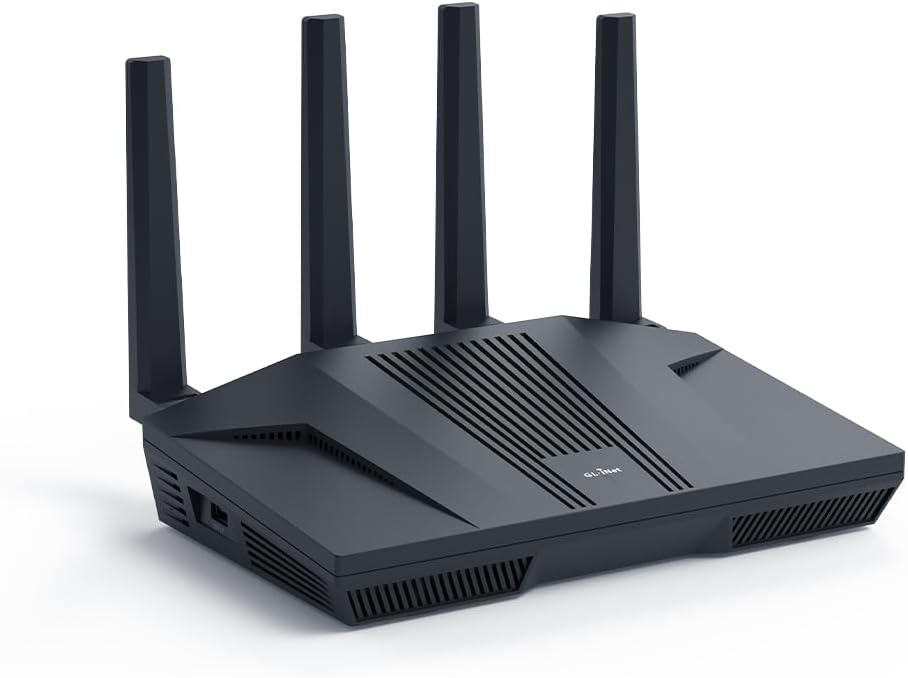
Il router arriva in un'elegante confezione in cartoncino blu che protegge una solida scatola interna in cartone nero. All'interno troviamo il router, l'alimentatore, una serie di adattatori per prese europee e inglesi (avvitabili direttamente sull'alimentatore), un cavo Ethernet e la manualistica. Il router è costruito con materiali di ottima qualità, interamente in plastica nera opaca. La scocca superiore, leggermente inclinata, presenta insieme alle fiancate numerose prese d'aria per consentire un'adeguata dissipazione del calore generato dalla potente componentistica interna. Sul lato destro è presente una porta USB-A 3.0 per il collegamento di memorie di massa come hard disk esterni, SSD o chiavette USB. Nella parte posteriore, oltre alle imponenti antenne Wi-Fi, sono presenti in totale sei porte Ethernet: due da 2.5 Gbps (configurabili come LAN o WAN) e quattro porte Gigabit classiche (LAN). Completano la dotazione il tasto di reset e l'ingresso di alimentazione DC da 12V. L'alimentatore fornisce in uscita 12V e 4A, ma il consumo medio alla presa si attesta sotto i 20W, un valore ottimo considerata la potenza del dispositivo. Sulla parte superiore della scocca è presente anche un indicatore LED di stato, che può essere personalizzato o spento via software. Il Flint 2 è un router Wi-Fi 6 (AX6000) che, da specifiche, può raggiungere velocità fino a 1148 Mbps sulla banda a 2,4 GHz e 4804 Mbps su quella a 5 GHz. È importante segnalare il pieno supporto ai canali a 160 MHz per massimizzare le prestazioni. A livello hardware, il dispositivo è equipaggiato con un potente processore Quad-Core Mediatek da 2 GHz, affiancato da 1 GB di RAM DDR4 e 8 GB di memoria eMMC per il sistema operativo e l'installazione di pacchetti aggiuntivi. A differenza dei firmware chiusi della maggior parte dei produttori concorrenti, questo router (come molti altri di GL.iNet) monta OpenWrt, un sistema operativo open source basato su Linux, appositamente progettato per dispositivi di rete. Essendo basato su Linux, l'utente ha un controllo granulare sulla rete, potendo configurare ogni minimo dettaglio, modificare impostazioni normalmente non disponibili e aggiungere nuove funzionalità installando pacchetti software. Alcuni esempi di pacchetti che ne espandono le funzionalità sono iPerf3 (per testare la velocità della rete locale), AdGuard Home (per bloccare pubblicità e tracker a livello di router per tutti i dispositivi) e, soprattutto, i pacchetti QoS/SQM per abilitare policy avanzate di gestione del traffico. Una funzionalità molto apprezzata, specialmente da chi gioca online, è la capacità di mitigare il bufferbloat tramite l'algoritmo SQM. Questo sistema gestisce in modo intelligente le code di dati per evitare che attività pesanti (come un download) aumentino la latenza delle applicazioni interattive (come i giochi online o le videochiamate), garantendo un ping basso e stabile anche quando la rete è sotto sforzo. Il software di sistema è molto ben fatto e offre due interfacce di gestione: - La prima è l'intuitivo pannello di controllo personalizzato da GL.iNet. - La seconda è LuCI, l'interfaccia web standard di OpenWrt, accessibile per gli utenti più esperti direttamente dal pannello principale. L'interfaccia personalizzata è semplice e ideale per utenti meno esperti. Consente di regolare rapidamente le impostazioni di base, monitorare il traffico e configurare facilmente il dispositivo in modalità router, access point o extender. Particolarmente interessante è il supporto nativo per client OpenVPN e WireGuard. È possibile configurare una VPN direttamente dal pannello web, facendo passare tutto il traffico della rete interna attraverso di essa. Le prestazioni sono eccellenti grazie all'hardware potente, raggiungendo fino a 190 Mbps con OpenVPN e 900 Mbps con WireGuard. Al momento in cui scrivo, il prezzo del router oscilla tra 120€ e 160€ a seconda delle offerte. A questo prezzo, specialmente quando scontato, questo router è a mio avviso ancora imbattibile. Offre prestazioni Wi-Fi 6 più che sufficienti per la stragrande maggioranza delle connessioni attuali, un hardware di fascia alta e una flessibilità software che è semplicemente su un altro livello rispetto alla concorrenza con firmware chiuso.
R**S
Seriously, hands down, best router ever. Block youtube, simple NAS, adblock etc.
This is the best router ever! It has tons of possible configurations. I bought it primary for blocking youtube on my "smart" TV and my kids phones. And it works. Under Parental control you can ad a profile and under that profile you ad the devices you want to be able to connect to internet. If they are not on a list they will be blocked. Even if they are connected to the network, and this is a must. Then you ad a a rule set under witch you can add all youtube sites to block. I asked an AI for that. There are a lot of sites you need to block. After this you can also ad time windows where these rules applies. Awesome! I also tried to add an M.2 SSD via the USB3 on the side. You set it up under Applications/network storage. My SSD is NTFS formatted but AI told me ext4 is best. Follow the guide and give the disk a UN och PW. Then I added a network drive in my computers file explorer pointing to the one configured in the router. Bam! 256GB on the network for moving files in the network (in Linux Mint, the manual says windows works to). AdGuard Home is a built in feature. It can also block sites and ads! Check out NetworkChuck on YT for more information. Awsome! No more ads. I also connected my old TP-Link P7 mesh network downstream the Flint 2 to extend the range. The rules set in the Flint 2 now also applies to the old P7 mesh network as they work as extenders from now on. AI helped me do this to. Now I have 4 access points for my devices with awesome range! I an go on and on. Best money ever spent on a router! Just buy!
E**M
Rapport qualité / prix & fonctionnalités
Excellent routeur. Installation très intuitive.
C**M
OpenWrt ve WireGuard kullanıcıları için alabileceğiniz en iyi yönlendiricilerden biri
Uzun süredir farklı yönlendiriciler kullanan biri olarak rahatlıkla söyleyebilirim ki, bu cihaz şimdiye kadar kullandığım en başarılı modellerden biri oldu. Tüm ev ağımı bu yönlendirici üzerine taşıdım ve ilk günden beri son derece stabil çalışıyor. OpenWrt desteği gerçekten muazzam. Ağını özelleştirmeyi sevenler, VLAN, VPN, DNS, firewall gibi gelişmiş ayarlarla uğraşanlar için büyük bir özgürlük sunuyor. WireGuard kurulumu ise inanılmaz kolay. Hazır yapılandırma dosyalarını birkaç adımda içe aktararak dakikalar içinde güvenli VPN bağlantısını kullanmaya başlayabiliyorsunuz. Donanım tarafı da en az yazılımı kadar etkileyici. İşlemcisi oldukça güçlü ve yoğun ağ trafiğinde bile performansından hiçbir şey kaybetmiyor. Aynı anda çok sayıda cihaz bağlıyken bile bağlantıda yavaşlama veya kararsızlık yaşamadım. Kablosuz performansı beklentimin çok üzerinde çıktı. Çekim gücü son derece başarılı, kapsama alanı geniş ve bağlantı hızı oldukça yüksek. Wi-Fi 6 destekli cihazlarla birlikte farkı rahatlıkla hissedebiliyorsunuz. Mobil uygulaması da oldukça başarılı hazırlanmış. İlk kurulumdan günlük yönetime kadar her şey anlaşılır ve pratik. Teknik bilgi seviyesi daha düşük kullanıcılar bile rahatlıkla kullanabilir. Eğer OpenWrt, WireGuard veya genel olarak güçlü ve uzun yıllar kullanılabilecek bir yönlendirici arıyorsanız, bu cihazı gönül rahatlığıyla tavsiye ederim. Fiyatını sonuna kadar hak eden, performansı ve sunduğu özelliklerle beklentilerin üzerine çıkan gerçekten premium bir ürün.
Trustpilot
3 weeks ago
5 days ago