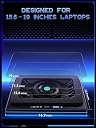
❄️ Stay Cool, Stay Ahead: The Ultimate Laptop Chill Companion
The llano V12 RGB Laptop Cooling Pad features a powerful 5.5-inch turbo fan that reduces laptop temperatures by up to 44°C within 90 seconds, ensuring optimal performance during intense gaming or heavy workloads. Equipped with a 3-port USB 2.0 hub, it expands your laptop’s connectivity while an integrated dust filter protects internal components, prolonging device lifespan. Its adjustable tilt angles enhance ergonomic comfort, and customizable RGB lighting with 10 modes adds a sleek, modern aesthetic. Designed for laptops sized 15.6 to 21 inches, the V12 combines robust cooling, user-friendly controls, and stylish flair for professionals and gamers alike.

| Asin | B0C69BVWGB |
| Best Sellers Rank | #50,132 in Computers & Accessories (See Top 100 in Computers & Accessories) #107 in Portable Computer Cooling Pads |
| Brand Name | llano |
| Colour | Black RGB |
| Cooling Method | Air |
| Customer Reviews | 4.5 4.5 out of 5 stars (2,204) 4.5 out of 5 stars |
| Enclosure Material | Acrylonitrile Butadiene Styrene (ABS) Metal |
| Item Dimensions L X W X H | 42.9L x 32.8W x 6.9H Centimeters |
| Item Weight Unit Of Measure | 1.8 Kilograms |
| Manufacturer | llano |
| Manufacturer Part Number | V12 |
| Model Number | V12 Black (Hub+RGB) |
| Number Of Fans | 1 |
| Number Of Items | 1 |
| Number Of Packs | 1 |
| Unit Count | 1.0 Count |
| Upc | 704444171967 |
User
It's not another gimmick, it works as intended
I purchased the Ilano V12 cooling pad primarily for my HP Omen 16 laptop with an AMD processor, as my CPU temperatures would spike to 95°C during intensive gaming. After using this cooling pad, I’m seeing a significant temperature drop of around 10-15°C, which is impressive.On max fan speed (2800 RPM), my CPU temps now stay around 50-60°C, though the fan noise is noticeable. However, at 1800 RPM, which is quieter, I still get a stable 60-65°C, which works well for me.The build quality is plastic, but it feels premium and is very lightweight. While ₹15,000 is quite expensive for a cooling pad, I consider it a worthwhile investment for prolonging my laptop’s lifespan. So far, it’s performing as intended, and I have no regrets. I will update this review after prolonged use.
User
Great fan, pricy but way cheaper than buying a whole new laptop!
My laptop fans stopped working and since it is a few years old no spare fans available in the market. (awesome *sarcasm* to see planned obsolescence working great). My only option was to go for a new laptop until a friend suggested cooling pads devices like this llano one.After viewing various reviews of various devices, this llano fan came up consistently as best recommended. If you can swallow the large price tag it is definitely worth the investment. I previously had a cheaper (2000 Rupee) fan of another brand which worked so so for a year before it too died.This one however with its variable fan speed is superb and cools down my laptop beautifully. Starts from 300 rpm which is near silent to a max of 2800 rpm which makes it sound like a blow dryer. But I don't mind that since I use noise cancelling headphones when I game which the only time I use the max speed. For regular use I keep it at 700 rpm which make it just about audible but still much softer than my ceiling fan.The LED lighting is gimmcky for my personal taste but it excites my little child so that's that.Overall I'm very happy with this llano fan. Definitely not cheap. But cheaper than a new laptop for sure!
User
Pricey but fantastic product
Its expensive but worth the investment especially if you primarily use a laptop for heavy work or gaming. The temperature difference is 10 degrees on load for me and the added benefit is a practically dust free laptop due to the filter the cooler has. After 7 months of heavy use I opened the laptop last week to clean and remove dust and to my surprise there was hardly any!The build quality is superb and it has given me 0 issues so far. Highly recommended if budget allows and you're looking to make a longterm investment in laptop cooling once and for all.
User
Fabulous
One thing I can sayExcellent cooling + excellent performance
User
Awesome product
Cools down the laptop ver effectively .... It's very costly though can be lowered. Also has good RGB lights and has dust filter. Extra dust filter is also there. The air flow is very good and keep the laptop cool. Only for those laptops that take aur from the bottom of the laptop
User
Great product deliveres on what it promises.
I recently used a this laptop cooler for my device, which tends to heat up quickly, and I highly recommend it for anyone facing similar issues. After using the cooler, I observed a significant drop in temperature, ranging from 8-10 degrees Celsius.The product is well-built, and the quality is impressive. Given the performance and durability, I find the price to be fully justified.
User
Great cooler for gaming laptop
Perfect cooler for my asus tuf fx505dt
User
Delivered 7 days eariler than estimated time.
My Legion 7i 5080 Laptop runs at 0 degrees now. Jokes aside, best investment for a high end gaming laptop to increase lifespan, plus matching with the RGB lights in the laptop.
User
It really works. GPU from 90 degrees to 66 degrees.
My GPU was always at 90 degrees while rendering. Now it's at 66 degrees.But it comes with a price, noise. But you will find the point at regulating the fan intensity, you will not use it at full power all the time, I mean, what if my GPU is at 72 degrees instead of 66 degrees?I have tried many cooler pads, even the small exhaust on the side of the laptop, but nothing really worked. This does. I TOTALLY recommend it.I have a ROG STRIX SCAR II and no need to fry more eggs on it...
User
Costoso ma consigliato per i pc portatili da gaming
Il prezzo è alto ma è di ottima fattura. A velocità minima (300) è silenzioso e si può aumentare o diminuire alla bisogna con facilità. Se messo al massimo e il pc è leggero, potrebbe farlo volare via (!), ma ci sono delle leve per evitarlo. Belle le luci RGB . La schiuma densa mantiene fresco il portatile e concentra il raffreddamento su di esso. L'ho provato sia per un portatile 14'' che 15.6'', funziona per entrambi, ma forse è troppo grande per i portatili da 14''.
User
This Thing Is An Absolute Beast
For starters, this took roughly 2 weeks to arrive after I ordered it. It was either that or the GT600. The GT600 would have an extended time to arrive due to it being shipped from out of the country (Canada). So I went ahead and ordered this. My laptop is a heavily modified MSi Katana B12VG (Windows 11 Pro, an additional 1TB SSD which is the WD Black SN770 that only has games on it, and 64GB of RAM instead of the stock 16. The reason for 64GB, is because this laptop replaced an 2019 ROG Strix, and it's because of Diablo IV, which I'm able to run with maxed out settings along with raytracing. Laptop has an i7-12650H and a 4070, which does not use GeForce Experience. All the changes to programs and games are made through nVidia Control Panel). I'm also not using the laptop's keyboard and trackpad, instead I use a SteelSeries Apex 7, an Aerox 5 (a standard and the Diablo IV edition, with the Standard Edition used just in case) and an Aerox 9).I also have power profiles since the 12th Gen H series processors cant be undervolted, and those are Extreme (the same as Gaming Mode, with every setting maxed out), Balanced, 99% (disables Turbo Mode), 75%, 50%, 25% and 10% (each cuts the processor speed, with it set to spin the fans up before throttling the processor). With the fans set at 300 (don't know if that's RPM or not), running a Performance Analysis with the power profile set at 25%, for 8 hours playing old Opie and Anthony episodes, and the screen off, the fans never spun up once (normally I'd have the CPU fan on around 2500RPM at about 55-60 degrees Celsius). Normally you'd be looking at the processor fan spinning up and remaining on. But nope. Never came on once. Temps stayed between 35-40 degrees Celsius on the processor and 34-40 degrees on the GPU).Now for Diablo IV, which this is benchmarked against. Slightly increasing the fan speed to 600, the game's temperature dropped 20-30 degrees Celsius (runs about 75-90 degrees on the CPU and 60-80 on the GPU), even after fighting the Herald of Malphas about 27 times (had someone keep activating it), and this is with every conceivable item on the ground. Temps stayed around the 60-70 degree Celsius mark. If I increased the fan speed, it does become more noisy, but I'm using noise cancelling headphones (Sony WH-1000XM4's repurposed for my laptop), so I don't hear the fan for this while playing games. I could probably increase the fan to 700-1000, but once it hits 1000, it starts to sound like a jet engine on an airplane about to take off, and starts to get loud. Speaking of that, I put the thing at 2800, and past 1000, you can feel the air coming out from the laptops vents in the back. You can also slightly feel the air coming from it on the side (if your laptop has a side vent or vents) That's how powerful this thing is. Because of this, I would recommend that the 300 setting be used for general work, and nothing about 1000 for games, unless you live alone. You can comfortably run Diablo IV on a setting (for my rig) at 600-1000 without you standing next to an airplane on a tarmac and that won't bother anyone.The one reason I listed noise level at 5/5, is because at the 300 mark (default), it does not bother you or anyone else. It's only after 1000 that you may get people bothering you that it's too loud.On mine however, there is a bit of a whine that you can hear on the lower settings, but as you ramp the fan to a higher setting, this is less audible, and I've tuned it out. You definitely cannot hear this if you are wearing headphones. Due to that, I will not dock points off.If you decide to get this, you will need to use noise cancelling headphones when you game (it's fine if set at 300, anything higher than 600, you'll need them). All in all, for a mid range laptop like mine, well worth the money I paid for it.
User
Superb cooling, if a little noisy
Works perfectly. My son's laptop was barely usable on high FPS games during this heat. Often topping out at 90degrees, even with a cheaper cooling pad. This may not be cheap but it does do the business. Temperatures now around 60, works as a great stand and, if you're that way inclined, a decent disco light setup. It's not quiet, but buy can you hear how it's working. Wish we'd invested in this rather than the bottom end. As long as you have good noise cancelling headphones, you can't go wrong. Have a very happy teenager
User
Very impressive
Was skeptical about buying this because of its size and price. I had a small, simple, usb powered 3-fan cooler that I was using which was fine. I don't know how effective it was but it was better than nothing, I suppose. I was worried about the hooks that grasp the laptop near my wrists being an issue. However, thanks to the replies of a number of other users, that is not a concern. I don't even use them as the memory foam gasket is sufficient to hold the laptop in place. This thing can move a ton of air. It can be noisy when you have it wound up, but I usually keep it at 500 rpm. You can hear it, but it's not offensively loud. It keeps the laptop cool during gaming with no concern whatsoever. It requires a DC jack which I didn't think about. It's not a concern for me, just something I did not consider. It's nice to have so many extra USB ports, even if I'm not really using them. It is thick, but the payoff is well worth the extra size. I should have bought this ages ago; it does a fantastic job.
Trustpilot
1 week ago
1 day ago